
Important Legal Disclaimer
This guide provides general information about digital evidence and is not legal advice. Laws vary by jurisdiction and change frequently. Always consult with qualified legal counsel familiar with your local laws and specific case requirements.
The information herein is educational and should not be relied upon as a substitute for professional legal advice tailored to your particular situation.
Table of Contents
Legal Foundation of Digital Evidence
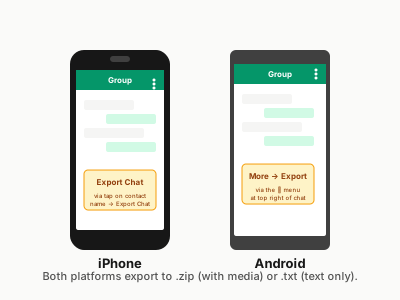
WhatsApp conversations constitute electronic records under most legal frameworks and can serve as admissible evidence when properly authenticated and documented. Understanding the legal foundation is crucial for successful utilization in legal proceedings. Before you can produce a court-admissible PDF, you have to understand the export shapes WhatsApp will give you — see the WhatsApp Chat to PDF: How to Convert in 30 Seconds (2026) guide for the export-side mechanics.
Legal Precedents
- • Federal Rules of Evidence (US) Rule 901 - Authentication
- • Electronic Transactions Acts (Various jurisdictions)
- • Digital Evidence Standards (International)
- • Uniform Electronic Evidence Act
- • Case law establishing digital communication validity
Evidence Categories
- • Direct evidence of communications
- • Circumstantial evidence of relationships
- • Business records exceptions
- • Present sense impressions
- • Admissions and declarations
⚖️ Key Legal Principles
Relevance Standard
Evidence must have probative value and be material to the case. WhatsApp messages must relate directly to disputed facts or issues.
Authenticity Requirement
Must prove the evidence is what it purports to be - actual messages from claimed participants at stated times.
Hearsay Considerations
Messages may constitute hearsay but often qualify for exceptions such as admissions, business records, or present sense impressions.
Best Evidence Rule
Original electronic records are preferred, but properly created PDF copies may qualify as acceptable duplicates.
Court Admissibility Requirements
For WhatsApp conversations to be admitted as evidence, they must satisfy multiple legal standards. Each jurisdiction may have specific requirements, but common elements include relevance, authenticity, and reliability.
Primary Admissibility Criteria
Relevance
Messages must be material to issues in the case and have probative value
Authentication
Must prove the evidence is what it claims to be through witness testimony or technical evidence
Reliability
System must be shown to produce accurate results under normal operating conditions
Chain of Custody
Documentation showing continuous possession and control of the evidence
Completeness
Evidence should fairly represent the relevant communications without misleading omissions
Legibility
Documents must be clear and readable to the court and opposing parties
🚫 Common Admissibility Challenges
Authentication Issues
- • Cannot prove sender identity
- • Lack of witness testimony
- • Insufficient technical documentation
- • Questions about message tampering
Procedural Problems
- • Incomplete chain of custody
- • Late disclosure to opposing party
- • Violation of discovery rules
- • Privacy and privilege issues
Authentication Standards & Procedures
Authentication is the cornerstone of digital evidence admissibility. Courts require sufficient proof that WhatsApp messages are genuine and unaltered from their original form.
🔐 Authentication Methods
Witness Testimony
- • Participant testimony about sending/receiving messages
- • Observer testimony about message creation
- • Expert testimony about system reliability
- • Custodian testimony about record-keeping
Circumstantial Evidence
- • Distinctive characteristics of communications
- • Content showing knowledge only sender would have
- • Reply patterns and conversation flow
- • Corroborating evidence from other sources
Technical Evidence
- • Metadata preservation and analysis
- • Hash values for integrity verification
- • System logs and technical records
- • Digital forensics examinations
Self-Authentication
- • Certified business records
- • Public records and reports
- • Commercial labels and inscriptions
- • Acknowledged documents
Authentication Checklist
🔍 Required Elements
📋 Supporting Documentation
FRE 901/902 and Equivalent International Standards
Under the United States Federal Rules of Evidence, Rule 901(b)(11) — added to address electronically stored information — permits authentication by evidence that the item is what the proponent claims. For WhatsApp exports specifically, courts have accepted a combination of: (1) the account holder's own testimony identifying the phone number and device; (2) the distinctive characteristics of the messages themselves, including reply chains, emoji usage, and internal references that corroborate authorship; and (3) technical testimony that WhatsApp's export function faithfully reproduces the message log from the device's local database.
Rule 902 self-authentication categories are narrower for private messaging data. A certified record from a service provider — obtained via legal process — can satisfy Rule 902(11) as a certified record of a regularly conducted activity, provided the custodian's declaration accompanies the exhibit. Absent that certified record, you are relying on witness testimony rather than self-authentication, which places greater weight on the quality of the foundation laid at trial.
Equivalent frameworks operate in comparable jurisdictions. The UK's Police and Criminal Evidence Act 1984 and the Civil Evidence Act 1995 both treat computer-produced records as admissible where a certificate of authenticity from a responsible officer accompanies the exhibit. Australian courts apply the Evidence Act 1995 (Cth) s 48 and s 182, which permit a document to be proved by tendering a copy where the original is a computer record — provided the party tendering it gives notice of any claimed reliability issue. European civil procedure varies by member state, but the eIDAS Regulation provides a supranational baseline for electronic documents.
Foundation Requirements: What the Authenticating Witness Must Establish
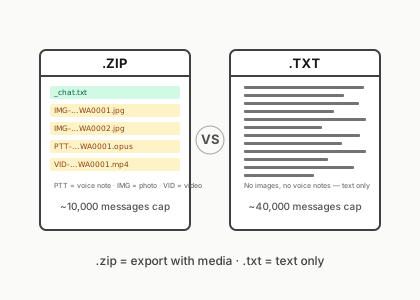
Regardless of jurisdiction, the authenticating witness — typically the party who sent or received the messages — must be able to testify to the following four matters. First, that the phone number displayed in the export was theirs or the counterparty's at the relevant time. Second, that the messages on screen reflect the actual exchange they participated in, not a fabrication or alteration. Third, the mechanism of export: that they used WhatsApp's built-in “Export Chat” function and that the resulting .zip or .txt file was not modified before conversion. Fourth, where voice notes appear, that they personally recognise the voice or can otherwise establish the speaker's identity.
Where the producing party cannot give that testimony — because the relevant chat belongs to a device they no longer control — an affidavit or declaration of authenticity from the original account holder becomes critical. That declaration should identify: the exporting party's full legal name, the WhatsApp account phone number, the date and method of export, and a statement that the exported file was transmitted to counsel without alteration. A witnessed signature and date are the minimum; a notarised or commissioned declaration carries more weight in contested proceedings.
Best practice is to produce both the original .zip export and the formatted PDF as separate exhibits, cross-referenced in the exhibit index. The .zip contains the raw _chat.txt and all media files with their original filenames and modification timestamps. The PDF is the human-readable rendering. Any competent opposing expert can compare the two artefacts and confirm that the PDF faithfully represents the source. Where those two exhibits are consistent, challenges to integrity are significantly harder to sustain.
Chain of Custody Protocols
Maintaining proper chain of custody is essential for digital evidence integrity. Every step from initial collection to court presentation must be documented to prevent challenges to evidence authenticity.
📋 Chain of Custody Steps
Collection
Initial capture of WhatsApp data
Documentation
Record collection methods and circumstances
Storage
Secure preservation of digital evidence
Transfer
Documented handoffs between parties
Chain of Custody Documentation Requirements
Initial Collection Record
- • Date, time, and location of collection
- • Identity of person collecting evidence
- • Method of collection used
- • Description of device and circumstances
- • Witness information if present
- • Condition of evidence at collection
Transfer Documentation
- • Date and time of each transfer
- • Identity of transferor and recipient
- • Purpose of transfer
- • Condition of evidence at transfer
- • Security measures employed
- • Signatures of all parties
⚠️ Critical Chain of Custody Considerations
Any gap in chain of custody documentation can result in exclusion of evidence. Maintain detailed logs of every person who had access to the evidence and every action taken with it.
Technical Documentation Requirements
Technical documentation proves the reliability and accuracy of digital evidence collection and preservation methods. Courts require detailed technical information to assess evidence integrity.
Metadata Requirements
- • Message timestamps and timezone information
- • Sender and recipient phone numbers
- • Message delivery and read status
- • File creation and modification dates
- • Device information and WhatsApp version
- • Network and location data (if available)
Integrity Verification
- • Hash values (MD5, SHA-256) for file integrity
- • Digital signatures and certificates
- • Checksum verification processes
- • Backup and redundancy measures
- • Version control and change tracking
- • Audit trails of all access and modifications
Voice Notes as Evidence: Transcription Standards and Retention
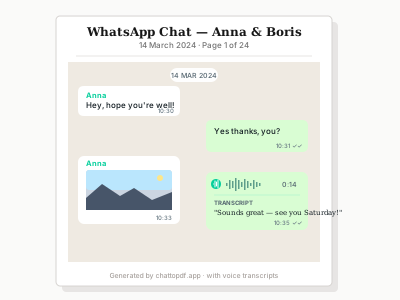
Voice notes occupy a distinct evidential category from text messages. The audio recording is the primary document; any transcription is a secondary representation and must be identified as such. Courts have admitted voice note evidence where the audio file is produced as the exhibit and the transcription is provided as an aide to the tribunal, not as a substitute for the recording itself.
When producing voice note evidence, word-level timestamps in the transcription are a significant practical advantage. They allow counsel to direct the tribunal to a specific passage — “at the 00:47 mark of Exhibit C-4, the speaker says” — without requiring the court to replay the entire audio. They also allow cross-examination to be anchored to specific points in the recording, reducing the risk of misquotation.
Any transcription submitted to a court should include a disclosure statement identifying: the method used to produce it (automated transcription, manual transcription, or a combination), the accuracy rate claimed for the automated tool on the language and audio quality in question, and the name of the person who reviewed and certified the transcription. Where automated transcription is used and the accuracy is not independently verified, opposing counsel may challenge the transcription and require the court to rely solely on the audio. Retaining the original audio file — the .opus or .mp4 attachment within the WhatsApp export .zip — is therefore non-negotiable for any matter where a voice note is relied upon.
Speaker identification in group chats is a related issue. The .txt export labels voice notes by sender account, but it does not by itself prove that the registered account holder was the person speaking. Where speaker identity is disputed, phonetic or voice comparison evidence from an appropriately qualified expert may be required. Counsel should flag this issue at the earliest opportunity rather than discovering it at trial.
Technical Expert Requirements
Complex technical evidence often requires expert witness testimony to establish reliability and explain technical processes to the court.
Expert Qualifications
- • Digital forensics certification
- • Mobile device expertise
- • WhatsApp technical knowledge
- • Court testimony experience
Expert Testimony Topics
- • WhatsApp system reliability
- • Data extraction methods
- • Evidence integrity measures
- • Technical limitations
Documentation Needs
- • Technical methods report
- • Tool validation studies
- • Quality assurance procedures
- • Error rate analysis
Legal Best Practices
✅ Pre-Collection Planning
Legal Preparation
- • Obtain proper legal authority (warrant, subpoena, consent)
- • Consider privacy and privilege issues
- • Plan for opposing party discovery obligations
- • Identify required expert witnesses early
Technical Preparation
- • Select appropriate collection tools
- • Prepare documentation templates
- • Establish secure storage procedures
- • Plan backup and redundancy measures
📝 Documentation Best Practices
Contemporaneous Documentation
Document all actions as they occur, not after the fact. Real-time documentation carries more weight in court.
Multiple Formats
Preserve evidence in multiple formats (native, PDF, screenshots) to address different admissibility challenges.
Completeness
Include relevant context and avoid selective editing that could mislead or create unfair prejudice.
❌ Common Mistakes to Avoid
Collection Errors
- • Failing to preserve metadata
- • Using unreliable collection methods
- • Contaminating evidence through improper handling
- • Incomplete documentation of procedures
Legal Oversights
- • Violating privacy laws or constitutional rights
- • Late disclosure to opposing parties
- • Inadequate authentication foundation
- • Ignoring privilege and confidentiality issues
Case-Type Scenarios: What WhatsApp Evidence Proves
Authentication gets you through the door. The harder question is what the authenticated messages actually establish in the context of the specific proceedings. The following scenarios illustrate the evidentiary value — and the hearsay treatment — that commonly arises across four practice areas.
Divorce and Parenting-Plan Disputes
In custody proceedings, WhatsApp messages serve two distinct functions. Substantively, a message from the other parent stating “I'll collect the children on Saturday” followed by a failure to appear is not offered for the truth of its contents — it is offered to prove that an agreement was reached and was breached. That distinction sidesteps a hearsay objection entirely. Where messages are offered for the truth of an assertion — for example, a parent's statement that a child disclosed something distressing — counsel must identify a hearsay exception: the child's statement may qualify as an excited utterance (FRE 803(2)) or a statement for the purpose of medical diagnosis (FRE 803(4)) depending on the circumstances.
Date and time attribution is particularly important here. WhatsApp timestamps in the export reflect the device's local clock at the time of transmission. Where timezone discrepancies exist — for example, messages sent while one party was abroad — clarifying the timezone in the authenticating declaration prevents later confusion about which jurisdiction's time applies.
Harassment and Protection-Order Proceedings
A series of unwanted messages — particularly where volume and frequency are probative of a course of conduct — requires that the exhibit capture the full thread chronologically, not cherry-picked excerpts. Courts have excluded harassment evidence where the producing party presented only selected messages and it later emerged that the thread contained exculpatory replies. The completeness obligation under FRE 106 (and its equivalents) requires you to include messages that provide context, even where those messages are unfavourable on their face.
Sender attribution is the central authentication issue in harassment matters. WhatsApp account registration requires a phone number, and cross-referencing the account's display name, profile photograph, and linked contacts with other corroborating evidence — such as call logs or confirmed emails from the same individual — typically provides sufficient foundation to resist a challenge that the account was operated by someone other than the named respondent.
Breach-of-Contract Disputes
Commercial parties frequently negotiate and confirm contractual terms via WhatsApp, particularly in trade, logistics, and property transactions. A message in which a party states “Agreed — deliver by the 15th” is a party admission under FRE 801(d)(2) and is therefore non-hearsay by definition. It requires no exception. It is admissible to prove that the admission was made. The tactical question is whether it is sufficient on its own to establish contractual formation or variation — that is a substantive law question, not an evidentiary one, but the threshold for admissibility is easily met.
Where prices, quantities, or delivery terms are embedded in voice notes rather than text, the voice note itself is the best evidence of what was said. A transcription prepared for court submission should clearly identify itself as a transcription, not a verbatim quotation from a document, and should note the start and end timestamps of the relevant passage within the audio file.
Employment Tribunal Cases
In unfair dismissal, constructive dismissal, and workplace harassment claims before employment tribunals, WhatsApp conversations between colleagues are treated as admissible communications subject to the same authentication requirements as any electronic record. Messages sent via a company WhatsApp group can engage questions of whether the communication was made in the course of employment — relevant to vicarious liability. Messages on personal accounts between employees may engage reasonable expectation of privacy arguments, though employment tribunals in most common-law jurisdictions have admitted such evidence where the content was directly relevant to the claim.
A prior inconsistent statement — where a manager's WhatsApp message contradicts their witness statement — is admissible to impeach credibility even where it would otherwise raise hearsay concerns. Under FRE 613 (and equivalent tribunal rules of procedure), prior statements of a witness may be used for impeachment without requiring compliance with the hearsay rules, provided the witness is given an opportunity to explain or deny the statement.
Jurisdictional Considerations
Digital evidence laws vary significantly across jurisdictions. Understanding local requirements is crucial for successful evidence presentation.
🇺🇸 United States
- • Federal Rules of Evidence Rule 901
- • State-specific evidence codes
- • Fourth Amendment considerations
- • Stored Communications Act
- • Electronic Communications Privacy Act
🇪🇺 European Union
- • GDPR privacy requirements
- • eIDAS Regulation on digital evidence
- • National implementation variations
- • Data Protection Impact Assessments
- • Cross-border evidence collection
🌏 Other Jurisdictions
- • Common law vs. civil law systems
- • Local privacy and data protection laws
- • Cultural and linguistic considerations
- • International treaties and agreements
- • Mutual legal assistance requirements
⚠️ Cross-Border Considerations
WhatsApp data may be stored in multiple countries, creating complex jurisdictional issues for evidence collection and admissibility.
Key Issues
- • Data residency and sovereignty
- • Conflicting privacy laws
- • International evidence treaties
- • Service provider cooperation
Solutions
- • Early legal consultation
- • Multiple jurisdiction strategy
- • International legal cooperation
- • Diplomatic and treaty mechanisms
GDPR-Compliant Collection and the EDPS Position on Messaging-App Exports
Where parties or witnesses are located within the European Economic Area, the collection and disclosure of WhatsApp chat data in legal proceedings engages the GDPR. The European Data Protection Supervisor has published guidance noting that messaging-app content constitutes personal data and that processing it for litigation purposes requires a lawful basis — typically Article 9(2)(f) GDPR (necessity for establishing, exercising, or defending legal claims) for special-category data, or Article 6(1)(f) for general personal data. Practically, this means that counsel disclosing a chat export in proceedings must be able to point to the litigation necessity basis and should not retain or copy the export beyond what is required for the proceedings.
Cross-border transfer of evidence containing personal data — for example, sending a chat export from an EU-based client to a US expert witness — requires an adequate transfer mechanism. Standard Contractual Clauses remain the most commonly used vehicle where no adequacy decision covers the destination country. A simple email attachment without any transfer mechanism in place is technically a GDPR infringement, even in a litigation context. Law firms handling cross-border matters should have a standing SCC or equivalent arrangement with their expert and forensic service providers.
Third-party messages contained in an exported chat — sent by individuals who are neither parties nor witnesses — are personal data belonging to those third parties. Where those messages are not relevant to the issues in the case, redaction before disclosure is both a data-minimisation obligation under GDPR Article 5(1)(c) and a prudent litigation practice. Courts expect counsel to have considered proportionality in what is placed before them.
Common Legal Challenges
🚨 Authentication Challenges
Common Problems
- • Anonymous or pseudonymous accounts
- • Shared devices and accounts
- • Spoofed or fake profiles
- • Missing witness testimony
- • Technical complexity of authentication
Solutions
- • Circumstantial evidence of authenticity
- • Technical expert testimony
- • Corroborating evidence
- • Distinctive content analysis
- • Multiple authentication methods
⚖️ Hearsay and Reliability Issues
Hearsay Challenges
- • Out-of-court statements offered for truth
- • Multiple levels of hearsay
- • Machine-generated content
- • Automated responses and systems
Exception Strategies
- • Party admissions
- • Business records exception
- • Present sense impressions
- • Excited utterances
🔒 Privacy and Privilege Issues
Privacy Concerns
- • Constitutional privacy rights
- • Third-party privacy interests
- • Data protection law compliance
- • Expectation of privacy analysis
Privilege Issues
- • Attorney-client privilege
- • Doctor-patient privilege
- • Spousal communications privilege
- • Work product doctrine
Professional Documentation Tools
For a side-by-side review of every WhatsApp to PDF tool — free and paid — see our Best WhatsApp to PDF Converter (2026 Comparison) — what works for legal use cases vs. what doesn't.
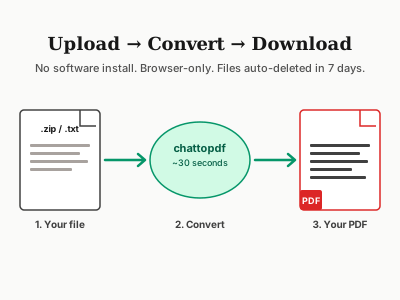
Professional-grade tools designed for legal documentation can significantly improve the admissibility and reliability of WhatsApp evidence by providing comprehensive technical documentation and authentication features.
ChatToPDF Professional Legal Features
Legal-Grade Documentation
Comprehensive metadata preservation with detailed technical documentation for court presentation
Chain of Custody Support
Built-in chain of custody tracking and documentation features for evidence integrity
Authentication-Ready Format
Professional PDF format designed to meet court authentication requirements
Security & Privacy Protection
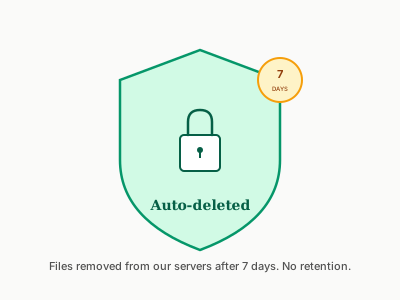
HTTPS upload, seven-day automatic file deletion and documented privacy terms
Expert Support
Technical expert consultation available for complex legal cases requiring testimony
Compliance Reporting
Detailed technical reports and processing logs for legal compliance requirements
Legal Professional Features
Court-Ready Documentation
Professional formatting for legal presentation
Evidence Integrity
Cryptographic verification of document authenticity
Audit Trail
Complete processing and access logs
Legal Professional Checklist
Pre-Collection Requirements
Post-Collection Requirements
Counsel Pre-Submission Checklist
Before a WhatsApp PDF exhibit is filed or served on opposing parties, counsel should work through the following checks. Skipping any one of them has a documented history of producing objections at inopportune moments — typically mid-hearing rather than in a calm pre-trial review.
Redaction and Privilege Review
Chat exports often contain content that is irrelevant to the proceedings but potentially harmful or privileged. Third-party phone numbers, personal health disclosures, and legally privileged advice appearing in the thread must be redacted before service. Redaction should be performed on the PDF exhibit — not by obscuring text in a screenshot — so that the underlying data cannot be extracted by selecting text in the document viewer. A redaction log recording what was removed and the basis for removal should be retained on the file in the event of a challenge.
Attorney-client communications embedded in the chat — for example, where counsel communicated with a client via WhatsApp — should be withheld and listed in a privilege schedule served with the discovery response. Inadvertent disclosure of privileged content in a filed exhibit creates a waiver risk that is difficult to cure after the fact.
Sealed-Record and Confidentiality Orders
Where the proceedings involve minors, medical information, or commercially sensitive pricing data, a sealed-record or confidentiality order should be sought before the exhibit is filed. A WhatsApp export containing a child's name, school, or medical details should not enter the public court record without protection. In family proceedings, court rules in most jurisdictions restrict publication of material relating to children, but those restrictions do not automatically seal the underlying exhibit — counsel must apply for the appropriate order.
Dual-Exhibit Production and Discovery Obligations
As noted above in the authentication standards discussion, best practice is to produce both the original .zip export and the formatted PDF. For discovery purposes, the .zip is the native-format production required by most electronically stored information protocols; the PDF is the rendered version provided for readability. Both should appear in the exhibit index with consistent labelling — for example, “Exhibit C-3 (Native)” and “Exhibit C-3 (PDF Rendering)” — so that the relationship between them is unambiguous.
Timeliness of disclosure is separately enforced from the quality of the exhibit itself. Late production of WhatsApp evidence — even where the exhibit is technically impeccable — invites an application to exclude on grounds of prejudice or non-compliance with case management directions. If the material has only recently come to light, a prompt application to extend time with a supporting explanation is far preferable to serving the exhibit without leave and hoping the objection is not pressed.
Conclusion
Successfully using WhatsApp conversations as legal evidence requires careful attention to authentication, chain of custody, and technical documentation requirements. The complexity of digital evidence law makes professional consultation essential for important cases.
While the technical aspects of WhatsApp to PDF conversion may seem straightforward, the legal requirements for admissible evidence are extensive and jurisdiction-specific. Proper planning, documentation, and use of professional-grade tools can significantly improve the likelihood of successful evidence admission.
Remember that legal standards continue to evolve as courts adapt to new technologies. Stay current with legal developments and always consult qualified legal counsel for case-specific guidance. The investment in proper evidence collection and documentation procedures often proves decisive in litigation outcomes.