
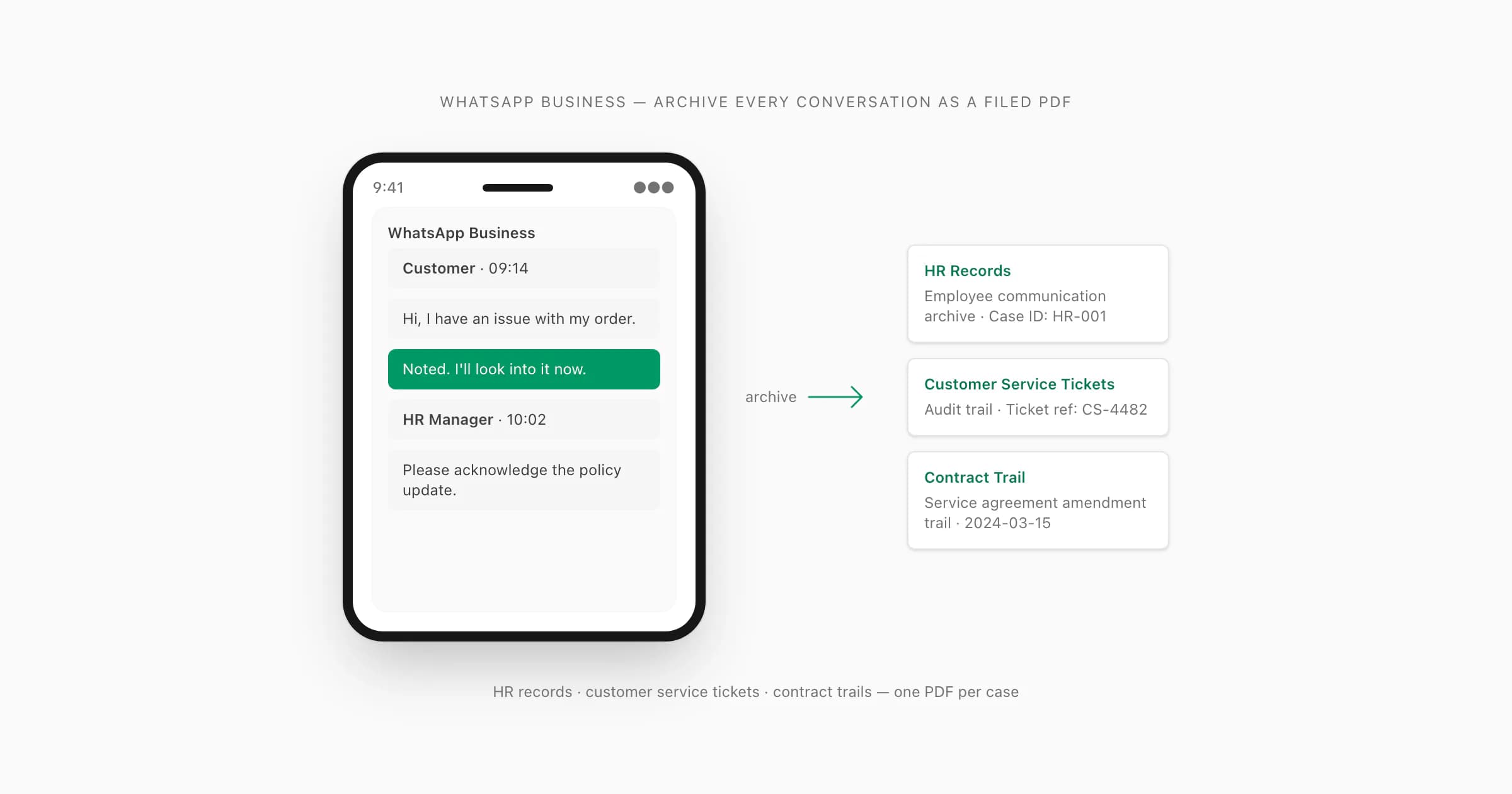
Why WhatsApp Business chats end up in HR files (and what they need to be)
Here's the part nobody tells you when they say "just use WhatsApp Business for your team": at some point, one of those chats becomes a document. An employee disputes something they said. A customer service complaint escalates. A freelancer claims the project scope changed. What started as a quick message thread suddenly needs to be filed, referenced, and potentially read by a lawyer or a labour tribunal.
WhatsApp Business is used by hundreds of millions of small businesses globally as the primary channel for customer and team communication. A 2024 Meta report cited over 200 million businesses using WhatsApp Business tools. That means a significant portion of workplace and commercial communication now lives inside a platform designed for messaging, not record-keeping.
The gap is the problem. WhatsApp Business is excellent at what it does — business profiles, away messages, quick replies, chat labels — but it has no native archive format that a compliance officer or HR manager can actually file. You can screenshot. You can print. You can use WhatsApp Web and save the browser window. None of these produce a document that holds up under scrutiny.
A properly formatted PDF does. Dated and sender-attributed, with messages from the export kept in sequence and supported media rendered when WhatsApp included it — that's what converts a WhatsApp Business thread into a record that can sit in a personnel file, a legal submission, or a customer service audit trail without anyone having to explain what they're looking at.
I built ChatToPDF initially for a legal use case on personal WhatsApp. But a meaningful number of the conversions people run through the tool are on WhatsApp Business exports — HR teams, operations managers, and small business owners who need their chat threads to become documents they can actually file. This guide is for them.
WhatsApp Business vs WhatsApp — what changes for export
The good news is that the Export Chat menu in WhatsApp Business works identically to the one in personal WhatsApp. The path is the same: open the chat, tap the contact name or group name at the top (iPhone) or the three-dot menu (Android), scroll to Export Chat, choose Without Media or Including Media, and save the file.
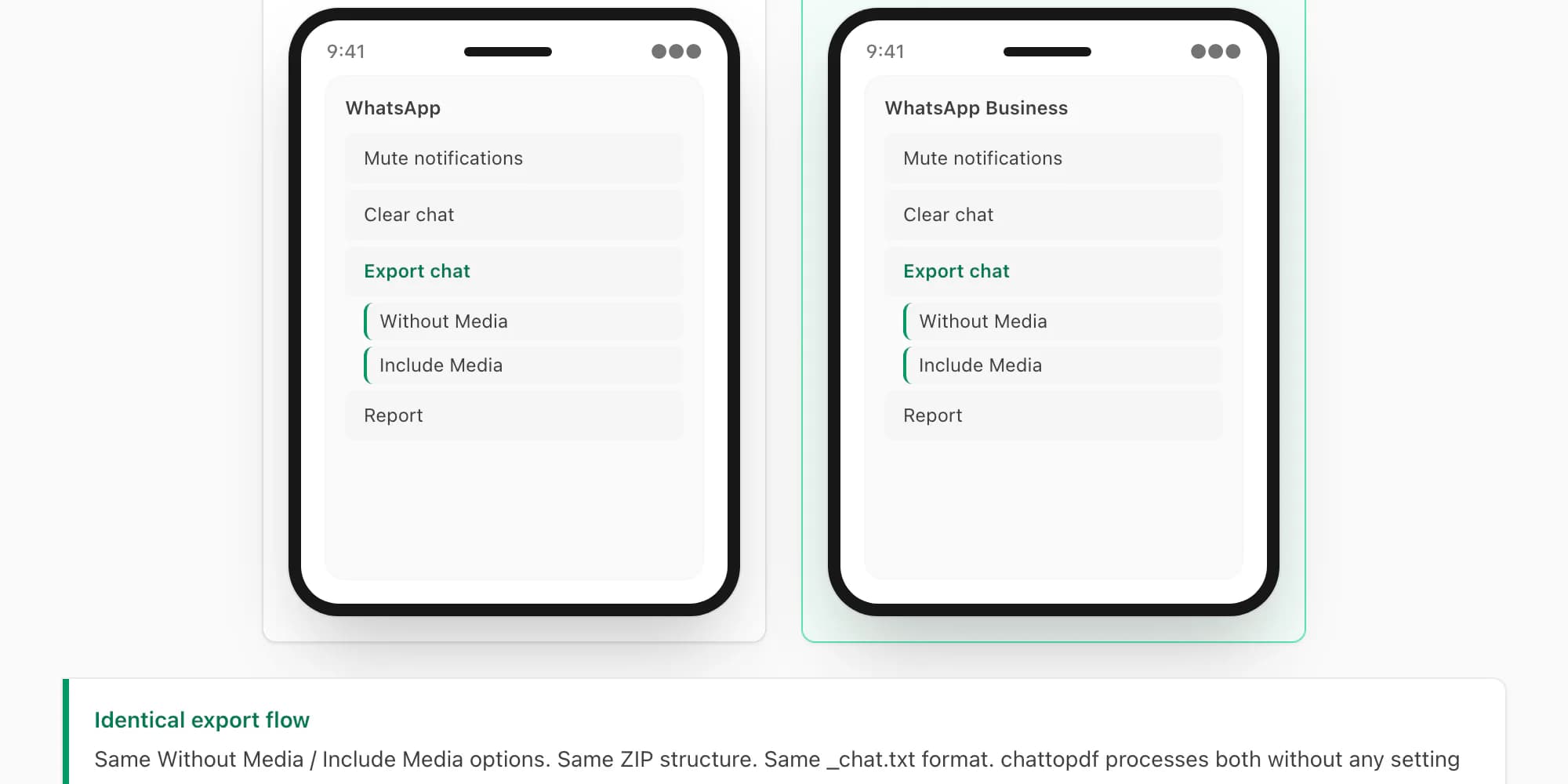
WhatsApp Business produces the same output format — a _chat.txt file, or a ZIP containing _chat.txt plus media attachments when you choose Including Media. ChatToPDF accepts both formats exactly as it does for personal WhatsApp exports.
There are three small differences worth knowing:
Business profile messages appear in the export. WhatsApp Business lets you set automated greeting messages, away messages, and quick replies. When these automated responses fire during a conversation, they appear in the _chat.txt just like any other message — attributed to your business number. This is actually useful for audit trails, because it proves that an automated message was sent and when.
Chat labels are not preserved in the export. WhatsApp Business's label feature (colour-coded tags like "New customer", "Payment pending", "Resolved") lives inside the app and does not travel with the export file. The exported _chat.txt contains only messages, timestamps, and sender names — no label metadata. If you use labels as a filing system inside WhatsApp Business, you'll need to note the label state separately when you archive the PDF.
Catalogue references appear as links. If your business uses WhatsApp Business's product catalogue, catalogue items shared in a chat appear in the export as plain-text links (e.g., a URL to the catalogue item). The product image and description are not bundled in the media ZIP. For customer-service documentation purposes, this usually doesn't matter — the message establishing that a product was discussed is the relevant record, not the product image itself.
Everything else — the ZIP structure, the _chat.txt format, the date format, the media attachment references — is identical. WhatsApp's own WhatsApp Business FAQ confirms that the Export Chat function is available on WhatsApp Business and works the same way as personal WhatsApp. If you've already read the general WhatsApp chat export guide, the WhatsApp Business export will feel familiar.
The HR documentation use case — what to include, what to redact
HR documentation is the use case that benefits most from converting WhatsApp Business chats to PDF. A disciplinary process, a performance review trail, a workplace harassment complaint, a termination paper trail — all of these can involve WhatsApp Business threads, and all of them need to become documents that can be filed, shared with a labour lawyer, and potentially presented at a tribunal.
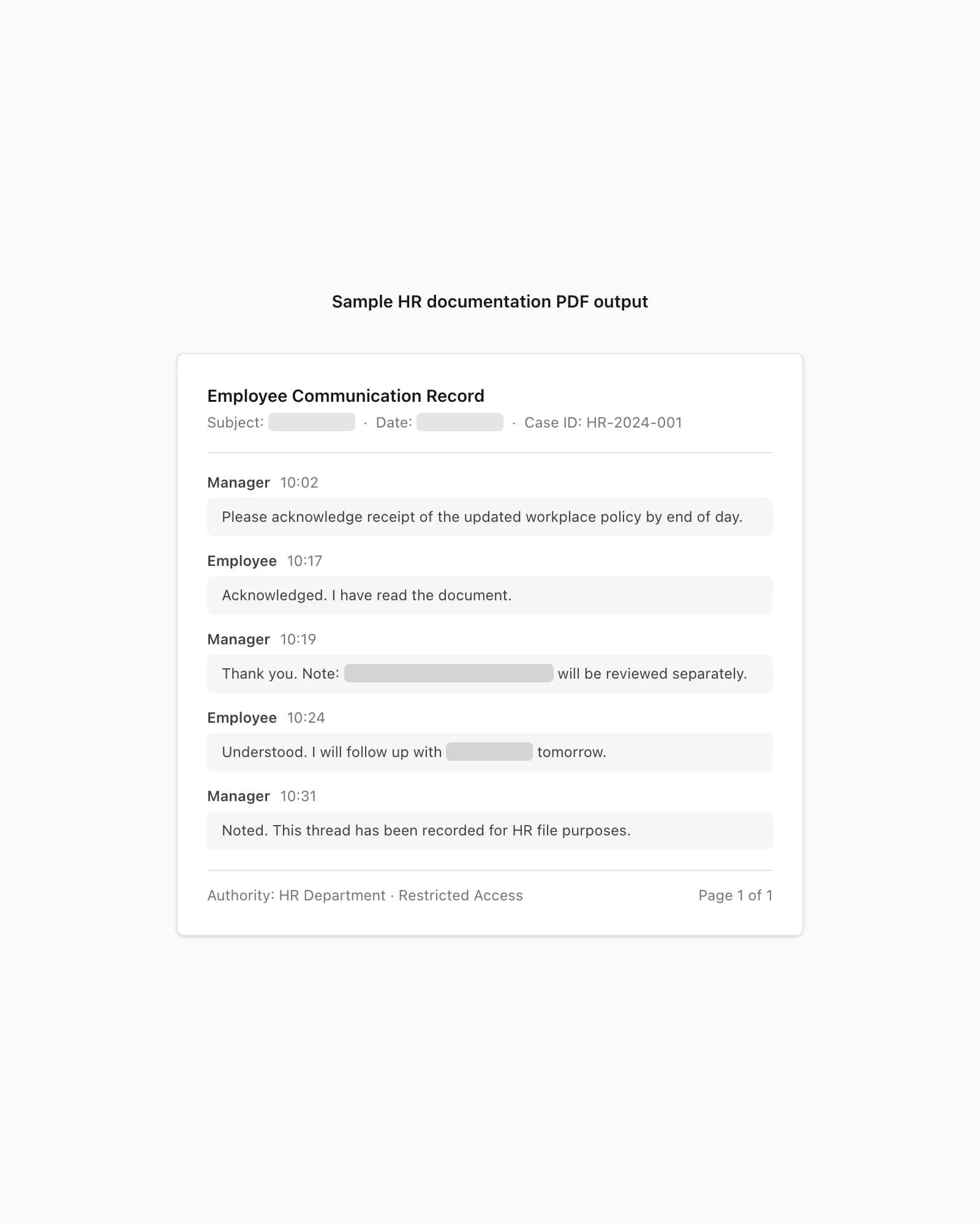
I've helped a number of small business owners through this process, and the consistent question is: what do I include, and what do I leave out?
What to include:
The full thread, unedited, from the relevant start date. Selective extraction — cherry-picking messages while omitting others — is the fastest way to undermine the credibility of the document. Courts and tribunals are sophisticated about this. A PDF of the complete thread from the first relevant exchange to the last one is far more defensible than a curated selection.
System messages matter too. When a group member is added, removed, or when the group's encryption state changes, WhatsApp records these as system messages in _chat.txt. In a disciplinary context, system messages that show when a person was added to a group chat — or removed from one — can be directly relevant to the timeline.
What to redact post-export:
The PDF can contain sensitive content from the WhatsApp export. Review the generated document and apply any required redactions before filing. Common redaction targets:
- Third-party customer phone numbers or personal details that appear in the thread
- Medical, banking, or personal details about individuals who are not parties to the HR matter
- Any content from a separate legal proceeding referenced incidentally
These redactions are applied to the PDF after download using a PDF editor (Adobe Acrobat, PDF-XChange, Preview on Mac). They should be proper redactions — black box overlays — not just black highlighter over a document that can be copy-pasted. Never file an HR document where sensitive content is "hidden" by colour rather than removed.
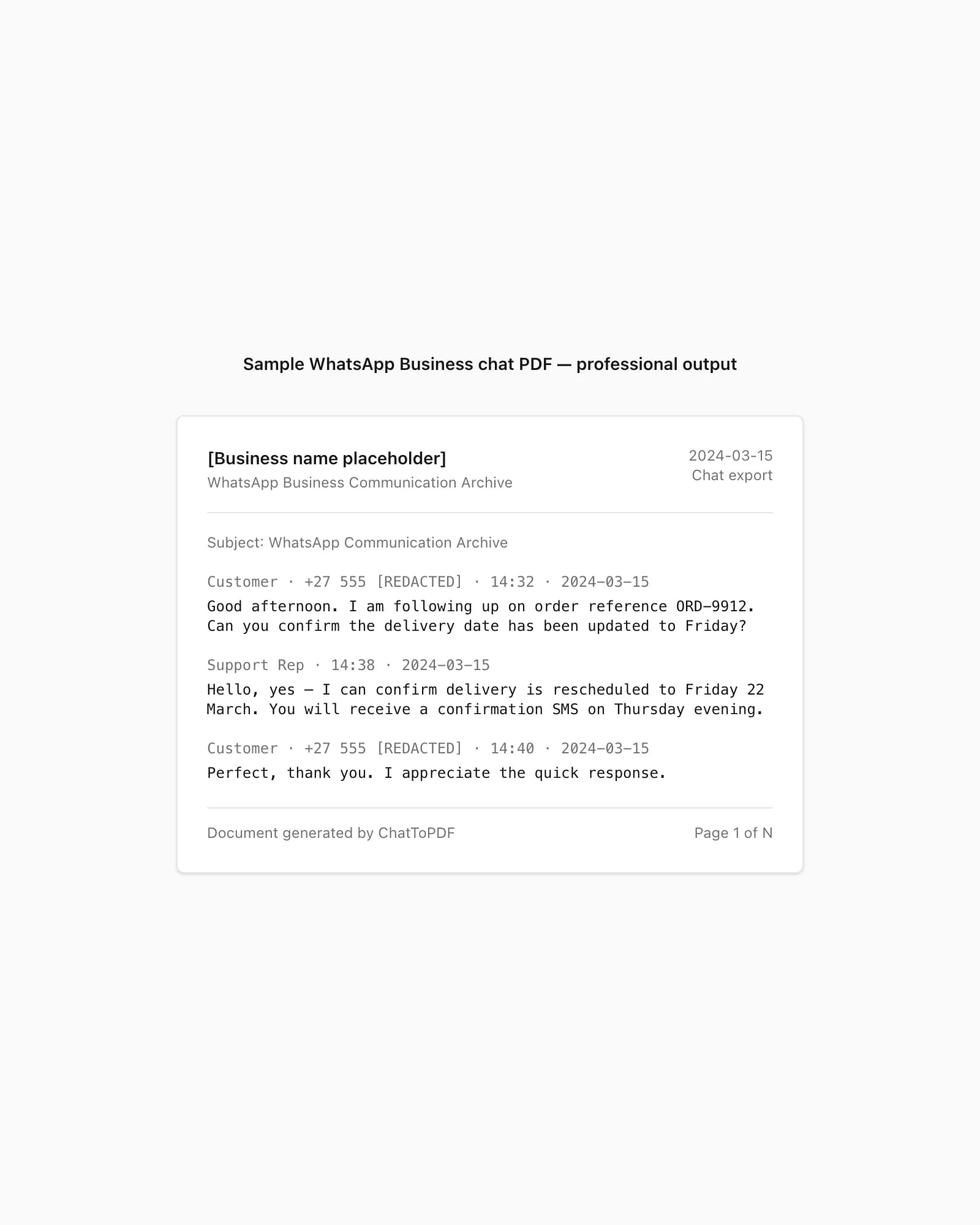
The Formal PDF style works best for HR submissions. It uses a letterhead-style header (chat name, date range, participant list), formats each message with sender name in small caps, timestamp on the right margin, and message body in indented body text. It reads like a deposition transcript rather than a screenshot of an app, which is what HR managers and labour lawyers expect when they open a "documentation file."
Retention: Most data protection regulations require that HR records containing personal data be retained for a defined period and then deleted. Seven years post-employment is the typical benchmark for employment records in most jurisdictions. The PDF you file should carry the same retention policy as your other personnel files — don't treat it as a special case just because it originated from a messaging app.
The customer-service audit-trail use case
Customer service done via WhatsApp Business is increasingly common. A customer messages your business number to query an order, report a defect, request a refund, or escalate a complaint. Your team responds. The conversation resolves — or doesn't. Either way, there's a record of what was promised, what was acknowledged, and what the outcome was.
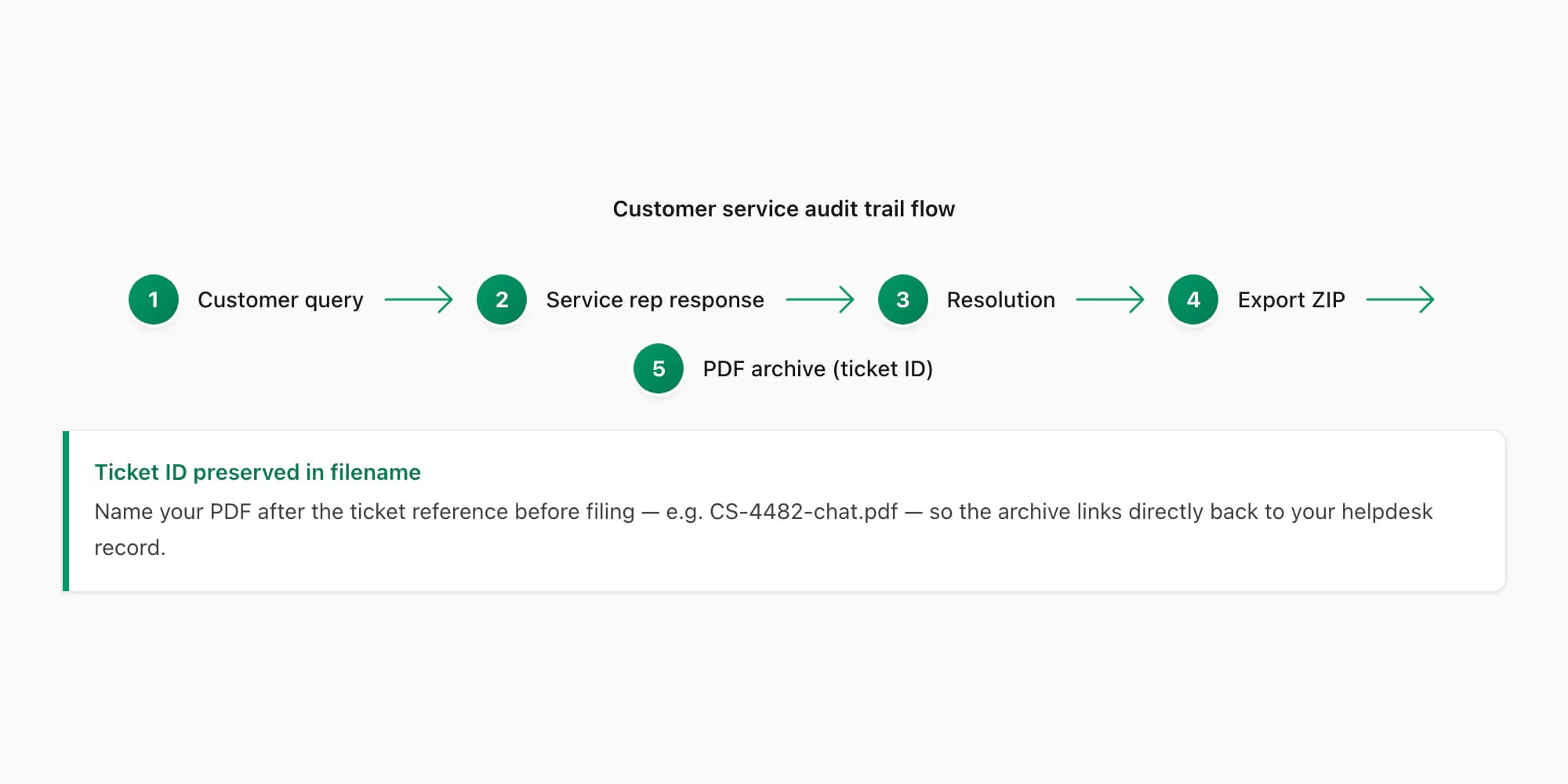
The audit trail use case is about structuring that record so it can be retrieved, reviewed, and acted on. The workflow I see working well in practice:
One PDF per ticket, filed by ticket ID. Each customer interaction gets its own PDF, named by a reference number you assign (e.g., CS-2026-04-00312.pdf). The PDF is archived in a folder structure by year and month. When a customer calls back three months later and says "nobody ever told me the refund was approved," you pull that PDF in seconds.
Include the SLA data you care about. ChatToPDF preserves timestamps for parsed messages from the export. If your service-level agreement commits to a 4-hour first-response time, compare the relevant message timestamps after checking that the exported period is complete.
Refund and return threads. Finance teams often need to reconstruct why a refund was authorised. "The customer said the product was faulty and we agreed to refund" needs a paper trail. A PDF of the WhatsApp Business thread where the refund was agreed — with dates and your team member's name attributed to the agreement message — gives the finance team the documentation they need for their reconciliation.
Escalation threads. When a complaint moves from a front-line representative to a manager, the escalation conversation often happens in a separate WhatsApp Business thread or group. Export each phase as a separate PDF and staple them together (or merge them in a PDF editor) with the ticket reference on each. The result is a complete escalation record: original complaint, first-line response, escalation, resolution.
The $14 Standard per chat conversion covers most customer-service audit scenarios — supported images inline, up to 25,000 messages per chat. For businesses with very active customer chats or where voice notes from customers are a significant part of the record, the $29 Premium per chat conversion removes the product message-count cap, and the $49 Premium+Voice per chat conversion adds language-aware voice transcription through the Deepgram Nova-3/ElevenLabs Scribe v2 router and ElevenLabs Scribe v2. The whole-chat voice-to-text guide explains how the exported notes return to their sender and timestamp for review.
The contract-trail use case (informal "yes" in WhatsApp counts)
This is the use case that surprises most people. If you've ever agreed a service, a price, or a project scope in a WhatsApp message, you may have created a binding contractual agreement — and the WhatsApp thread is your evidence.
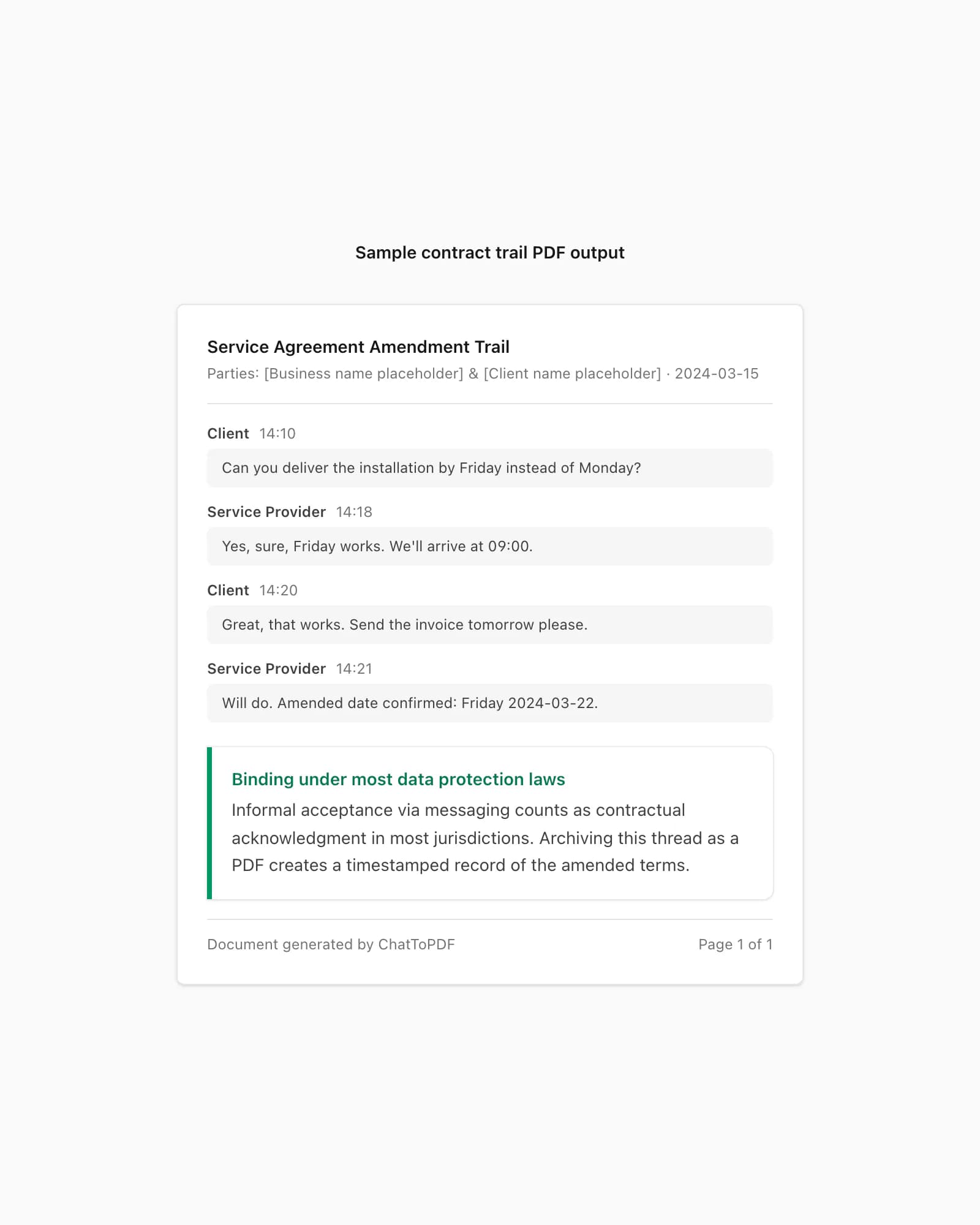
Most contract law recognises that a written exchange — including digital messaging — constitutes a valid agreement when the essential elements are present: offer, acceptance, and consideration (something exchanged for something). A WhatsApp message saying "Yes, can you do the full installation by Friday for R8,500?" followed by "Sure, confirmed" has those elements. Whether that's enforceable depends on your jurisdiction, but in most common-law and civil-law systems, courts have consistently held that WhatsApp messages constitute written evidence of agreement.
The contract-trail use case covers four common scenarios:
Service agreement confirmation. A client messages you asking whether you can do X by a certain date for a certain price. You say yes. That exchange is the service agreement. When the same client later claims they never agreed to the price, the WhatsApp PDF — dated, sender-attributed, with the exact message thread — is your evidence.
Amendment documentation. "Can you also do Y while you're there?" / "Yes, I'll add that, it'll be an extra R500." Scope changes negotiated over WhatsApp are scope amendments. If you don't document them, you'll find yourself doing extra work for free because there's no record of the discussion. The PDF becomes the change-order record.
Payment confirmation. "Payment just went through" / "Got it, thanks." A simple exchange, but it establishes when payment was received and that both parties acknowledged it. Useful when a client later disputes having paid.
Informal contract formation. Freelancers and small contractors often operate without formal written contracts. If that describes you, your WhatsApp Business thread with a client may be the only written record of what was agreed. Converting it to a timestamped, sender-attributed PDF before a dispute arises is basic risk management.
I want to be direct about the limitations: a WhatsApp PDF is evidence, not a substitute for a proper contract. If you're doing significant commercial work, get a written agreement signed by both parties. But for the small-scale commercial reality that most small businesses operate in — where a formal contract for every job is impractical — a preserved WhatsApp thread is the next best thing.
Group-chat exports for team accounts
WhatsApp Business group chats — team coordination threads, project groups, department channels — present a specific archiving challenge. Individual chats are straightforward: two participants, clear attribution, easy to read. Group chats with five, ten, or fifteen members are a different kind of document.
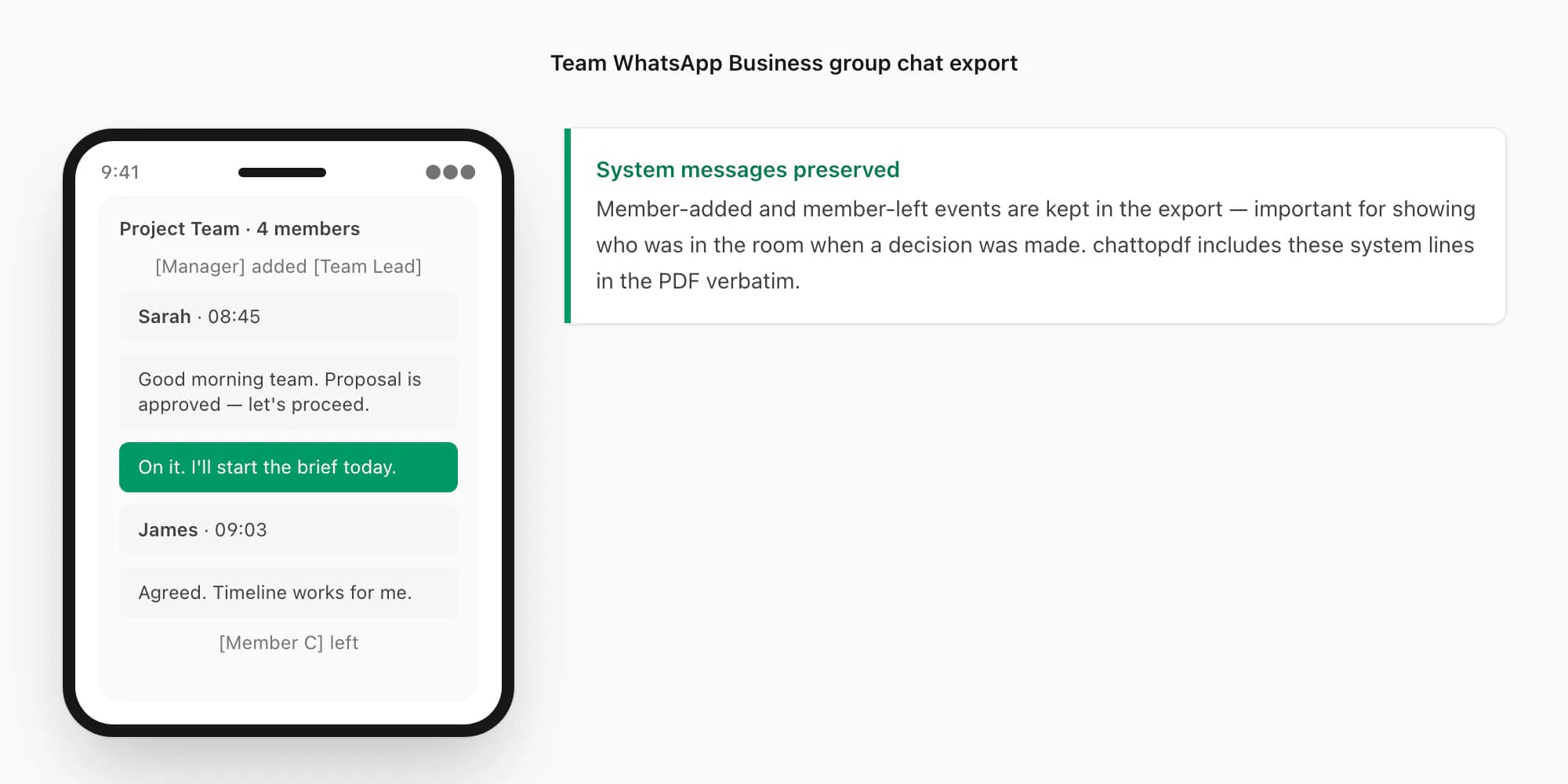
ChatToPDF uses the attribution present in WhatsApp Business group exports. Parsed messages carry the sender's saved name, or the phone number when no saved name is available, and supported system messages remain in sequence.
System messages in group exports matter more than people realise for HR and compliance purposes. If a decision was made in a team WhatsApp Business group, the system message showing who was in the group at that time is evidence of who was present when the decision was made. That's relevant for disciplinary proceedings ("You were in the group and should have been aware of the policy change"), for project accountability ("The scope change was communicated to the full team in this group on this date"), and for coverage disputes ("The client was added to the group on this date and had visibility of all subsequent messages").
One significant limitation: WhatsApp group exports are limited to what the exporting member can see. If a member joined a group after other members had already exchanged messages, the exporting member's _chat.txt will show "Messages and calls are end-to-end encrypted. Only people in this chat can read or listen to them." as a break point, followed by messages from their join date. Members who left and rejoined will have a gap in their export. This is a WhatsApp architectural constraint — it cannot be worked around at the export level.
The practical advice: if you need a complete record of a group thread from its beginning, the member who created the group and has been present continuously is the one who should perform the export. That member's _chat.txt will contain the complete thread from day one.
Migrating from personal WhatsApp to WhatsApp Business (export-restore path)
If your business has been running on a personal WhatsApp number and you're switching to WhatsApp Business — or if you're getting a separate business number and want to preserve the history from your personal number — this section is for you.
The migration path depends on one factor: are you keeping the same phone number or switching to a new one?
Same phone number migration: When you install WhatsApp Business on the same number as your existing personal WhatsApp, the app offers a "Migrate from WhatsApp" prompt during setup. Your chat history, contacts, and media transfer across automatically. This is the clean path — you get continuity without manual intervention.
The only catch: you cannot run personal WhatsApp and WhatsApp Business on the same device with the same number simultaneously. Installing WhatsApp Business replaces personal WhatsApp for that number. If you want to keep a personal WhatsApp number active alongside your business number, you need either a dual-SIM phone (one number for each app) or a second device.
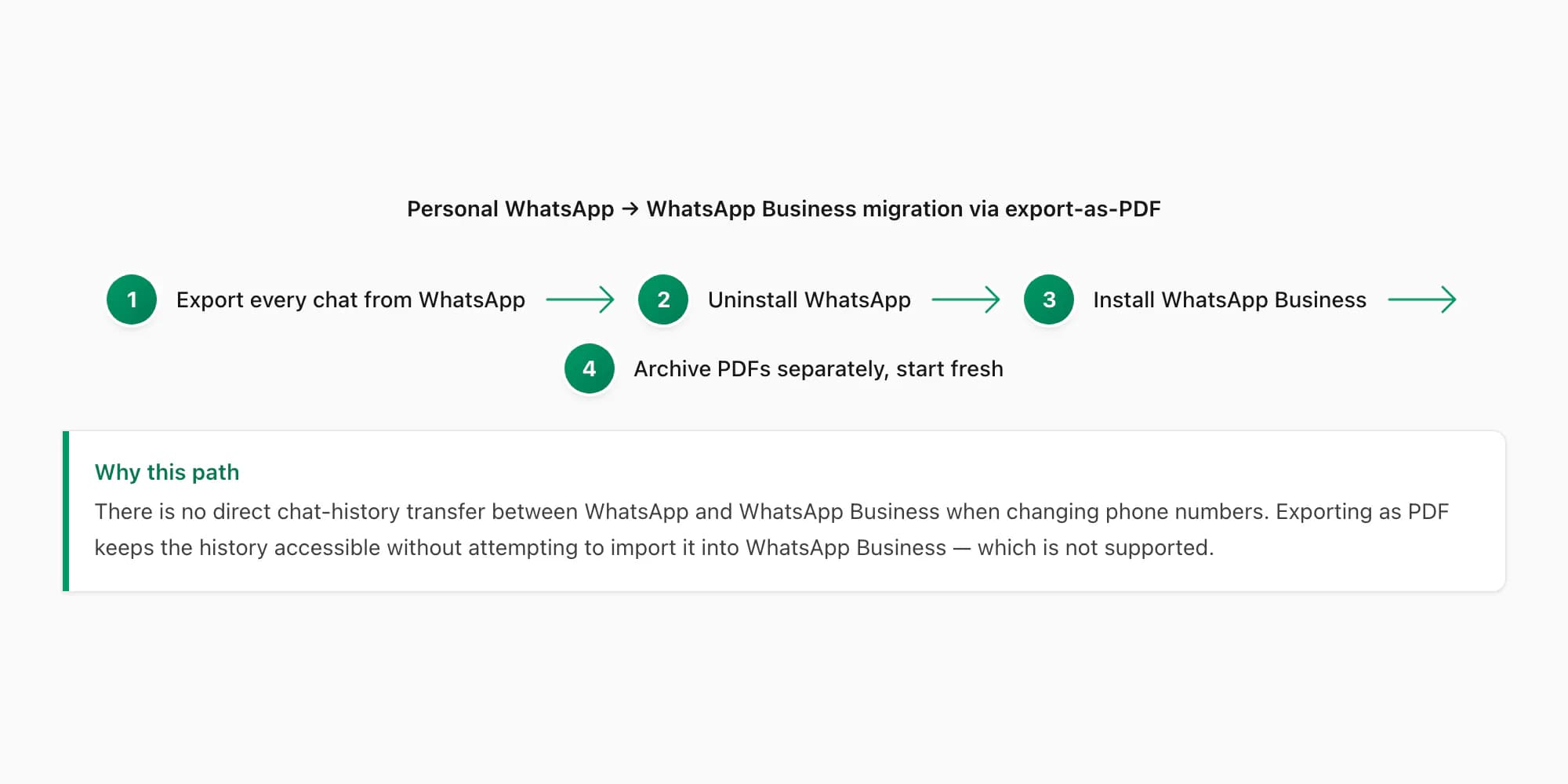
Different phone number migration: This is the harder path, and it's where a lot of people lose their chat history unnecessarily. If you want your business on a new number (e.g., a dedicated business SIM), there is no official WhatsApp migration tool that moves chats from one number to another. WhatsApp's restore function only restores to the same number from a backup.
Here's the part nobody tells you: the correct approach is to export every chat you want to preserve as a PDF before you make the switch. Export each customer chat, each team chat, each supplier chat — all of them. Convert them to PDFs with ChatToPDF. Now you have a complete archived record of every business conversation you've ever had on that number, preserved in a format that doesn't depend on WhatsApp's backup system.
Then start fresh on WhatsApp Business with the new number. Your archived PDFs are your history. They're more useful than a WhatsApp backup anyway — you can actually read them, search them, and file them without needing to restore an entire account.
I built ChatToPDF partly because I was in a situation where I needed to preserve conversations before switching devices, and I found that existing tools required a desktop, a backup file, and a level of technical setup that most people don't have. The export path — WhatsApp's own Export Chat menu — is what works reliably on any phone, any platform, any time. The PDFs you get at the end of this process are the most portable format your chat history can exist in.
For the full detail on how the WhatsApp to PDF conversion process works, including the parser and the four PDF styles, see the dedicated guide.
High-volume archiving — still one conversion per chat
Individual chat exports work well for one-off conversions — a specific HR incident, a single customer complaint, a contract dispute. But businesses that need to archive WhatsApp Business chats at scale face a different problem: WhatsApp has no "export all chats" function. Each chat must be exported individually.
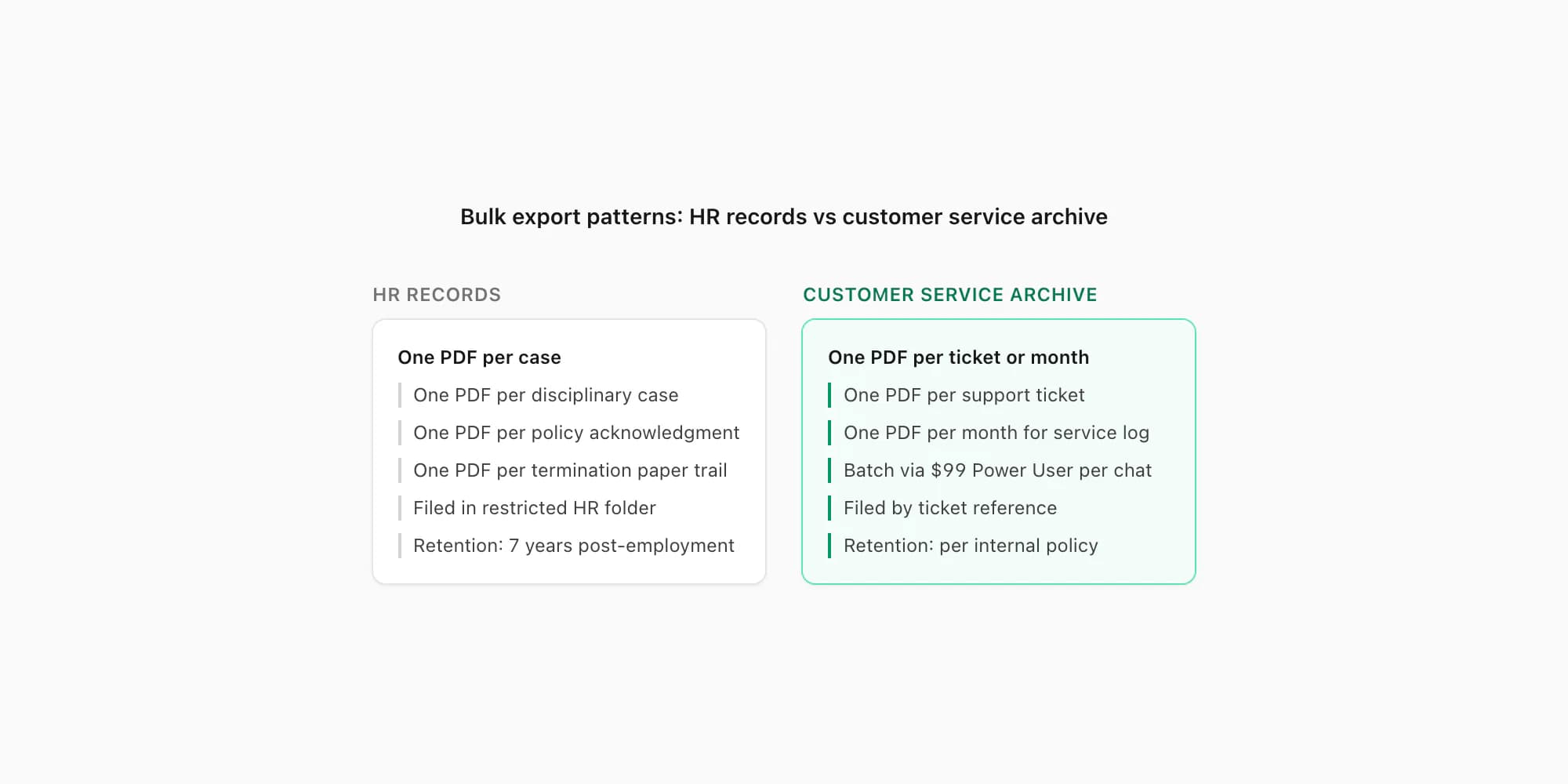
A business with 200 active customer chats and a policy requiring monthly archiving would, without any automation, spend hours every month tapping through export menus. That's not a viable workflow.
ChatToPDF does not currently provide a multi-ZIP batch uploader. Each WhatsApp chat must be exported, uploaded, purchased, processed, and downloaded as a separate conversion. The $99 Power User package adds priority processing and larger single-chat capabilities; it does not combine several chat exports into one order.
For a high-volume archive, plan a repeatable one-chat-at-a-time routine: assign a reference before upload, convert the ZIP, download and verify the output, then move to the next chat. Pricing remains per chat, with no reduced bulk rate or account-level bundle.
Two archiving patterns that work:
One PDF per chat. Each customer or employee WhatsApp Business thread becomes its own PDF, named by a reference number. This is the right pattern for HR records and customer service tickets, where you need to retrieve a specific conversation by reference. The folder structure: archive/YYYY/MM/CS-YYYYMMDD-NNNNN.pdf or hr/YYYY/employee-lastname-topic-YYYYMMDD.pdf.
One PDF per month per channel. For team group chats that run continuously — a daily operations thread, a sales team channel — monthly archiving produces a PDF of everything said in that group during the calendar month. You export the group chat once a month, convert it, and file the PDF as ops-group/2026-04.pdf. This keeps the archive manageable without requiring you to export and name individual conversations.
The two patterns can coexist. Customer-service chats get individual PDFs by ticket reference. Team group chats get monthly archive PDFs. HR incident chats get individual PDFs by matter reference. The folder structure is the organizing principle, not the tool.
Pricing for high-volume business use (Power User tier per chat)
Business use cases span the full pricing range, depending on what the chat contains and what the output needs to do.
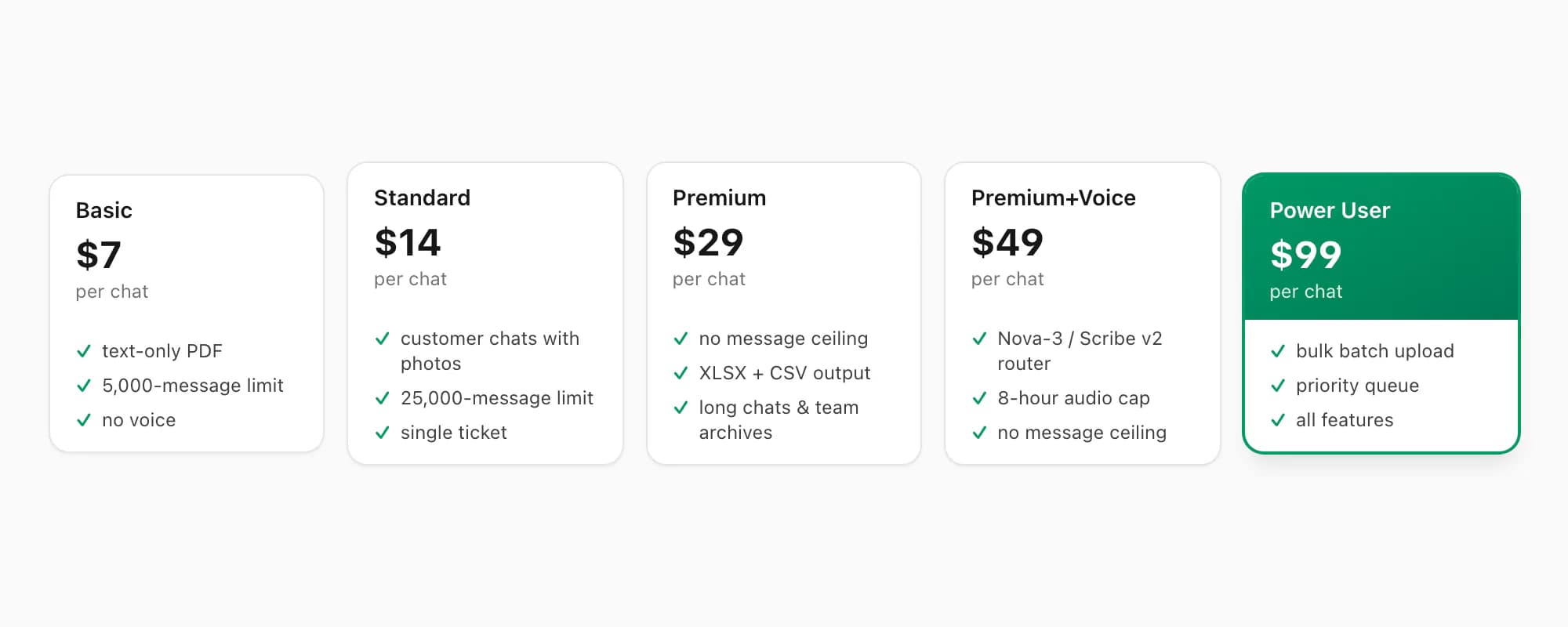
$14 Standard per chat conversion is the right tier for most customer service audit trails. It includes inline image rendering (up to 25,000 messages), which covers the photos, receipts, and document images that often appear in customer support threads. Most customer service chats are under 25,000 messages, so the message cap rarely applies.
$29 Premium per chat conversion is the tier to use when the chat is very long — an ongoing customer relationship that spans months, or a team group chat being archived for the first time. There is no message cap on the $29 Premium per chat conversion. It also includes XLSX and CSV outputs alongside the PDF, which is useful for operations teams that want to analyse message frequency or filter by sender across a period.
$49 Premium+Voice per chat conversion adds language-aware transcription for supported voice notes included in the export, up to 8 hours of audio across the chat. The current router uses Deepgram Nova-3 where the language is supported and ElevenLabs Scribe v2 for the broader 93-language registry and fallback path. Coverage is not an accuracy guarantee; review important wording against the source audio.
$99 Power User per chat conversion is for a large single-chat archive that needs priority processing or more than 8 hours of audio. It includes the lower-tier features, supported image rendering, no product message-count cap, the same 93-language Nova-3 and Scribe v2 router with no audio-duration cap, and the full output bundle. It remains one conversion for one chat ZIP.
There are no recurring fees at any tier. You pay for the conversion you're running today. If your archiving volume fluctuates — heavy one month, light the next — you're not locked into a fee structure that charges you regardless of use. For a business that runs ten Power User conversions in March and two in April, the bill is proportional to actual use.
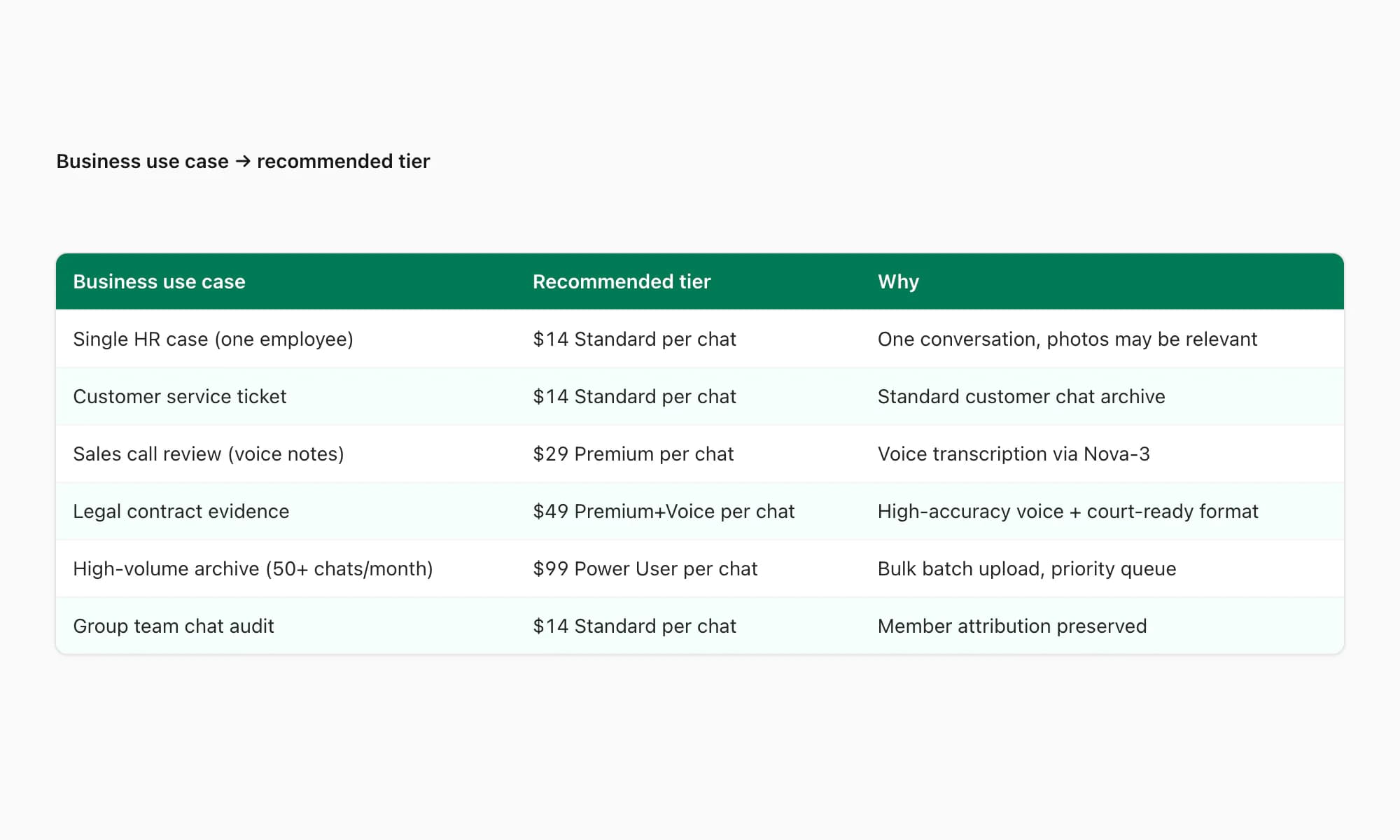
The decision tree above maps each business use case to the appropriate tier. If you're unsure which tier applies, the free preview at chattopdf.app parses the export and shows conversation, participant, message, media, and voice-note diagnostics before you pay.
Compliance considerations
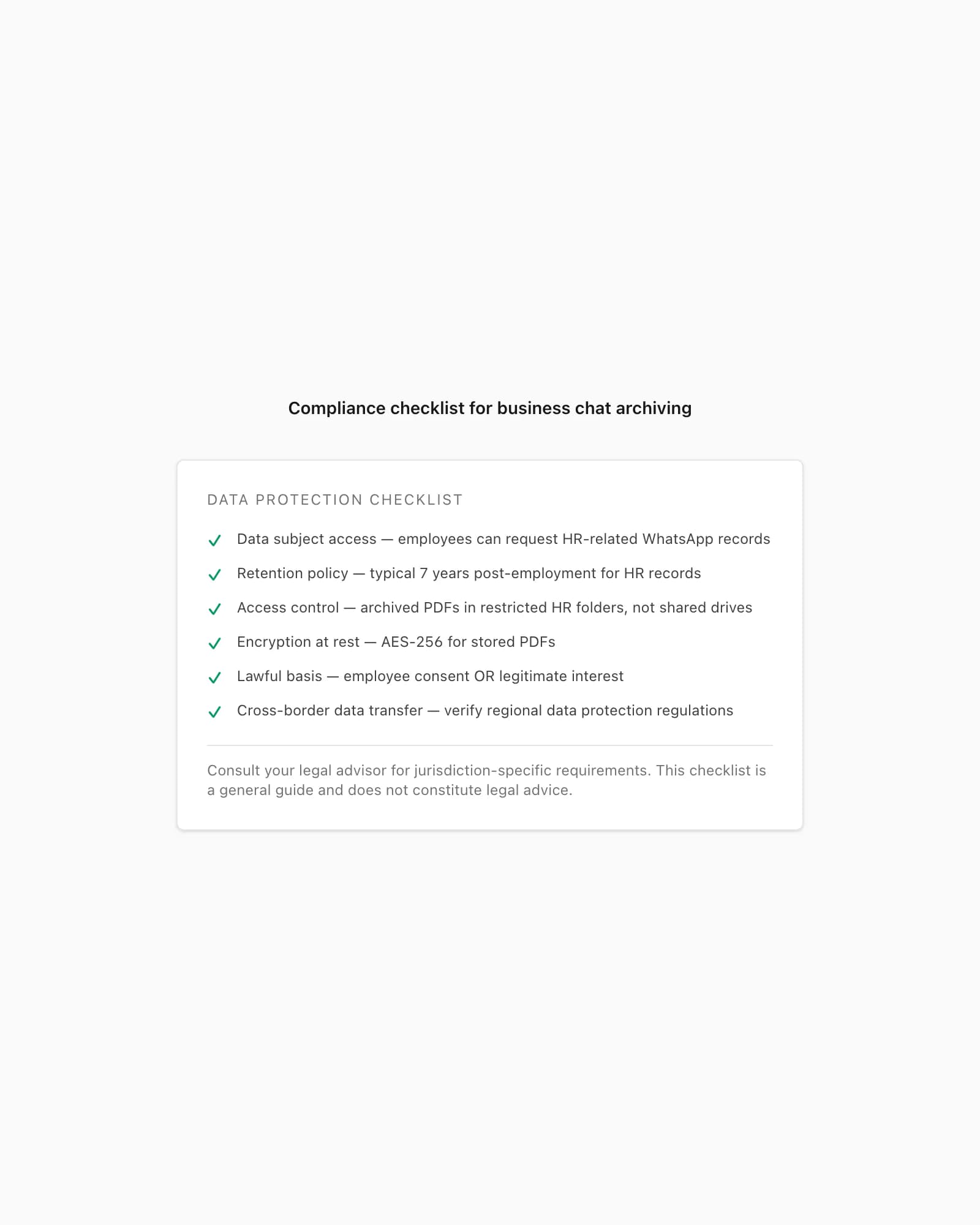
Converting WhatsApp Business chats to PDF for business records touches on several data protection considerations. I'll cover the practical ones, because the legal specifics vary by jurisdiction and you should be getting advice from a lawyer or compliance officer for anything high-stakes.
Data subject access rights. Most data protection laws around the world give individuals the right to request copies of personal data held about them. If an employee's WhatsApp Business messages are archived as PDFs in an HR file, those PDFs are likely within scope for a subject access request. The practical implication: your archive needs to be searchable enough that you can locate and produce the relevant records if a request comes in. The one-PDF-per-chat naming convention described above makes this tractable; a pile of unnamed files does not.
Retention periods and deletion. Regional data protection regulations typically require that personal data be retained only as long as necessary for the original purpose, and then deleted. For HR records, seven years post-employment is a common benchmark in most jurisdictions. For customer service records, the retention period is typically shorter — often two to five years depending on the nature of the relationship and any statutory limitation period that might apply to disputes.
The practical takeaway: build a deletion schedule for your archived PDFs that mirrors your general records retention policy. The fact that the original data was in WhatsApp doesn't exempt it from the same retention rules that apply to emails and other business communications.
Access control. Archived PDFs containing employee or customer personal data should sit in restricted folders. HR files should be accessible to HR and relevant managers — not to your entire team. Customer service archives should be accessible to the service team and management — not to finance, marketing, or other departments that have no need for the content.
ChatToPDF processes the source file and output in a server-side job directory. Deletion of source files, extracted media, and generated downloads for paid and unpaid jobs is scheduled when the files reach seven days. A job still processing at that point can receive a bounded grace period of up to 24 hours so cleanup does not remove files while a worker is reading them. If that server-side window conflicts with your organisation's policy, use a local-only workflow. After download, the PDF is your responsibility; apply the same access controls and retention rules used for other personal-data records.
Encryption at rest. Once the PDF is in your business archive — a shared drive, a document management system, a cloud storage folder — it should be in a location that has encryption at rest enabled. Most major cloud storage providers (Google Drive, SharePoint, Dropbox Business) offer this as a default or configurable option. Don't store archived HR or customer data in an unencrypted location.
Lawful basis for processing. Under most data protection frameworks, processing employee data for HR purposes (including archiving relevant communications) is typically justified by the legitimate interest of the employer in maintaining accurate employment records, or by the legal obligation to maintain records required by employment law. Processing customer data for service records is typically justified by the contractual relationship or legitimate interest in resolving disputes. You don't need to overturn your data protection framework to archive WhatsApp Business chats — but you should ensure your data protection policy mentions that employee and customer communications may be archived, and how.
For businesses that operate across borders — particularly with EU customers or employees — the data transfer question arises. ChatToPDF processes uploads in the region of the upload origin by default. For businesses with specific data residency requirements, the contact form is the right path to discuss arrangements. The UK Information Commissioner's Office guidance on employee monitoring is a useful reference for understanding how data protection rules apply to employer-held communications records.
For further reading on admissibility of WhatsApp chats as evidence — a related but distinct topic — see the guide on WhatsApp evidence and court PDF submissions.
Key takeaways
- WhatsApp Business exports use the same Export Chat menu as personal WhatsApp — the output format is identical and ChatToPDF accepts it without any change to your workflow
- HR documentation, customer-service audit trails, and contract trails are the three primary business use cases — each benefits from a different PDF style (Formal for HR, Clean for customer service, Clean for contract documentation)
- Informal "yes" messages in WhatsApp Business constitute written evidence of agreement in most jurisdictions — archiving them as PDF before a dispute arises is basic risk management
- ChatToPDF has no multi-ZIP batch uploader: each chat is a separate upload and purchase; the $99 Power User package adds priority processing, no audio-duration cap, and a full output bundle for that one chat
- Data protection laws apply to archived WhatsApp Business PDFs the same as to any other business record — build a retention and deletion schedule and enforce access controls on the archive folder
- Per-chat pricing means your archiving cost scales with actual use — you are not paying a recurring fee for months when you convert nothing
- System messages in group chat exports (who was added, who left, when) are preserved in the PDF and can be directly relevant to HR and compliance documentation
FAQ
Does WhatsApp Business export chats the same way as regular WhatsApp?
Yes. The Export Chat menu in WhatsApp Business works identically to personal WhatsApp — same path (contact name tap on iPhone, three-dot menu on Android), same Without Media and Including Media options, and the same _chat.txt format inside the export file. ChatToPDF accepts WhatsApp Business exports without any modification to your workflow. The only difference you'll notice is that automated messages (greeting messages, away messages, quick replies) from your business profile appear in the export attributed to your business number, exactly as they appeared in the chat.
What tier should I use for HR documentation that might go to a labour tribunal?
Use the $49 Premium+Voice per chat conversion or the $99 Power User per chat conversion when relevant voice notes need transcription. Both tiers remove the product message-count cap and use the 93-language Deepgram Nova-3 and ElevenLabs Scribe v2 router; the $99 Power User tier lifts the 8-hour audio cap that applies at $49. Transcription can contain errors, so verify important passages against the audio before formal use. For the PDF style, select Formal in the upload flow — it produces a letterhead-style document that reads like a deposition transcript rather than a screenshot.
Can I convert WhatsApp Business chats in bulk for monthly archiving?
Not in one batch. ChatToPDF currently accepts one chat export per conversion, so each ZIP must be uploaded, purchased, processed, and downloaded separately. The $99 Power User package gives that individual conversion priority processing, no audio-duration cap, and a full output bundle; it does not add a multi-ZIP uploader. For a monthly routine, use a naming checklist and file each verified result by year, month, and reference.
Do informal WhatsApp Business agreements hold up legally?
In most jurisdictions, a WhatsApp message exchange that establishes offer, acceptance, and consideration constitutes a written agreement. Courts in the UK, Australia, South Africa, and many EU member states have admitted WhatsApp messages as evidence of contractual agreements. The PDF conversion is useful because it produces a dated, sender-attributed document that is more legible and credible than a series of screenshots. That said, the weight given to informal WhatsApp agreements varies by jurisdiction and the specific facts of the case — for anything significant, get proper legal advice. The PDF is evidence, not a substitute for a formal contract.
How do I handle third-party personal data that appears in WhatsApp Business exports?
The PDF you download from ChatToPDF contains everything in the original export. Before filing an HR or compliance document, review it for third-party personal data — customer phone numbers, medical details, banking information — that has no relevance to the matter being documented. Apply proper redactions in a PDF editor (Adobe Acrobat, PDF-XChange, Preview on macOS) using black box overlays rather than colour highlights. File the redacted version. Retain the unredacted original in a separately access-controlled location if you need it for completeness. This is standard document hygiene for any record containing personal data, whether it originated from WhatsApp or anywhere else.
What happens to my WhatsApp Business export file after I upload it to ChatToPDF?
Your file is transmitted over HTTPS and processed by the automated conversion pipeline in a server-side job directory. Deletion is scheduled when files reach seven days; a job still processing can receive up to 24 hours of bounded grace. No transcription provider receives the full chat text. For voice-enabled conversions, supported audio is routed to Deepgram Nova-3 or ElevenLabs Scribe v2, and Deepgram requests opt out of its Model Improvement Program. Use a local-only workflow if your policy cannot accept server or external-provider processing.
Can I archive WhatsApp Business chats as part of a data protection subject access response?
Yes. If you receive a data subject access request and the relevant personal data includes WhatsApp Business messages, the PDF archive is the format to produce — it is legible, dated, and sender-attributed in a way that raw _chat.txt files are not. Ensure your archive is organised well enough to locate the relevant conversations by date and participant. If you have not yet archived those chats and need to produce them quickly, ChatToPDF's $14 Standard per chat conversion covers most scenarios. For chats that include voice notes that are relevant to the request, use the $49 Premium+Voice per chat conversion to ensure the full content of the thread is documented.
I'm Paul, the founder of ChatToPDF. I built it after needing a long WhatsApp conversation as a readable PDF for a legal matter. I test and document WhatsApp exports, PDF conversion, voice-note transcription, and the limits people should check before relying on the result.