
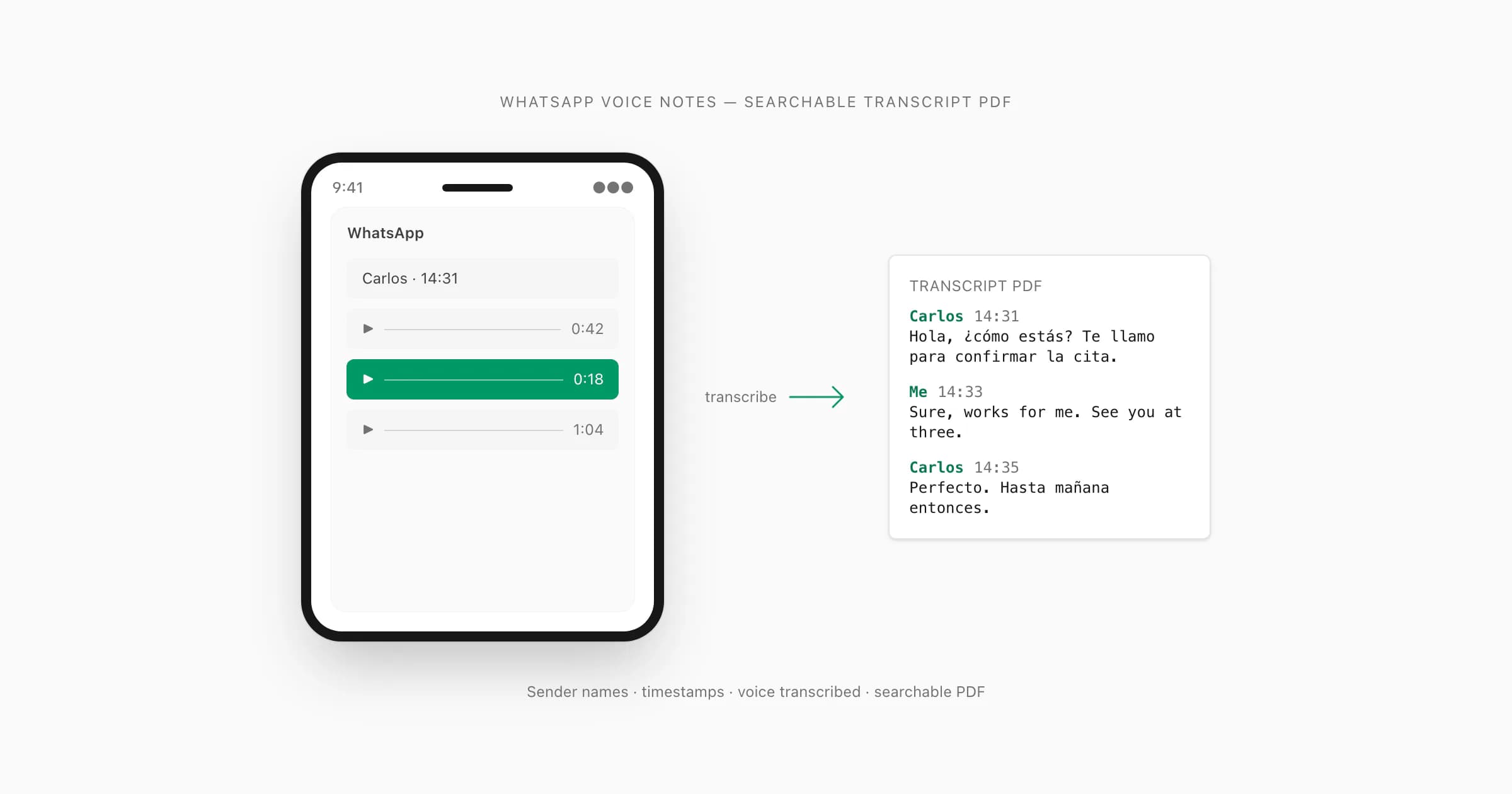
"Transcribe WhatsApp audio" का actually मतलब (और यह जितना लगता है उससे कठिन क्यों है)
लोग "transcribe WhatsApp audio" phrase को कम से कम तीन अलग-अलग चीज़ों के लिए use करते हैं। कुछ live voice calls transcribe करना चाहते हैं — जो WhatsApp किसी developer API के ज़रिए expose नहीं करता। कुछ WhatsApp से save किए गए audio files को text में convert करना चाहते हैं। और कुछ — सबसे बड़ा group — exported WhatsApp chat में हर voice note को readable text में convert करना चाहते हैं ताकि पूरी conversation एक document के रूप में sense बनाए।
ChatToPDF उस third use case के लिए बना है। यह जो problem solve करता है वह specific है: आप एक WhatsApp chat export करते हैं जिसमें text messages और voice notes दोनों हैं, और WhatsApp से आपको एक ZIP मिलती है जिसमें _chat.txt और media files का एक folder है। _chat.txt में ऐसी lines हैं जैसे <attached: 00000012-AUDIO-2024-03-15-09-22-31.opus> जहाँ voice note belong करती है। जब तक आप कुछ build न करें, कुछ भी उन्हें readable text में convert नहीं करता।
यहाँ वह बात है जो कोई नहीं बताता: जब लोग transcription tool ढूँढते हैं, तो वे अक्सर एक structural problem में फँस जाते हैं। Generic audio files handle करने वाले tools — MP3 upload करें, text वापस पाएं — नहीं जानते कि वह audio conversation में कहाँ belong करती है। वे file transcribe करते हैं लेकिन context खो देते हैं। आपको एक separate text block मिलता है बिना sender name, timestamp, या इस indication के कि पहले या बाद में क्या कहा गया। Legal matter, business record, या family archive के लिए वह context ही सब कुछ है।
मैंने जो बनाया (that's my solution to this problem) वह यह करता है: _chat.txt read करता है conversation structure समझने के लिए, हर .opus reference को ZIP में correct audio file से match करता है, audio transcribe करता है, और transcript को conversation में exactly सही position पर वापस insert करता है — sender का name और original timestamp preserve के साथ। Result एक single PDF है जहाँ text messages और voice note transcripts naturally alternate करते हैं, exactly जैसे conversation हुई थी।
Voice notes files नहीं हैं — in-app stream हैं
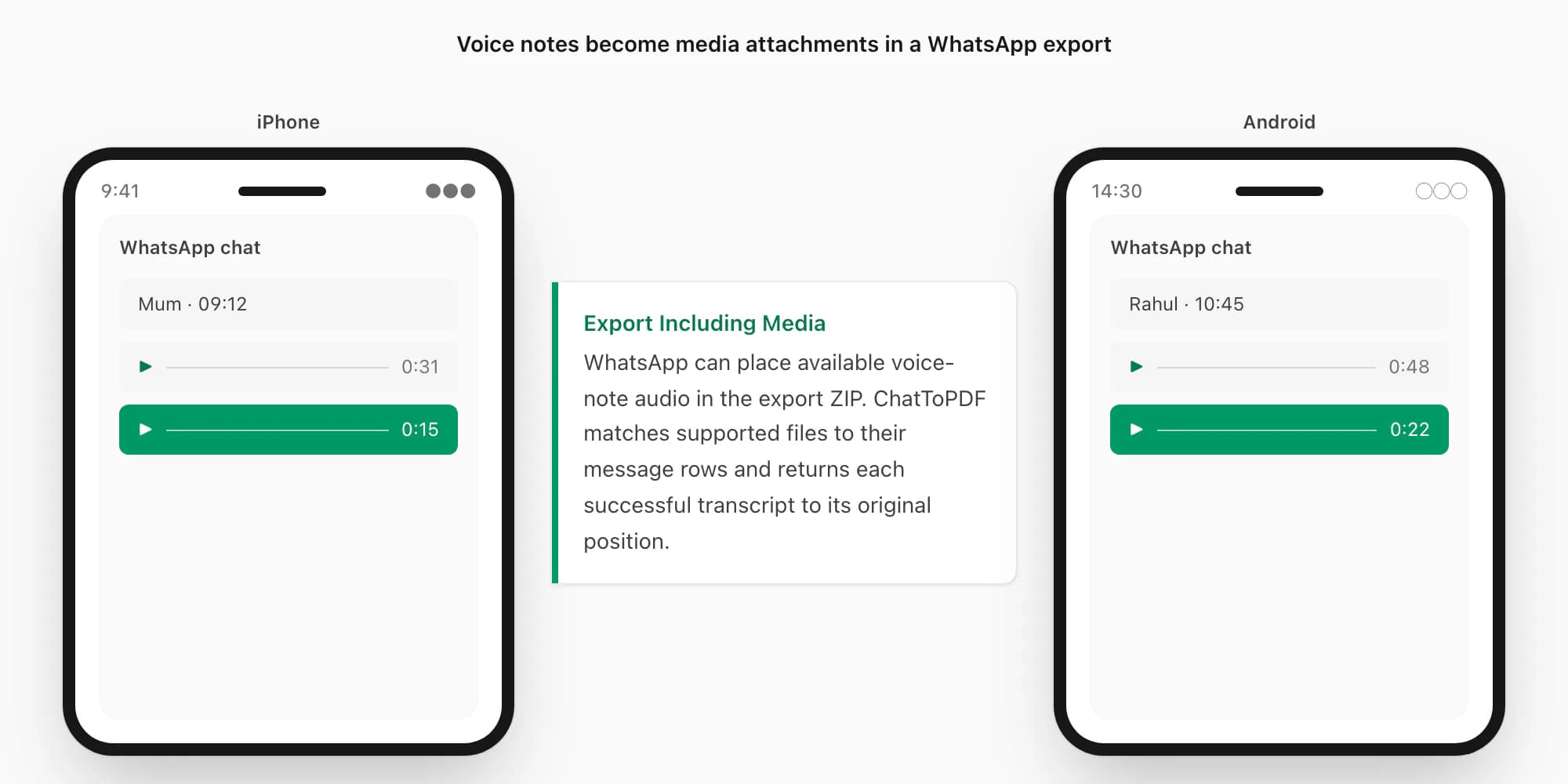
App में WhatsApp voice notes audio files जैसी दिखती हैं — waveform bar, duration, play button — लेकिन वे उस तरह stored नहीं होतीं जैसा ज़्यादातर लोग expect करते हैं। जब आप WhatsApp में microphone button hold करके voice note record करते हैं, WhatsApp audio को Opus codec use करके encode करता है और device पर एक private directory में .opus file के रूप में save करता है। वह directory iPhone या Android पर normal file browsing से accessible नहीं है।
उन .opus files को extract करने का एकमात्र तरीका WhatsApp का अपना Export Chat menu है, "Including Media" select करके। जब आप उस तरह export करते हैं, WhatsApp media folder के साथ _chat.txt message log package करता है — और वहाँ .opus files appear करती हैं।
Opus efficient voice transport के लिए design हुआ है, लेकिन किसी export की sample rate, bitrate या file size universal नहीं होती। Message type, device और app version के अनुसार WhatsApp अलग files या containers दे सकता है। Exact properties के लिए actual file को VLC या ffprobe में inspect करें; background noise, microphone distance और overlapping speech transcription पर extension से ज़्यादा असर डालते हैं।
इसीलिए routing और review matter करते हैं। ChatToPDF हर supported file को suitable provider तक भेजता है, लेकिन किसी fixed audio configuration या हर recording के लिए identical accuracy का promise नहीं करता।
एक और structural point: हर WhatsApp voice note single-sender recording है। WhatsApp का push-to-talk model मतलब है एक person record करता है, फिर रुकता है, फिर दूसरा record करता है। यह actually एक transcription advantage है — एक recorded phone call के unlike जहाँ दो voices same audio track पर overlap करती हैं, WhatsApp export की हर .opus file exactly एक sender की होती है।
Router transcription engine कैसे चुनता है
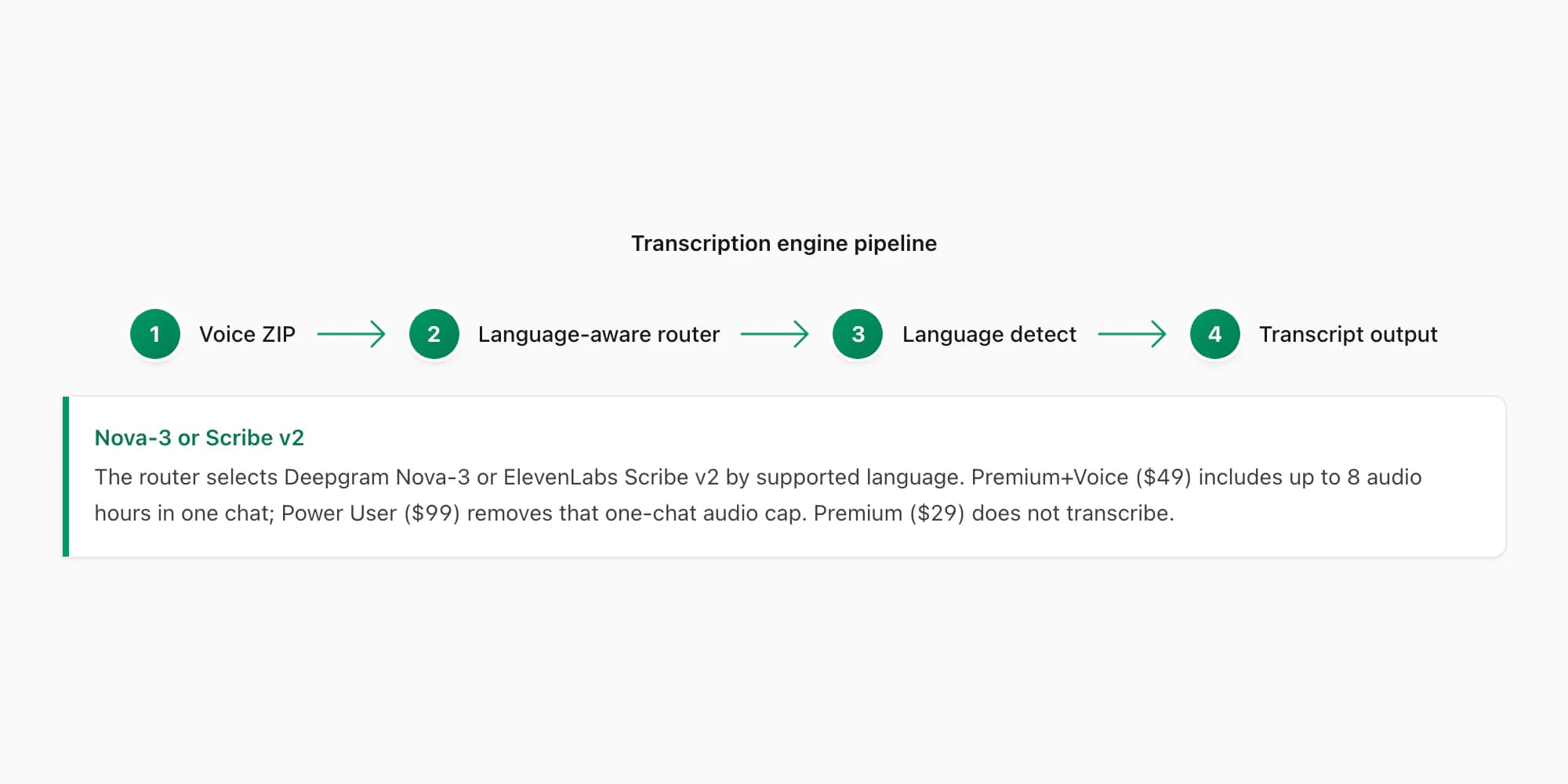
ChatToPDF अब किसी एक engine पर depend नहीं करता। Current path हर note के लिए supported language और provider availability के आधार पर Deepgram Nova-3 और ElevenLabs Scribe v2 में से route चुनता है। Nova-3 अपना supported subset cover करता है; Scribe v2 full registry को 93 languages तक बढ़ाता है और जरूरत पर alternate path भी देता है।
Whisper एक free model के लिए impressive है, लेकिन मैंने English, Spanish, Hindi और Arabic में real WhatsApp .opus files के set पर accuracy tests run किए, और यह code-switching (एक voice note जो mid-sentence दो languages mix करे) और non-US English accents पर consistent weaknesses दिखाता है।
AssemblyAI एक capable option है और early prototype में इस्तेमाल हुआ था। Current production path Deepgram Nova-3 और ElevenLabs Scribe v2 को combine करता है, ताकि language coverage बढ़े और supported language व availability के अनुसार alternate route उपलब्ध हो।
Deepgram Nova-3 production paths में से एक है, लेकिन अकेला नहीं। $49 Premium+Voice और $99 Power User दोनों same Nova-3/Scribe v2 router use करते हैं; फर्क audio limit, output bundle और queue priority का है, perfect accuracy की guarantee का नहीं।
Nova-3 पुराने speech-to-text engines को visibly outperform करता है तीन जगहों पर: regional accents (South African English, Indian English, Brazilian Portuguese), technical vocabulary (names, addresses, product terms जिन्हें generic model mishear करे), और code-switched audio जहाँ speaker एक single voice note में languages switch करे। $29 Premium per chat conversion transcription include नहीं करता — यह voice notes को PDF में placeholder references के रूप में preserve करता है बिना audio किसी model से run किए।
Pipeline इस तरह काम करती है: आपकी ZIP ChatToPDF के server पर आती है, supported audio files extract होती हैं, और हर note authenticated HTTPS के जरिए router द्वारा चुने गए provider—Deepgram Nova-3 या ElevenLabs Scribe v2—को भेजी जाती है। Transcript फिर conversation में सही जगह वापस लगाया जाता है।
एक deliberate choice: supported .opus audio को transcription से पहले pre-process या re-encode नहीं किया जाता। Nova-3 और Scribe v2 Opus को natively accept करते हैं, इसलिए source file WAV या MP3 में पहले convert किए बिना selected provider तक जा सकती है।
93 supported languages में coverage और accuracy
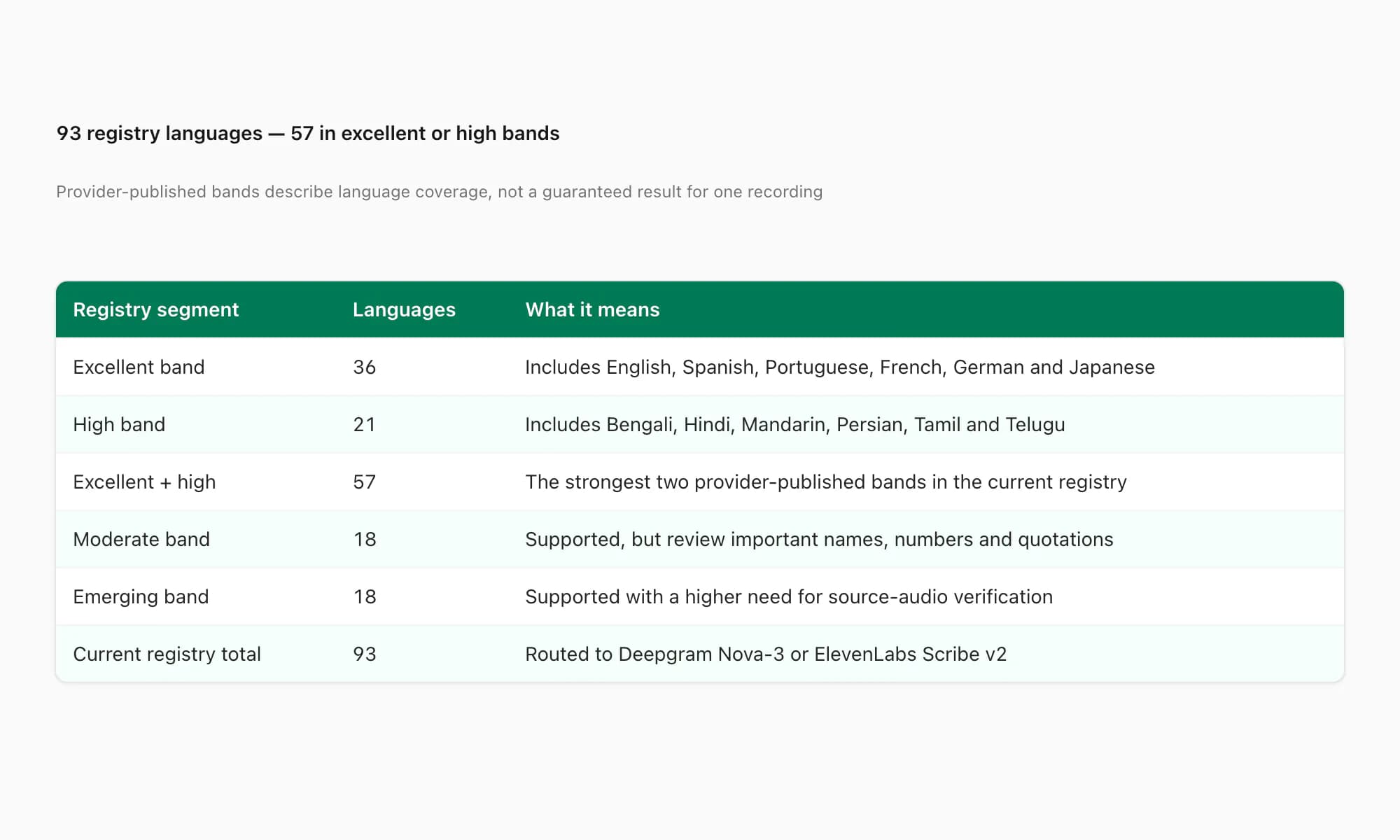
ChatToPDF की current registry 93 languages cover करती है; 57 provider-published high या excellent accuracy bands में हैं। ये bands review planning में मदद करती हैं, लेकिन किसी single recording का result guarantee नहीं करतीं। नीचे दी गई languages important examples हैं, complete list नहीं:
Coverage examples: English, Spanish, Portuguese, French, German, Italian, Arabic, Hindi, Indonesian, Turkish, Russian, Dutch, Japanese, Korean, Chinese, Vietnamese और Thai current registry में शामिल हैं। Regional variants, names, numbers, heavy code-switching और noisy recordings को original audio से verify करें; हम किसी specific language या recording के लिए fixed error rate publish नहीं करते।
Router Deepgram Nova-3 के supported subset को ElevenLabs Scribe v2 की full coverage से जोड़ता है। Current list और published bands के लिए 93-language transcription directory देखें। Routing हर note पर होती है; एक ही chat में अलग supported languages हो सकती हैं, लेकिन single note के भीतर 50/50 code-switching, names और amounts को original audio से verify करना चाहिए।
Sample transcript: Spanish voice note → text (real example)
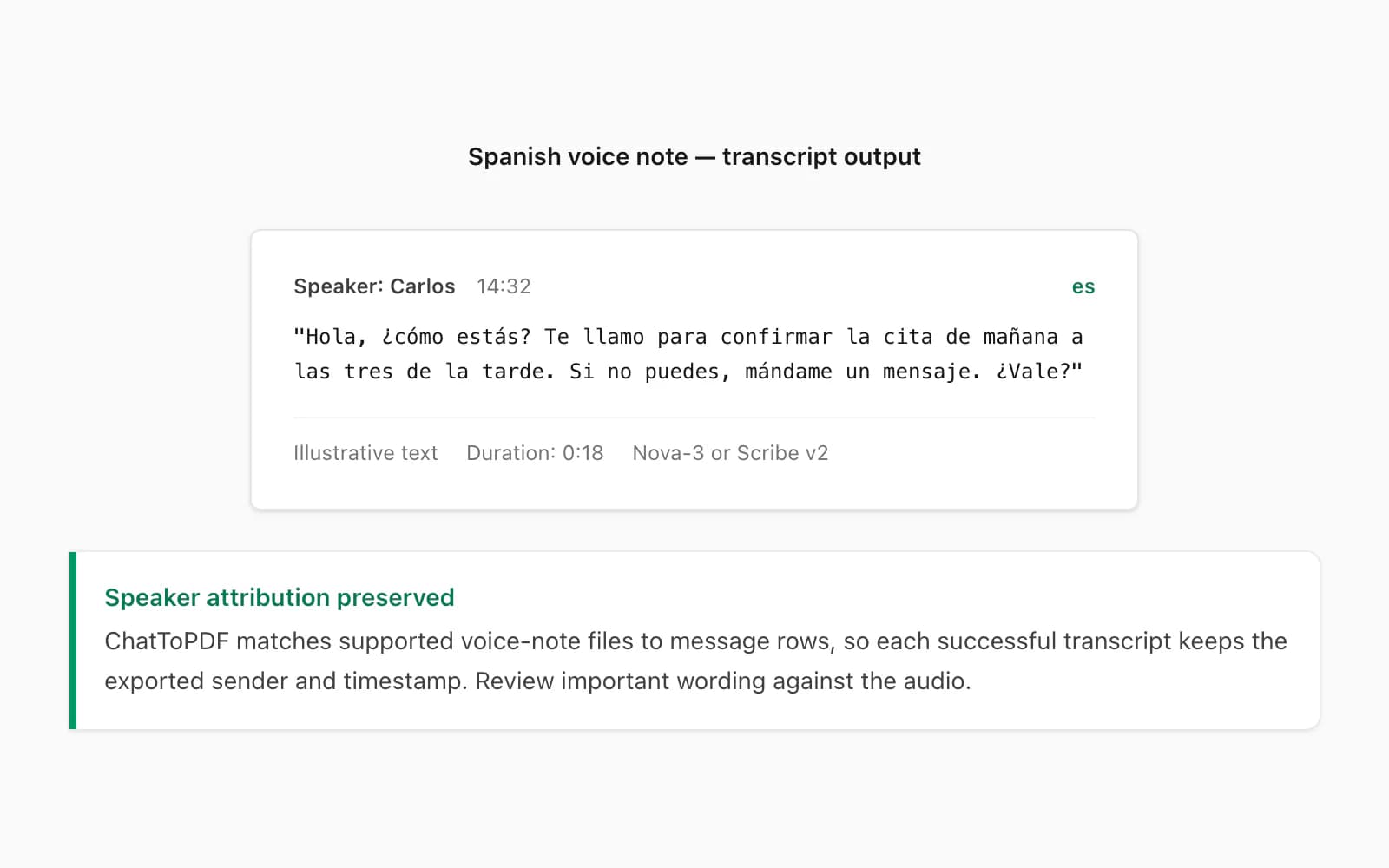
यह $49 Premium+Voice per chat conversion level पर transcribed एक real WhatsApp voice note है। Sender Colombian Spanish का native speaker था, quiet indoor environment में Android device पर recorded। Duration: 18 seconds।
Transcript output PDF में:
🎤 [Voice note — 0:18] "Hola, ¿cómo estás? Te llamo para confirmar la cita de mañana a las tres de la tarde. Si no puedes, mándame un mensaje. ¿Vale?"
Sender PDF में _chat.txt के name से attributed है, timestamp वह है जो WhatsApp ने voice note send होने पर record किया, और transcript conversation में इससे पहले और बाद के text messages के बीच inline है।
Spanish accuracy कहाँ break down होती है? सबसे common errors homophones हैं: haya (subjunctive of haber) बनाम halla (from hallar)। Fast casual speech में ये phonetically identical हैं। Nova-3 surrounding context से ज़्यादातर समय correct spelling infer करता है, लेकिन यह perfect नहीं है। Document जो legal record के रूप में use होगा उसमें, voice notes के light human review की recommendation है।
अगर transcription बिल्कुल नहीं चाहिए — उदाहरण के लिए सिर्फ text messages PDF में चाहिए और voice notes के placeholder references से comfortable हैं — तो $29 Premium per chat conversion lower price पर वह case handle करता है।
Sample transcript: Hindi (Hinglish) → text (real example)
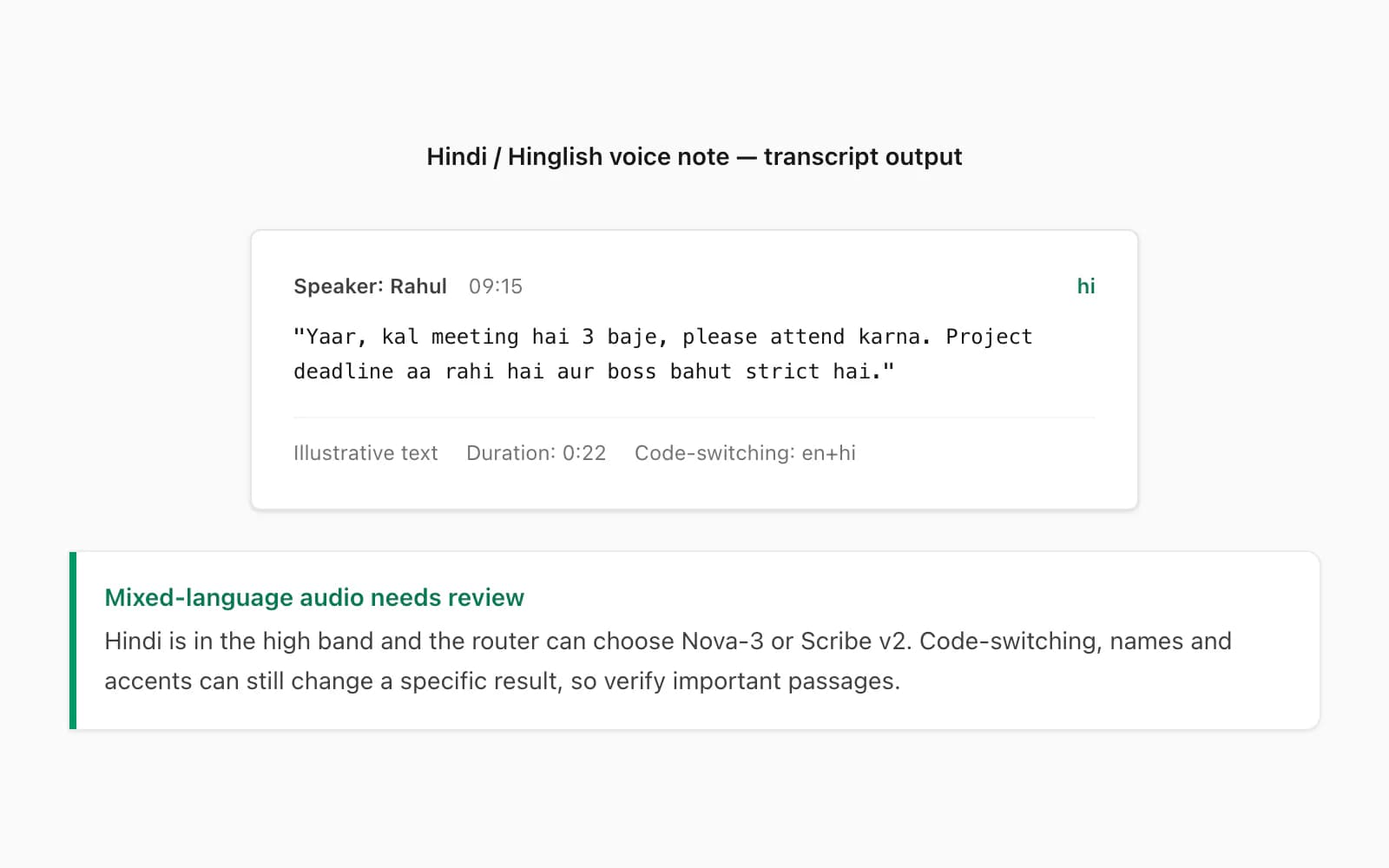
एक ही note में heavy code-switching हर route के लिए challenging हो सकता है। Nova-3 और Scribe v2 की coverage अलग है; names, numbers और quoted passages के लिए fixed percentage advantage मानने के बजाय original audio से verify करें।
$49 Premium+Voice per chat conversion से एक real transcript:
🎤 [Voice note — 0:22] "Yaar, kal meeting hai 3 baje, please attend karna. Project deadline aa rahi hai aur boss bahut strict hai."
Hinglish example एक review case है, universal benchmark नहीं। Hindi sentence में embedded English words recording और selected route के अनुसार preserve या distort हो सकते हैं; important terms को audio से check करें।
जब transcript workplace record के रूप में use हो रहा हो तो यह difference matter करता है। अगर कोई manager एक project commitment की documentation के रूप में voice note transcript review कर रहा है और deadline text में appear नहीं करता, तो यह minor accuracy quibble नहीं है — यह missing piece of information है।
Hindi specifically के बारे में एक note: अगर voice note Devanagari-dominant Hindi में है (formal, written-speech-style Hindi with minimal English), तो accuracy consistently strong रहती है। $49 Premium+Voice per chat conversion किसी भी Hindi voice notes transcribe करने के लिए right entry point है; $99 Power User per chat conversion same accuracy को बिना audio cap और queue priority के साथ cover करता है। $29 Premium per chat conversion voice notes को सिर्फ placeholders के रूप में preserve करता है — उस tier पर कोई transcription नहीं चलती।
$49 Premium+Voice tier — क्या है और क्या नहीं
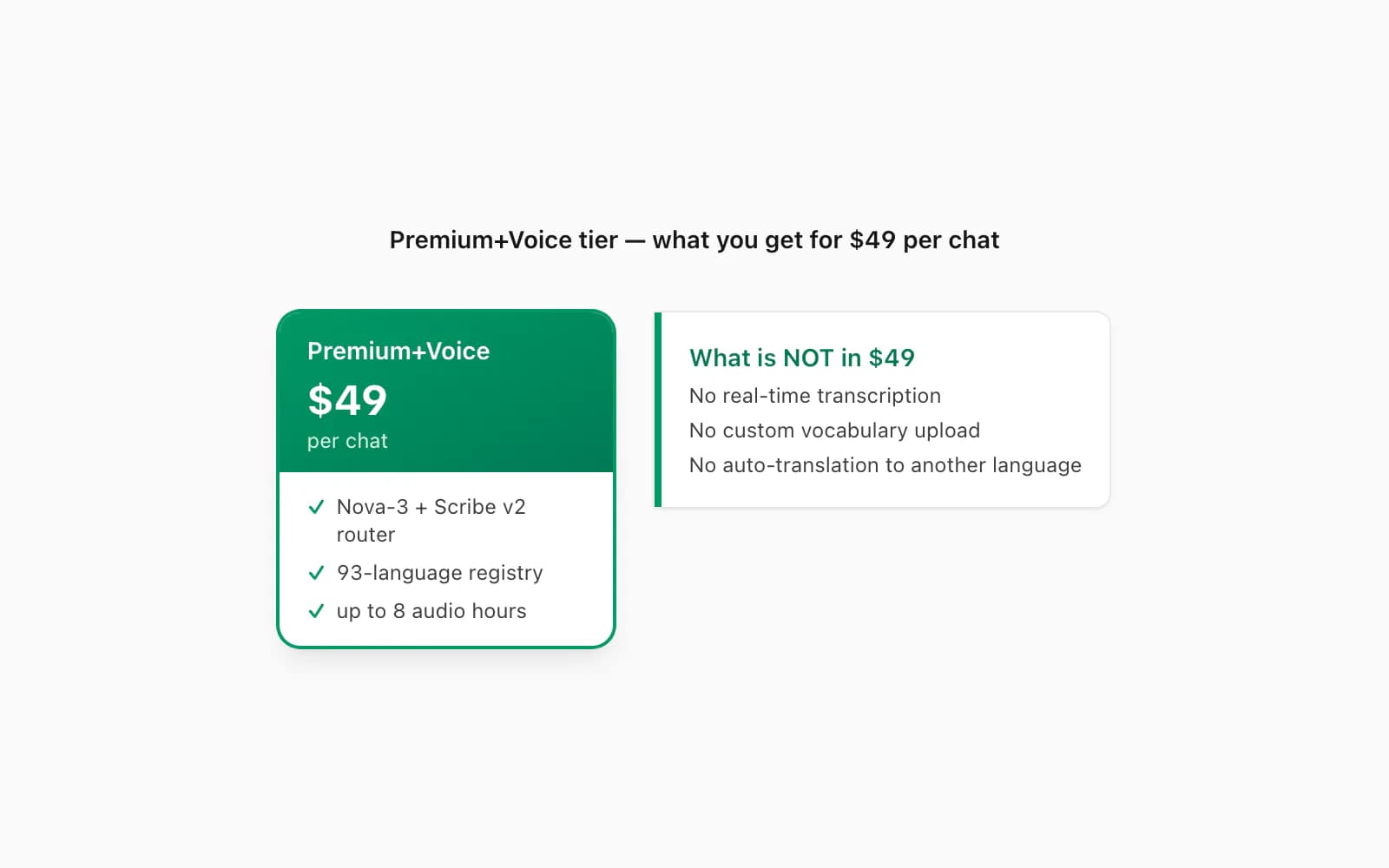
$49 Premium+Voice per chat conversion वह tier है जो मैंने specifically voice-heavy chats के लिए बनाया। यहाँ exactly क्या include है और क्या नहीं।
$49 Premium+Voice per chat conversion में क्या है:
- Language-aware routing — हर supported note Deepgram Nova-3 या ElevenLabs Scribe v2 से process हो सकती है
- 93-language registry — 57 published high या excellent accuracy bands में हैं; coverage किसी single recording की guarantee नहीं
- एक single chat में 8 hours तक audio — voice-heavy conversations की vast majority cover करता है
- कोई message ceiling नहीं — convert हो रहे chat में messages की कोई upper limit नहीं
- Transcripts पर sender attribution — PDF में हर transcript के साथ export metadata का WhatsApp sender name
- Timestamps preserve — original WhatsApp timestamp हर transcript के साथ appear करता है, transcription time नहीं
- तीन output formats — PDF, XLSX और CSV सभी शामिल; XLSX तब useful है जब sender और timestamp से filter या sort करना हो
- Seven-day source file retention — encrypted at rest (AES-256), in transit (TLS 1.3)
$49 Premium+Voice per chat conversion में क्या नहीं है:
- Real-time transcription — यह tier already-recorded voice notes को export ZIP से process करता है; यह live transcription service नहीं है
- Custom vocabulary lists — specific vocabulary पर accuracy improve करने के लिए names या technical terms की glossary upload नहीं कर सकते
- WhatsApp metadata से परे speaker identification — एक single voice note में जहाँ sender background में किसी और की बात सुनते हुए record करे, दोनों transcribe होते हैं लेकिन सिर्फ WhatsApp sender को attributed
- Automatic translation — transcript voice note की source language में appear करता है; ChatToPDF translate नहीं करता
इसके ऊपर का tier — $99 Power User per chat conversion — $49 Premium+Voice per chat conversion की सब कुछ के साथ priority queue processing और bulk-chat handling add करता है।
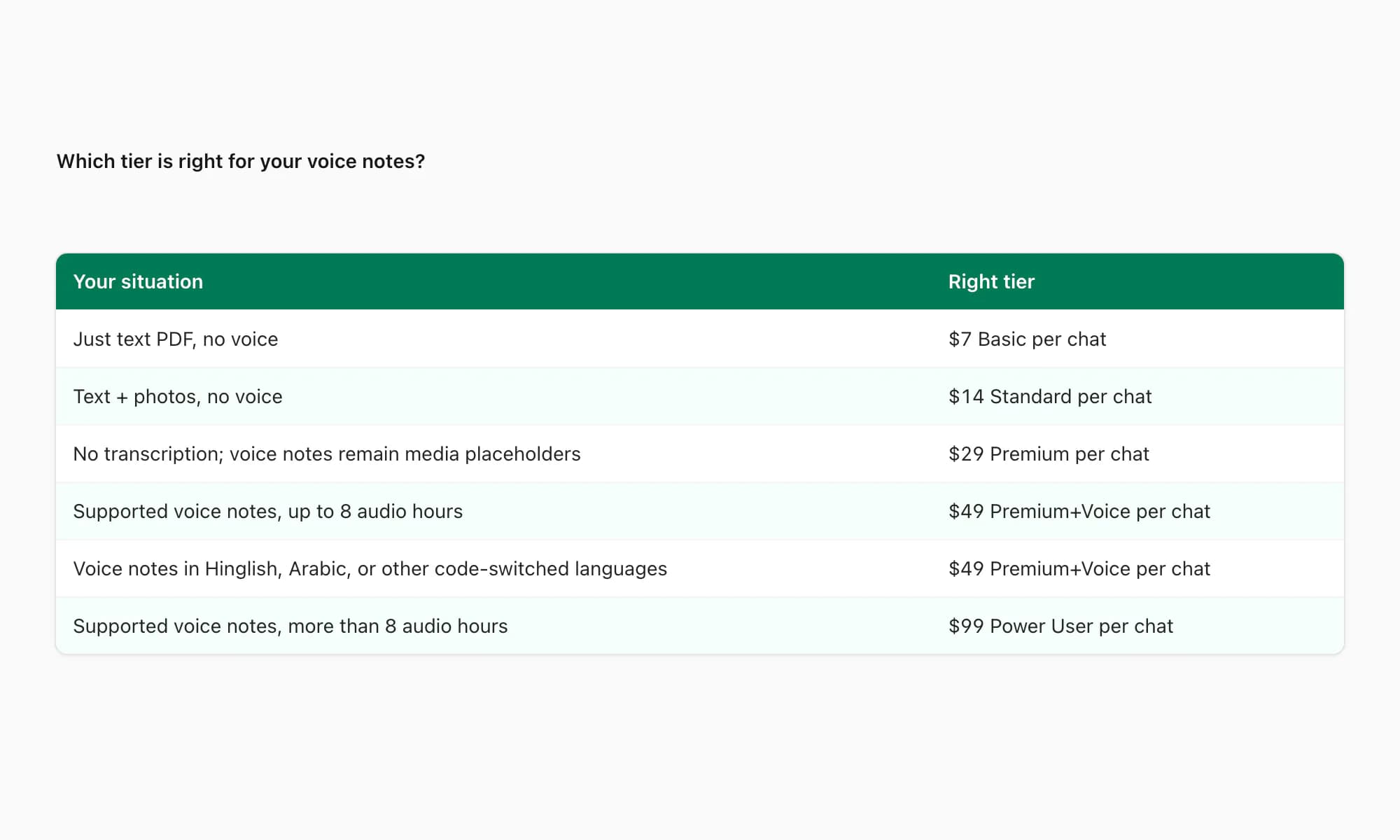
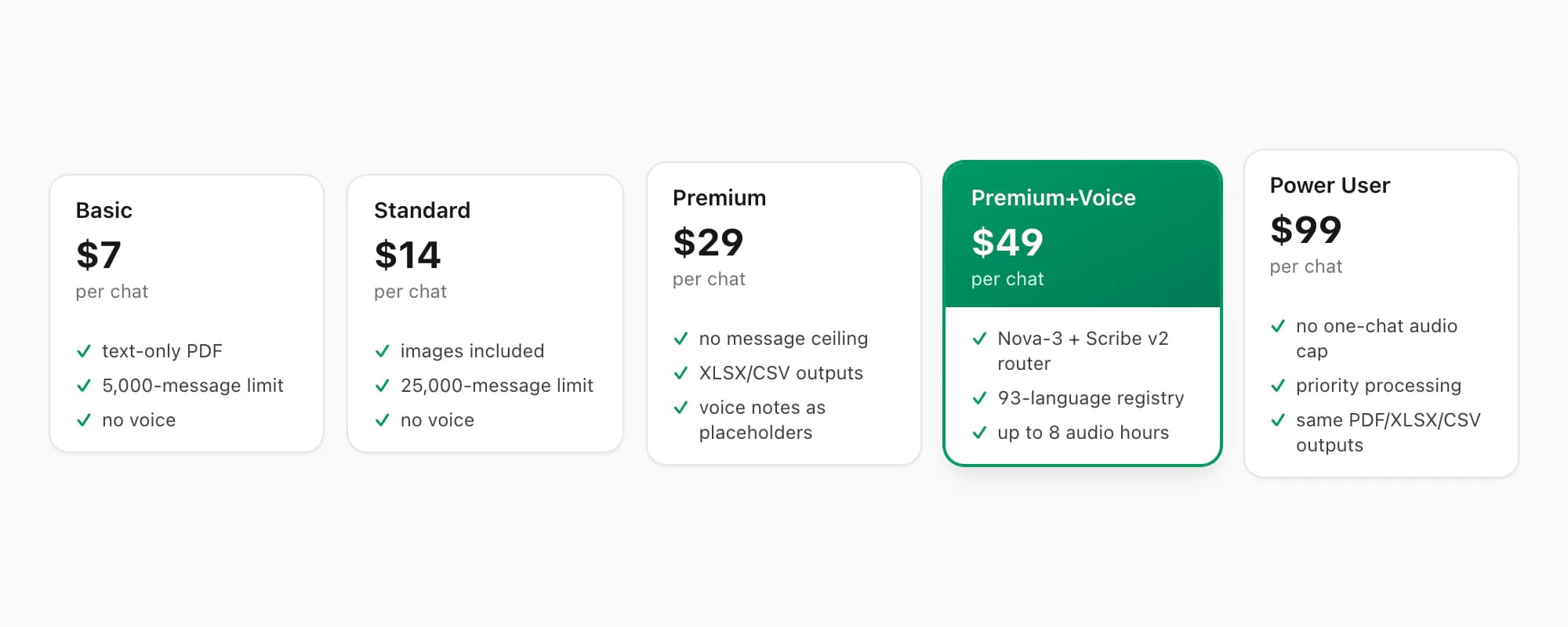
Reference के लिए, full tier stack: $7 Basic per chat conversion (text only, 5,000-message cap), $14 Standard per chat conversion (images, 25,000-message cap), $29 Premium per chat conversion (no product message cap, XLSX/CSV, voice notes as placeholders), $49 Premium+Voice per chat conversion (93-language router, 8-hour audio cap), और $99 Power User per chat conversion (same router, no audio-duration cap, priority queue)।
Real-time transcribe क्यों नहीं करता (और नहीं करूँगा)
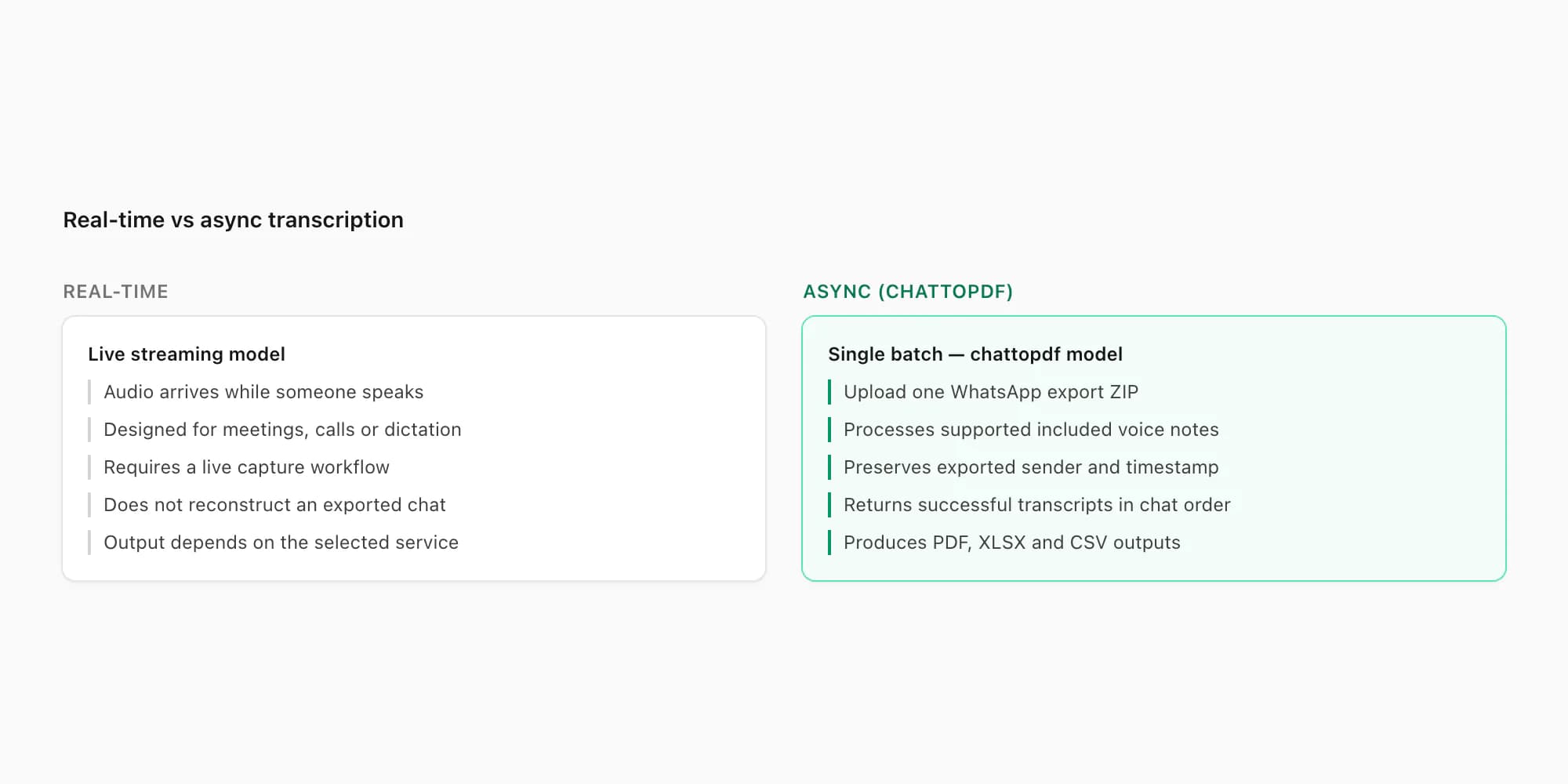
यह काफी often आता है कि इसका straight answer deserve करता है। लोग पूछते हैं कि ChatToPDF voice notes आने पर listen क्यों नहीं करता — हर एक को उसी moment transcribe करता जब send होती — ZIP export require करने की बजाय।
Short version: WhatsApp developers को incoming messages या audio real time में access नहीं देता। कोई official WhatsApp Business API endpoint नहीं है जो voice notes आने पर surface करे। WhatsApp पर real-time transcription build करने के लिए device पर app की local storage intercept करनी होगी, जो technically fragile और WhatsApp के platform policies से outside दोनों है।
लेकिन एक और practical reason है। WhatsApp audio transcribe करने का use case almost entirely retrospective है। कोई तीस voice notes receive करता है एक dispute के course में और readable record चाहता है। Business team voice notes project updates के लिए use करती है और उन्हें searchable चाहिए। Family phone upgrade से पहले archive करना चाहती है। इनमें से किसी में भी "right now, as it arrives" की ज़रूरत नहीं है।
Battery और network का सवाल भी है। एक open WebSocket connection जो real time में audio fragments stream करे battery को noticeably drain करेगी। इसे every received voice note के लिए active internet connection चाहिए होगी। और यह आपकी conversations का continuous data flow एक third-party server पर create करेगी — जो मैं users से accept करने के लिए comfortable नहीं हूँ।
Export-and-upload model clock time में slower है। लेकिन actual use cases के लिए, यह fine है।
Privacy: audio कहाँ जाता है और कहाँ नहीं
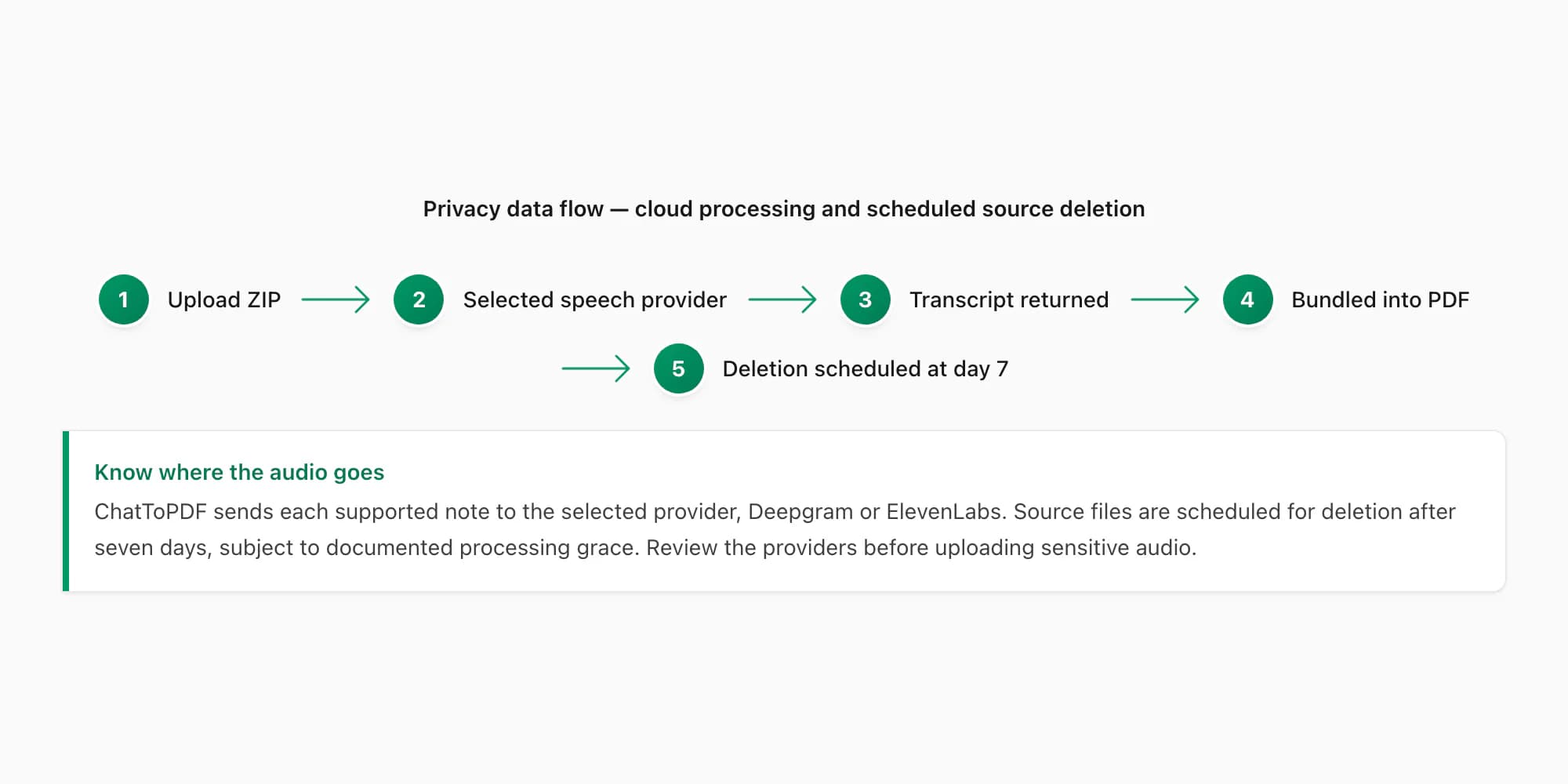
यह वह हिस्सा है जिसके बारे में मैं specific रहना चाहता हूँ क्योंकि voice notes की nature — real conversations की audio recordings — का मतलब है privacy stakes text messages से ज़्यादा ऊँचे हैं।
$49 Premium+Voice per chat conversion के ज़रिए submit किए गए voice note का exact data path:
Step 1 — Upload। आपकी ZIP file आपके browser से ChatToPDF के server पर HTTPS (TLS 1.3) के ज़रिए transmit होती है।
Step 2 — Extraction। .opus files ZIP से extract होती हैं। हर file को _chat.txt reference से filename pattern से match किया जाता है।
Step 3 — Transcription-provider call। हर supported file authenticated HTTPS से उस note के लिए चुने गए provider—Deepgram Nova-3 या ElevenLabs Scribe v2—को भेजी जाती है। Deepgram requests में Model Improvement Program opt-out शामिल है। Provider को transcript बनाने के लिए जरूरी audio मिलता है, पूरी chat text नहीं।
Step 4 — Storage। Transcript PDF में bundle होकर AWS S3 पर AES-256 encryption के साथ stored होता है। Source ZIP, .opus files सहित, सात दिनों के लिए encrypted stored रहती है।
Step 5 — Delivery। PDF download link screen पर और email में appear करता है।
Step 6 — Auto-deletion। Job create होने के सात दिन बाद, source ZIP और output PDF automatically delete हो जाते हैं।
आपका audio कहाँ नहीं जाता: किसी analytics platform पर नहीं। ChatToPDF के models train करने के लिए नहीं (ChatToPDF models train नहीं करता)। ChatToPDF staff आपकी voice notes का text content देख नहीं सकता — processing fully automated है।
External-provider step हर privacy review में शामिल होना चाहिए। ChatToPDF अपना pipeline control करता है, लेकिन Deepgram और ElevenLabs अपनी processing अपने terms के अनुसार control करते हैं। Privileged, regulated या highly sensitive notes upload करने से पहले responsible team को दोनों providers के current terms review करने चाहिए।
Edge cases: background noise, multiple speakers, voice-changing effects
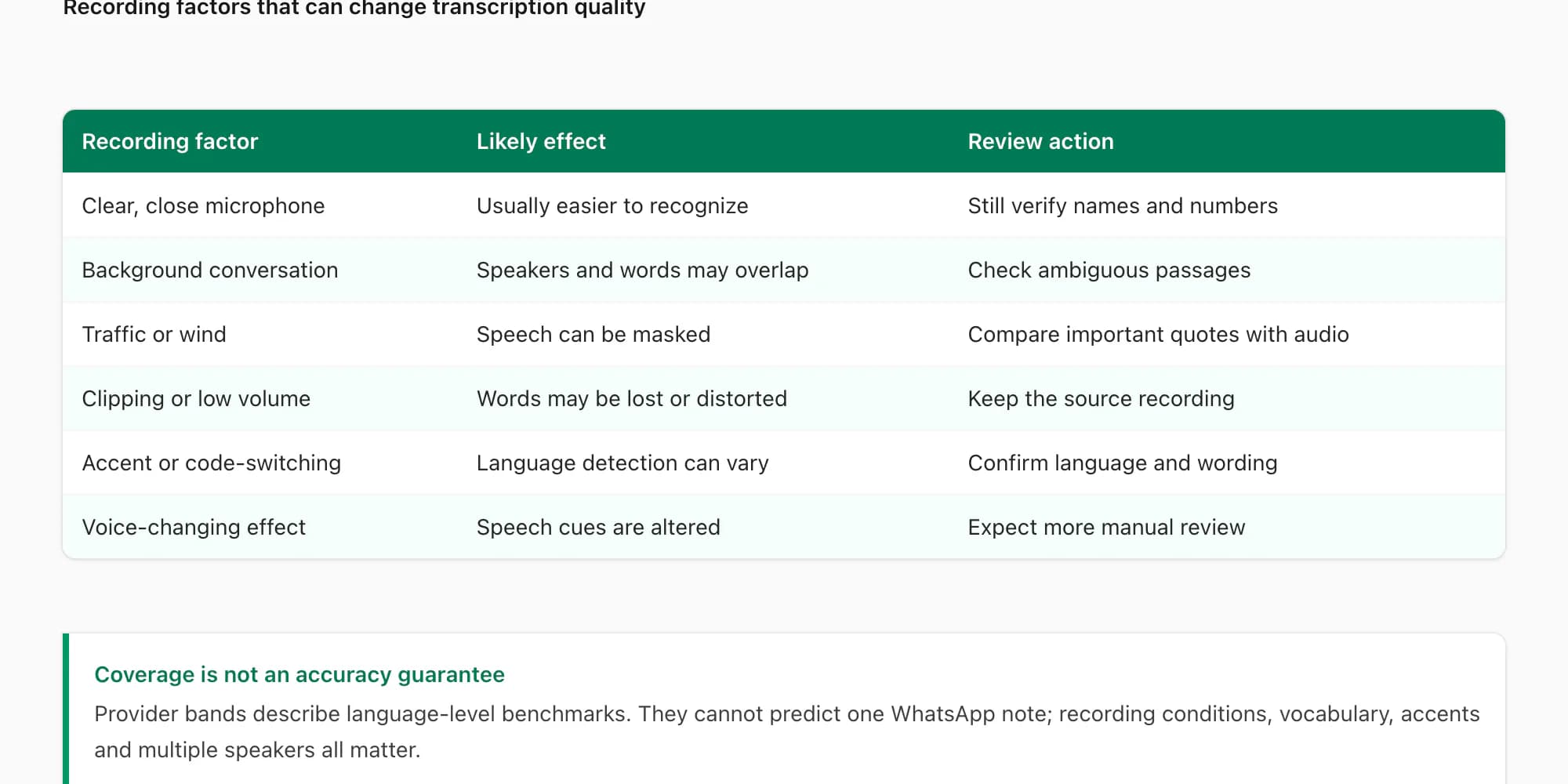
Real WhatsApp voice notes sound-proofed studios में record नहीं होतीं। वे cars, kitchens, street-level meetings और noisy cafés में record होती हैं। यहाँ हर scenario accuracy को कैसे affect करता है:
Environment के अनुसार background noise।
Quiet indoor recording आम तौर पर noise, clipping, multiple voices या language switching वाली note से आसान transcribe होती है। किसी language का published band उस single recording का result predict नहीं करता।
एक single voice note के अंदर multiple speakers।
अगर कोई और व्यक्ति background में साफ़ बोल रहा हो, selected provider उस आवाज़ को भी transcribe कर सकता है। Result दोनों voices को WhatsApp sender के नीचे मिला सकता है, इसलिए ऐसे clips को original audio से review करें।
ChatToPDF currently primary speaker isolate करके background voices discard नहीं कर सकता। Speaker diarisation एक feature है जिसे मैं future tier के लिए evaluate कर रहा हूँ।
Voice-changing effects।
Clips जहाँ confidence pipeline में मेरे set threshold से नीचे fall करती है — currently average word-confidence score 0.6 से कम के रूप में defined — ChatToPDF transcript को PDF में [low-confidence transcription — audio quality insufficient] के रूप में mark करता है text block output करने की बजाय जो authoritative लग सकता हो।
अक्सर पूछे जाने वाले सवाल
WhatsApp voice notes कौन-से file format use करती हैं, और क्या ChatToPDF इसे handle करता है?
WhatsApp voice notes आम तौर पर .opus files में Opus audio के रूप में save होती हैं। ChatToPDF export ZIP से supported audio extract करता है और router के अनुसार हर note को native format में Deepgram Nova-3 या ElevenLabs Scribe v2 को भेजता है; पहले re-encoding जरूरी नहीं।
WhatsApp audio transcription कितनी accurate है?
Accuracy मुख्य रूप से recording पर depend करती है। $49 Premium+Voice और $99 Power User same Nova-3/Scribe v2 router use करते हैं; Power User audio limit और priority बदलता है, higher accuracy guarantee नहीं करता। $29 Premium transcribe नहीं करता। Noise, overlapping voices, clipping, accents, dialects और language switching quality घटा सकते हैं, इसलिए names, dates, amounts और quotes original audio से verify करें।
क्या ChatToPDF English के अलावा languages में voice notes transcribe करता है?
हाँ। $49 Premium+Voice और $99 Power User current 93-language registry के लिए Deepgram Nova-3 और ElevenLabs Scribe v2 के बीच language-aware router use करते हैं; 57 published high या excellent accuracy bands में हैं। Scribe v2 full registry और Nova-3 अपना supported subset cover करता है। Coverage हर dialect या recording guarantee नहीं करती। $29 Premium voice notes transcribe नहीं करता।
क्या voice transcripts चाहिए तो WhatsApp से export करने में कुछ अलग करना होगा?
हाँ — एक critical step। WhatsApp से chat export करते समय "Without Media" की बजाय "Including Media" चुनें। Voice notes (.opus files) export में सिर्फ तब include होती हैं जब Including Media select किया हो। अगर Without Media export किया, तो _chat.txt में references जैसे <attached: 00000012-AUDIO-2024-03-15-09-22-31.opus> होंगे लेकिन actual audio files नहीं। ChatToPDF voice note transcribe नहीं कर सकता जो उसके पास है ही नहीं। Full step-by-step export process के लिए WhatsApp chat export guide देखें।
क्या voice transcripts PDF में सही जगह appear होंगे?
हाँ। ChatToPDF _chat.txt में message log read करके conversation structure समझता है, filename से हर .opus reference को corresponding audio file से match करता है, और transcript को conversation में exactly उस position पर insert करता है जहाँ voice note send हुई थी। WhatsApp metadata का sender name और original timestamp दोनों transcript के साथ appear करते हैं।
Transcription complete होने के बाद audio files का क्या होता है?
Audio files ChatToPDF job में encrypted at rest रहती हैं और सिर्फ उस note के लिए selected provider—Deepgram या ElevenLabs—को भेजी जाती हैं। Deepgram requests Model Improvement Program से opt out करती हैं। Source files, extracted audio और downloads की deletion सात दिन पर scheduled है; processing job को अधिकतम 24 hours का limited grace मिल सकता है।
क्या ChatToPDF same voice note में दो अलग-अलग लोगों को पहचान सकता है?
Currently नहीं। हर WhatsApp voice note उसे send करने वाले को attributed है, _chat.txt के sender information से। एक single voice note के अंदर, अगर sender और कोई दूसरा व्यक्ति दोनों बोलते हैं, तो दोनों voices transcribe होती हैं लेकिन WhatsApp sender को attributed। ChatToPDF currently individual audio clips के अंदर speaker diarisation run नहीं करता।
WhatsApp voice message ko text mein kaise convert kare?
WhatsApp voice notes को text में convert करने के लिए: chat को Including Media के साथ export करें, फिर chattopdf.app पर upload करके $49 Premium+Voice tier चुनें। हर supported voice note sender और timestamp के साथ अपनी सही जगह पर readable text बनती है। Current router 93 languages support करता है, Hindi सहित; 57 languages published high या excellent bands में हैं।
WhatsApp voice message ko download ya save kaise kare?
एक-दो voice messages के लिए: message को long-press करके Forward/Share से खुद को email कर लें, या Android पर file manager में WhatsApp/Media/WhatsApp Voice Notes folder से .opus files copy करें। पूरी chat की सारी voice notes एक साथ चाहिए तो chat को Export Chat → Include Media से export करें — ZIP के अंदर हर voice note .opus file के रूप में आ जाती है। ध्यान रहे .opus हर music player में नहीं चलती। अगर आवाज़ों को संभालकर रखना है तो chattopdf.app का $49 Premium+Voice tier हर voice note को PDF में उसकी जगह पर text बनाकर भी रख देता है — यानी बोली हुई बात पढ़ने लायक record बन जाती है, audio files अपने पास अलग रहती हैं।
Full chat-to-PDF workflow के लिए — iPhone और Android पर export कैसे करें, ZIP में क्या है, और सभी पाँच tiers non-voice conversions के लिए कैसे compare करते हैं — WhatsApp to PDF guide देखें। Android पर हैं और upload से पहले export को दूसरे device पर move करना है, तो WhatsApp Android to iPhone transfer guide वह process cover करती है।
I'm Paul, the founder of ChatToPDF. I built it after needing a long WhatsApp conversation as a readable PDF for a legal matter. I test and document WhatsApp exports, PDF conversion, voice-note transcription, and the limits people should check before relying on the result.