
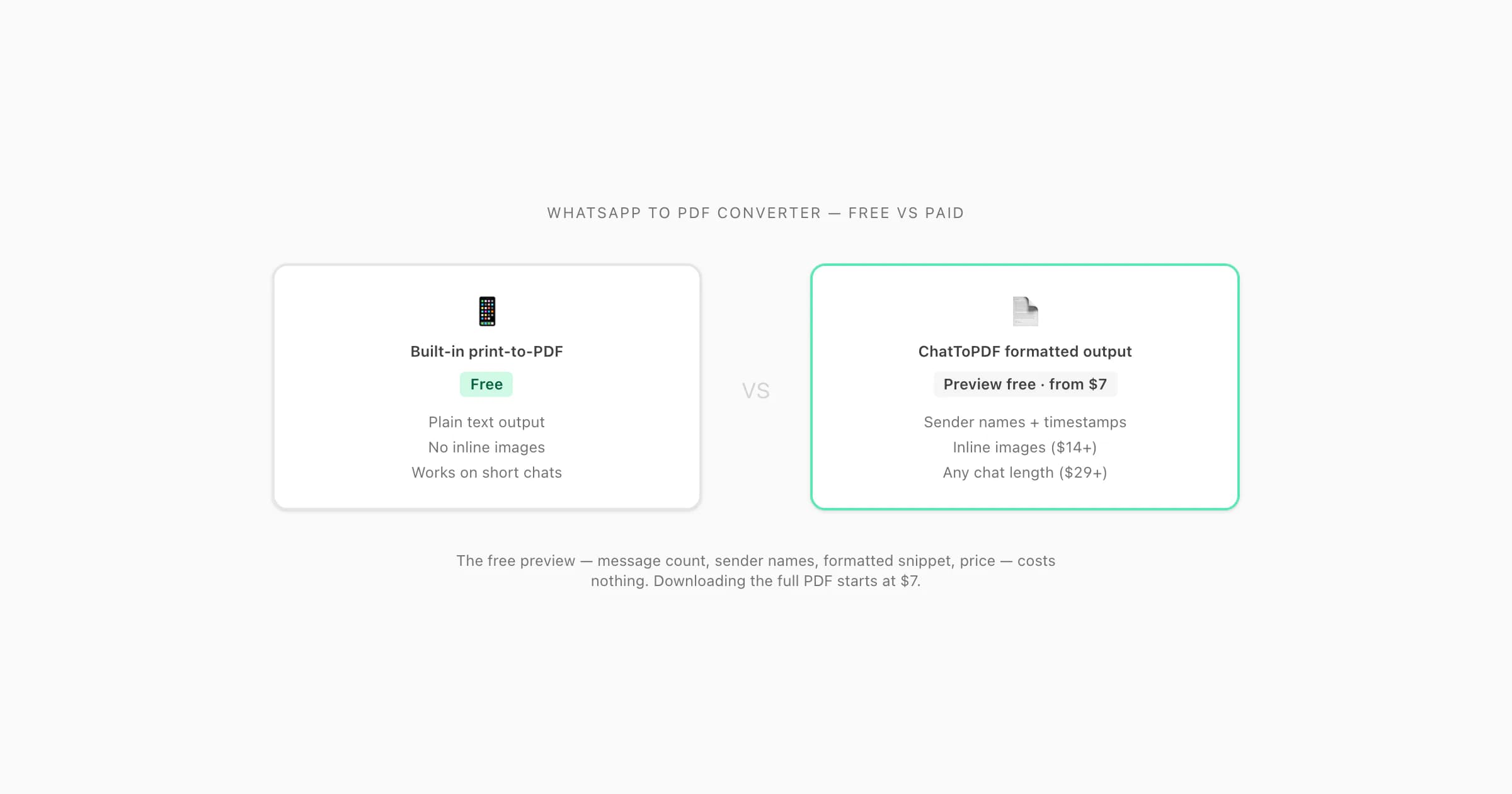
Yes, there are genuinely free ways to get a WhatsApp chat into PDF — WhatsApp's built-in export plus your phone's print-to-PDF works at no cost for small chats. But a fully formatted converter that keeps sender names, timestamps, and inline media across a long chat is a paid tool. ChatToPDF's preview is free; conversion starts at $7.
What you can do for free
Three genuinely free options exist for getting a WhatsApp chat into PDF format. None of them are a dedicated online whatsapp to pdf converter online free with full formatting — but they are real, zero-cost paths.
Option 1: WhatsApp's built-in Export Chat + print-to-PDF
WhatsApp includes an Export Chat feature on both iPhone and Android. The official WhatsApp export instructions describe the source TXT or ZIP workflow. You then open that text file on your phone and use the built-in print-to-PDF function. This costs nothing and requires no third-party tool.
Export the chat from WhatsApp
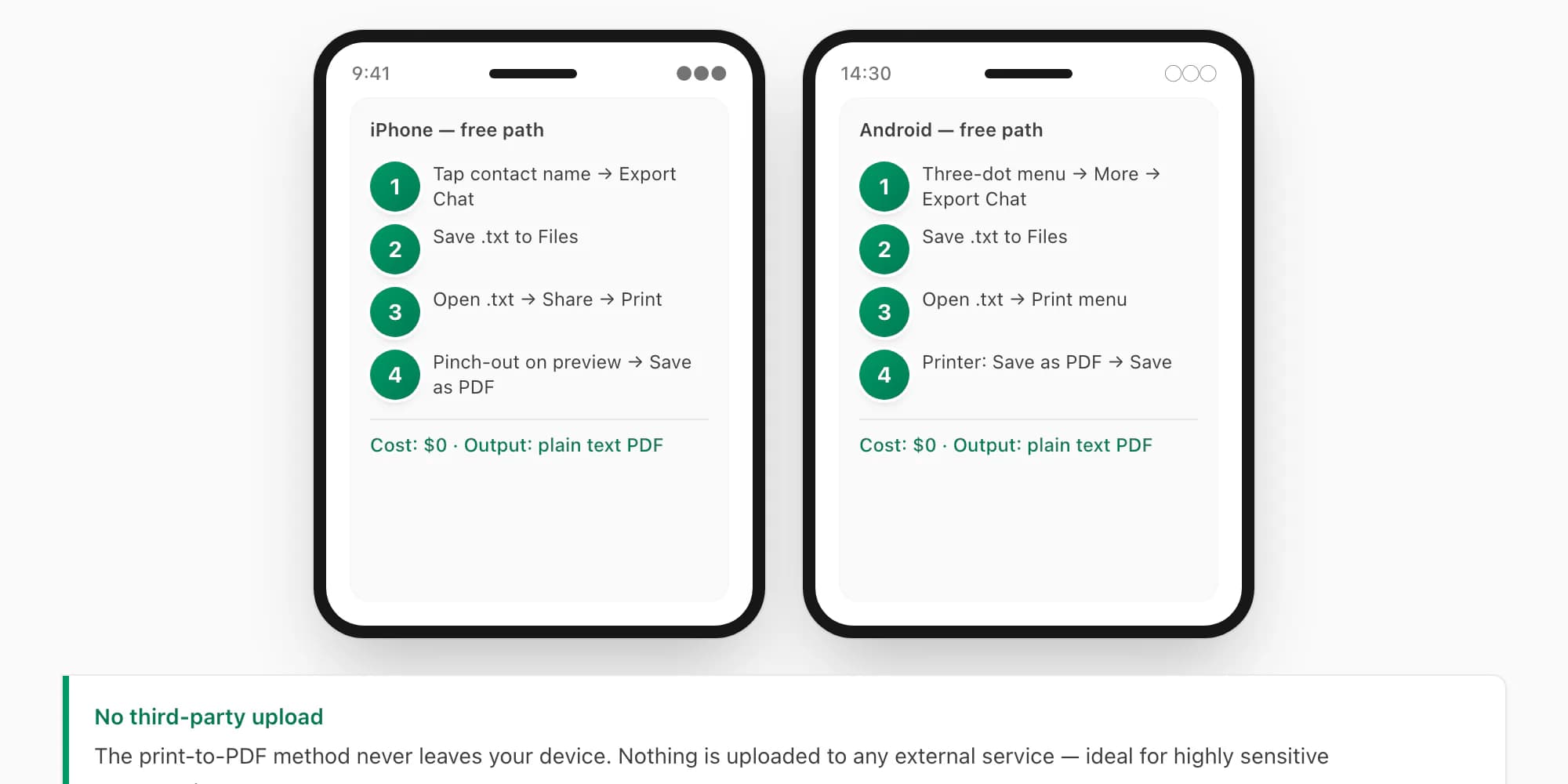
Open the chat you want to save. On iPhone: tap the contact or group name at the top → scroll down to Export Chat → choose Without Media or Including Media. WhatsApp creates a
.txtor.zipfile; save it to Files. On Android: tap the three-dot menu → More → Export Chat → pick your option → save to Files or Google Drive.Open the exported .txt file
Locate the
.txtfile in your Files app (or Google Files on Android). Tap to open it — it will open in a basic text viewer or your default notes app. The raw format is readable but not formatted: you will see timestamps and sender names as plain text.Print to PDF on iPhone
With the
.txtfile open, tap the Share icon → Print. On the print preview, use the two-finger pinch-out gesture on the preview thumbnail. This opens the preview as a full PDF. Tap Share and save to Files as a PDF.Print to PDF on Android
With the
.txtopen, tap the three-dot menu → Print. In the printer selector, choose "Save as PDF" (built into Android). Choose a save location and tap Save.
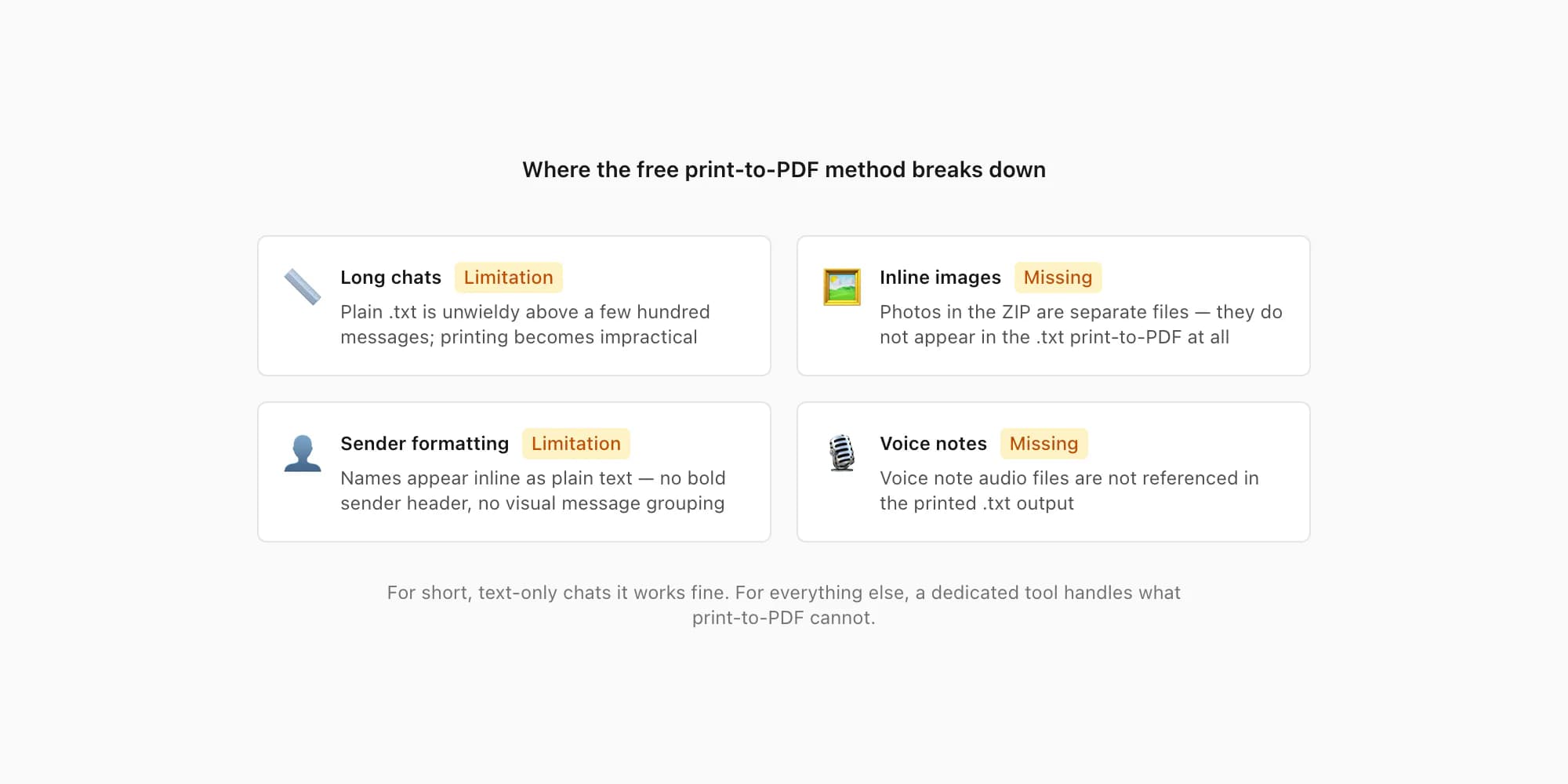
The honest trade-off: this free method works, but the result is a plain text dump — no bubble formatting, no sender highlighting, no visual separation between messages. And it breaks on longer chats: WhatsApp's .txt export truncates at around 40,000 messages, and many text viewers struggle to open and print very large files smoothly. Images from the ZIP do not appear in the printed text file at all; they are separate files in the archive that the .txt print path ignores entirely.
For a short chat you want a quick record of, the built-in print-to-PDF route is a perfectly reasonable free option. For anything longer, more structured, or intended for business or legal use, its limits matter.
PDFSimpli is one example where “free conversion” and “free download” are not the same promise: its current support material says editing and converting are free but an active paid access period is required to download or print. The dated ChatToPDF vs PDFSimpli comparison checks that distinction, its WhatsApp TXT claim and its renewal terms against PDFSimpli's own pages.
Option 2: Generic free online converters
A number of general-purpose online tools accept uploaded files and attempt some conversion. These are not WhatsApp-specific; they treat the .txt as plain text and reflow it into a PDF without interpreting WhatsApp's chat structure.
In my experience testing tools of this category, the typical limitations include:
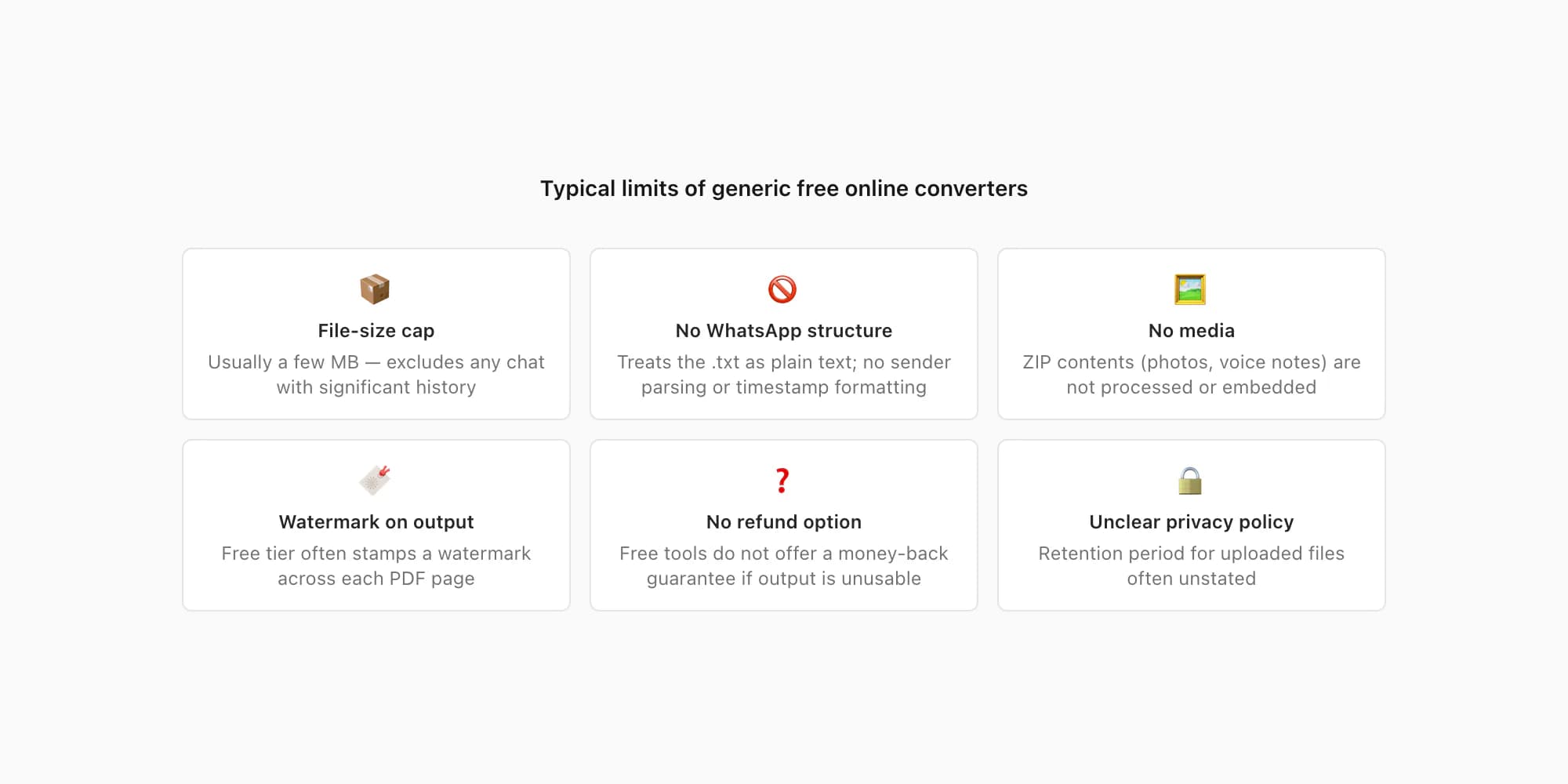
- File size caps — usually a few megabytes, which excludes chats with significant message history
- No sender attribution — the output renders raw text without distinguishing senders visually
- No media — even if you upload the full
.zip, photos and voice notes are not processed or embedded - Watermarks — many free tiers stamp a watermark on the output PDF
- Unknown data retention — the privacy policies of generic free online tools vary widely; many do not publish a retention period for uploaded files
I am not going to name specific tools here and invent performance comparisons I have not independently verified — that would not be honest. What I can say from the category pattern is that a generic free online file converter is not built for WhatsApp's format and will not produce sender-attributed, timestamped output.
Option 3: ChatToPDF's free preview
This one is worth being precise about, because I have seen it described imprecisely elsewhere: the preview at ChatToPDF is free, but the download is not.
When you upload your WhatsApp export to chattopdf.app, the tool immediately parses the file and shows you — at no cost — the total message count, the detected sender names, the date range, and the formatted price for each tier. You also see a rendered snippet of the first few messages in the PDF style you choose. Nothing is charged at this stage. No card details are entered.
That free preview answers the question "will this work for my chat?" before you commit to paying. It is also the step where you can confirm that the encoding parsed correctly — useful for non-Latin scripts or emoji-heavy chats. The WhatsApp to PDF guide has more on what the parser handles.
Where free runs out (and paid is worth it)
The honest answer to "is there a free whatsapp to pdf converter online?" is: for a short, text-only chat where you just need a readable record, the built-in print-to-PDF method is free and adequate. But several common needs push past what free options can deliver.
Long chats. The print-to-PDF method works reasonably on a few hundred messages. At several thousand messages — a multi-year group chat, for instance — the plain .txt file becomes unwieldy to print, and the output PDF has no structure to help you navigate it. ChatToPDF's $7 Basic tier handles up to 5,000 messages with full sender attribution and timestamps; the $29 Premium tier removes the cap entirely.
Inline media. If your chat ZIP contains photos, the print-to-PDF approach produces nothing for those photos — they are not referenced in the .txt at all in a way a text viewer renders. On the $14 Standard tier and above, ChatToPDF embeds each photo at its exact position in the conversation.
Sender attribution with visual formatting. The free print-to-PDF output is a wall of text with sender names embedded as part of each line. A properly formatted PDF with sender names in bold, timestamps separated, and messages visually grouped by sender looks quite different and is considerably easier to read. All ChatToPDF tiers produce that formatting.
Professional, legal, or business use. A plain .txt printout would not stand up well as a business record or legal exhibit. ChatToPDF's Formal style (available at all tiers) produces numbered entries with timestamps, consistent sender attribution, and a document header — the kind of output referenced in the WhatsApp evidence court PDF guide.
XLSX and CSV output. No free option produces a spreadsheet from a WhatsApp chat. ChatToPDF generates a row-per-message XLSX and CSV at the $29 Premium tier and above — useful for any analysis or record-keeping that requires tabular data.
Voice note transcription. The free methods produce nothing for voice note audio. ChatToPDF's $49 Premium+Voice tier processes supported audio through a language-aware Deepgram Nova-3/ElevenLabs Scribe v2 router. Successful transcripts appear inline; the current registry covers 93 languages, including 57 in provider-published excellent or high bands.
The WhatsApp to PDF converter guide covers the full tier comparison — formats, message caps, and output types — in detail. This page is focused on the free question specifically.
How ChatToPDF's free preview works
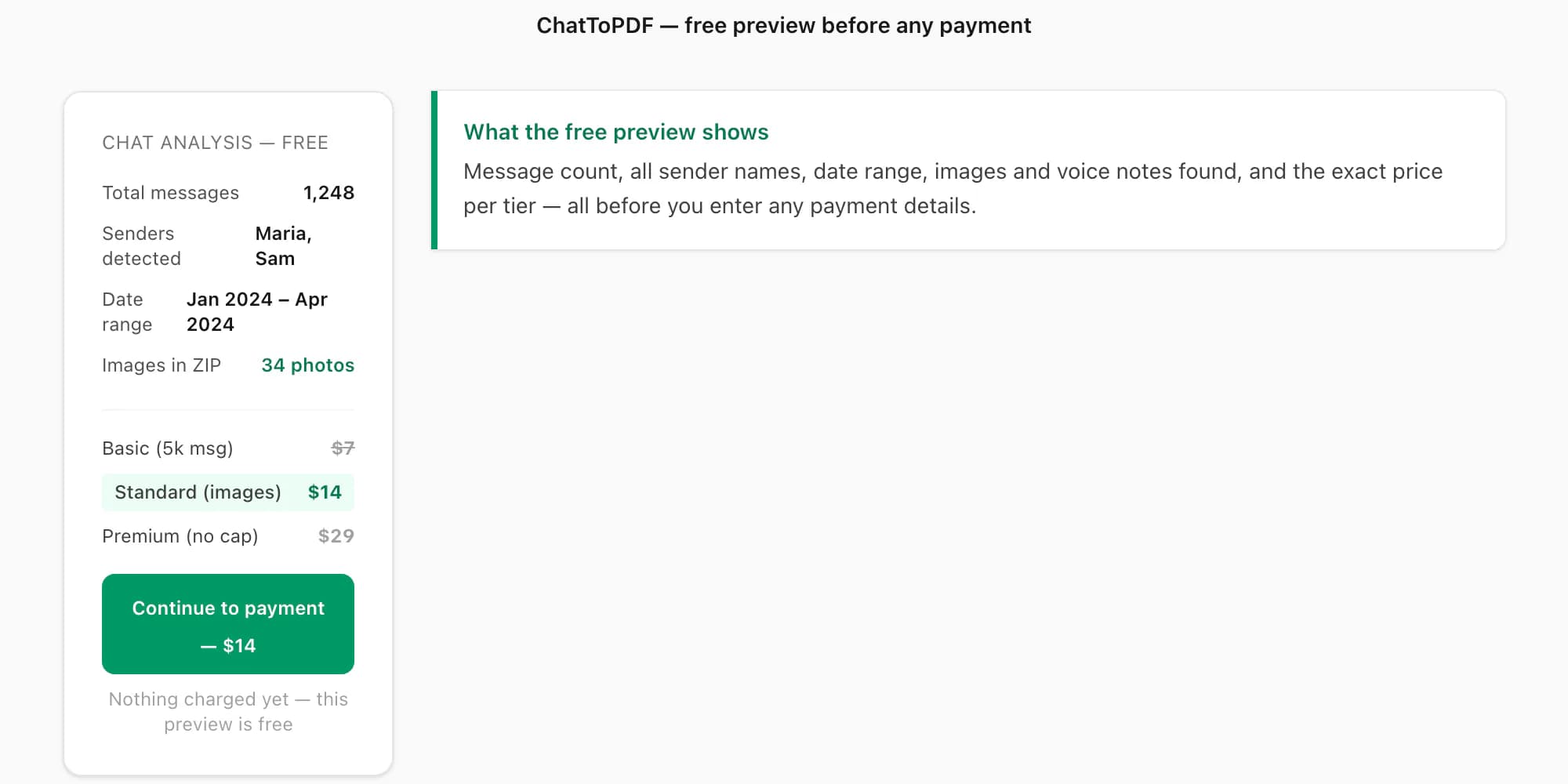
When you drop your chat export onto chattopdf.app, this is what happens before any payment:
- The file is validated — confirms it is a genuine WhatsApp export, not a random
.zip - The parser reads the full export and counts messages, detects senders, and identifies the date range
- A preview is shown to you: message count, sender names, date range, images and voice notes found
- The price for each tier is displayed based on your actual message count
- A rendered snippet of the first messages appears in the PDF style you have selected
Only after you have seen all of that and chosen a tier does a payment screen appear.
- Free preview
ChatToPDF's free preview is the stage after upload and before payment where you see your chat's statistics (message count, senders, date range, media found) and the formatted price for each tier. No payment information is entered during this stage. The preview costs nothing regardless of whether you proceed to pay.
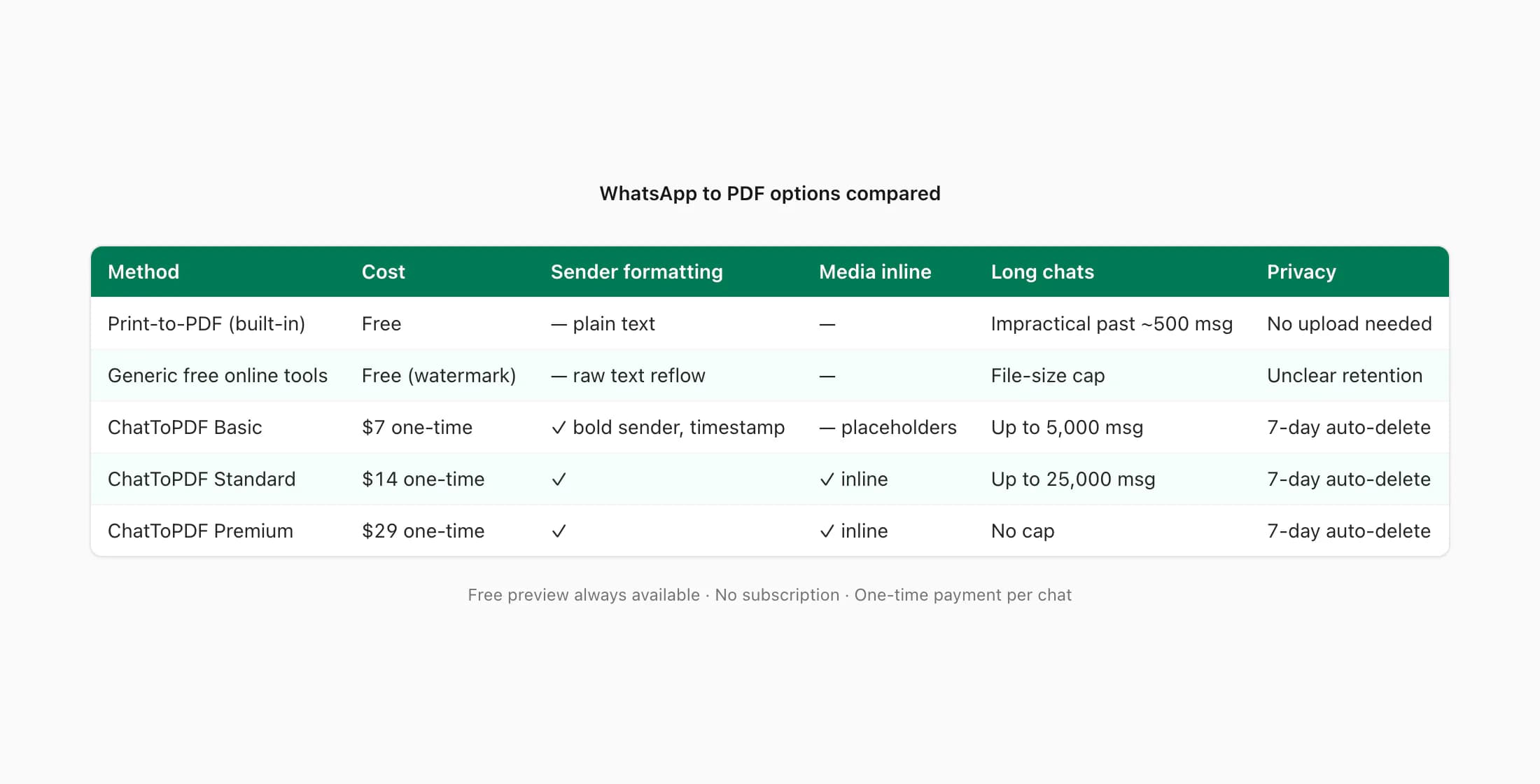
Here is how the main options compare:
| Method | Cost | Message limit | Media inline | Sender formatting | Privacy / retention |
|---|---|---|---|---|---|
| WhatsApp print-to-PDF | Free | Practical limit ~few hundred before unwieldy | No | Plain text, no visual formatting | No upload; stays on your device |
| Generic free online tools | Free (often watermarked) | Typically a few MB file cap | No | None — raw text reflow | Varies; most do not publish a retention policy |
| ChatToPDF (paid, from $7) | $7–$99 one-time per chat | 5,000 (Basic) to no cap ($29+) | Yes — from $14 Standard | Full — sender names bold, timestamps, styled bubbles | 7-day auto-deletion; TLS + AES-256 |
Privacy of free online converters
Before uploading a WhatsApp chat to any online tool — free or paid — it is worth understanding what happens to the file after you upload it.
WhatsApp chats contain personal conversations: names, phone numbers, addresses, financial arrangements, relationship details. The privacy risk is not hypothetical.
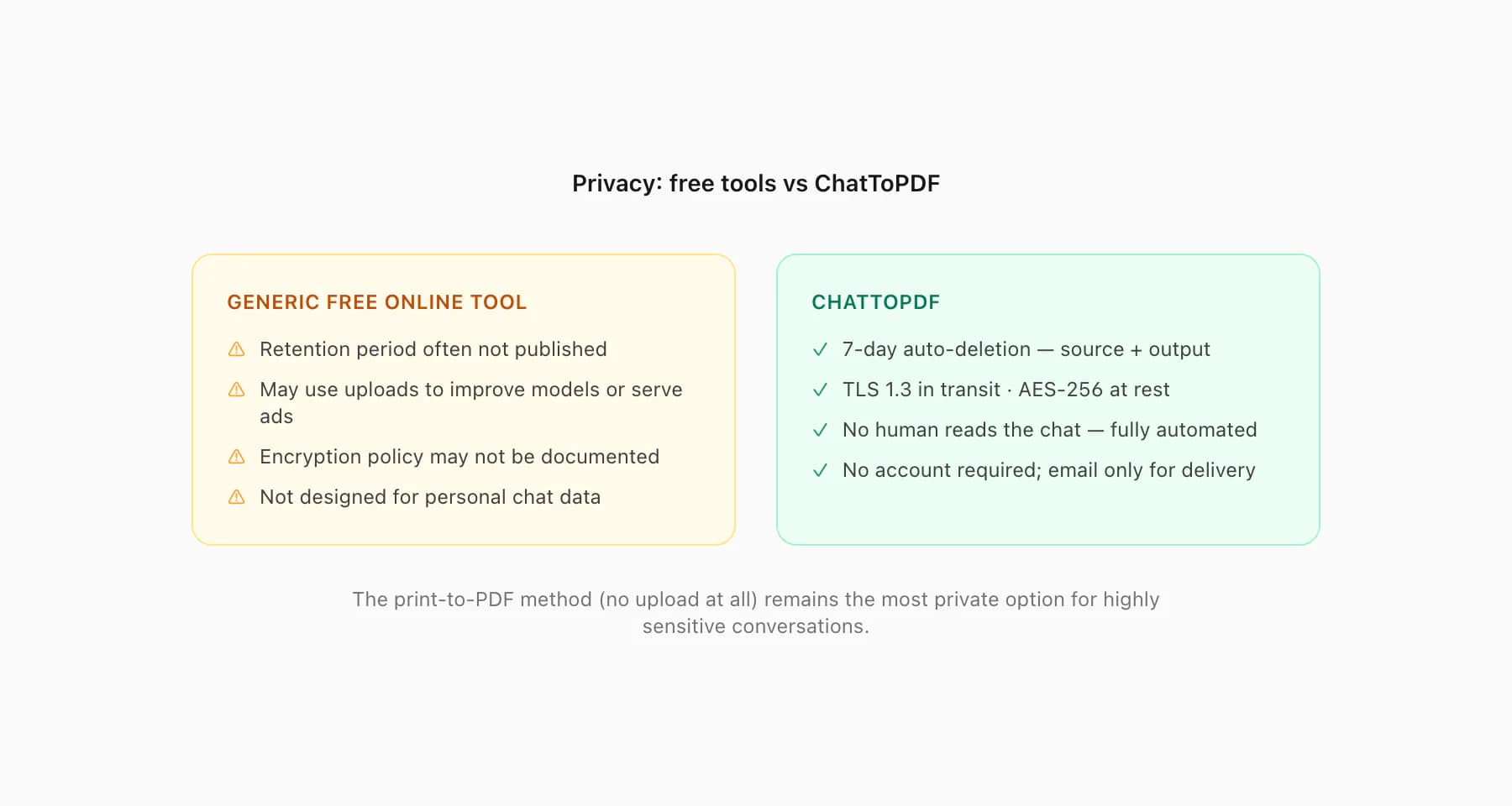
Generic free online converters typically do not publish a clear data retention policy. When I look at the terms of general-purpose file-conversion tools, "we may retain uploaded files for [X days]" is common, but some do not specify a period at all. Some free tools are supported by advertising, which raises the question of what data they collect alongside the file upload. I am not going to claim any specific tool does anything harmful — I have not audited them individually — but the absence of a clear, published retention policy is a genuine concern when uploading a personal conversation.
ChatToPDF's policy is specific and documented: both the source file and the output PDF are automatically deleted seven days after the job is created. The deletion is a scheduled automated job that runs against every record older than seven days — it applies to paid and unpaid jobs alike. The upload travels over TLS 1.3 and is stored with AES-256 encryption at rest on AWS S3. No person reads the chat content; the conversion is entirely automated. No account creation is required — the only personal information stored is the email address you provide for download delivery, which is also removed on day 7.
For a chat that contains personal or sensitive information — and most WhatsApp chats do — the extra few dollars for a tool with a clear, auditable retention policy is a reasonable trade-off against a nominally free option whose data handling is opaque.
FAQ
Is there a truly free WhatsApp to PDF converter?
There is no online converter that produces a fully formatted, sender-attributed, media-inclusive WhatsApp PDF for free. WhatsApp's own built-in export combined with your phone's print-to-PDF function is genuinely free and produces a basic PDF — but the output is a plain text dump with no visual formatting, no inline images, and no clear sender distinction. ChatToPDF's preview (message count, sender names, price) is free; the conversion itself starts at $7.
How do I convert a WhatsApp chat to PDF for free on my phone?
Export the chat from WhatsApp (iPhone: tap the contact name → Export Chat; Android: three-dot menu → More → Export Chat), save the .txt file to your Files app, then open it and use your phone's print option — on iPhone pinch-out on the print preview thumbnail to get a "Save as PDF" option; on Android select "Save as PDF" from the printer selector. The result is a plain-text PDF of the chat content. Images from the ZIP are not included by this method.
Why isn't the full ChatToPDF converter free?
Running the parser that interprets WhatsApp's date-format variations and encoding edge cases, the PDF rendering engine that produces formatted, searchable output, and the server infrastructure that stores and processes the files all have real costs. The free preview (message count, senders, price, formatted snippet) is genuinely free because parsing and showing statistics is lightweight. Rendering and delivering the full PDF is not. The $7 Basic tier is the entry point; there is no subscription — it is one payment per chat.
Are free online converters safe for personal WhatsApp chats?
The honest answer is: it depends on the tool, and many do not publish a clear retention policy. A WhatsApp chat typically contains names, phone numbers, and personal conversation content. Before uploading to any free online converter, I would check their privacy policy for a specific retention period and confirm they do not use uploaded content for advertising targeting. ChatToPDF auto-deletes both the source file and the output after 7 days; that policy is published and applies uniformly. The print-to-PDF method described above avoids uploading to any third party at all.
What is the best free WhatsApp to PDF option for a short chat?
For a short chat — up to a few hundred messages, no photos you need embedded — WhatsApp's own export + print-to-PDF is the best free option because it requires no third-party upload. For anything longer, with media, with formatting requirements, or with professional or legal needs, the $7 Basic tier at ChatToPDF is the cheapest paid option that produces properly formatted output. The free preview lets you confirm it parsed correctly before committing.
Key takeaways
- The only truly free WhatsApp-to-PDF path is WhatsApp's built-in Export Chat combined with your phone's print-to-PDF function — it works for short, text-only chats; the WhatsApp to PDF guide covers the full method.
- Generic free online converters have file-size caps, no sender formatting, no inline media, and often unclear privacy policies; they are not designed for WhatsApp's chat structure.
- ChatToPDF's preview is free: you see message count, senders, date range, formatted snippet, and the exact price before paying anything.
- Paid conversion starts at $7 (Basic, 5,000 messages); the $14 Standard tier adds inline images; the $29 Premium tier removes the message cap and adds XLSX + CSV.
- For a long chat, media-inclusive export, professional formatting, or legal use, the free methods fall short — paid is the realistic path.
- Any online tool that accepts personal WhatsApp chats should have a published, specific data retention policy; ChatToPDF auto-deletes source and output after 7 days.
- The print-to-PDF free method avoids uploading your chat to any third party at all — worth considering for highly sensitive conversations.
I'm Paul, the founder of ChatToPDF. I built it after needing a long WhatsApp conversation as a readable PDF for a legal matter. I test and document WhatsApp exports, PDF conversion, voice-note transcription, and the limits people should check before relying on the result.