
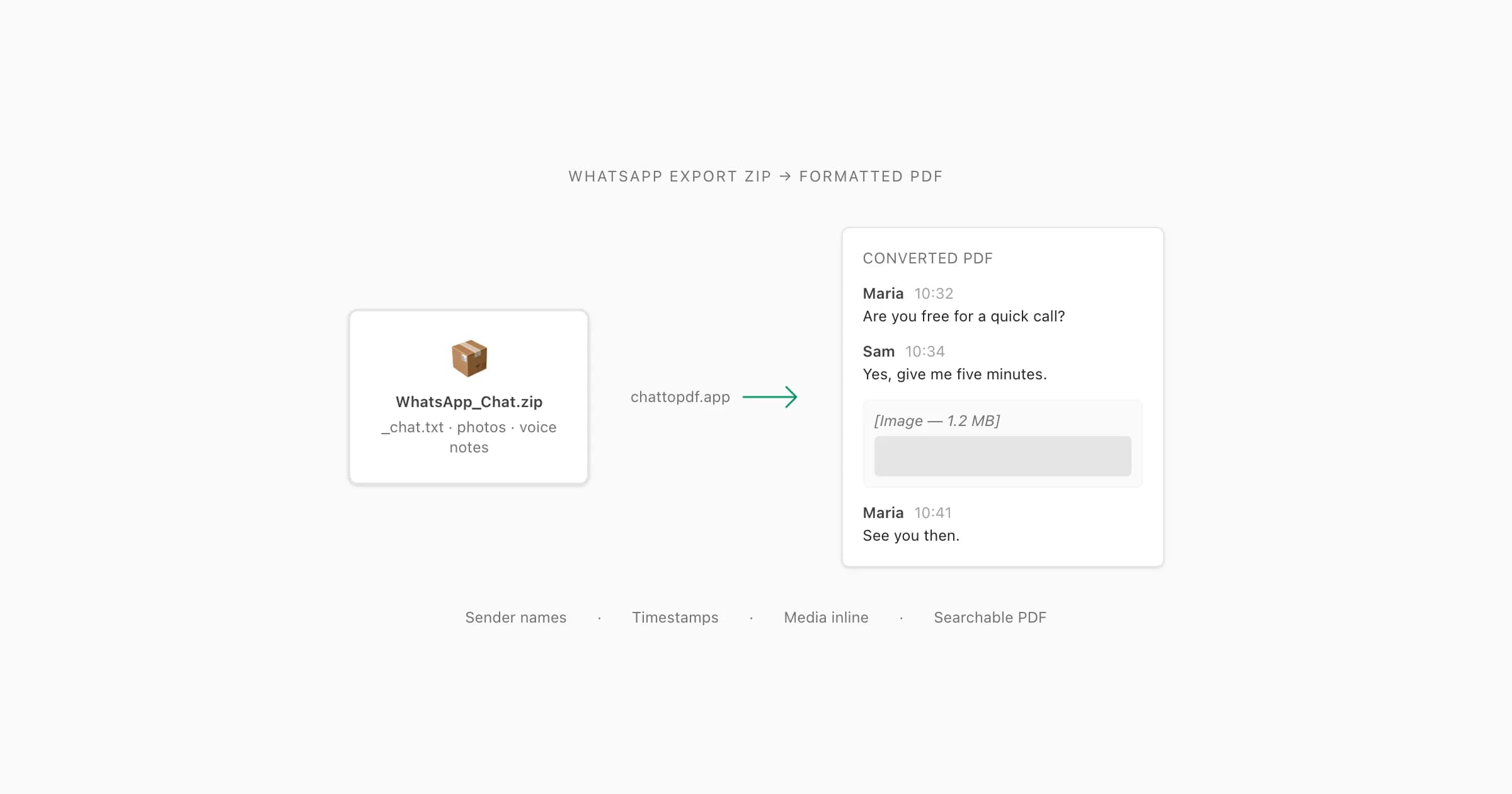
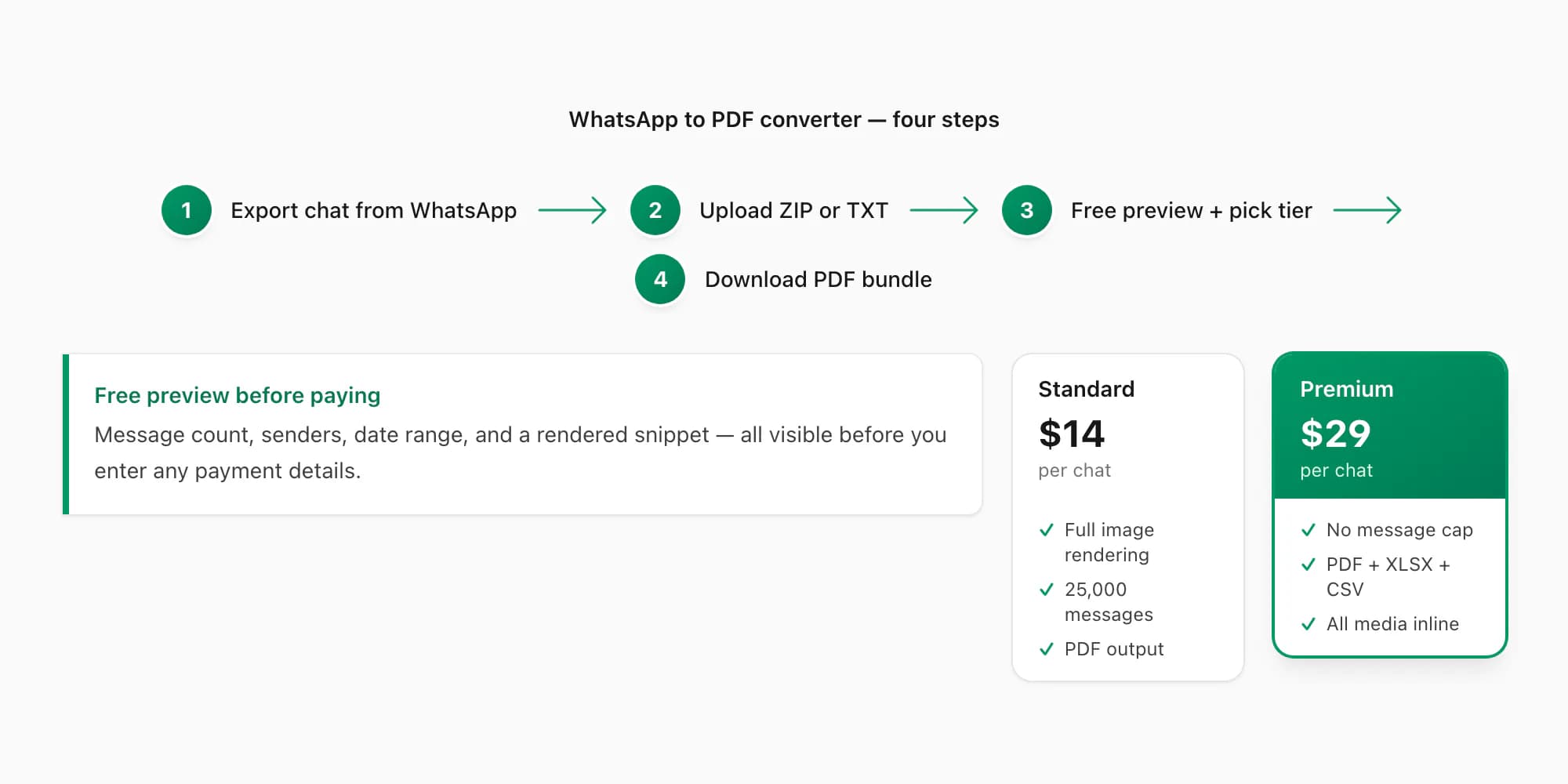
A WhatsApp to PDF converter accepts the ZIP or TXT file that WhatsApp's built-in Export Chat menu produces and turns it into a formatted PDF with sender names, timestamps, and media inline. I built ChatToPDF to do exactly that: upload the export, see a free preview of message count and price, pick a tier ($7 and up), and download the PDF.
8 minutes — the five things worth checking before you trust any WhatsApp export tool.
How the converter works
The WhatsApp to PDF converter works through any modern browser — nothing to install. The input is the file that WhatsApp's own Export Chat menu produces: either a .txt for a text-only export, or a .zip when you chose Including Media.
Export the chat from WhatsApp
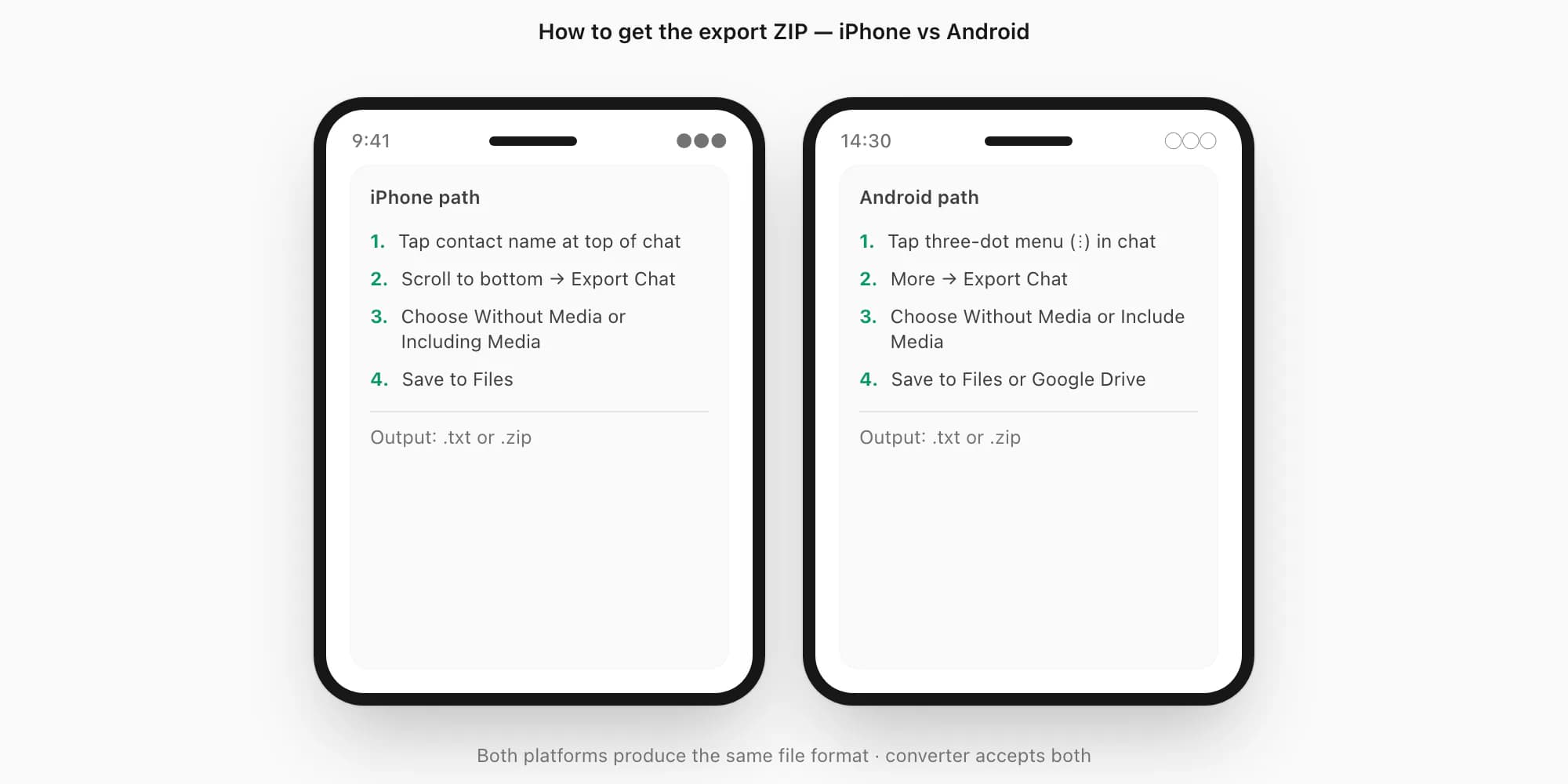
Open WhatsApp and navigate to the chat you want to convert. On iPhone: tap the contact or group name at the top → scroll to Export Chat near the bottom → choose Without Media (text only) or Including Media (text + photos + voice notes). On Android: tap the three-dot menu → More → Export Chat → pick your option. WhatsApp produces either a
.txtfile (Without Media) or a.ziparchive (Including Media). Save it to your phone's Files app or iCloud Drive. WhatsApp's official export chat FAQ documents the export sheet; the WhatsApp chat export guide covers this step in detail for both platforms.Upload the ZIP or TXT to chattopdf.app
Open chattopdf.app in any browser — mobile or desktop. Drag and drop the
.zipor.txtonto the upload zone, or tap to open a file picker. The converter validates the file immediately: it checks that the archive contains a_chat.txtin the expected WhatsApp format before proceeding. Invalid files or non-WhatsApp archives are rejected at this stage.Review the free preview — no payment yet
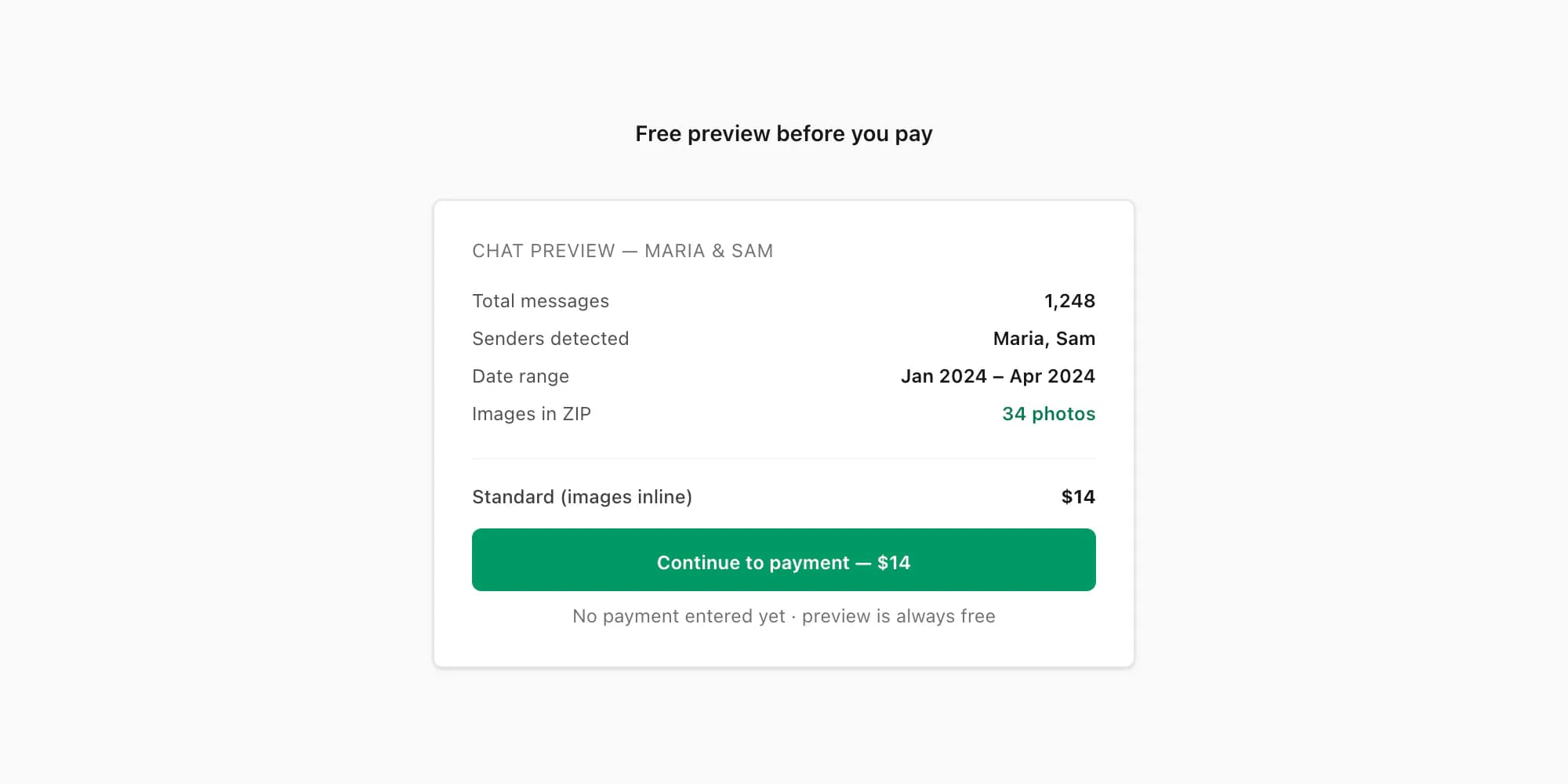
After validation, the converter parses the export and shows you a free summary: total message count, detected senders, date range, and an itemised price based on the tier you hover over. You can also see a rendered snippet of the first few messages in your chosen PDF style. This is the step where you confirm the encoding parsed correctly — especially useful for Arabic, Hebrew, or emoji-heavy chats. No card details are entered at this point.
Select a tier and pay once
Pick the tier that matches what you need (see the table below). Payment is one-time per chat — no subscription, no recurring charge. After payment, the converter processes the full export and the download link appears on screen. An email with the same link is sent to the address you provide, so you don't lose access if the browser tab closes.
Best WhatsApp to PDF converters compared
The best WhatsApp to PDF converter depends on where the chat is and what you want to preserve. ChatToPDF is the strongest fit when you already have WhatsApp's native ZIP or TXT export, want a free parsed preview before paying, and need a browser workflow that can add supported media, filters, spreadsheets, or inline voice-note transcripts. HonestPDF is the clearest local-browser alternative in the current results. Chat Archive and Chat Explorer are Apple apps for people who want a reusable local archive as well as a PDF. Team Hazelnut's Chat to PDF Converter fills the offline Android-app slot. WAtext's WAexport starts from WhatsApp Web instead of an exported ZIP, which suits bulk desktop export. WhatsAppToPDF.com is another direct web uploader.
This comparison was checked on 24 July 2026 against each product's own website, store listing, or published guide. The descriptions below report what those vendors currently claim; I did not upload a private conversation to every competing service, buy every upgrade, or treat a marketing promise as an independently audited result. App-store prices and product limits can vary by region and change after the review date.
| Tool | Starting point | Published PDF and media support | Published processing model | Best fit and caveat |
|---|---|---|---|---|
| ChatToPDF | WhatsApp TXT or ZIP in a mobile or desktop browser | Four PDF styles; sender names and timestamps; supported images from Standard; filters and additional data outputs on higher tiers; voice transcripts from Premium+Voice | Encrypted server processing; source, extracted media, and output scheduled for deletion within seven days, with a maximum 24-hour processing grace period | Best all-round fit for a native export when you want a parsed preview before a one-time per-chat payment; it is not a local-only converter |
| Chat Archive | WhatsApp ZIP opened in an iPhone app | The vendor says it rebuilds messages, media, files, and voice notes into a searchable archive and can create a PDF with chat bubbles, images, attachment previews, and available voice transcripts | The vendor says imported chat content and available voice transcription are processed on the iPhone | Best for an iPhone user who wants to keep browsing the archive locally; check the current App Store offer and export entitlements |
| Chat Explorer | WhatsApp ZIP or TXT in an iPhone, iPad, or Mac app | The vendor publishes local chat search, media browsing, date and participant filters, and PDF export; free PDFs cover the unlocked segment and carry a watermark, while Pro removes it and unlocks full history | The vendor says core import, browsing, search, and media handling stay on the Apple device; optional enhanced transcription may use Apple services | Best for an Apple-device archive with search and analytics; full, watermark-free PDF export requires Pro |
| HonestPDF | WhatsApp ZIP or TXT in a web browser | The vendor advertises group-chat attribution, timestamps, inline images, and Bubble, Document, and Transcript PDF styles | The vendor says the conversion is entirely client-side and that chat files never leave the device | Best free, no-install option when local browser processing is the deciding factor; the no-hard-limit and completion claims are vendor claims, not this review's load test |
| Chat to PDF Converter by Team Hazelnut | Exported TXT or ZIP shared to an Android app | The Google Play description claims formatted PDFs that preserve message order, timestamps, and sender names | The developer describes chat conversion as offline and on-device; the same Play listing separately discloses collection or sharing of app activity, app information, performance data, and device identifiers | Best for an Android-only offline workflow; the listing offers two free exports per day and a one-time Premium upgrade, with ads and in-app purchases |
| WAtext / WAexport | Live conversations in WhatsApp Web through a Chrome extension | The vendor advertises PDF, HTML, CSV, and TXT, bulk chat export, date and label filters, contact export, and optional media retrieval | The vendor says chats and contacts are processed locally in the browser and not uploaded to its servers | Best when the job is bulk desktop extraction or contact export; it reads WhatsApp Web rather than converting the native phone-export ZIP you already have |
| WhatsAppToPDF.com | WhatsApp ZIP uploaded to a web service | The vendor advertises messages, images, timestamps, group chats, date grouping, and PDFs with media inline or at the end | The vendor says files are processed temporarily on its servers and deleted after conversion, but the reviewed page does not publish a precise retention interval | A direct free web-uploader alternative; verify the generated PDF and current privacy terms before using a sensitive chat |
| PDFSimpli | Exported WhatsApp TXT according to its dedicated product page | The vendor says it preserves chronological order, timestamps, and sender names; the reviewed official pages did not document direct WhatsApp ZIP import or media matching | Online conversion with paid access required to download according to its current support material | Best when TXT conversion is followed by general PDF editing; see the dated ChatToPDF comparison for the current uploader and renewal findings |
Current product sources and what each one establishes
- ChatToPDF's current pricing and feature list, security page, and sample PDF establish the plans, processing boundary, deletion schedule, and actual output used in its row.
- Chat Archive's product page and privacy page document iPhone ZIP import, a local searchable archive, PDF creation, media handling, and on-device processing.
- Chat Explorer's product page and PDF export guide document Apple-platform ZIP/TXT import, local handling, the free watermark and history limits, and subscription or lifetime Pro options.
- HonestPDF's WhatsApp converter is the source for its ZIP/TXT, client-side, image, group-chat, three-style, and no-hard-limit claims.
- WAtext's WAexport guide documents the Chrome extension's WhatsApp Web workflow, output formats, bulk and contact features, free offer, and local-browser claim.
- The Team Hazelnut Google Play listing is the source for its Android availability, offline-conversion claim, two daily free exports, one-time Premium description, and separate data-safety disclosures.
- WhatsAppToPDF.com is the source for its ZIP upload, image and formatting claims, free offer, and server-side deletion statement.
- PDFSimpli now publishes a WhatsApp TXT route. The ChatToPDF vs PDFSimpli comparison separates that published TXT claim from the visible uploader observed during the review and checks its download gate, billing, and retention wording against official pages.
- Zapptales sells both printed chat books and a downloadable PDF. The Zapptales alternative comparison shows when ChatToPDF's focused PDF workflow fits better and when Zapptales' editor, binding, wider messenger support or QR-linked original media justify the full-service route.
How to choose without testing every tool
Choose by the input you already have first. If you have a ZIP or TXT from WhatsApp's Export Chat menu, use a native-export parser such as ChatToPDF, HonestPDF, one of the Apple archive apps, the Team Hazelnut Android app, or WhatsAppToPDF.com. If you have not exported yet and need many chats or contact lists from a computer, WAexport's WhatsApp Web route is a different and potentially better-shaped workflow. If you only have a plain TXT and want to continue editing the resulting document, PDFSimpli can fit that broader PDF-editor job.
Then choose the processing boundary you are comfortable with. Chat Archive, Chat Explorer, HonestPDF, and the Android app describe local or on-device chat conversion. ChatToPDF and WhatsAppToPDF.com use server processing and publish deletion statements, although only ChatToPDF states a fixed seven-day schedule. WAexport says its extension processes locally, but installing an extension that can read a live WhatsApp Web session is a different permission decision from selecting one export file. Review the current store or extension permissions yourself.
Finally, match the output, not just the word “PDF.” A plain text conversion may be enough for a short record. A long group chat can require sender attribution, page numbers, filters, inline images, voice-note transcripts, or a spreadsheet alongside the PDF. Download or preview a sample where the vendor provides one, and test a non-sensitive export before trusting any workflow with an important record.
Where Smallpdf, iLovePDF, Backuptrans, and iMyFone fit
The current SERP also overlaps with tools that solve adjacent jobs. Smallpdf and iLovePDF are broad PDF toolkits: they are useful after a source has already become a document, but their core official product flows are not the same as parsing a WhatsApp media ZIP. The dedicated ChatToPDF vs Smallpdf and ChatToPDF vs iLovePDF pages keep those general-PDF comparisons separate from this converter shortlist.
Backuptrans and iMyFone are desktop transfer, backup, or recovery suites. They can make sense when the real goal is reading a device database, restoring a backup, or moving a WhatsApp history between phones—not merely converting one exported chat. See ChatToPDF vs Backuptrans and ChatToPDF vs iMyFone for the official feature and installation trade-offs. Keeping these adjacent categories distinct avoids calling every product that eventually produces a PDF a like-for-like WhatsApp converter.
What formats it outputs
Every conversion produces at minimum a formatted PDF. The $29 Premium tier and above also produce an XLSX spreadsheet and a CSV file as part of the same bundle.
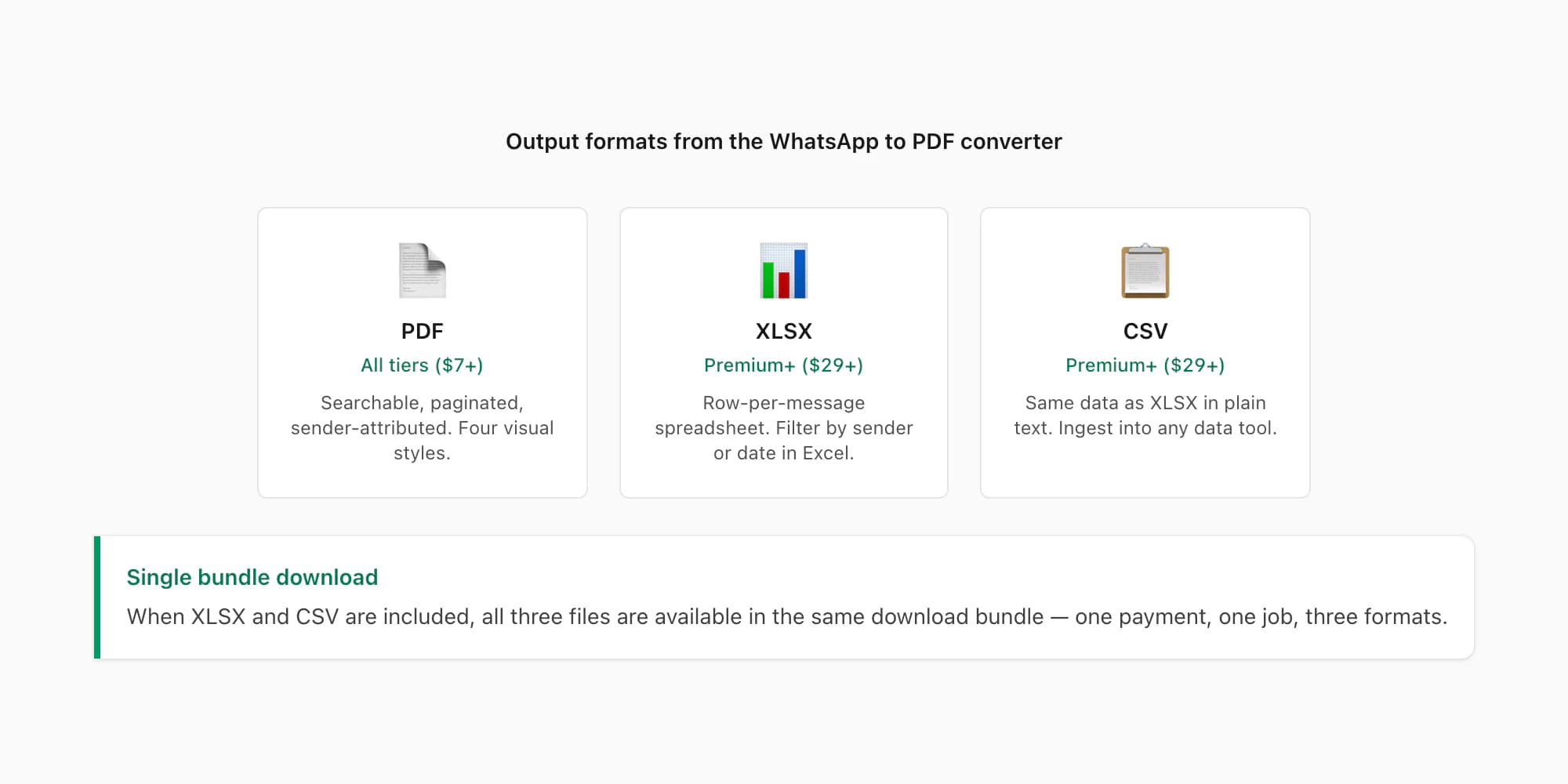
PDF is the primary output. The PDF is fully searchable, properly paginated, and includes a header with the chat name and date range on every page. Each message is attributed to the sender with the timestamp. Four visual styles are available at all tiers: Green Bubble (closest to the WhatsApp app UI), Clean (recommended for legal and HR use), Formal (letterhead header, deposition-style layout), and Book (continuous prose, no bubbles). All four styles are available regardless of tier.
XLSX is a row-per-message spreadsheet with columns for timestamp, sender name, message body, and a media flag. It's useful for filtering by sender, sorting by date, or doing message-frequency analysis in Excel or Google Sheets.
CSV is the same data as XLSX but in plain comma-separated format, compatible with any data tool that ingests tabular data.
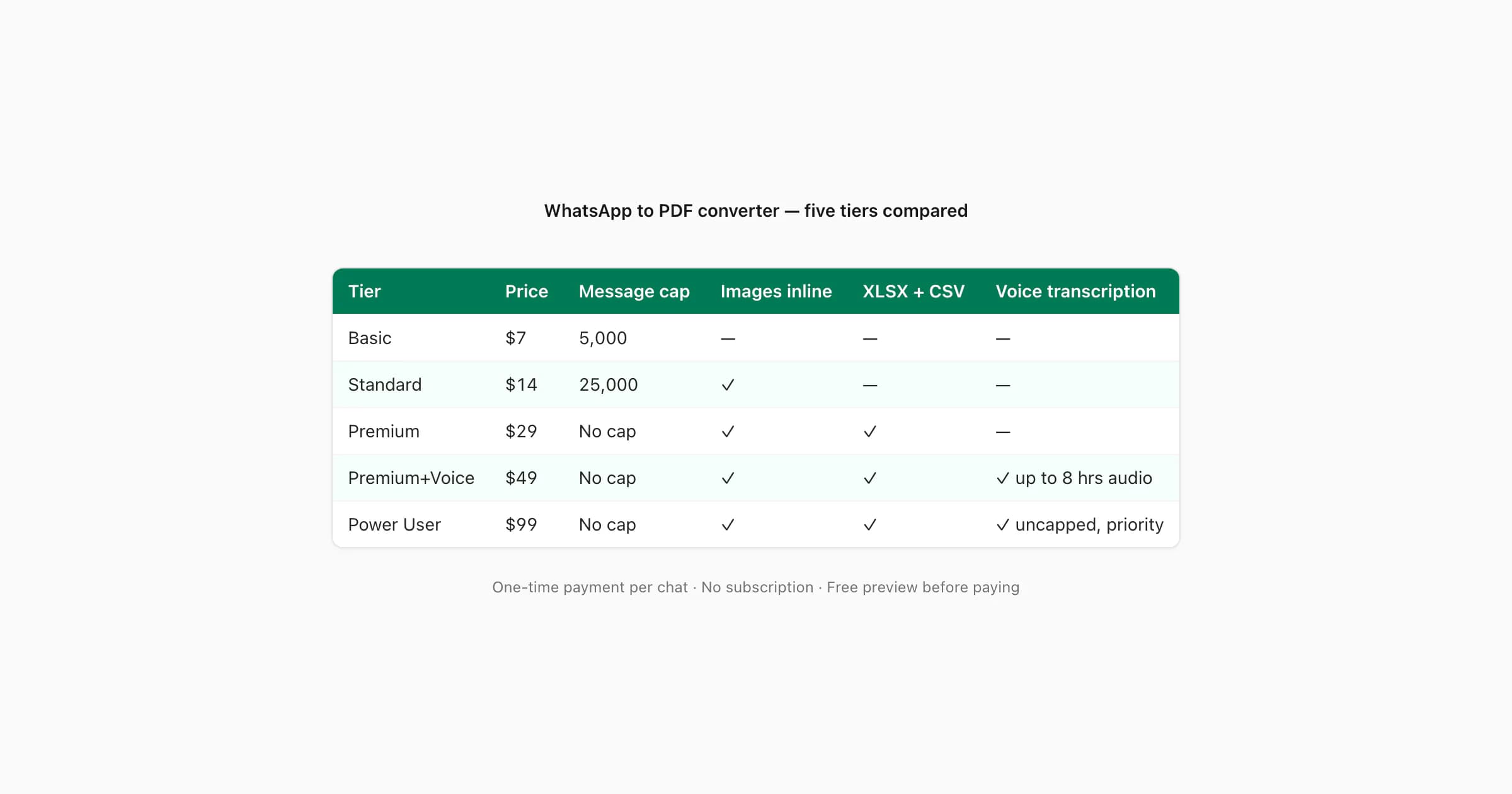
The tier table below shows which features each tier includes:
| Tier | Price | Message cap | Images inline | XLSX + CSV | Voice transcription |
|---|---|---|---|---|---|
| Basic | $7 | 5,000 | No — placeholders | No | No |
| Standard | $14 | 25,000 | Yes — inline | No | No |
| Premium | $29 | No cap | Yes — inline | Yes | No |
| Premium+Voice | $49 | No cap | Yes — inline | Yes | Yes — Nova-3/Scribe v2 router, up to 8 hrs audio |
| Power User | $99 | No cap | Yes — inline | Yes | Yes — uncapped, priority queue |
Voice transcription processes supported voice notes in the ZIP and places successful transcripts at the correct position in the conversation. The $49 Premium+Voice tier covers up to 8 hours of audio per chat; the $99 Power User tier is uncapped and runs in the priority processing queue. Both use language-aware routing between Deepgram Nova-3 and ElevenLabs Scribe v2 across a current 93-language registry, including 57 in provider-published excellent or high bands. The WhatsApp voice to text guide covers the transcription step, review caveats and full language list.
The full story behind the converter — PDF styles, how the parser handles date formats and encoding edge cases, and a side-by-side comparison against alternative methods — is in the WhatsApp to PDF guide. If your first question is whether any free online option exists, the WhatsApp to PDF converter online free guide covers exactly that.
Speed and file handling
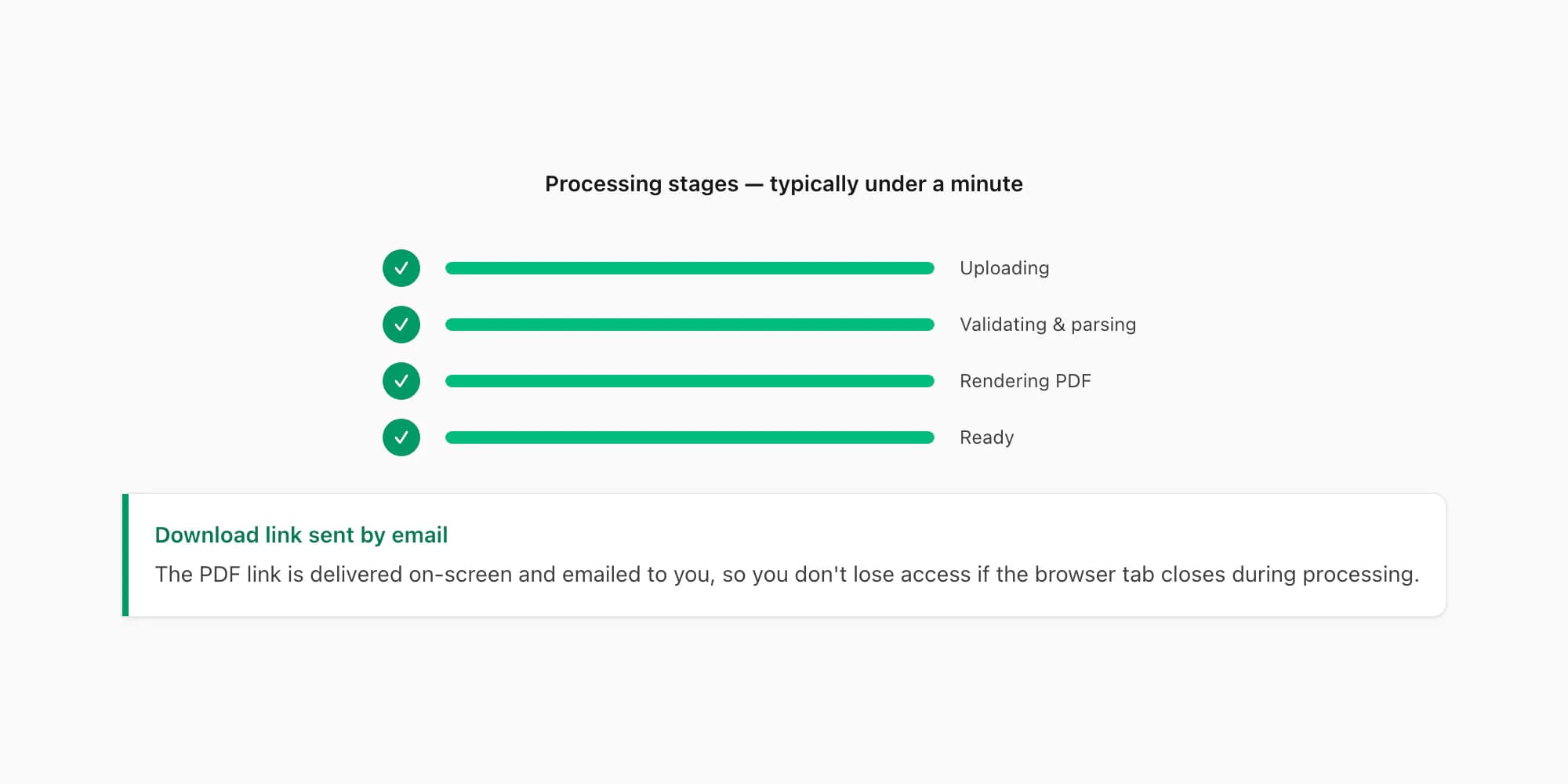
In my testing, a typical chat of a few hundred to a few thousand messages converts in well under a minute from upload to download-ready. The processing time scales with message count and media volume — a chat that includes dozens of large images or many voice notes takes longer than a text-only export of the same message count.
The converter handles .txt files (from the Without Media export) and .zip files (from the Including Media export) without any conversion step on your end. Both are uploaded directly to the converter.
For large chats — tens of thousands of messages, hundreds of megabytes of media — the converter processes the full export without truncating, at the $29 Premium tier and above. The $7 Basic tier caps at 5,000 messages and $14 Standard caps at 25,000; beyond those limits the output is truncated at the cap. If you have a long group chat and are unsure which tier you need, the free preview step shows the total message count before you commit to a tier.
Very large exports get special handling: since June 2026 the renderer splits chats past roughly 10,000 messages into chunks, renders each chunk separately, and merges the pieces into a single continuous PDF. That's why a 40,000-message export — the kind that makes generic TXT-to-PDF converters time out or crash the browser tab — completes here without truncation. The largest single output delivered so far is a 2,341-page PDF from one multi-year chat.
After the PDF renders, the download link appears on-screen and is sent to the email you provided. If you close the browser before the render completes, the email delivery means you don't need to re-upload.
Privacy and 7-day deletion
When you're converting a personal conversation, knowing exactly what happens to the file matters. Here is the full picture.
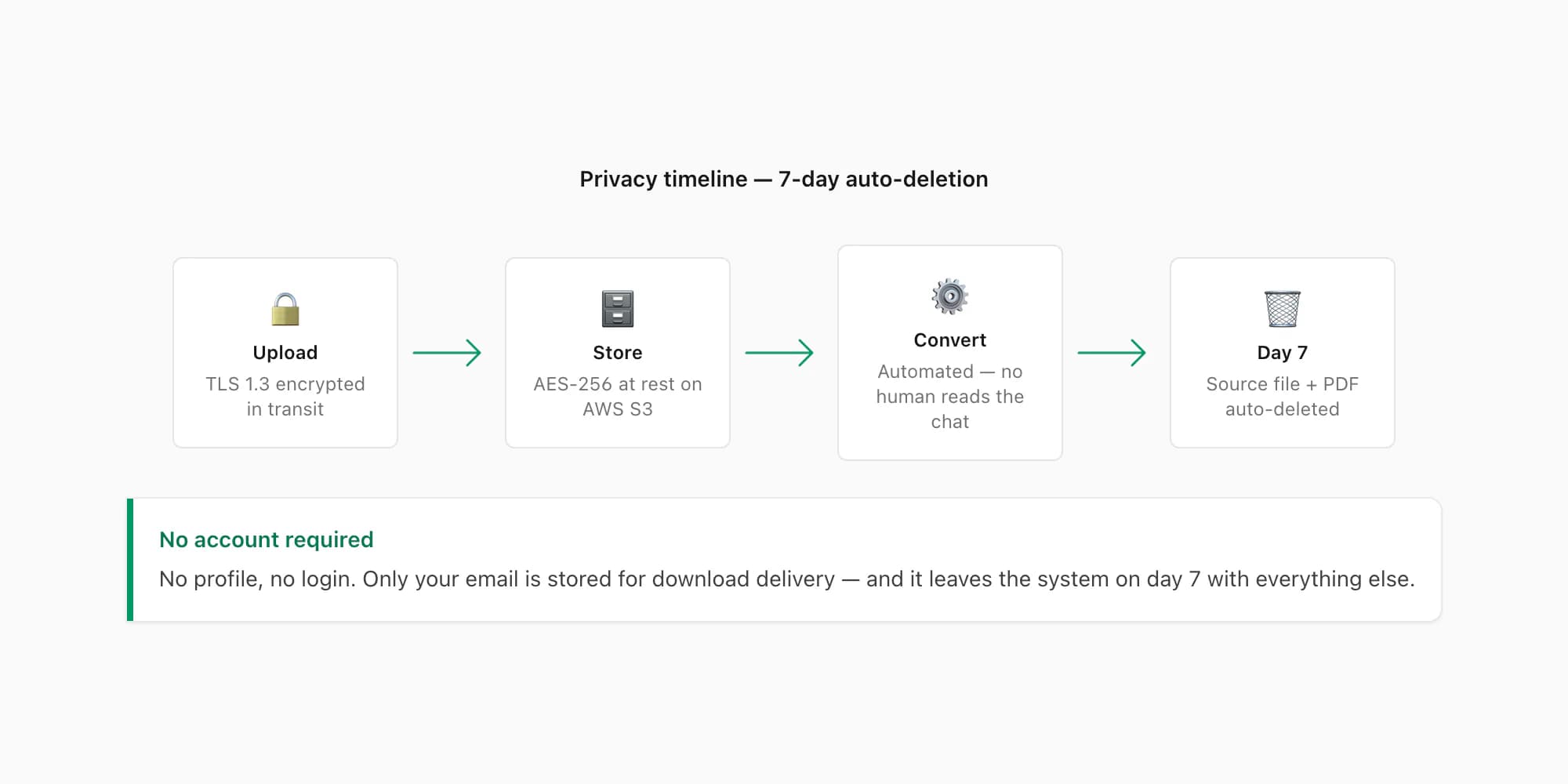
Upload: The file travels over HTTPS (TLS 1.3) from your browser to the servers. It is never transmitted unencrypted.
Storage: The uploaded file is stored on an AWS S3 bucket with AES-256 server-side encryption at rest. Access to raw files is restricted to the automated processing pipeline — no human download path exists through the normal interface.
Processing: The conversion is automated. No human review is included. The parser, PDF renderer and selected voice-transcription path run without routine manual handling. For voice transcription, the chosen provider — Deepgram or ElevenLabs — receives the audio needed for that note, not the full chat text. Processing follows the provider's current terms.
7-day deletion: Both the source file (your upload) and the output PDF are automatically deleted seven days after the job is created. This is a scheduled job that runs against every record older than seven days — there are no manual exceptions, and the deletion applies to both paid and unpaid jobs equally.
No account required. You do not create a profile or log in to use the converter. The only personally identifiable information stored is the email address you provide for download delivery.
For more on privacy, retention policy, and data handling, the WhatsApp to PDF guide includes the full privacy section with the step-by-step breakdown of what happens at each stage.
FAQ
Is the WhatsApp to PDF converter free?
The converter is free to try — you upload the chat and get a full preview of message count, senders, date range, and the formatted output before paying anything. Generating and downloading the actual PDF requires a one-time payment per chat: $7 Basic, $14 Standard, $29 Premium, $49 Premium+Voice, or $99 Power User. There is no subscription and no recurring charge.
Does it work for iPhone and Android exports?
Yes. Both iPhone and Android WhatsApp export the same _chat.txt format inside the ZIP (or as a standalone .txt). The converter accepts files from either platform. The export path is slightly different on each — iPhone uses the contact name tap → Export Chat; Android uses the three-dot menu → More → Export Chat — but the resulting file is the same and processes identically. The WhatsApp chat export guide covers both export paths with step-by-step instructions.
What does the PDF include?
The PDF includes every message with the sender name, the timestamp, and the message text. On the $14 Standard tier and above, images and document thumbnails appear inline at the position they were sent. On the $49 Premium+Voice tier and above, voice notes are transcribed and appear as readable text at their correct position in the conversation. The PDF is fully searchable and paginated, with a header on each page identifying the chat and date range. Four visual styles are available at all tiers: Green Bubble, Clean, Formal, and Book.
Is my chat data safe?
Your file is encrypted in transit and at rest. The conversion runs on automated software and includes no routine human review. Source and output files follow the published deletion schedule. If you use a voice tier, the selected provider — Deepgram or ElevenLabs — receives only the audio needed for the notes being processed, not the full chat text. No account creation is required.
Do I need to download an app?
No. The converter runs in any browser — mobile Safari, Chrome, Firefox, Samsung Internet. You access it at chattopdf.app and upload the export file directly from your phone or computer. There is no desktop application, no browser extension, and no app to install. The output PDF is delivered on-screen and by email.
Key takeaways
- A WhatsApp to PDF converter turns the export ZIP from your phone into a formatted, sender-attributed PDF — no desktop app or USB cable needed.
- ChatToPDF previews message count, senders, and price for free before you pay anything.
- Five tiers from $7 to $99 per chat, one-time payment — no recurring billing.
- Output formats are PDF (all tiers), XLSX, and CSV ($29 Premium and above).
- Supported voice notes are routed through the Deepgram Nova-3/ElevenLabs Scribe v2 router or ElevenLabs Scribe v2 on the $49 Premium+Voice tier; successful transcripts appear inline across the current 93-language registry.
- Source files and output PDFs are automatically deleted 7 days after conversion — no data kept beyond that.
- Works on both iPhone and Android exports; accepts
.zipand.txtfiles directly from WhatsApp's Export Chat menu.
I'm Paul, the founder of ChatToPDF. I built it after needing a long WhatsApp conversation as a readable PDF for a legal matter. I test and document WhatsApp exports, PDF conversion, voice-note transcription, and the limits people should check before relying on the result.