
Definition and scope
Can you view a WhatsApp backup?
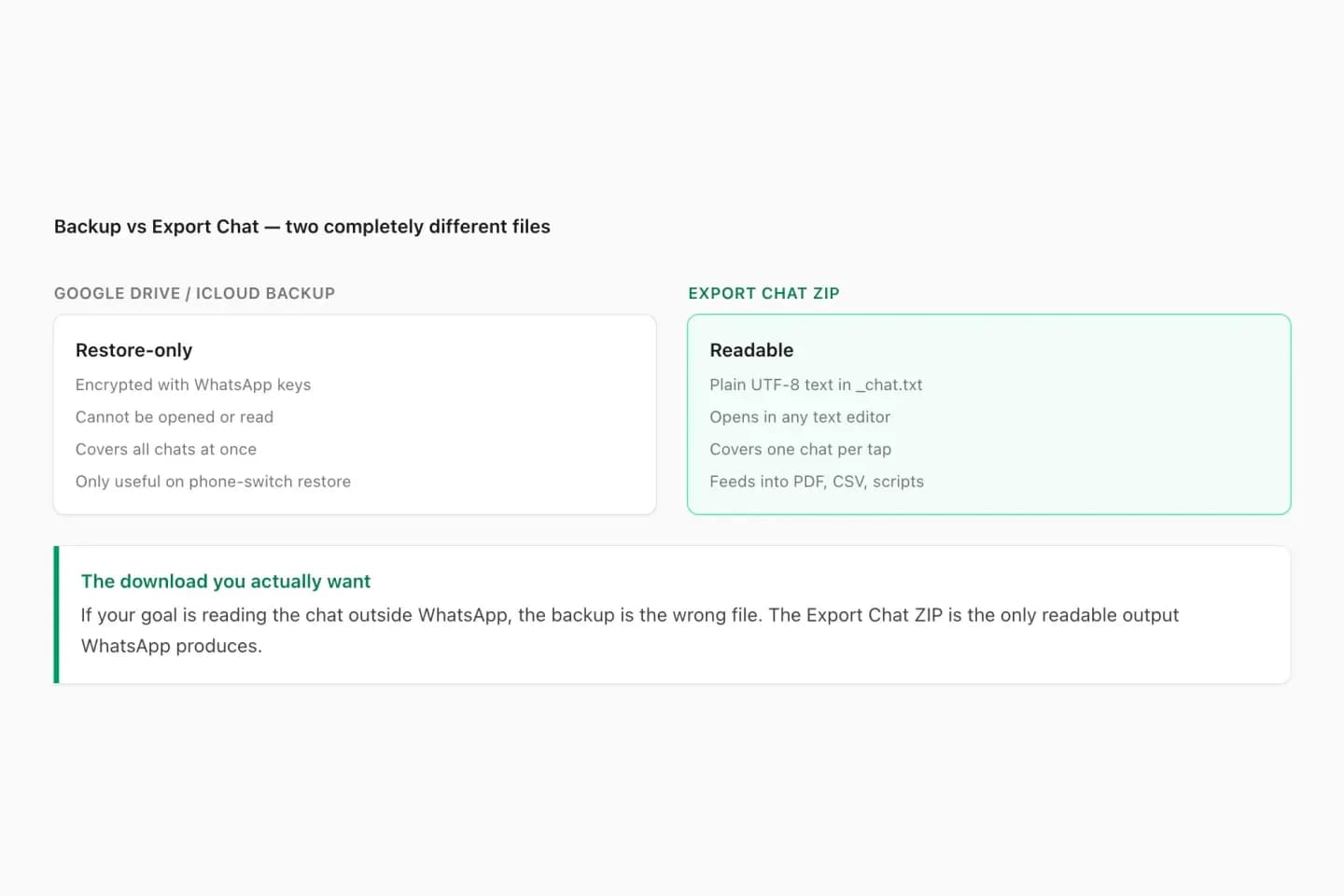
Not directly. On Android, WhatsApp backs up to your Google account (Google Drive); on iPhone it backs up to iCloud. Both backups are stored as WhatsApp data for one purpose: restoring your chats when you reinstall WhatsApp or move to a new phone with the same number. Google Drive lists the backup under storage but does not let you download or open it, and the iCloud backup is not browsable as files.
Local Android backups (msgstore.db.crypt14 or .crypt15 files) are encrypted databases. If you have turned on WhatsApp’s end-to-end encrypted backup, the backup is additionally locked with your password, passkey or 64-digit key. Either way, the file is not a document a viewer can display.
ChatToPDF does not open backup files and does not ask for keys, passwords or access to your Google or Apple account. What it opens is the file WhatsApp produces when you choose Export Chat: a plain TXT transcript, or a ZIP with the transcript and media. That export is the readable version of a chat, and it is what the viewer below is built for.
Three-step workflow
How to use the WhatsApp Backup Viewer
Get the chats back into WhatsApp (only if needed)
If the conversation is still on your phone, skip this. If it only exists in a backup, install WhatsApp on a phone, verify the same phone number and accept the restore prompt from Google Drive or iCloud.
Restores need the same phone number and the same Google account or Apple ID that made the backup, plus your password or key if the backup is end-to-end encrypted.
Export the chat you want to read
Open the chat. iPhone: tap the contact or group name → Export Chat. Android: ⋮ → More → Export Chat. Choose Include Media for photos and voice notes, or Without Media for a small text file.
Export Chat works one conversation at a time. Repeat it for each chat you want to read outside WhatsApp.
Open the export in the viewer
Upload the TXT or ZIP here. The viewer rebuilds the conversation with names, dates and media references so you can read it in a browser, with a free preview before you choose to download anything.
To keep the whole conversation, download it as a formatted PDF with Excel and CSV copies from $7. The original export stays unchanged on your device.
Ready to check your export?
Upload the source file and inspect the parsed preview first. No account, no email, nothing to pay until you download.
Field-level detail
Backup vs export: what each file is for
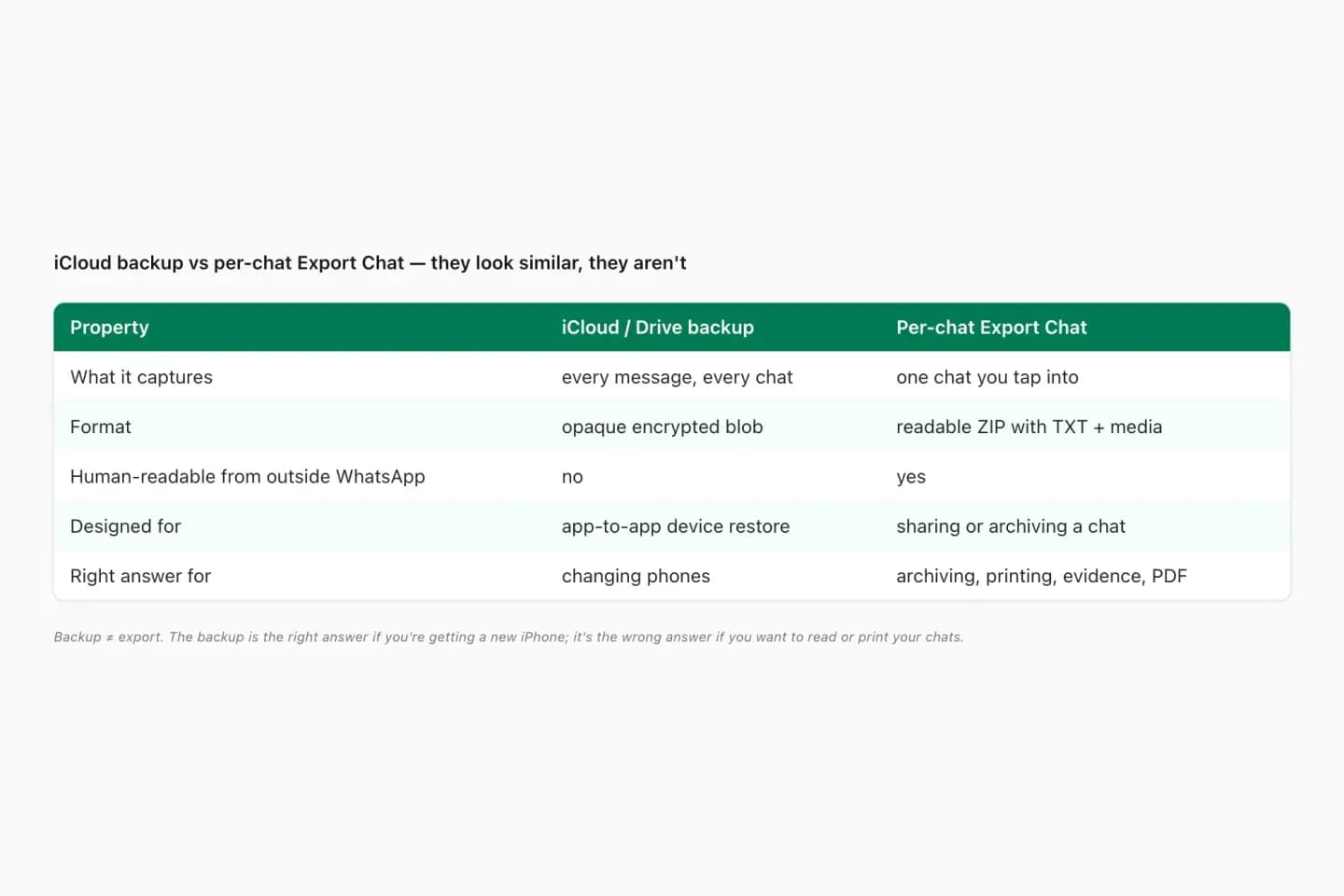
People search for a backup viewer because the backup feels like “all my chats in a file”. These are the differences that decide what you can actually open.
- Field
- Google Drive backup
- What it contains
- All chats, stored as WhatsApp data in your Google account; not downloadable as a readable file
- Useful for
- Restoring WhatsApp on an Android phone
- Field
- iCloud backup
- What it contains
- All chats, stored as WhatsApp data in iCloud; not browsable as files
- Useful for
- Restoring WhatsApp on an iPhone
- Field
- Local .crypt14 / .crypt15
- What it contains
- An encrypted copy of the Android chat database on the phone’s storage
- Useful for
- Restoring on Android from local storage
- Field
- End-to-end encrypted backup
- What it contains
- A backup locked with your password, passkey or 64-digit key
- Useful for
- Keeping the cloud backup private, even from WhatsApp and the cloud provider
- Field
- Export Chat TXT
- What it contains
- One conversation as plain text: date, time, sender and message
- Useful for
- Reading, viewing, printing and converting
- Field
- Export Chat ZIP
- What it contains
- The TXT transcript plus the photos, voice notes and files still on the phone
- Useful for
- Viewing and keeping a chat with its media
Practical applications
When this format is useful
Read chats from an old phone
Restore the backup to any phone with the same number, export the chats you care about and read them in the browser.
Read WhatsApp chats on a computer
Export on the phone, send the file to your computer and open it in the viewer — no WhatsApp Web session needed.
Check what a chat contains before converting
Confirm participants, dates and message count in the free preview before paying for a PDF.
Keep a readable archive
A backup is replaced by the next backup. An exported PDF or spreadsheet stays readable on any device.
Share one conversation, not the whole account
Export one chat for a lawyer, family member or colleague instead of handing over a phone or an account backup.
Prepare for a phone switch
Keep readable copies of important chats alongside the backup, in case the restore does not go to plan.
Format decision guide
Which way of “viewing a backup” actually works?
Search results for WhatsApp backup viewers mix several approaches. Here is what each one does.
- Approach
- Open the backup in Google Drive or iCloud
- What happens
- You can see that a backup exists and its size
- Catch
- There is no option to open or download readable messages
- Approach
- Restore into WhatsApp, then read on the phone
- What happens
- Chats return to the app exactly as they were
- Catch
- Needs a phone with the same number and the right Google account or Apple ID
- Approach
- Restore, Export Chat, open in the ChatToPDF viewer
- What happens
- Read any chat in a browser; keep it as PDF/Excel/CSV from $7
- Catch
- One chat per export; only messages still on the phone are exported
- Approach
- Tools that claim to decrypt backup files
- What happens
- Typically ask for root access, keys or account credentials
- Catch
- Handing those over is a real security risk; ChatToPDF does not do this
How to see your WhatsApp backup in Google Drive
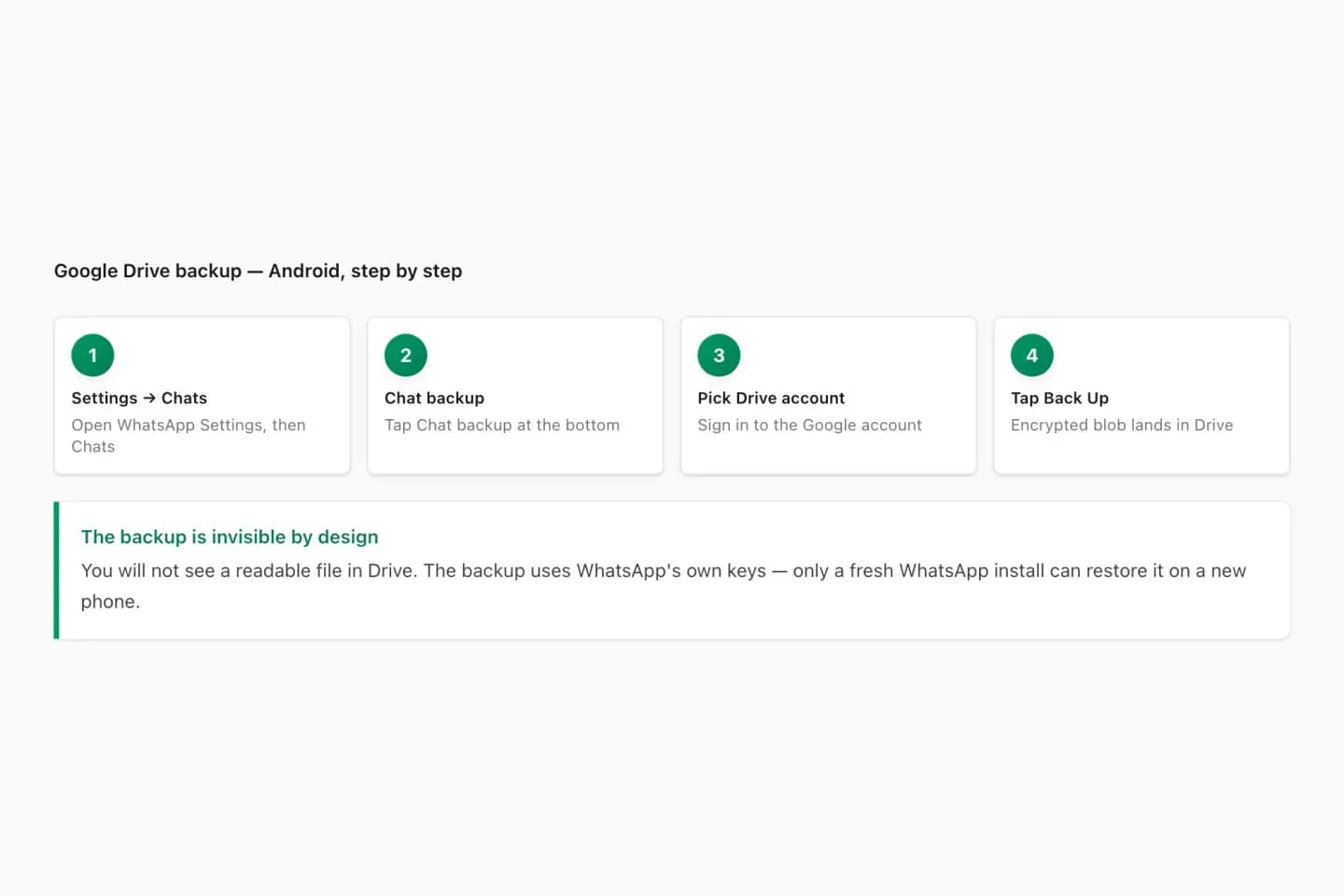
Open Google Drive on the web, go to Storage, and choose Backups (on the phone: Drive app → Menu → Backups). A WhatsApp entry shows the backup’s size and date. That is all Drive shows: there is no button to open, preview or download the messages.
This is by design. The backup exists so WhatsApp can restore itself; Google Drive simply stores it. WhatsApp notes that a standard Drive backup is not protected by WhatsApp’s end-to-end encryption unless you turn on end-to-end encrypted backup, but that does not make it readable in Drive — it is still WhatsApp restore data.
How to see your WhatsApp backup on iPhone and iCloud
On iPhone, WhatsApp → Settings → Chats → Chat Backup shows when the last iCloud backup ran and how large it is. In iPhone Settings → your name → iCloud → Manage Storage, WhatsApp appears as an app using storage. Neither screen lets you read the messages.
To read iPhone chats outside WhatsApp, export them: open the chat, tap the name at the top, choose Export Chat, and save or share the file. Then open it in the viewer.
Why we don’t open backup files
Reading a backup file outside WhatsApp would require its encryption key, which on Android is held by WhatsApp and the phone, and for an end-to-end encrypted backup is your own password or key. Getting that key usually means rooting a phone or handing a third party your credentials — both are risks we will not ask you to take for a chat you can simply export.
The export route is also more useful. It produces a plain-text record WhatsApp documents and supports, and you choose exactly which conversation leaves your phone.
- No backup files
- No keys or passwords
- No Google or Apple sign-in
- Only the chat you choose to export
What the viewer shows, and what it costs
The viewer shows a free preview of the first 10 messages of your export with sender names, dates and media references, so you can confirm it is the right chat and that it was read correctly. To keep the complete conversation, a one-time download from $7 gives you a formatted PDF plus Excel and CSV copies (text-only chats up to 5,000 messages; photos and larger chats from $14).
Uploads and generated files are deleted automatically within 7 days. Keep your original export file as the source copy.
Troubleshooting
Common problems and fixes
I can’t find a WhatsApp file in Google Drive
Backups are stored in hidden app data. Look under Drive → Storage → Backups; you will see the backup listed, but not as a file you can open.
I only have a .crypt14 or .crypt15 file
That is an encrypted Android database, not an export. Restore it into WhatsApp on a phone with the same number, then use Export Chat.
Restore asks for a password or 64-digit key
The backup is end-to-end encrypted. Only that password, passkey or key can unlock it; WhatsApp cannot reset it, and neither can anyone else.
The viewer says it found zero messages
Make sure you uploaded an Export Chat TXT or ZIP, not a backup, database or screenshot file.
Photos are missing in the viewer
Export again with Include Media. After a restore, older media may need to be downloaded in the chat before it can be exported.
Frequently asked questions
WhatsApp Backup Viewer FAQ
Is there a WhatsApp backup viewer?
Not for the backup itself. Google Drive and iCloud WhatsApp backups can only be restored into WhatsApp. To read chats outside the app, export the chat and open the export in a chat viewer such as ChatToPDF.
How can I see my WhatsApp backup in Google Drive?
Go to Google Drive → Storage → Backups. You can see that a WhatsApp backup exists, its size and date, but Drive does not let you open or download the messages.
Can I read WhatsApp backup messages without restoring?
Not in any safe, supported way. The backup is WhatsApp restore data. Restore it into WhatsApp, then export the chats you want to read.
Can ChatToPDF open my .crypt14 or .crypt15 file?
No. Those are encrypted WhatsApp databases. ChatToPDF opens Export Chat TXT and ZIP files only, and never asks for backup keys or account passwords.
How do I view my iCloud WhatsApp backup?
You can check its date and size in WhatsApp → Settings → Chats → Chat Backup, but not read it. Restore it on an iPhone with the same number and Apple ID, then export the chat.
How do I read WhatsApp chats on my computer?
Export the chat on your phone, send the TXT or ZIP to your computer and upload it to the viewer. It shows the conversation in your browser without WhatsApp Web.
Is the viewer free?
The preview of your export is free. Downloading the whole conversation as a PDF with Excel and CSV copies is a one-time purchase from $7.
Can I view all my chats at once?
No. WhatsApp exports one conversation at a time, so you export and view each chat separately.
Can a viewer recover deleted messages from a backup?
No. A viewer only shows messages in the export. If a message was deleted before the backup or export was made, it is not there to show.
Primary references
Technical statements on this page are tied to the source instructions or format documentation below. Product behavior is based on the current ChatToPDF implementation.
- WhatsApp Help Center — How to export your chat history
Primary instructions for the TXT or media-inclusive ZIP export every page on this site starts from.
- WhatsApp Help Center — How to back up your chat history
How Google Drive, iCloud and end-to-end encrypted backups are created and restored.
- WhatsApp Help Center — About Google Drive backups
Backup encryption, account linking and replacement of older backups.
- WhatsApp Help Center — How to back up to iCloud
iCloud backup requirements and the link between backups and phone numbers.
Last reviewed: 9 October 2026. ChatToPDF is independent and is not affiliated with or endorsed by WhatsApp or Meta.