
Definition and scope
What is a WhatsApp chat analyzer?
A WhatsApp chat analyzer reads the file WhatsApp produces with Export Chat and turns it into statistics. The export is a plain transcript: one line per message with a date, a time, a sender name and the text. Because every line carries a timestamp and a name, the file can be counted in ways the app itself never shows you.
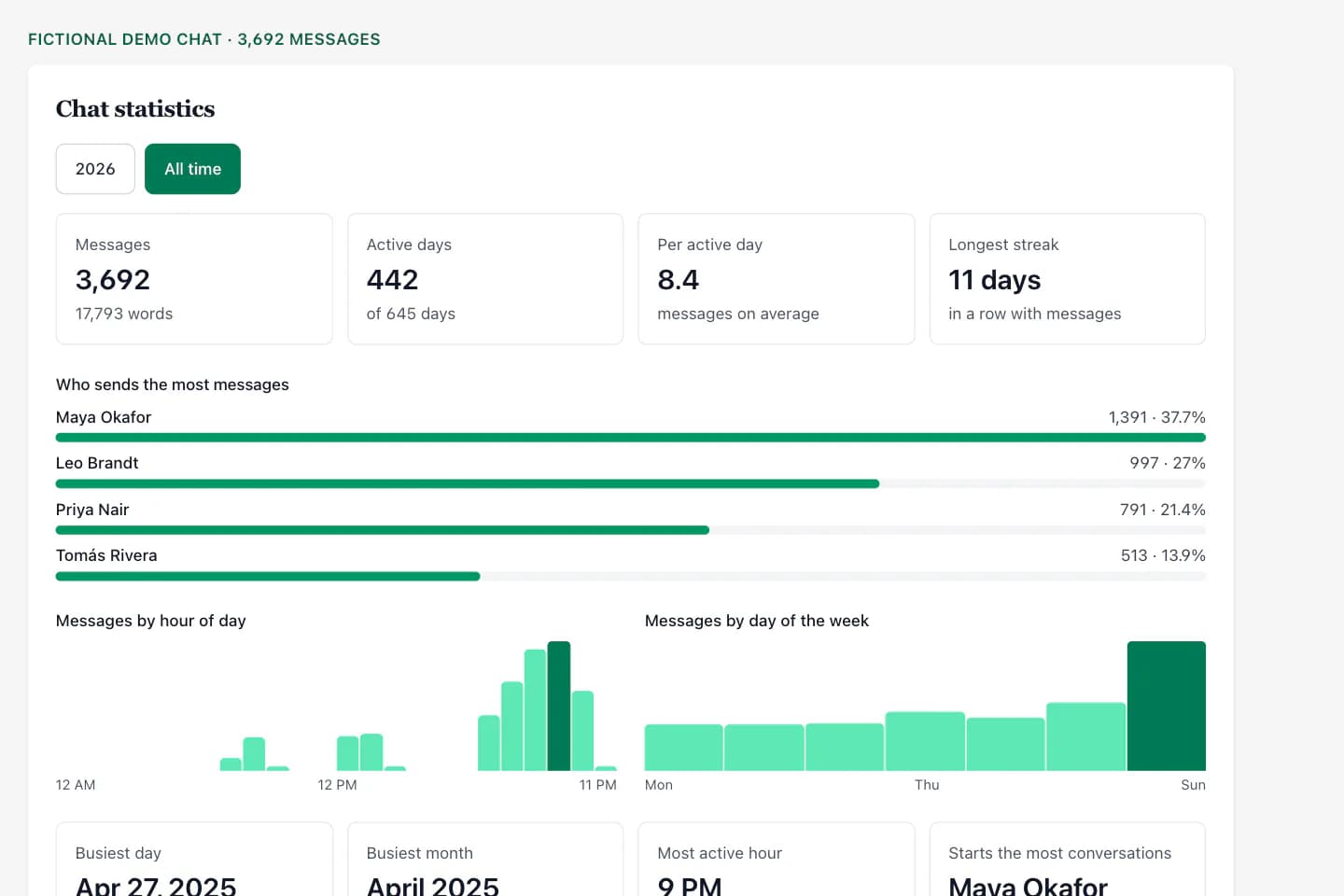
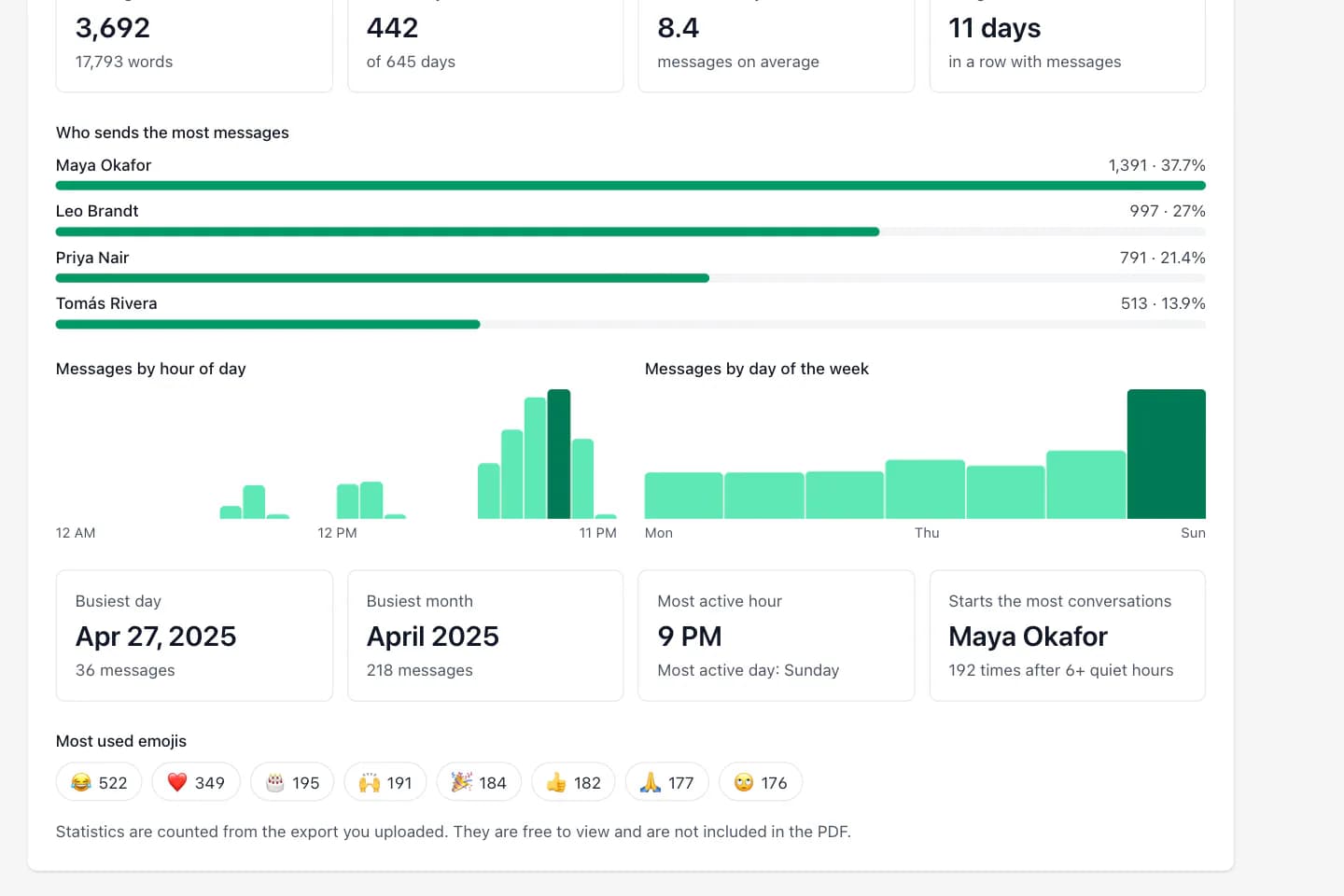
This analyzer counts. It reports how many messages and words each person sent, how the conversation is spread across the hours of the day and the days of the week, which day and month were busiest, how many days in a row the chat stayed active, who tends to write first after a quiet spell, and which emojis appear most. It does not judge tone, score sentiment or summarise what was said.
Everything is calculated from the one file you upload. ChatToPDF does not connect to your WhatsApp account, does not ask for your phone number and cannot see any chat you have not exported.
Three-step workflow
How to use the WhatsApp Chat Analyzer
Export the chat from WhatsApp
Open the chat. iPhone: tap the contact or group name, scroll down and tap Export Chat. Android: tap ⋮ → More → Export Chat. Choose Without Media.
Without Media gives the fullest history. WhatsApp limits an export to roughly 40,000 messages without media and far fewer with media, so a media export of a long chat drops its oldest messages.
Upload the TXT or ZIP
Send the export here from your phone or computer. The file is read on our server, the statistics are calculated in about a second, and the page opens on the results.
No account, no email and no WhatsApp login. Uploads are deleted automatically within 7 days.
Read the statistics, then decide what to keep
Switch between the whole chat and the most recent calendar year. Below the statistics you can read a free preview of the conversation itself.
If you want the conversation as a file, a one-time download from $7 gives you a formatted PDF plus Excel and CSV copies. The spreadsheet has one row per message, which is the right starting point for your own charts.
Ready to check your export?
Upload the source file and inspect the parsed preview first. No account, no email, nothing to pay until you download.
Field-level detail
What the analyzer counts
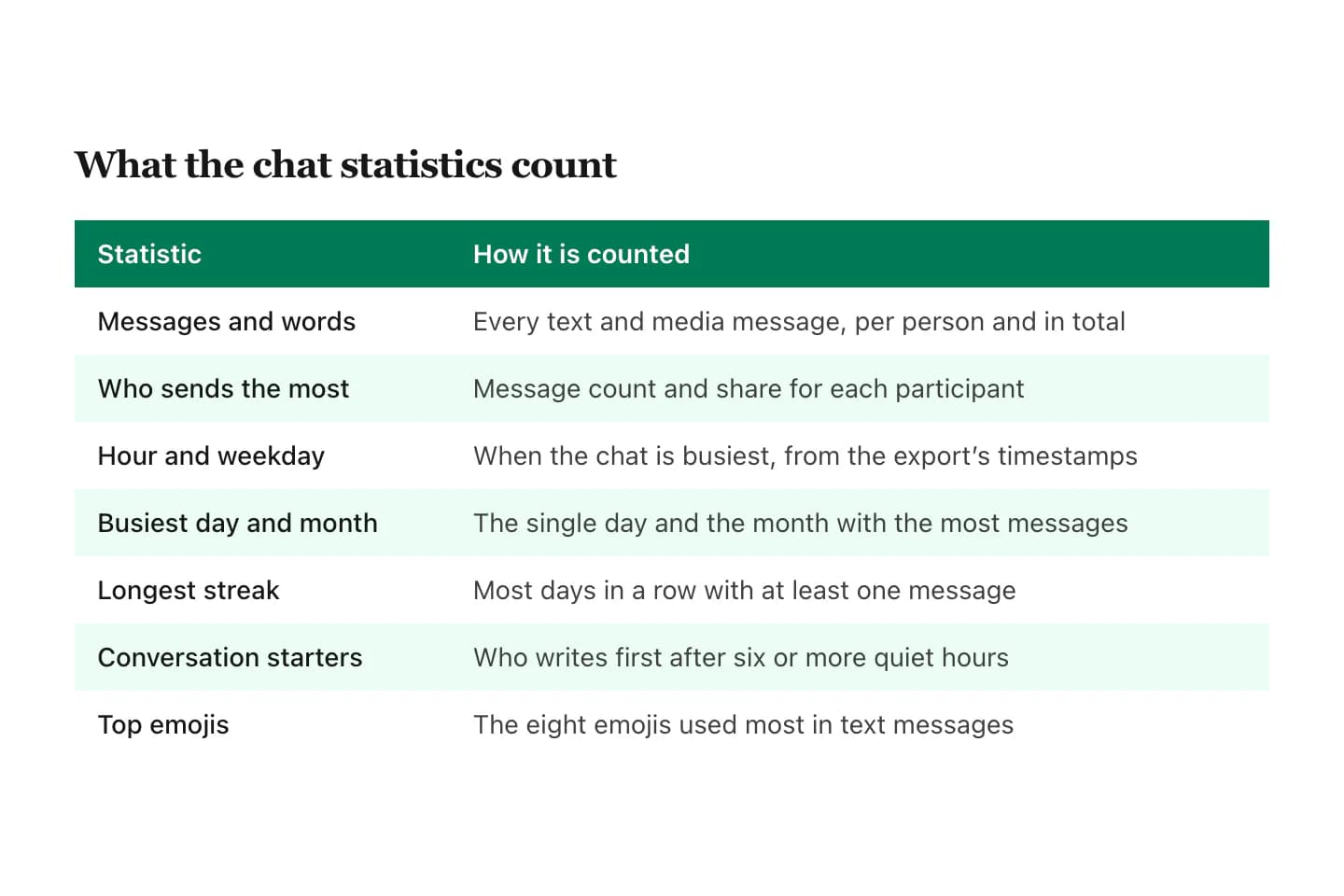
Each statistic is a count taken from the timestamps and sender names in your export. Nothing is estimated and nothing is inferred from the meaning of a message.
- Field
- Messages and words
- What it contains
- Total messages, and total words in text messages, for the chat and per person
- Useful for
- Seeing how large the conversation really is
- Field
- Who sends the most
- What it contains
- Message count and percentage share for up to eight participants
- Useful for
- Group chats where a few people carry the conversation
- Field
- Hour of day
- What it contains
- Messages in each of the 24 hours, using the times written in the export
- Useful for
- Finding when the chat is actually active
- Field
- Day of the week
- What it contains
- Messages on each weekday, Monday to Sunday
- Useful for
- Spotting weekend-heavy or workday-only chats
- Field
- Busiest day and month
- What it contains
- The single date and the calendar month with the most messages
- Useful for
- Locating the event everyone was talking about
- Field
- Active days and streak
- What it contains
- Days with at least one message, and the longest run of consecutive active days
- Useful for
- Measuring how regular the contact is
- Field
- Conversation starters
- What it contains
- Who wrote first after six or more hours of silence, counted per person
- Useful for
- Seeing who usually reaches out
- Field
- Top emojis
- What it contains
- The eight emojis used most often in text messages
- Useful for
- A quick read on the chat’s habits
Practical applications
When this format is useful
Settle who talks most in the group
Message counts and shares per person, from the first exported message to the last.
Look back on a relationship or friendship
Total messages, active days and the longest streak give a long conversation a shape.
Check a community or class group
See whether a group is active daily or only around events, and at which hours.
Prepare data for your own analysis
The paid Excel and CSV files hold one row per message with date, time and sender, ready for a pivot table.
Review a customer or team chat
Count volume by weekday and hour before deciding how to staff or archive the conversation.
Find the date worth rereading
The busiest day points straight at the part of a long chat most people want to see again.
Format decision guide
Ways to analyze a WhatsApp chat, compared
Several kinds of tool answer this search. They differ mainly in where your chat is processed and how much setup they need.
- Approach
- This analyzer (upload the export)
- What you get
- Statistics in the browser in seconds, free, with an optional PDF, Excel and CSV
- Catch
- The file is processed on our server and deleted within 7 days
- Approach
- On-device apps
- What you get
- Statistics calculated on the phone, nothing uploaded
- Catch
- An app to install; features and prices vary by app
- Approach
- Open-source scripts (Python, Streamlit)
- What you get
- Full control and custom charts
- Catch
- Needs a computer, setup and often a specific date format
- Approach
- Spreadsheet by hand
- What you get
- Any chart you can build
- Catch
- You must first split the TXT into date, time, sender and message columns
How the counting works
The analyzer parses the export into messages using the same parser that builds ChatToPDF’s PDFs, so the date formats of iPhone and Android exports in different languages are recognised the same way. System lines, such as the encryption notice or “X added Y”, are left out of every count.
Hours and weekdays come from the time written in the export, which is the local time of the phone that made it. A streak is a run of calendar days that each contain at least one message. A conversation start is a message sent after six or more hours with no messages from anyone.
What it does not do
There is no sentiment score, no “red flag” detector and no AI summary. Those features require interpreting what people wrote, and results of that kind are easy to over-read. This tool reports counts you can verify against the export yourself.
It also cannot see messages that are not in the file. Deleted messages, chats you did not export and anything older than WhatsApp’s export limit are outside the statistics.
- No sentiment or tone scoring
- No summaries of message content
- No access to your WhatsApp account
- No data beyond the uploaded export
Privacy: where your chat goes
Your export is uploaded to ChatToPDF’s server to be parsed. It is not analysed in the browser alone, and we would rather say so plainly than imply otherwise. Uploaded files and anything generated from them are deleted automatically within 7 days, and no person reads your chat.
If the conversation is too sensitive to upload anywhere, use a tool that runs on your own device. ChatToPDF’s parser is also available as an open-source command-line tool for local conversion to PDF.
What is free and what costs money
The statistics and a preview of the first messages are free, with no account. You pay only if you want the conversation as a file: $7 for a text-only PDF of up to 5,000 messages, $14 with photos up to 25,000 messages, and $29 with no message limit. Every paid plan includes the Excel and CSV files.
The statistics panel is shown on screen and is not part of the PDF. To keep it, take a screenshot.
Troubleshooting
Common problems and fixes
The analyzer found zero messages
Upload the TXT or ZIP that Export Chat creates. Backup files, screenshots and copied text are not exports and cannot be counted.
The chat starts later than I expected
WhatsApp limits how many messages one export holds. Export again with Without Media, which carries the longest history.
One person appears twice
The export uses the name saved in your contacts at the time. A renamed contact or a changed number can appear as two senders.
The hours look shifted
Times are shown exactly as written in the export, in the time zone of the phone that exported it.
Only eight people are listed
The list shows the eight most active participants and tells you how many others there are. The paid Excel file contains every message from everyone.
Frequently asked questions
WhatsApp Chat Analyzer FAQ
Is the WhatsApp chat analyzer free?
Yes. The statistics and a preview of the first messages are free and need no account. You pay only if you want the conversation as a PDF with Excel and CSV copies, from $7.
How do I analyze a WhatsApp chat?
Export the chat from WhatsApp with Export Chat → Without Media, then upload the TXT or ZIP. The analyzer shows messages per person, activity by hour and weekday, the busiest day, streaks and top emojis.
Is it safe to upload my chat?
The file is processed on ChatToPDF’s server, not only in your browser. Uploads are deleted automatically within 7 days and no person reads them. For a chat too sensitive to upload, use an on-device tool instead.
Does it work for group chats?
Yes. Group exports are counted the same way, with a ranked list of the eight most active participants and a note of how many more there are.
Can it analyze the whole chat history?
It analyzes everything in the export. WhatsApp limits one export to roughly 40,000 messages without media, so very long chats may be missing their oldest messages.
Does the other person know I analyzed the chat?
No. Exporting a chat does not notify anyone, and the analyzer never contacts WhatsApp or the people in the conversation.
Does it show sentiment or who is more interested?
No. It reports counts only: messages, words, times, streaks and emojis. It does not interpret what was written.
Can I download the statistics?
The statistics are shown on screen; take a screenshot to keep them. The paid download is the conversation itself as PDF, Excel and CSV, and the spreadsheet lets you build any chart you like.
Does it work with iPhone and Android exports?
Yes. Both produce a TXT transcript, or a ZIP containing it, and the analyzer reads the date formats of either platform.
Primary references
Technical statements on this page are tied to the source instructions or format documentation below. Product behavior is based on the current ChatToPDF implementation.
- WhatsApp Help Center — How to export your chat history
Primary instructions for the TXT or media-inclusive ZIP export every page on this site starts from.
Last reviewed: 11 November 2026. ChatToPDF is independent and is not affiliated with or endorsed by WhatsApp or Meta.