
Scope before software
One clip and one chat are different conversion jobs
Most pages ranking for “WhatsApp audio to MP3” are generic single-file converters. They are appropriate when you already saved one voice note and only need a compatible copy. A local tool such as VLC or FFmpeg is usually the more private and economical answer for that small task.
A full chat can contain dozens or hundreds of generated audio filenames. Processing those files one by one loses the sender, timestamp and surrounding message that explain what each recording belongs to. ChatToPDF uses the exported transcript as a map, then packages the resolved audio beside a readable PDF.
If your actual goal is to search or quote the spoken words, MP3 is the wrong endpoint. Use the WhatsApp audio-to-text workflow instead. It keeps successful transcripts in conversation order.
Intent check
Choose the route by the job, not the file extension
VLC or FFmpeg
Keep it local when the recording is sensitive.
ChatToPDF MP3 bundle
Preserve filenames and conversation-level context.
Voice-note transcription
Choose text output instead of another audio format.
Three-step workflow
How to convert a whole WhatsApp chat’s audio to MP3
Export the chat with media
Open the conversation in WhatsApp on the phone, choose Export Chat and select Include Media or Including Media. Save the ZIP without extracting or renaming its contents.
A desktop or web interface may not expose the same export action. WhatsApp’s current Help Center is the source of truth for entry points.
Upload the untouched ZIP
The preview parses the transcript, identifies participants and resolves voice-note media present in the archive. It then reports the detected voice-note count before payment.
A placeholder in _chat.txt is not audio. If the count is lower than expected, check the source export rather than assuming the converter can retrieve omitted media.
Create and verify the bundle
Choose playable audio for $49, complete the conversion and download the bundle. Extract the entire ZIP, open the PDF and test representative links and audio files.
Keep your original WhatsApp export separately. The generated bundle is a convenience derivative, not a replacement for the source archive.
Input contract
Why “Include Media” is not optional
Without media
_chat.txt
Message rows and placeholders; no voice-note bytes to convert.
With media
_chat.txt
PTT-202607…001.opus
PTT-202607…002.opus
Chronology plus the media files WhatsApp included.
Before payment
The free preview is a count-and-fit checkpoint
Your count
Messages
Parsed from _chat.txt
Your count
Participants
Read from supported message rows
Your count
Voice notes
Resolved from included audio files
Check the archive before paying
The dedicated upload accepts ZIP only and keeps transcription off.
Know the deliverable
What the $49 playable bundle contains
The paid job produces a formatted PDF and an audio directory inside one downloadable ZIP. Voice-note rows in the PDF receive relative links to their packaged audio when the source reference can be resolved. The original filenames provide the bridge between the transcript row and the converted asset.
On a successful conversion, an Opus, Ogg or other supported source is delivered as MP3. A file that is already MP3 passes through. If the converter times out or cannot decode one note, that note is delivered under its original extension. This per-file fallback is intentional: preserving access to the original bytes is better than failing every other note.
Relative links are more portable than links to a temporary website, but PDF readers differ. Extract the whole bundle, keep the PDF and audio folder together, and verify the reader used by the eventual recipient.
Delivery contract
Keep the output folder together
chat-playable-audio.zip
├── formatted-chat.pdf
└── audio/
├── PTT-…001.mp3
├── PTT-…002.mp3
└── PTT-…003.opus ← fallback
Codec note
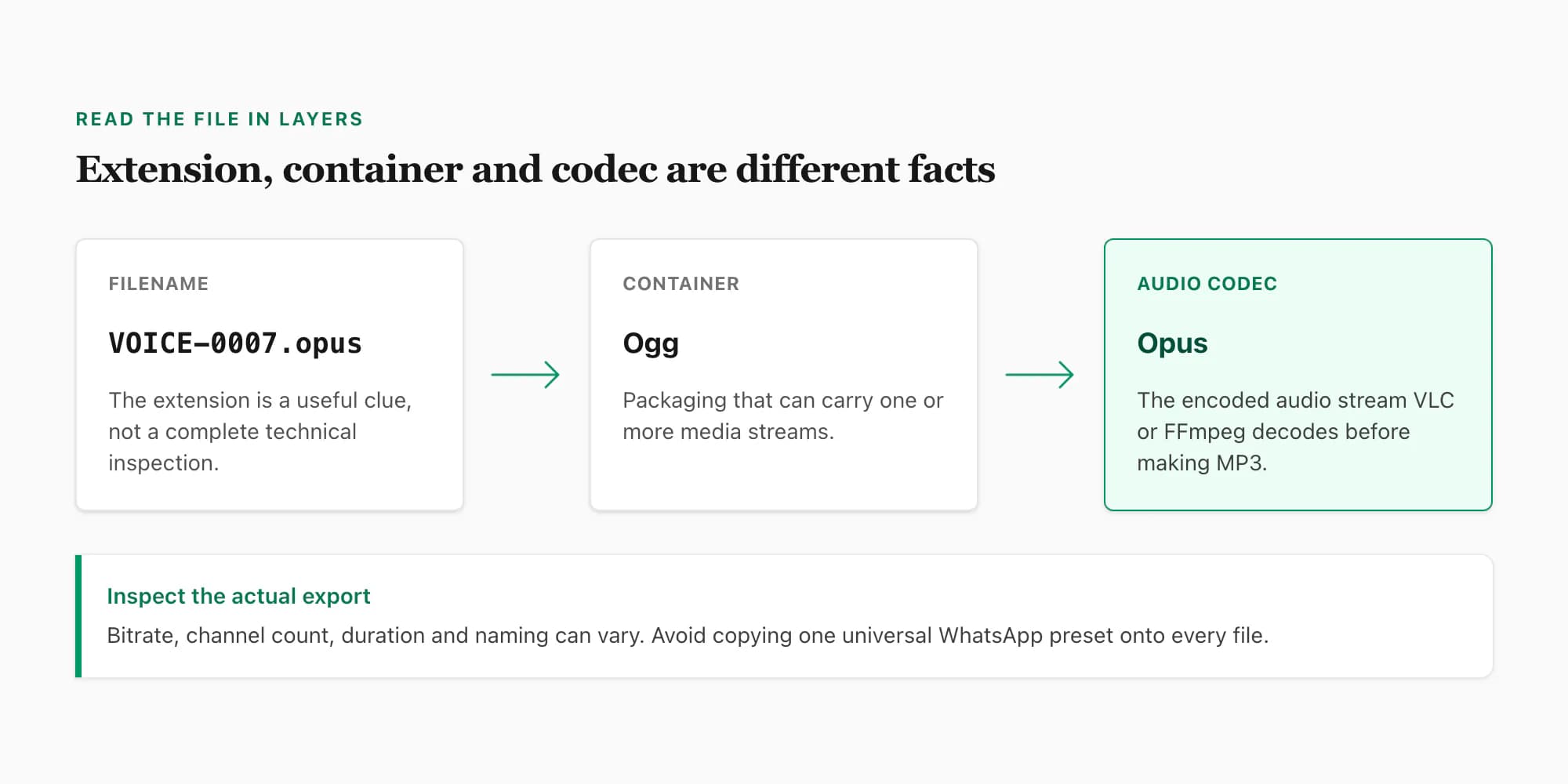
Renaming .opus to .mp3 is not conversion
A filename extension, a container and an audio codec describe different layers. Changing the suffix does not decode Opus or encode MP3. A real transcode reads the source stream and creates a new compatible stream. The WhatsApp audio-format reference explains the layers and the properties that can vary between exports.
This is an explanatory diagram, not a screenshot of the converter.
Privacy and retention
Audio conversion is not permission to transcribe
A WhatsApp export can contain private family, workplace, medical or client conversations. ChatToPDF is a cloud processor: the ZIP is uploaded over HTTPS and processed in a server-side job directory. It is not a browser-local converter.
The dedicated MP3 intent turns on playable audio and keeps transcription off. The free preview does not create a speech-provider language sample on this path. If you later enable transcription, that is a separate choice and the configured speech provider receives the audio needed for that purpose.
Source exports, extracted media and generated downloads are scheduled for deletion within seven days of upload. A job still processing at that boundary can receive a bounded grace period. Operational records have separate retention rules described in the privacy policy.
Processing boundary
MP3-only means no speech-provider sample
HTTPS upload
Encrypted in transit
MP3 job
Server-side transcode
Scheduled deletion
Within seven days
Limits worth knowing first
What this workflow cannot recover or prove
- It cannot convert audio that WhatsApp omitted from the export.
- It does not accept a lone .opus, .ogg, .m4a or .mp3 upload.
- It does not turn voice or video call history into call recordings.
- It does not improve the recording’s original speech quality.
- It does not guarantee every PDF reader will open relative audio links.
- A derivative MP3 bundle is not automatically forensic evidence or proof of authorship.
Frequently asked questions
WhatsApp audio to MP3 FAQ
Can ChatToPDF convert one WhatsApp voice note to MP3?
No. This route accepts the original ZIP created by WhatsApp Export Chat with media, not a lone .opus, .ogg, .m4a or .mp3 file. For one saved note, VLC or FFmpeg is the better local option.
How do I convert all WhatsApp voice notes to MP3 at once?
Open the conversation in WhatsApp, choose Export Chat and include media, then upload the untouched ZIP. ChatToPDF finds the audio files referenced by that exported conversation and attempts to transcode each supported note as one job.
Is the WhatsApp audio-to-MP3 converter free?
The preview is free: it parses the export and reports the detected voice-note count before payment. Creating the playable audio bundle is a one-time $49 purchase for that chat. There is no subscription.
Does the $49 package include transcription?
The MP3 landing path selects playable audio and leaves transcription off. You are buying a PDF with clickable audio references plus the bundled audio files. Transcription is a separate option and processing purpose that you can choose deliberately.
What happens if one WhatsApp voice note cannot be converted?
A failed transcode does not fail the whole job. That note is delivered with its original bytes and original extension instead, while successful notes remain MP3 files. The output should therefore be checked before you discard any working copies.
Does converting Opus to MP3 improve the recording quality?
No. MP3 usually improves playback compatibility, not source quality. Opus-to-MP3 is another lossy encode, so it cannot recreate clipped words, missing frequencies or detail that was never present in the exported recording.
Why does the upload have to be a ZIP?
A text-only WhatsApp export contains message text and media placeholders, but not the audio bytes. The media-inclusive ZIP contains the transcript plus the voice-note files that can be matched back to their place in the conversation.
How long are my upload and generated files kept?
The source export, extracted media and generated downloads are scheduled for deletion within seven days of upload. A job still processing at that boundary can receive a bounded processing grace period described in the privacy policy.
Primary references and verification
Export instructions and codec claims are tied to primary sources. Bundle behavior, fallback handling, pricing and retention describe the current ChatToPDF implementation and policies.
- WhatsApp Help Center — export chat history
Current first-party export entry points and media-export context.
- IETF RFC 6716 — Opus audio codec
Authoritative technical definition of the Opus codec.
- FFmpeg documentation
Primary command and stream-processing reference for the local transcode engine.
- ChatToPDF privacy policy
Current file processing, deletion and operational-retention terms.
Last reviewed: 24 July 2026. ChatToPDF is independent and is not affiliated with or endorsed by WhatsApp or Meta.