
WhatsApp voice notes commonly appear in chat exports as Opus audio in an Ogg container, often with an .opus or .ogg extension. That is the useful format answer; a universal 16 kHz or 16 kbps specification is not. Encoding details can vary by app version, device and file, so inspect the actual export when sample rate, channel count or bitrate matters. Converting to MP3 helps compatibility. Turning the speech into searchable text is transcription, which is a different operation.
I use the file's actual metadata when those technical details matter; the extension alone cannot prove its bitrate, sample rate or channel layout.
What audio format does WhatsApp use?
For a push-to-talk voice note, the most common export is an Ogg-family file containing the Opus codec. The filename may end in .opus or .ogg; an Ogg file with only Opus audio is often called an “Opus file.” A song or recording attached as a normal audio document may instead be MP3, M4A/AAC, WAV or another accepted media type. The exported extension is therefore a clue to the message type, not one universal rule for every audio item WhatsApp can send.
- Opus codec
Opus is an open, royalty-free audio codec standardised as RFC 6716 (IETF, 2012). The reference codec supports 6–510 kbit/s, narrowband through fullband audio, 8–48 kHz input rates, mono or stereo, and constant or variable bitrate. Those are codec capabilities, not fixed WhatsApp settings. Read the individual file's metadata before reporting its exact sample rate or bitrate.
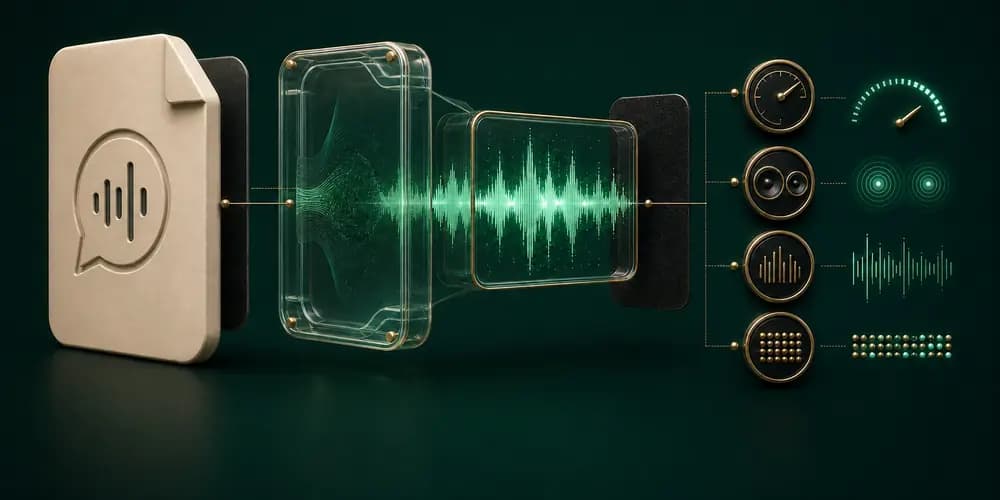
To inspect a file yourself, use a media-information panel in VLC or run ffprobe -v error -show_streams -show_format your-file.opus. Record the codec, container, channels, duration and measured average bitrate from that file. Opus commonly exposes a 48 kHz decoding clock even when its effective audio bandwidth is lower, which is another reason not to infer recording quality from a single displayed field.
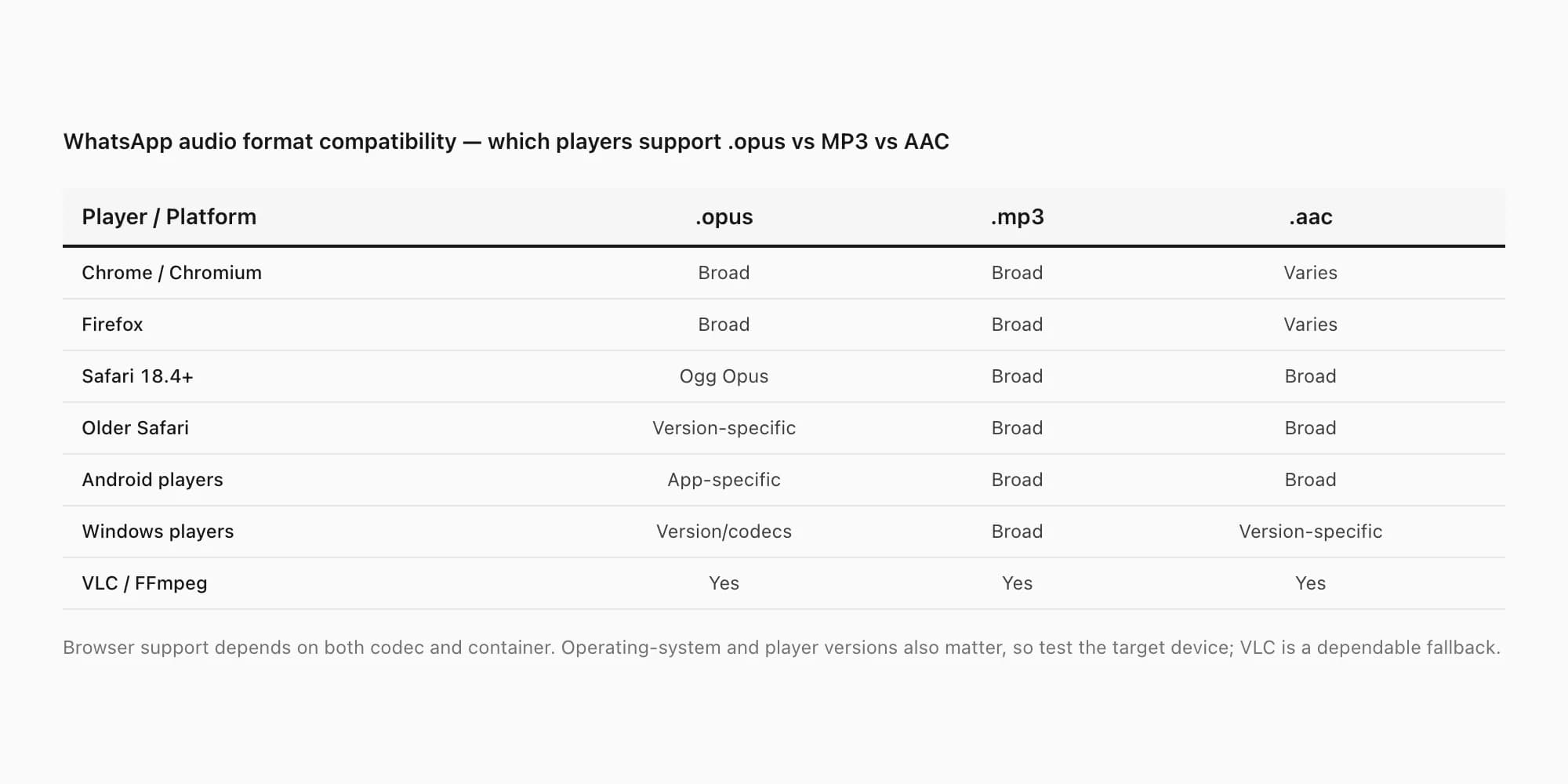
Compatibility also changes over time. Chromium and Firefox have broad Opus support, VLC and FFmpeg are dependable cross-platform fallbacks, and Safari 18.4 added Opus in Ogg-container playback on current Apple operating systems. Older browsers, operating systems and hardware players can still fail. Test the target device instead of relying on an evergreen yes/no matrix; convert to MP3 or M4A only when the recipient's player needs it.
Which audio formats does WhatsApp support?
There is no single audio-file answer for every WhatsApp message or export. Push-to-talk voice notes commonly appear as Opus audio in an Ogg container, often ending in .opus or .ogg. Ordinary audio attachments in a media-inclusive export can instead be MP3, M4A/AAC, WAV or another file-specific format. A text-only export contains no audio bytes.
- Export item
- Push-to-talk voice note
- What you can encounter
- Commonly Opus in an Ogg container
- What to verify
- Inspect the codec, container and duration in the actual file
- Export item
- Ordinary audio attachment
- What you can encounter
- MP3, M4A/AAC, WAV or another attachment-specific format
- What to verify
- Check the extension and probe the file rather than inferring from WhatsApp
- Export item
- Export with media
- What you can encounter
- _chat.txt plus the media files WhatsApp includes in that archive
- What to verify
- Confirm the required audio files are present before conversion or transcription
- Export item
- Export without media
- What you can encounter
- The text transcript and attachment references, without the audio payloads
- What to verify
- Re-export with media if the source audio is needed
| Export item | What you can encounter | What to verify |
|---|---|---|
| Push-to-talk voice note | Commonly Opus in an Ogg container | Inspect the codec, container and duration in the actual file |
| Ordinary audio attachment | MP3, M4A/AAC, WAV or another attachment-specific format | Check the extension and probe the file rather than inferring from WhatsApp |
| Export with media | _chat.txt plus the media files WhatsApp includes in that archive | Confirm the required audio files are present before conversion or transcription |
| Export without media | The text transcript and attachment references, without the audio payloads | Re-export with media if the source audio is needed |
WhatsApp's official export instructions distinguish exports with media from exports without media, but they do not define one universal codec, container or playback contract for every audio attachment. This section describes files you can encounter in an export; it is not a claim that every WhatsApp client accepts every listed format for sending.
Opus vs MP3 vs AAC — the real differences
Here is what the three formats trade off. Keep codec, container and filename separate: Opus and AAC are codecs, while .opus, .ogg, .m4a and .mp3 describe the file packaging or extension users encounter.
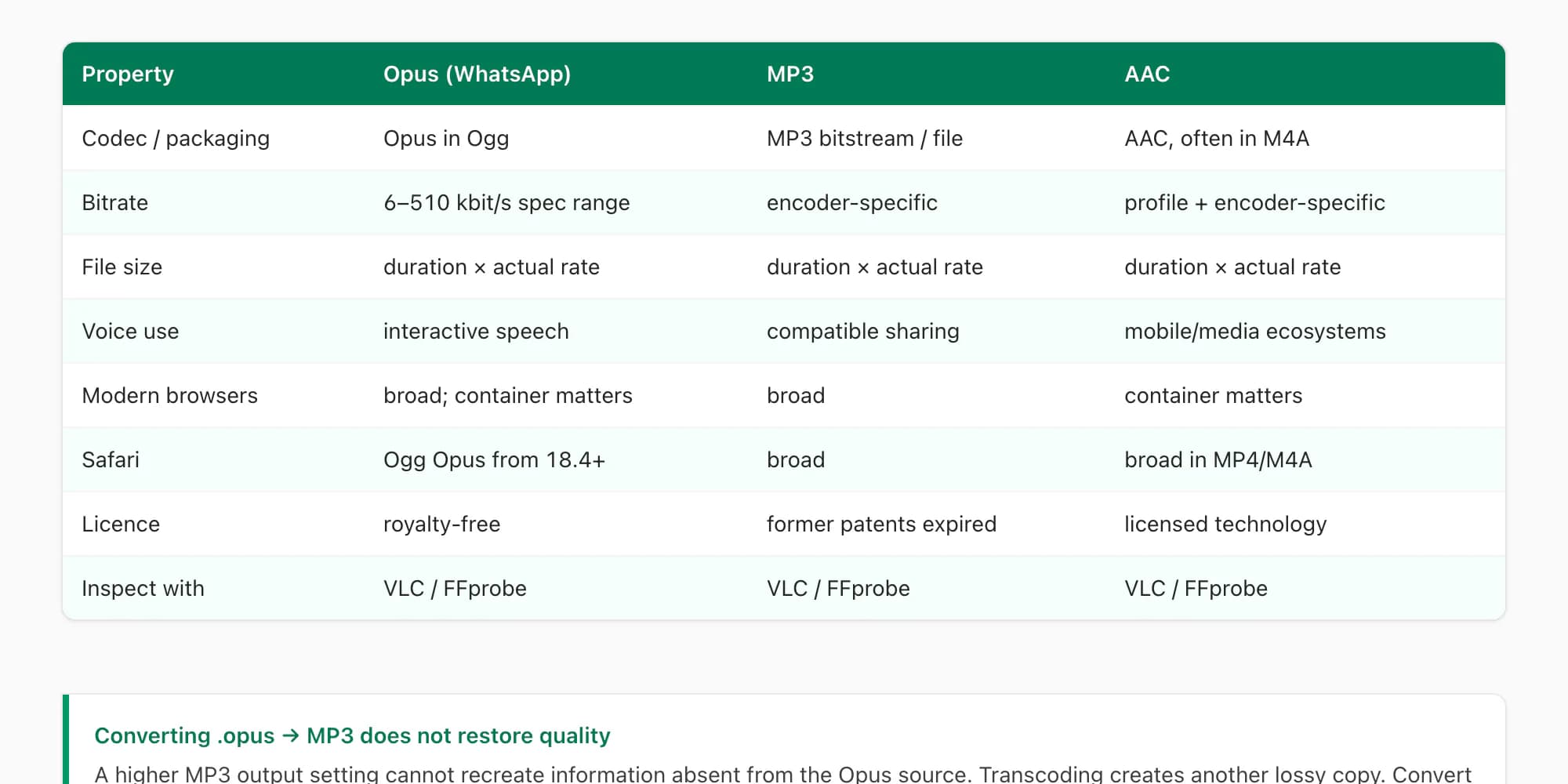
| Property | Opus (common voice-note codec) | MP3 | AAC |
|---|---|---|---|
| Bitrate | 6–510 kbit/s in the codec specification | Encoder and file specific | Profile, encoder and file specific |
| File size | Duration × actual average bitrate | Duration × actual average bitrate | Duration × actual average bitrate |
| Voice quality | Efficient for interactive speech | Depends on source and encode settings | Depends on source and encode settings |
| Native browser support | Broad; container and browser version matter | Nearly universal | Nearly universal |
| macOS / iOS (Safari) | Ogg Opus supported in Safari 18.4+; older versions vary | Supported | Supported (preferred) |
| Windows Media Player | Version and installed codecs matter; VLC is safer | Supported | Supported |
| Editing / DAW support | Strong in FFmpeg/VLC; editor support varies | Universal | Very wide |
| Transcription engine support | Accepted by many providers; verify the API | Widely accepted | Widely accepted in M4A/MP4 |
| Licence | Royalty-free (IETF RFC 6716) | Former patent pool has expired | Licensed technology |
| Best use case | VoIP, streaming, WhatsApp | Universal sharing, archiving | Apple ecosystem, streaming |
The important thing to notice: converting Opus to MP3 does not improve the source audio. A higher number selected for the MP3 output cannot restore information discarded before or during the original encode. It creates a second lossy encode in a format that may play on more devices. Convert for compatibility, and keep the untouched Opus file for verification or future processing.
What should you do with the exported audio?
The filename tells you how the recording is stored. Your next step depends on what you need from it:
- Your task
- Listen to one saved note
- Useful output
- The original audio, or an MP3 compatibility copy
- Next step
- Try a compatible local player; convert only if your target player needs it
- Your task
- Listen to notes across one exported chat
- Useful output
- PDF with audio references and the playable bundle
- Next step
- Keep the media-inclusive ZIP intact for whole-chat MP3 processing
- Your task
- Read or search the spoken words
- Useful output
- A transcript
- Next step
- Try one short note free, or preview the whole chat for paid transcription
- Your task
- Read the written conversation
- Useful output
- Viewer, PDF or spreadsheet
- Next step
- Use the TXT transcript; audio conversion is not needed for written messages
| Your task | Useful output | Next step |
|---|---|---|
| Listen to one saved note | The original audio, or an MP3 compatibility copy | Try a compatible local player; convert only if your target player needs it |
| Listen to notes across one exported chat | PDF with audio references and the playable bundle | Keep the media-inclusive ZIP intact for whole-chat MP3 processing |
| Read or search the spoken words | A transcript | Try one short note free, or preview the whole chat for paid transcription |
| Read the written conversation | Viewer, PDF or spreadsheet | Use the TXT transcript; audio conversion is not needed for written messages |
For one file, follow the local MP3 conversion guide. For many included notes, use the whole-chat MP3 bundle. To turn speech into searchable words, use the audio-to-text tool. To check the written conversation first, open the chat viewer.
When to make an MP3 compatibility copy
Create an MP3 only when a target player, editor or sharing workflow cannot use the exported source. First download the WhatsApp voice note, inspect the real file and keep the untouched original. A conversion decodes the source and encodes a new lossy derivative; renaming .opus to .mp3 is not conversion.
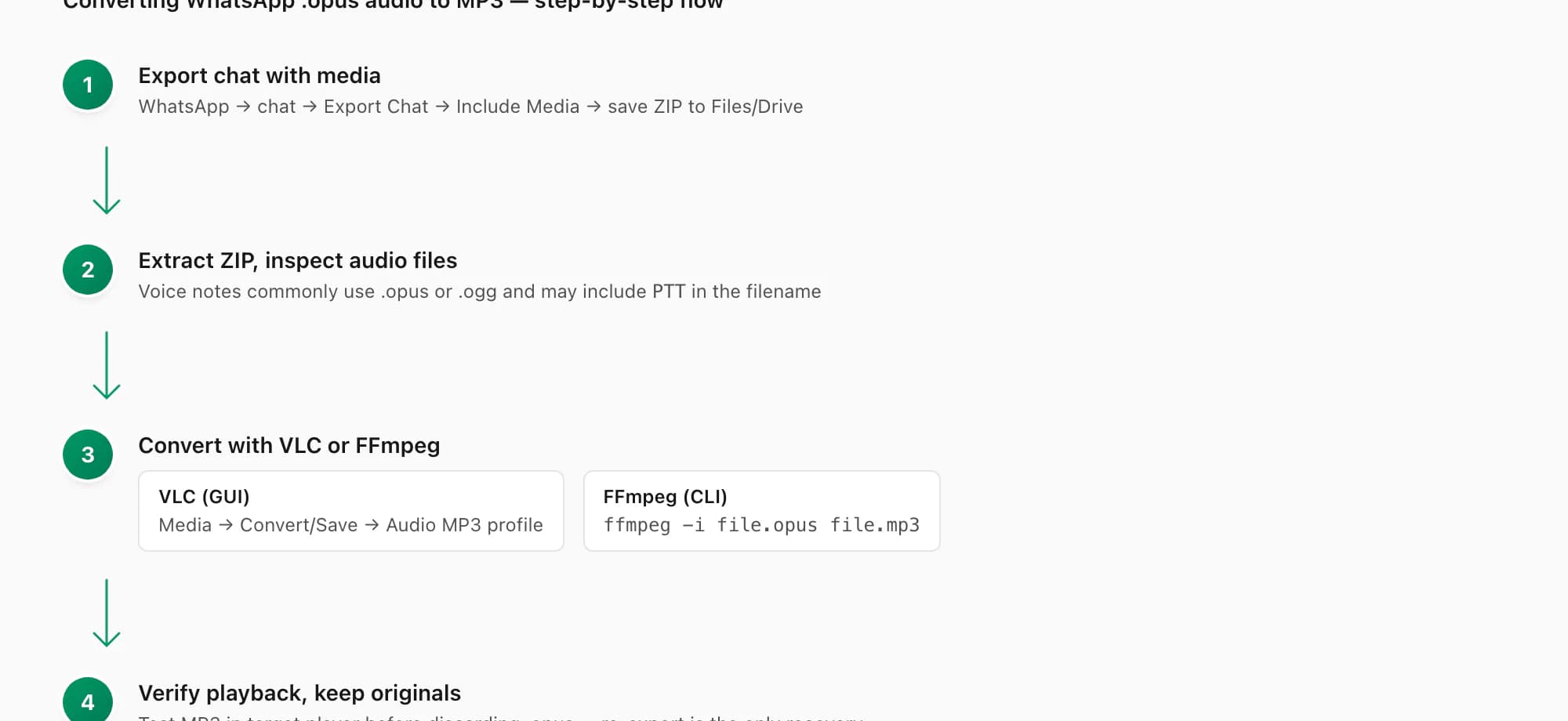
Use VLC for a visual local workflow, FFmpeg for a repeatable command or batch, and a browser service only after checking who receives the recording and when it is deleted. The dedicated WhatsApp audio to MP3 guide provides the complete VLC and FFmpeg steps, online-converter privacy checklist, output settings, verification and preservation workflow.
This page retains the format decision: Opus is commonly the efficient exported source, while MP3 is a broadly compatible derivative. The conversion guide owns the step-by-step task.
Bitrate and quality — why WhatsApp audio sounds the way it does
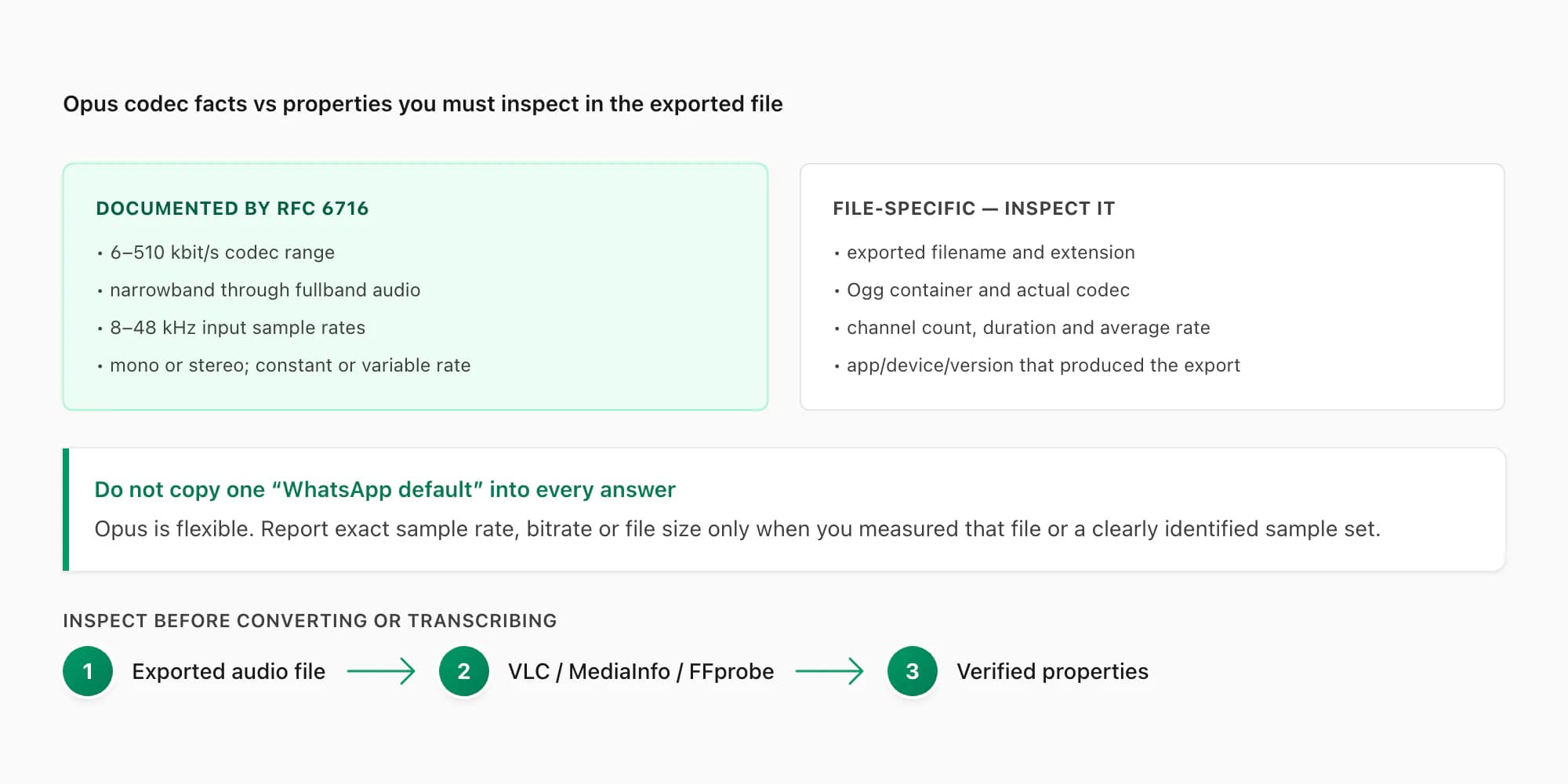
Do not infer a WhatsApp audio file's quality from a copied “default bitrate” on the web. Opus supports a wide range, can vary its bitrate during the recording and can represent different audio bandwidths. The only reliable technical description of a specific export comes from inspecting that file.
- Bitrate
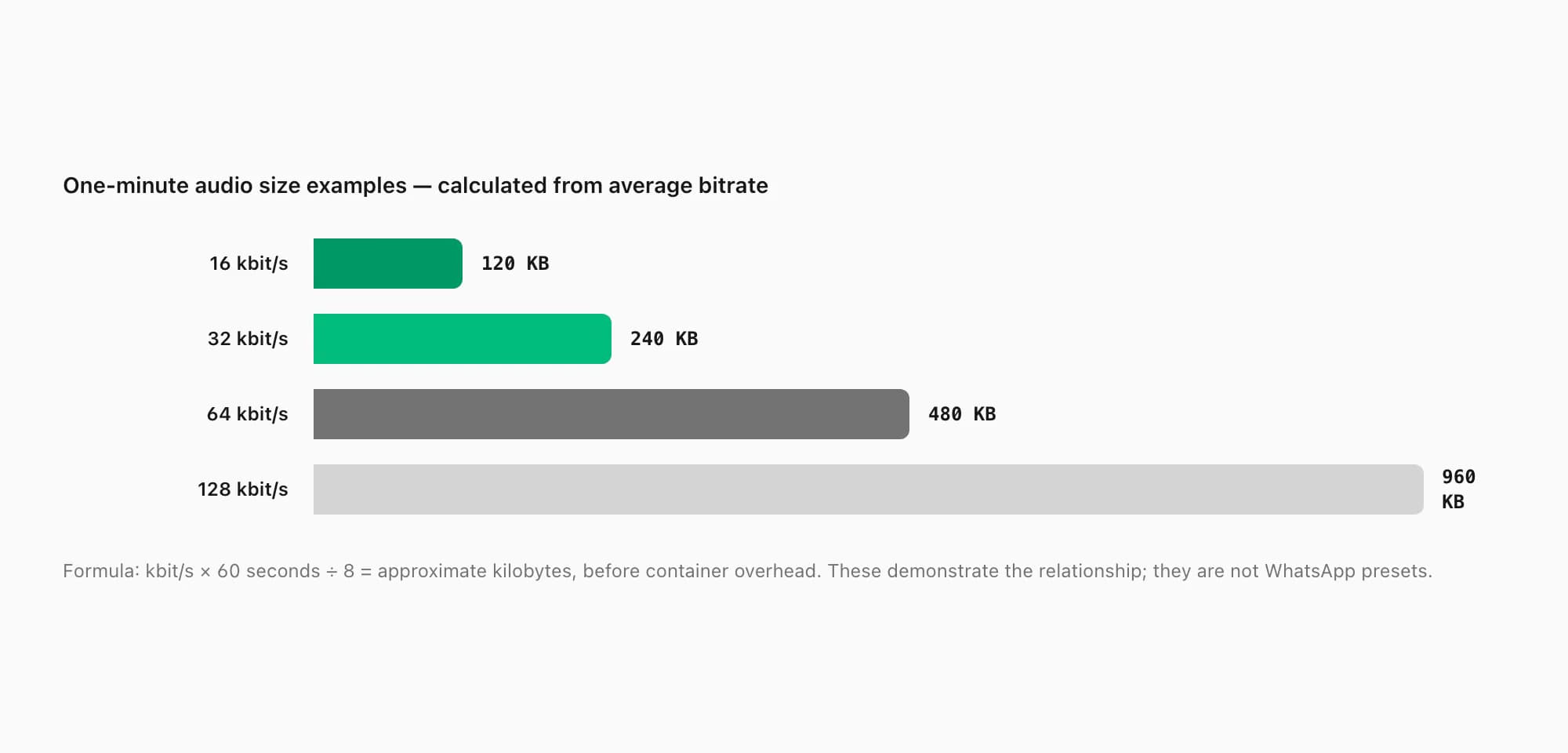
Bitrate is the average amount of encoded data used per second of audio. For a constant-rate estimate, file size in kilobytes is approximately
bitrate in kbit/s × duration in seconds ÷ 8. Variable-bitrate files move around that average, so use the measured file size or a full-file probe rather than one instantaneous reading.
For one minute of audio, 16 kbit/s is about 120 KB, 32 kbit/s about 240 KB, 64 kbit/s about 480 KB and 128 kbit/s about 960 KB before container overhead. Those are arithmetic examples, not WhatsApp presets. They explain why converting a compact source to 128 kbit/s MP3 can create a much larger file without adding information.
For transcription, recording conditions usually matter more than the extension: distance from the microphone, clipping, background voices, wind, traffic, accent, dialect and code-switching all affect the words a speech model can recover. Converting Opus to a higher-bitrate MP3 cannot repair speech that is masked or missing in the original.
Does WhatsApp compress audio?
There is no one yes-or-no answer for every WhatsApp audio message. WhatsApp's published export instructions do not promise a fixed bitrate or sample rate, and they do not say that every exported attachment is byte-for-byte identical to a pre-send master. A push-to-talk voice note is encoded media, while an ordinary audio attachment can arrive in another format. Export Chat gives you the file currently available to that export; it is not a provenance log for an earlier source file.
When exact preservation matters, keep the received source file, export the chat with media, and compare the relevant files yourself. Record file size, duration, codec, container, channels and measured bitrate with a tool such as FFprobe. Matching cryptographic hashes show that two compared files are byte-identical; different hashes show only that the bytes differ, not when or why they changed.
Do not infer compression or quality from the extension or file size alone. Converting an exported Opus file to MP3 creates another lossy derivative for compatibility; it does not restore an earlier recording or prove what happened before export.
Don't want the file — want the words?
Everything above is about the audio file as a file — its format, its codec, how to convert it so it plays somewhere. But a lot of people searching "WhatsApp audio format" are not really trying to play the file anywhere. They want the spoken content as text: for a record, for search, for a legal document, for a quick summary of a long voice thread.
Converting .opus to MP3 gets you a different file. It does not get you the words. That is transcription, and it is a completely different operation.
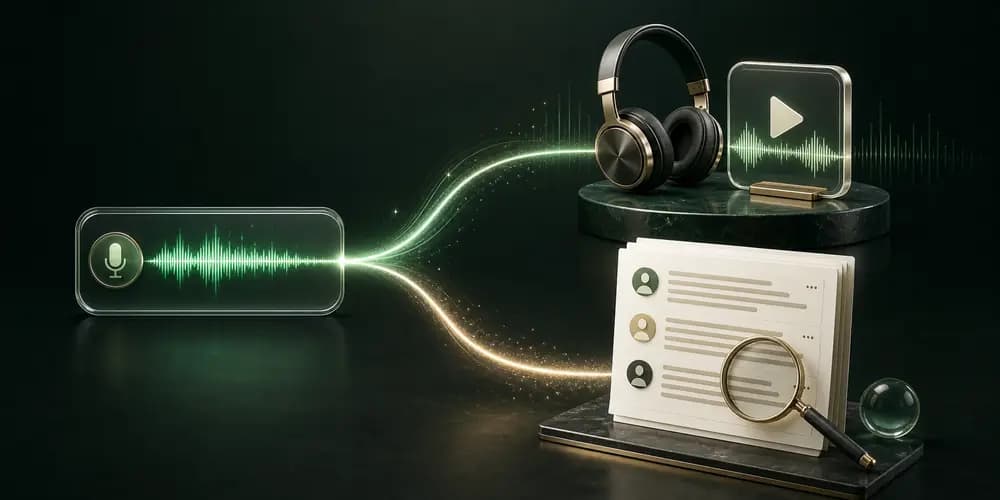
The way ChatToPDF handles this is by running transcription on supported voice notes included in one exported chat ZIP. You do not have to extract the files, run FFmpeg, upload them one by one and stitch the output back into a document. You upload the ZIP once, inspect the free voice-note count, and pick the $49 Premium+Voice per chat tier. A language-aware router selects Deepgram Nova-3 or ElevenLabs Scribe v2 for each note, and the resulting PDF places usable transcript text at the source message's timestamp and sender.
If what you wanted was "I have a WhatsApp export with 40 voice notes and I want to know what was said in all of them without listening to each one" — that is the tier and the path.
The distinction between conversion and transcription is worth being clear about because the search intent behind "WhatsApp audio format" splits roughly three ways:
- Format curiosity — "I just want to know what .opus is" (answered above)
- Compatibility fix — "I want the file to play somewhere it doesn't currently play" (convert to MP3, steps above)
- Content extraction — "I want the words" (transcription, not conversion)
If you are in category 3, conversion will not help you. Transcription will.
FAQ
Can I play .opus files from a WhatsApp export?
Usually, but support depends on the container, operating-system version and player. Chromium, Firefox, VLC and FFmpeg commonly handle Ogg Opus. Safari 18.4 and later added Ogg Opus playback on current Apple operating systems; older Safari and system media players can differ. Try VLC before transcoding. If the recipient's target player still fails, create an MP3 or M4A copy and keep the original.
Why does WhatsApp use Opus instead of MP3?
WhatsApp does not publish a simple engineering rationale beside each exported file, so claims about its internal decision should be labelled as inference. What is documented is that Opus is royalty-free, designed for interactive speech and music, supports low delay and variable bitrate, and spans narrowband speech through fullband audio. Those properties make it a natural codec for voice messaging. The IETF specification and Opus project document the codec itself.
Does converting .opus to MP3 improve audio quality?
No. Converting an already lossy Opus source to MP3 cannot recreate information absent from that source. It performs another lossy encode and commonly creates a larger, more compatible file. The audible change depends on both the original and output settings, but the conversion is for playback compatibility—not restoration. Keep the original and avoid repeated transcodes.
How do I get the text of a WhatsApp voice note?
That is transcription, not format conversion. For one supported note, WhatsApp's on-device transcript is the free first option. For many notes in one conversation, export the chat with Including Media, upload the ZIP to ChatToPDF, inspect the detected audio count and choose a voice-enabled conversion. Supported files are routed to Deepgram Nova-3 or ElevenLabs Scribe v2, then usable text is returned to the source message's sender and timestamp in the searchable PDF. The transcribe WhatsApp audio guide covers the full pipeline.
What is the difference between .opus and .ogg files from WhatsApp?
Opus is the codec; Ogg is a container that can carry an Opus audio track. An Ogg file containing only Opus audio is often given an .opus extension, but .ogg alone does not prove which codec is inside. WhatsApp export names vary, so inspect the file with VLC, MediaInfo or FFprobe when the distinction matters. The MDN container guide explains the relationship.
Primary technical references
- IETF RFC 6716 — Definition of the Opus Audio Codec: codec modes, bandwidths, delay and bitstream.
- Opus project overview: supported rates, channels and intended speech/music uses.
- MDN media-container guide: Ogg containers, Opus tracks and the
.opusconvention. - WhatsApp Help Center — Export chat history: the official path for creating the media-inclusive archive.
Key takeaways
- WhatsApp voice notes commonly export as Opus audio in an Ogg container, often named
.opusor.ogg; ordinary audio attachments can use other formats. - A media-inclusive export can contain voice notes and ordinary audio attachments in different formats; a text-only export contains no audio bytes.
- Opus codec capabilities are broad. Do not report one fixed WhatsApp sample rate, bitrate or file size without inspecting the actual file.
- WhatsApp's export instructions do not publish one universal compression or byte-preservation promise, so compare the actual files when exact preservation matters.
- Recent browsers have better Ogg Opus support than older compatibility tables imply. VLC and FFmpeg remain dependable fallbacks; test the recipient's target player.
- Converting Opus to MP3 does not restore quality. It creates a compatibility copy, so retain the untouched source.
- At a constant rate, one-minute size is approximately bitrate × 60 ÷ 8: 16 kbit/s ≈ 120 KB and 128 kbit/s ≈ 960 KB. These are examples, not WhatsApp presets.
- If your real goal is extracting the spoken content as text, that is transcription — not format conversion. Converting to MP3 does not give you the words.
- ChatToPDF's $49 Premium+Voice per chat tier processes supported voice notes included in one exported chat and places usable transcripts back into conversation order.
- Internal links: transcribe WhatsApp audio full guide · WhatsApp voice to text · best WhatsApp transcription tools · WhatsApp to PDF conversion overview
I'm Paul, the founder of ChatToPDF. I built it after needing a long WhatsApp conversation as a readable PDF for a legal matter. I test and document WhatsApp exports, PDF conversion, voice-note transcription, and the limits people should check before relying on the result.