
Definition and scope
Why does exporting iMessages need an extra tool?
Apple’s Messages app on iPhone has no “export conversation” option. Your texts live in a database inside the phone (and in its backups), so every route to a document starts with a tool that reads that database: iMazing, the open-source imessage-exporter, or Messages on a Mac.
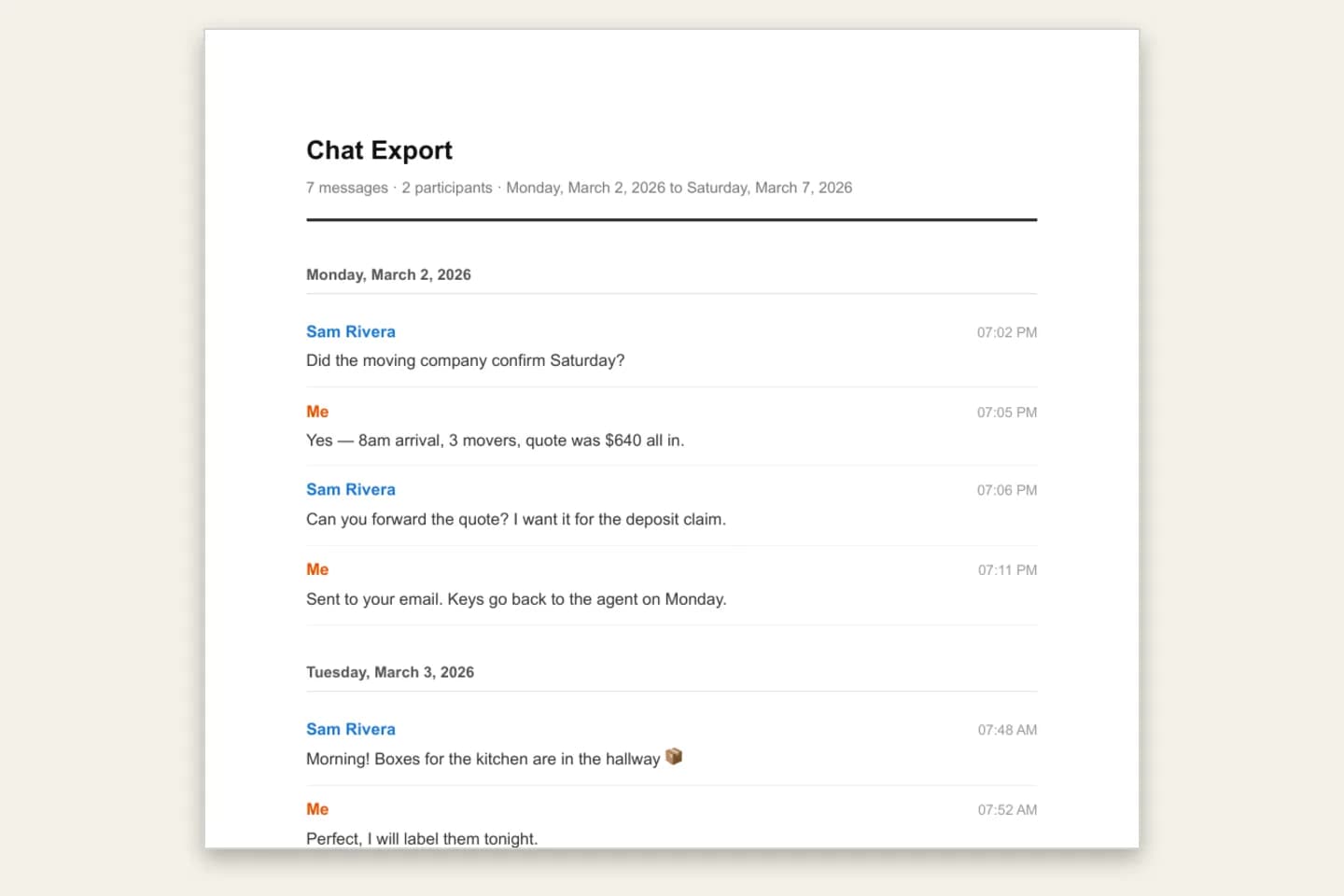
Those tools give you a raw file: a CSV spreadsheet or a folder of text files. ChatToPDF is the last step. It reads the export and lays it out as a document with sender names, dates, times, replies and photos, on numbered pages, in one of four styles.
ChatToPDF works with iMazing-style Messages CSV files and imessage-exporter text exports. It does not read an iPhone, an iCloud account or Apple’s chat.db file directly.
Three-step workflow
How to use the iMessage to PDF Converter
Get the conversation off your iPhone
With iMazing: connect the iPhone, open Messages, select the conversation and choose Export to CSV. With imessage-exporter: run it on a Mac (or against an iPhone backup) with the txt format, which writes one .txt file per conversation plus an attachments folder.
imessage-exporter’s HTML output is not supported; use the txt format. A single .txt file uploaded on its own is read as a WhatsApp export, so always upload imessage-exporter output as a ZIP.
Zip it with attachments if you want photos
A bare CSV converts the text and lists attachments by name. To place photos in the PDF, zip the CSV together with its attachments folder, or zip the whole imessage-exporter output folder, and upload the ZIP.
If the export contains several conversations, the largest is converted and a note says so. Export one conversation at a time to choose exactly which one becomes the PDF.
Upload, preview and download
Upload the .csv or .zip. The free preview shows the first messages, senders and dates and whether the chat was labelled iMessage or SMS. Choose a style, pay once and download the PDF, Excel and CSV files.
$7 covers up to 5,000 text-only messages, $14 up to 25,000 with photos, $29 is unlimited, and $49 adds transcription of supported voice messages. Upload limit: 150 MB.
Ready to check your export?
Upload the source file and inspect the parsed preview first. No account, no email, nothing to pay until you download.
Field-level detail
What the iMessage PDF keeps from your export
The PDF is built only from the export file. Fields the export does not contain cannot appear in the PDF.
- Field
- Sender
- What it contains
- “Me” for outgoing messages; the sender name in the export, or the phone number or email address when there is no name
- Useful for
- Following who said what, including group chats
- Field
- Service
- What it contains
- The chat labelled iMessage or SMS according to the export’s service column
- Useful for
- Knowing which kind of conversation it is
- Field
- Date and time
- What it contains
- Each message’s date and time, grouped by day
- Useful for
- Timelines and finding a message later
- Field
- Replies and edits
- What it contains
- Threaded replies shown as “Replying to …”; edited messages marked “(edited)”; undelivered messages marked
- Useful for
- Reading replies in context
- Field
- Photos
- What it contains
- Images from a ZIP that includes the attachments folder, inline on $14 and above
- Useful for
- Pictures next to the words around them
- Field
- Voice messages
- What it contains
- Voice messages saved as .m4a or .mp4 can be transcribed on the $49 plan; original .caf files cannot
- Useful for
- Putting spoken messages on the page
- Field
- Page numbers
- What it contains
- “Page X of Y” on every page
- Useful for
- Citing a specific page
Practical applications
When this format is useful
Records for a lawyer or court
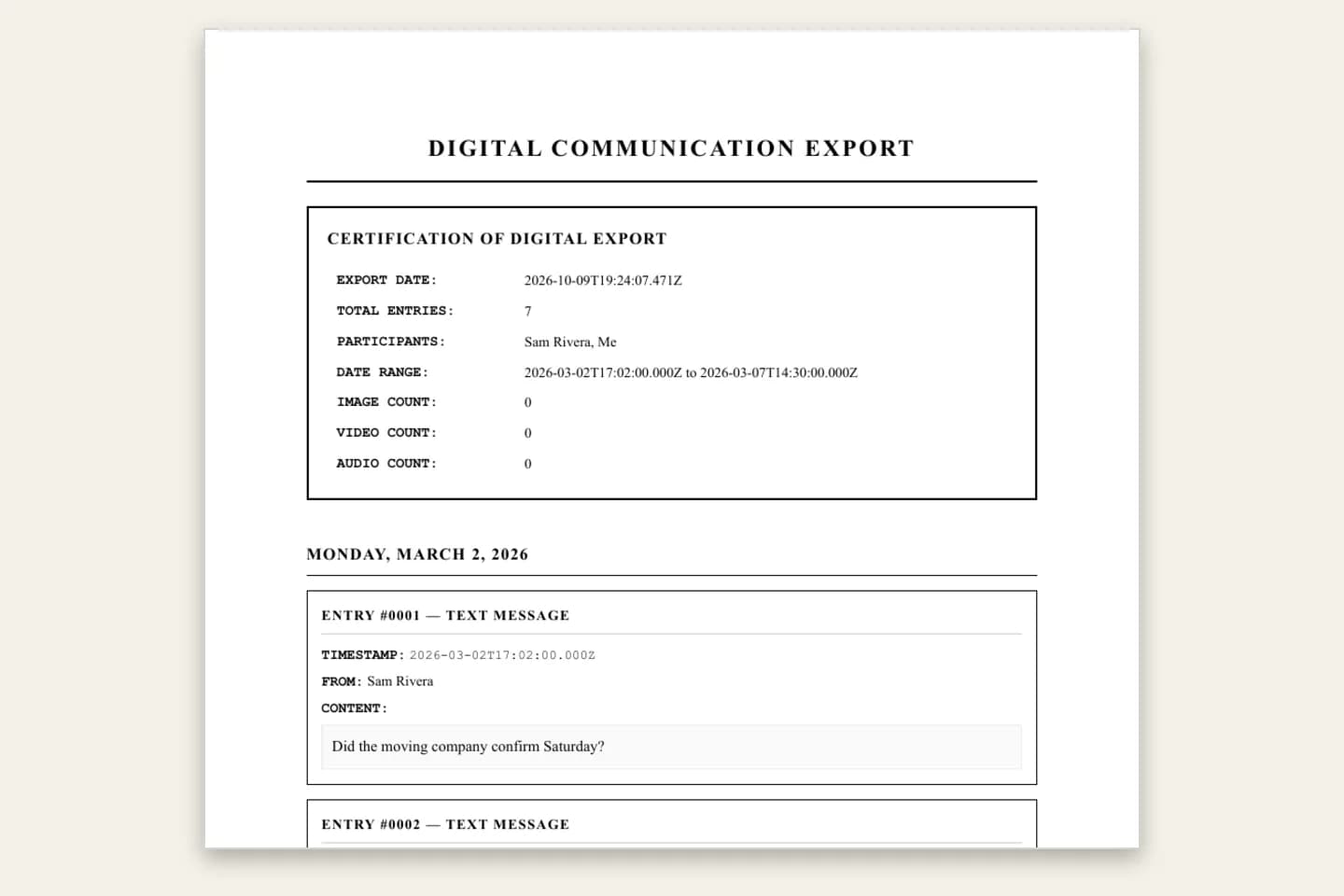
The Formal / Legal style numbers every message with its sender and timestamp. Ask your lawyer what format they need, and keep the original export.
A keepsake from someone you love
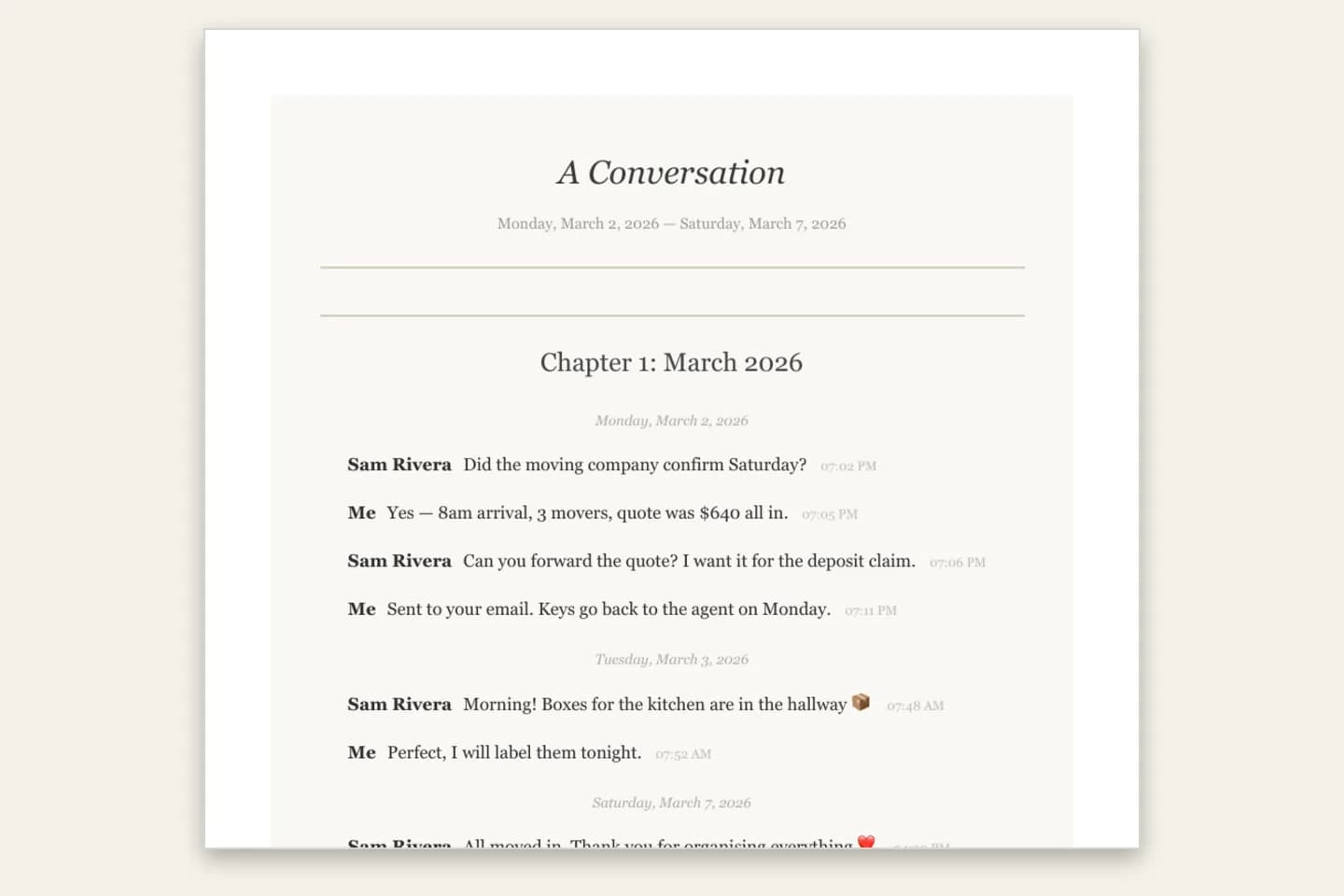
Book Format turns years of iMessages into a printable book with a title page and chapters by month ($14+).
An archive before you change phones
A readable PDF, Excel and CSV copy that does not depend on Apple devices or backups to open.
Work and client records
Agreements, quotes and instructions sent by text, in one dated document you can file.
Searchable history
Excel and CSV copies let you filter by sender or date and search the whole conversation.
Printing a long thread
A paginated PDF prints cleanly at any length, unlike screenshots.
Format decision guide
Mac printing, iMazing or ChatToPDF?
All three can get iMessages onto paper. They suit different lengths of conversation and different budgets.
- Route
- Messages on a Mac → File → Print → Save as PDF
- What you get
- A free print of the conversation window
- Trade-off
- Fine for short chats; a print of the window, with one layout and no spreadsheet copies
- Route
- iMazing or similar on its own
- What you get
- A desktop app that exports and prints messages
- Trade-off
- Paid desktop software; you work inside its layouts
- Route
- iMazing CSV or imessage-exporter → ChatToPDF
- What you get
- Four PDF styles, Book Format and voice-message transcripts, plus Excel and CSV, from $7
- Trade-off
- You make the export first; one conversation per upload
How do I export iMessages to PDF?
Export the conversation with iMazing (Messages → Export to CSV) or with the free imessage-exporter in its txt format, then upload the CSV or a ZIP of the output to ChatToPDF. Check the free preview, pick a style and download a PDF with every sender, date and time on numbered pages. Prices start at $7.
Why not just print from a Mac?
If you have a Mac signed in to the same Apple ID and the conversation is short, Messages → File → Print → Save as PDF is free and good enough. For a long thread you may need to scroll back to load older messages first, the layout is fixed, and you get no spreadsheet copy.
An export is better when the conversation is long, when you need numbered entries for a record, a book layout for a gift, or transcripts of voice messages.
Can I use imessage-exporter on Windows?
imessage-exporter reads either a Mac’s Messages database or an iPhone backup made with iTunes or Finder, so a Mac is not the only starting point. Check the project’s README for the platforms it currently ships for. Whichever machine you run it on, use the txt format, zip the output folder and upload the ZIP here.
Can iMessages be used in court?
That depends on your court and case, so ask your lawyer; this is not legal advice. What ChatToPDF gives you is a complete, chronological PDF of the exported conversation with sender, date and time on every message and Page X of Y on every page. The Formal / Legal style numbers each entry. Keep the original export too.
Honest limits: what this converter does not do
iPhone support is built on the documented export formats of iMazing-style CSV files and imessage-exporter. The free preview shows exactly what was read before you pay anything.
- Needs an iMazing-style CSV or imessage-exporter txt output; we never read an iPhone, iCloud or chat.db
- imessage-exporter HTML output is not supported; upload txt output as a ZIP
- One conversation per upload; the largest is converted if the export holds several
- HEIC photos are embedded, but whether they display depends on the PDF viewer
- Voice messages in .caf format cannot be transcribed; .m4a and .mp4 can ($49)
- Upload limit 150 MB; a ZIP can hold up to 10,000 files
Troubleshooting
Common problems and fixes
Photos show as file names
A bare CSV contains only the text. Zip the CSV with its attachments folder (or the whole imessage-exporter output) and choose the $14 plan or above.
The wrong conversation was converted
The export held several conversations and the largest was used. Export just the one conversation and upload again.
My .txt file was read as a WhatsApp chat
Single .txt files are treated as WhatsApp exports. Zip the imessage-exporter output folder and upload the ZIP.
The HTML export was rejected
Only imessage-exporter’s txt format is supported. Run it again with the txt format.
A voice message has no transcript
Original .caf voice messages cannot be transcribed. Voice messages saved as .m4a or .mp4 can, on the $49 plan.
Frequently asked questions
iMessage to PDF Converter FAQ
How do I export iMessages to PDF?
Export the conversation with iMazing (CSV) or imessage-exporter (txt, zipped), upload it to ChatToPDF, check the free preview and download the PDF from $7.
What is the best way to export text messages from my iPhone?
For a short chat, printing from Messages on a Mac is free. For long threads, iMazing’s CSV export or the free imessage-exporter, followed by ChatToPDF, gives you a paginated PDF plus Excel and CSV copies.
How can I export text messages from my iPhone to PDF for free?
imessage-exporter is free and the ChatToPDF preview is free. The complete formatted PDF is a one-time paid download from $7. Printing a short conversation from a Mac is the fully free option.
How do I get my iPhone text messages on my PC?
Use a computer tool that reads the iPhone or its backup, such as iMazing’s CSV export or imessage-exporter. Upload the export to ChatToPDF to get a PDF, Excel and CSV copy you can open on any PC.
Does it work with SMS from an iPhone, not just iMessage?
Yes. The chat is labelled iMessage or SMS based on the service column in your export, and both are converted the same way.
Do you need my Apple ID or access to my iPhone?
No. ChatToPDF never connects to your phone, iCloud or any account. You upload an export file you made yourself, the conversion runs automatically, and the upload and every generated file are deleted within 7 days.
How much does it cost?
One-time per conversation: $7 for up to 5,000 messages (text only), $14 for up to 25,000 messages with photos, $29 for unlimited messages, and $49 to add voice transcription. No subscription. Every paid plan includes the PDF plus Excel and CSV files, and there is a 7-day money-back guarantee.
Primary references
Technical statements on this page are tied to the source instructions or format documentation below. Product behavior is based on the current ChatToPDF implementation.
- imessage-exporter on GitHub
The free, open-source exporter; use its txt output format.
- iMazing
Desktop app that can export an iPhone conversation to CSV.
Last reviewed: 9 October 2026. ChatToPDF is independent and is not affiliated with or endorsed by Apple, iMazing (DigiDNA) or the imessage-exporter project.