
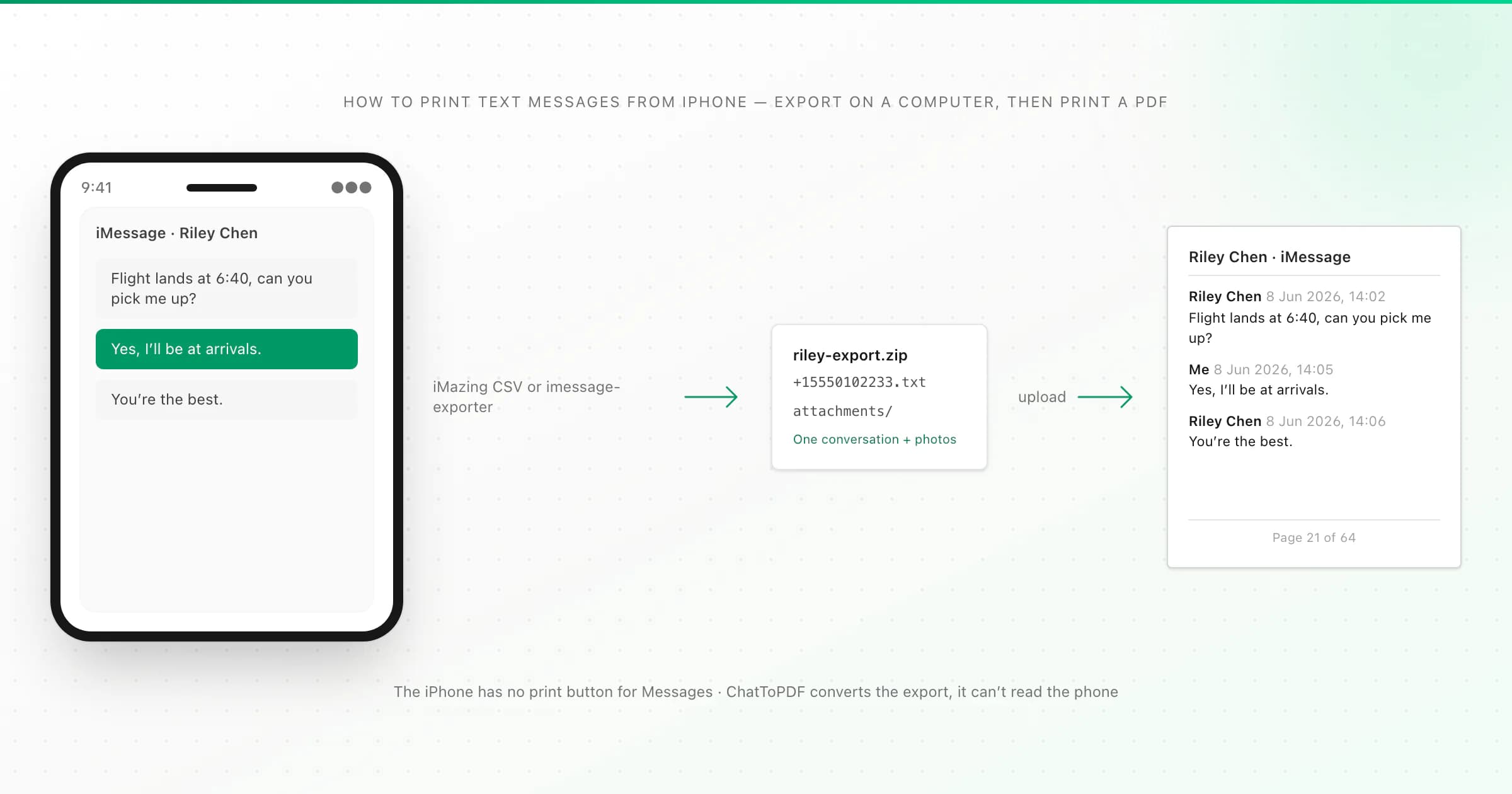
There's no print button in the iPhone's Messages app. To print text messages from an iPhone, print screenshots of a few messages, or use a Mac's Messages app (File → Print) for shorter threads. For a long conversation, export it on a computer with iMazing (paid) or the free imessage-exporter, then print it as a paginated PDF.
I'll be straight with you about where my own tool fits. ChatToPDF can't read your iPhone. It converts an export file that another tool made. And iMazing, one of those tools, can already print to PDF itself. So below I'll walk through all four routes and say which one I'd use for which situation, including the ones that don't involve me.
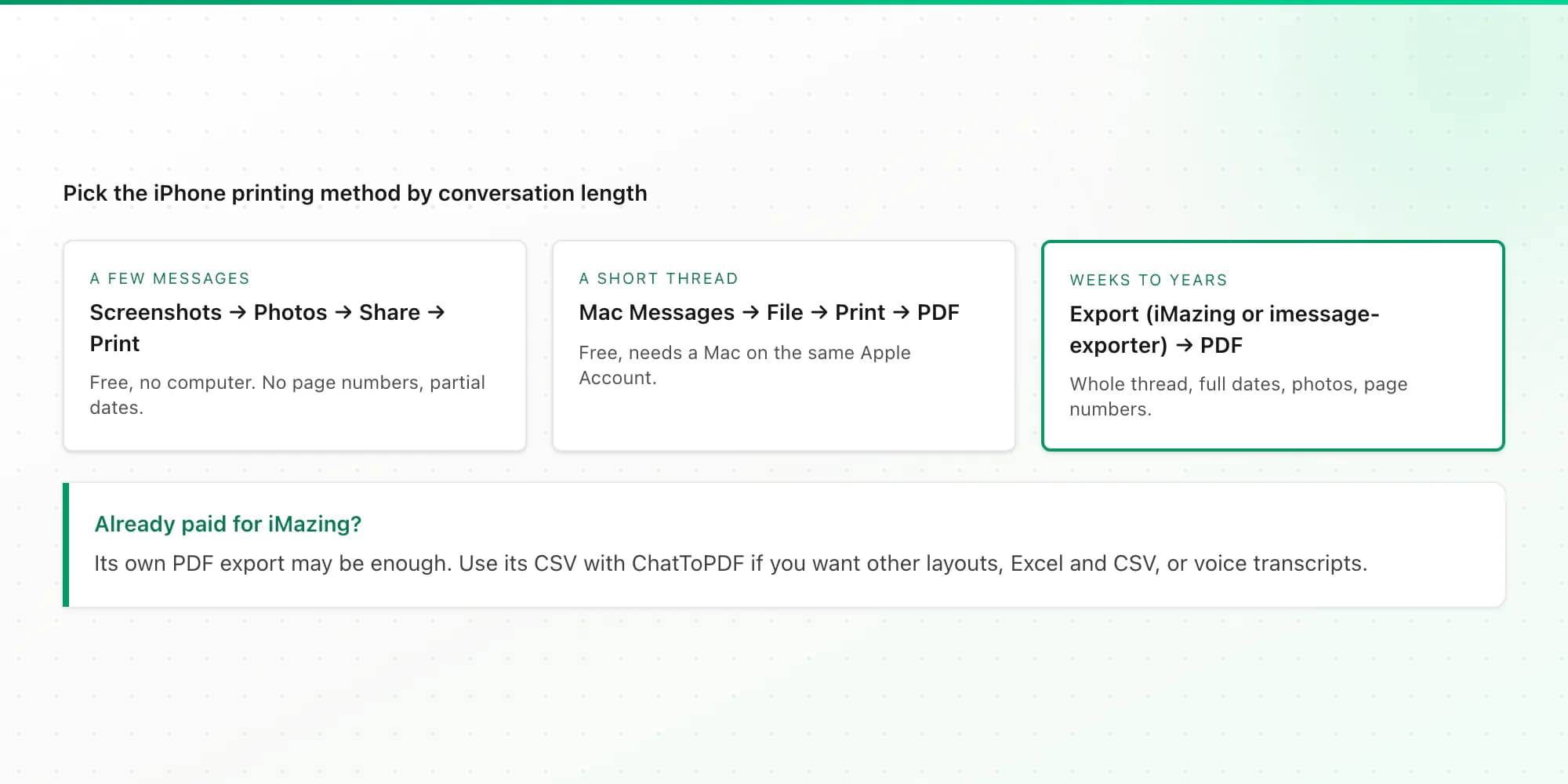
Which method fits your conversation?
Thread length is what decides it:
- A handful of messages: screenshots (method 1).
- A short thread, and you have a Mac signed in to the same Apple Account: Mac Messages print (method 2).
- Weeks, months or years of messages, or you need photos and full dates: export, then print a PDF (methods 3 and 4).
Method 1: screenshots, then AirPrint
Open the conversation, take screenshots (side button and volume up together on Face ID iPhones), then open Photos, select the screenshots, tap Share and choose Print.
This is quick and free, and for three or four messages it's fine. It falls apart on anything longer: dozens of images, no page numbers, and dates that only appear above groups of messages, often as "Yesterday" or a weekday rather than a full date. If the printout is for a dispute, screenshots are also the easiest format to challenge. I explain why in how to print text messages for court.
Method 2: print from Messages on a Mac
If your Mac uses the same Apple Account and Messages in iCloud is switched on, your conversations appear in the Mac's Messages app. Open the conversation, scroll up to load the period you need, then choose File → Print. In the print dialog, use the PDF menu to save it as a PDF instead of printing straight away.
It's free and needs no extra software. The limits: it prints the conversation as Messages displays it, with no control over layout. On long threads you'll be scrolling a lot to make older messages load, so check that the PDF starts where you need it to before relying on it. It also needs a Mac; there's no Windows equivalent.
Method 3: iMazing (paid)
iMazing is a paid desktop app for Mac and Windows that reads your iPhone, or a backup of it, and can export Messages conversations in several formats, including PDF and CSV.
If iMazing's own PDF looks the way you want, you're done and don't need me. Where ChatToPDF helps is if you want a different layout (Clean Document, Formal / Legal with numbered entries, or Book), Excel and CSV copies, or transcripts of voice messages. In that case:
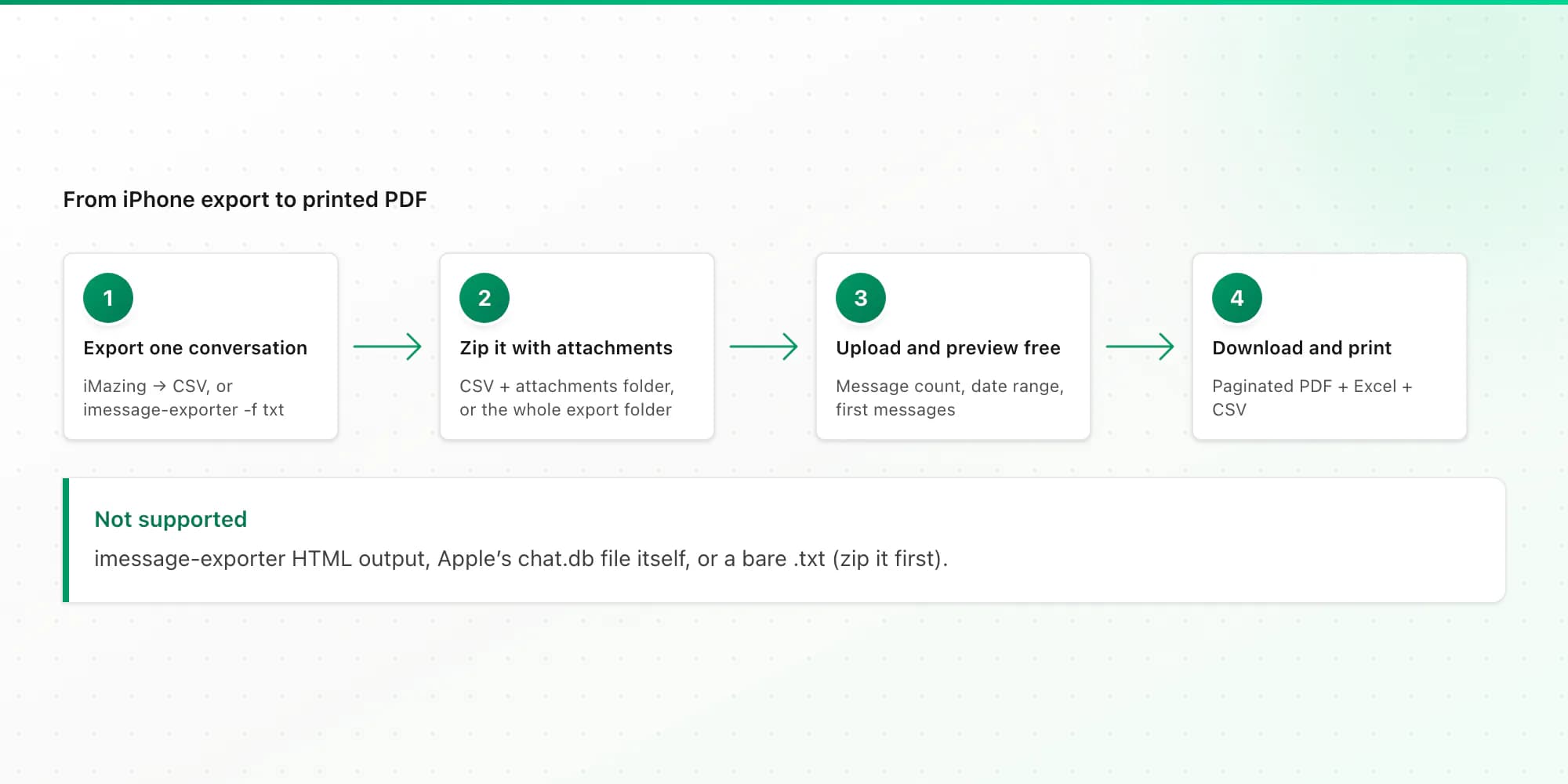
- In iMazing, export the conversation as CSV.
- To include photos and voice messages, put the CSV and its attachments folder into one ZIP file. A bare CSV gives you text only, with attachments listed by name.
- Upload the ZIP (or the CSV) on the iMessage to PDF page, check the free preview, and download.
The PDF is labelled iMessage or SMS based on the export's service column, and it covers one conversation per upload. If the CSV holds several, I convert the largest one and tell you which.
Method 4: imessage-exporter (free and open source)
imessage-exporter is a free, open-source command-line tool. On a Mac it reads the Messages database directly. On a Mac, Windows or Linux computer it can read a local iPhone backup instead. It's the free route for long threads, though you'll need to be comfortable typing a command into Terminal.
The short version:
brew install imessage-exporter
imessage-exporter -f txt -c basic -t "+15555550123" -o ~/texts-export
That exports the conversation with that number (plus any group chats it's part of) as text files, copies attachments into the export folder, and converts HEIC photos to JPEG. Zip the whole export folder, attachments included, and upload the ZIP. ChatToPDF reads imessage-exporter's TXT output only, not its HTML output. Install options, the Full Disk Access setting and the iPhone-backup variant are all in my step-by-step imessage-exporter guide.
The four methods side by side
| Method | Cost | Needs a computer | Long threads | Photos | Full date and time per message |
|---|---|---|---|---|---|
| Screenshots + AirPrint | Free | No | Impractical | As seen on screen | No |
| Mac Messages, File then Print | Free | A Mac | Possible, with a lot of scrolling | As displayed | As Messages displays them |
| iMazing's own PDF export | Paid licence | Mac or Windows | Yes | Yes | Yes |
| iMazing CSV + ChatToPDF | iMazing licence + from $7 per conversation | Mac or Windows | Yes | Yes, zip the attachments with the CSV ($14 plan and up) | Yes |
| imessage-exporter + ChatToPDF | Exporter free + from $7 per conversation | Mac, or Windows/Linux with an iPhone backup | Yes | Yes, in the ZIP ($14 plan and up) | Yes |
What you get from the PDF route
When you upload an iPhone export, the PDF shows every message in order with the sender, date and time, and "Page X of Y" on every page. Your own messages are labelled Me. You choose one of four layouts: chat bubbles, Clean Document (best for a home printer), Formal / Legal (numbered entries) or Book.
Pricing is per conversation, one-time: $7 for text up to 5,000 messages, $14 with photos up to 25,000 messages, $29 with no message cap, and $49 adds voice-message transcription. Voice messages can be transcribed when they're in .m4a or .mp4 format; Apple's original .caf files can't be. Every paid plan includes Excel and CSV versions. The free preview needs no account or email, uploaded files are deleted within 7 days, and there's a 7-day money-back guarantee. Full details are on the pricing page.
Two honest notes. iPhone photos are often HEIC files, and I can't promise every HEIC image will display in the PDF, which is why I recommend imessage-exporter's JPEG conversion. And iPhone support is newer than our Android and WhatsApp support, so do check the preview before you pay.
Printing other kinds of messages
Android texts are easier, because a free app can export them. See how to print text messages from Android. If you need the messages on your computer rather than on paper, saving text messages from an iPhone to a computer compares the backup options. WhatsApp chats have a built-in export, which the WhatsApp printing guide covers. Instagram DMs come from Meta's data download, which downloading Instagram messages explains.
Key takeaways
- The iPhone's Messages app can't print a conversation.
- A few messages: screenshots, then Share → Print. A short thread with a Mac: Messages → File → Print → save as PDF.
- A long thread: export on a computer with iMazing (paid) or the free imessage-exporter, then print a paginated PDF.
- ChatToPDF reads iMazing-style Messages CSVs and imessage-exporter TXT output in a ZIP. It can't read the phone itself or imessage-exporter's HTML output.
FAQ
How do I print a whole text conversation from my iPhone?
You need a computer. On a Mac with Messages in iCloud, open the conversation and use File, then Print. For long threads, export the conversation with iMazing (paid) or the free imessage-exporter, convert the export into a paginated PDF, and print the PDF. The iPhone itself has no way to print a whole thread.
How do I print imessages?
iMessages print the same way as regular texts, because they live in the same Messages app. Use screenshots for a few, a Mac's Messages app for short threads, or an export tool for long ones. A PDF made from an export is labelled iMessage or SMS according to the service each conversation used.
What is a free app that can convert text messages to PDF?
On iPhone, the free option is imessage-exporter, an open-source tool that runs on a computer. Mac users can also print a conversation to PDF from the Messages app. ChatToPDF shows a free preview of your converted export; the full PDF starts at $7 per conversation, one-time.
Can I print text messages from my iPhone without a computer?
Only as screenshots: take them, then print from Photos with AirPrint. Every method that produces the whole conversation with full dates needs a Mac or a Windows PC to make the export first.
Will the printout include photos?
On the PDF route, yes, if the photos are in the export: zip the iMazing CSV with its attachments folder, or zip imessage-exporter's whole output folder. Photos are included on the $14 plan and above. HEIC photos may not display, so converting them to JPEG during export is safer.
I'm Paul, the founder of ChatToPDF. I built it after needing a long WhatsApp conversation as a readable PDF for a legal matter. I test and document WhatsApp exports, PDF conversion, voice-note transcription, and the limits people should check before relying on the result.