
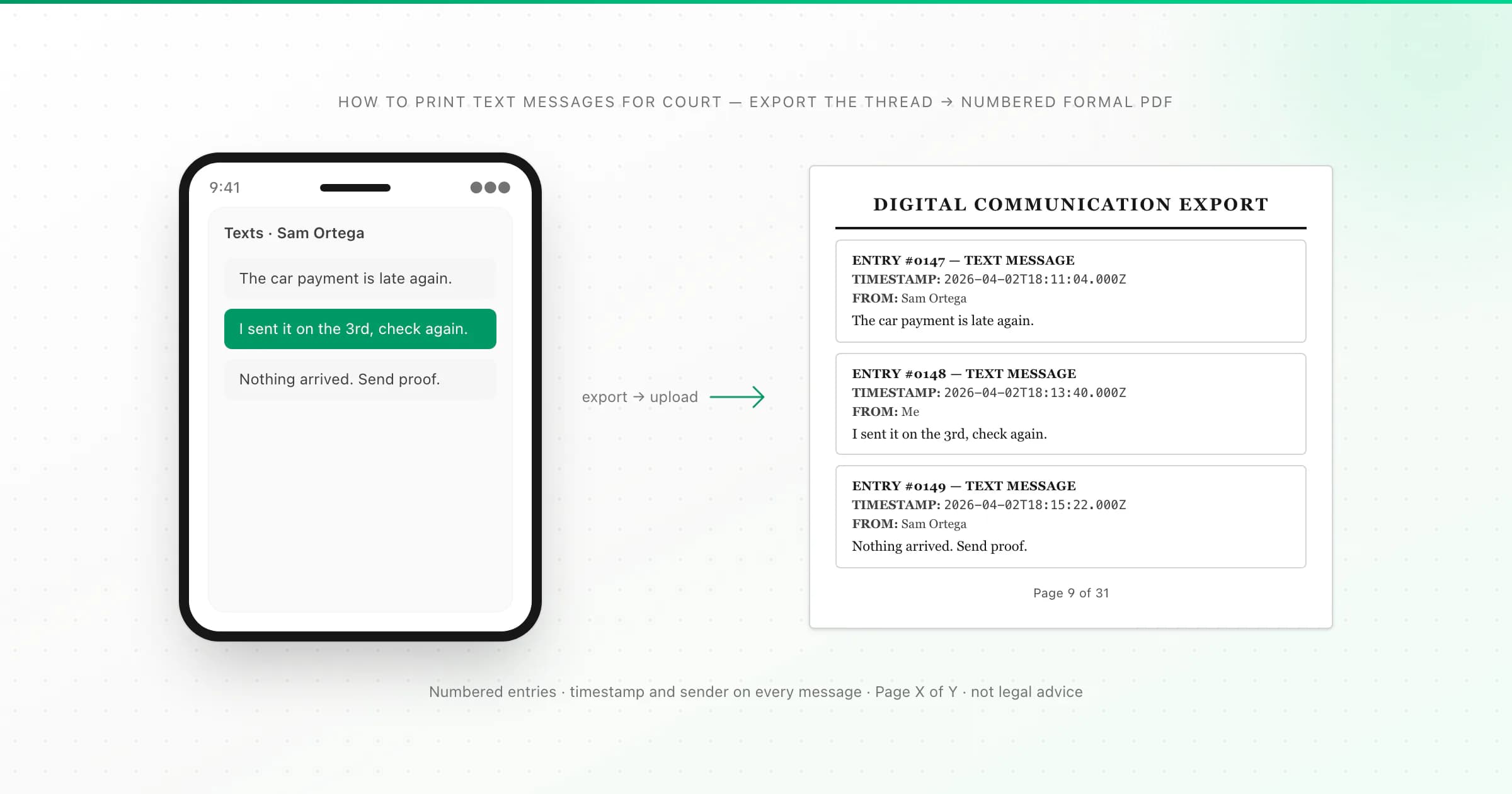
To print text messages for court, export the whole conversation from the phone, then turn that export into a numbered PDF that shows the sender, date and time on every message. Carriers generally keep records of when texts were sent, not what they said, so the phone is your source. Ask your lawyer which format the court accepts.
I'm not a lawyer, and nothing on this page is legal advice. What I can tell you is the practical part: how to get SMS and iMessage threads off an Android phone or an iPhone, what the resulting document shows (I checked this against my own converter's code), and what it doesn't show. I built ChatToPDF after needing a chat as a document myself, and the court use case is the one where getting these details right matters most.
Courts differ on what they accept and how exhibits must be prepared. Use this page for the practical steps, and confirm the format, the date range and whether you need anything beyond a printout with your lawyer or the clerk's office.
What a court printout of texts should show
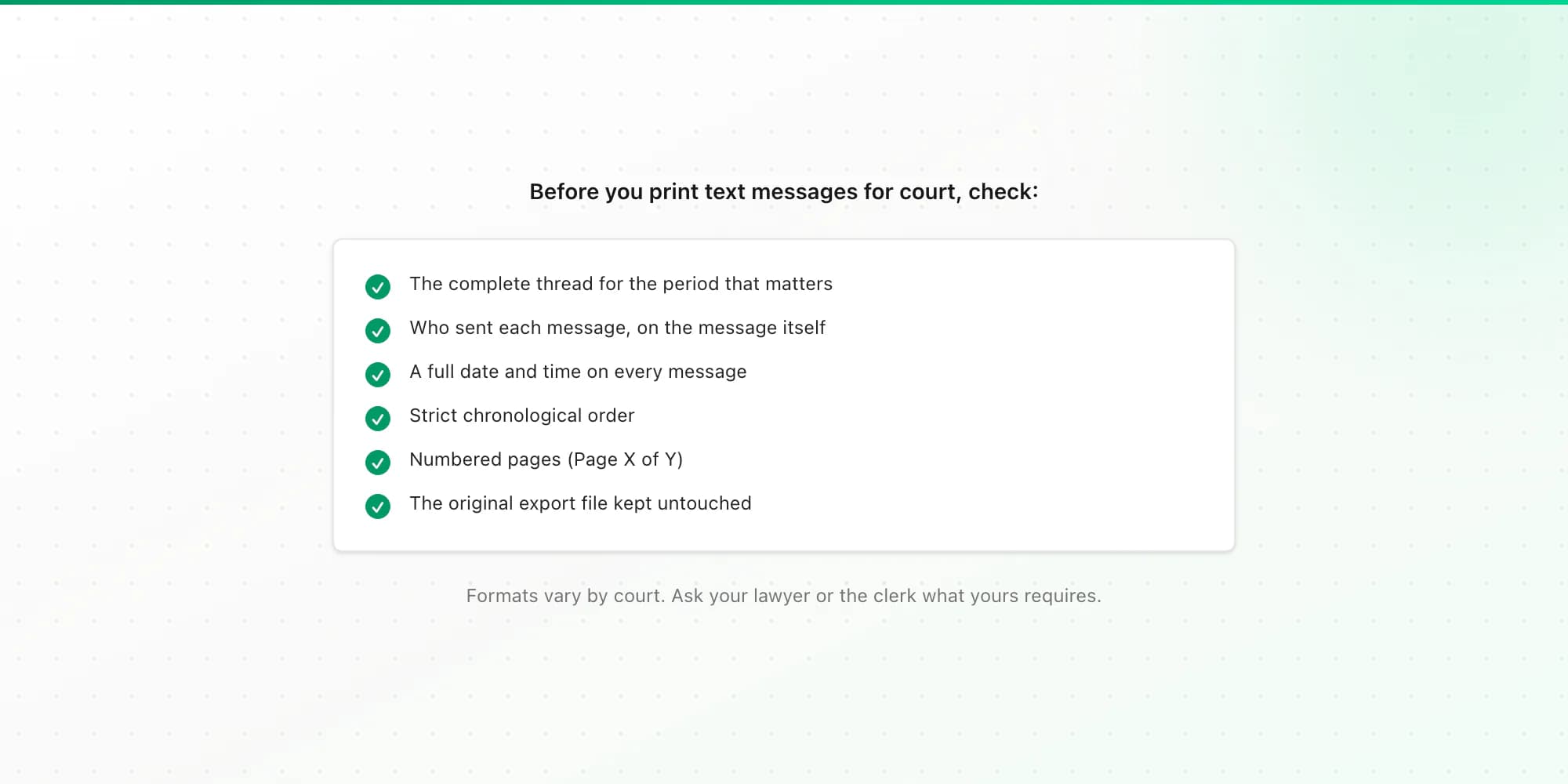
Whatever tool you use, check the printout against this list before you rely on it:
- The complete thread for the period that matters, not hand-picked messages. Selective excerpts invite the question "what was said in between?"
- Who sent each message, written on the message itself.
- A full date and time on every message. "Yesterday" or "Tue" on a screenshot isn't good enough.
- Chronological order, with nothing shuffled.
- Numbered pages, so nobody can argue pages were added or removed, and so a page can be cited.
- Your original export file kept untouched, as the source the printout came from.
Screenshots fail most of these. They are cropped by nature, they rarely show full dates, and they are easy to dispute as edited. I wrote about this in more depth in why a PDF export beats screenshots. The example there is WhatsApp, but the points apply to texts too.
Why you can't just ask the phone company
People often assume the carrier can print the messages. In most cases carrier records show which numbers exchanged messages and when, not what the messages said. Those records can help corroborate that a conversation happened, but they are usually obtained through a formal legal request, and they won't give you the content. For the content you need the device, or a backup of it.
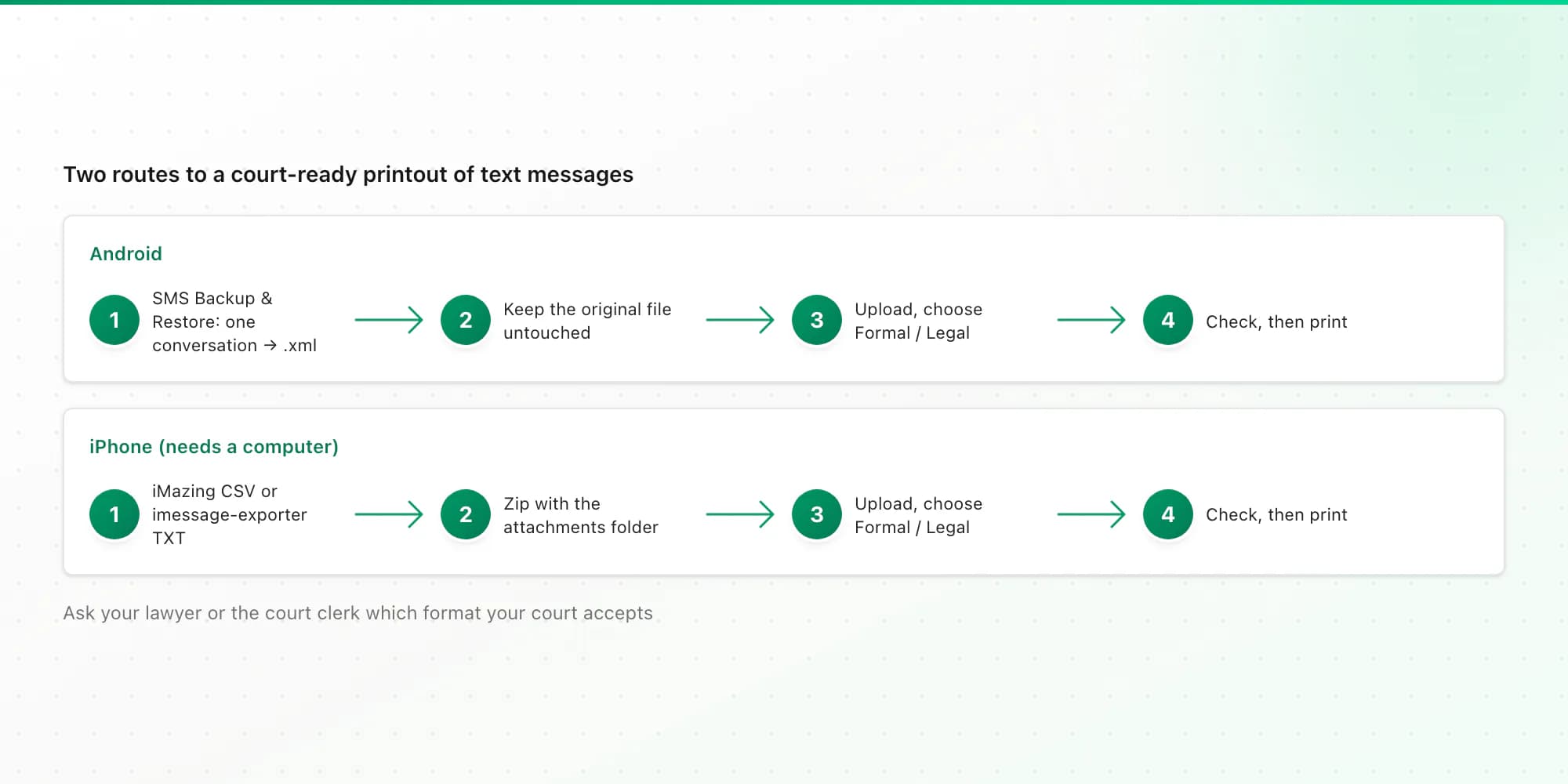
Android: SMS Backup & Restore, then a Formal PDF
Back up only the relevant conversation
Install the free SMS Backup & Restore app (SyncTech). Back up Messages only, choose selected conversations, and tick the one thread you need. Keep MMS on if photos matter. The app writes an
.xmlfile. Each setting is explained in how to print text messages from Android.Copy the XML somewhere safe and leave the original alone
Save the backup to Google Drive or your computer. Make a working copy to upload and keep the original exactly as the app produced it.
Upload and choose Formal / Legal
Upload the XML on the text messages to PDF page. The free preview shows the message count, the date range and the first messages, so you can confirm it's the right conversation. Choose the Formal / Legal style before you download.
On Android, your sent messages are labelled Me. Received messages show the contact name saved on your phone, or the phone number when the sender isn't a contact. Group texts keep each sender. Messages that failed to send are kept and marked as not sent; drafts are left out.
iPhone: export first, then a Formal PDF
The iPhone has no export button for Messages, so you need a computer and a third-party tool. Two exports work with ChatToPDF:
- A Messages CSV from iMazing (paid, Mac or Windows) or a similar tool. Zip the CSV together with its attachments folder if you want photos included; a bare CSV gives you text only.
- imessage-exporter's TXT output (free and open source). Zip the export folder, including its
attachmentsfolder, and upload the ZIP. My imessage-exporter guide has the exact commands, including the one that exports a single conversation.
If you don't have a Mac, imessage-exporter can also read an iPhone backup made on a Windows PC. That route is covered in saving text messages from an iPhone to a computer. Once you have the file, upload it on the iMessage to PDF page and pick Formal / Legal. The document is labelled iMessage or SMS based on the export.
One honest caveat: iPhone support is newer than our Android and WhatsApp support, and I built it from the export tools' documented formats. Use the free preview to check names and dates before you pay.
What the Formal PDF shows, and what it doesn't
I checked this against the code that generates the document, so here is exactly what's in it.
Shown:
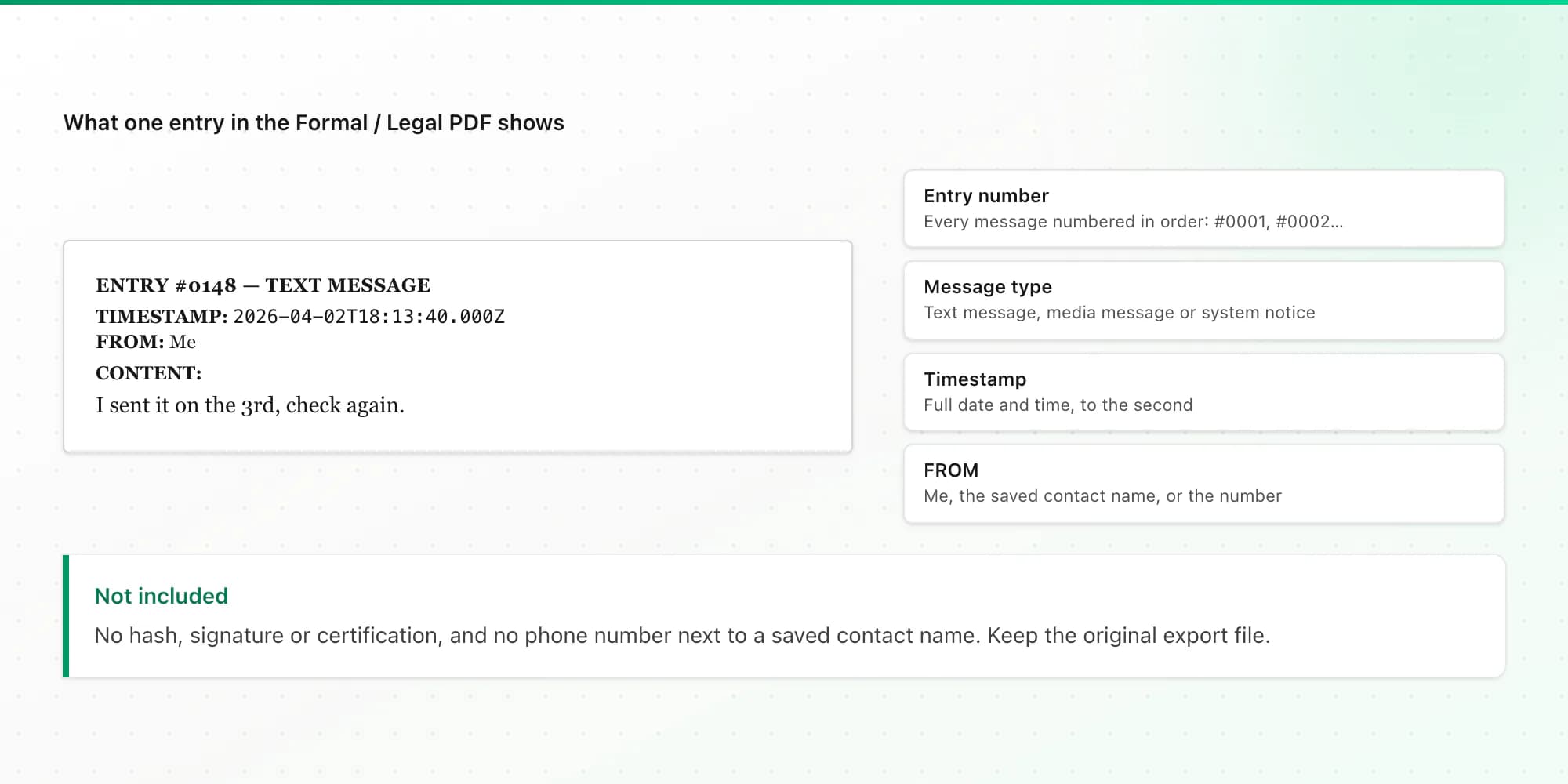
- A title, "Digital Communication Export", and a summary block on the first page with the export date, the total number of entries, the participants, the date range covered and counts of images, videos and audio.
- Every message as a numbered entry (ENTRY #0001, #0002 and so on), labelled as a text message, media message or system notice.
- On each entry: a timestamp to the second, FROM (the sender) and the content. Photos from the export appear inline (on the $14 plan and above).
- "Page X of Y" on every page, and an end-of-document note stating the number of entries and the source app.
Not shown or not done:
- Phone numbers next to saved contact names. If the number matters, keep the original backup file, which contains it.
- Any hash, digital signature or certification by ChatToPDF. The PDF is a formatted copy of your export, not a forensic extraction, and I don't vouch for its contents in court.
- Messages that weren't in the export. If something was deleted from the phone before you backed it up, it won't be there.
Before you print, spot-check a few timestamps in the PDF against the phone itself. If anything looks off, sort it out before the document goes to anyone.
Printing and handing it over
Print the whole PDF, single-sided, and check the first page, the last page and one in the middle. The Formal layout is black text on white, so it survives photocopying. Many lawyers will also want the PDF itself and possibly the original export file, so keep all three: the original file, the PDF and the printout.
Ask the clerk or your lawyer about anything procedural: exhibit labels, cover sheets, how many copies, and whether the court wants paper or a digital filing.
How this compares with other options
| Option | Cost | Full thread | Sender and full timestamp per message | Numbered pages |
|---|---|---|---|---|
| Screenshots | Free | No | Rarely | No |
| Carrier records | Varies, usually a formal request | No content, metadata only | Times and numbers only | Varies |
| Mac Messages, File then Print (iPhone texts synced to a Mac) | Free | What the window has loaded | Dates shown as Messages displays them | No |
| Paid desktop tools (iMazing, Decipher and similar) | Paid licence | Yes | Yes | Varies by tool |
| Export + ChatToPDF Formal layout | From $7 per conversation, one-time | Yes, for what's in the export | Yes, numbered entries | Yes, Page X of Y |
If you already own a desktop tool that prints to PDF, its own output may be all you need. ChatToPDF earns its place when you want the numbered Formal layout, the Excel and CSV copies that come with every paid plan, or a browser tool instead of more software. Prices are on the pricing page, and every plan has a 7-day money-back guarantee.
If the messages are in WhatsApp rather than SMS, the route is simpler, because WhatsApp has its own export. That's covered in how to print WhatsApp messages for court.
Key takeaways
- Carriers generally don't provide message content, so export the thread from the phone.
- Android: SMS Backup & Restore, selected conversation only, XML. iPhone: iMazing CSV or the free imessage-exporter, then upload.
- The Formal / Legal PDF has numbered entries, a timestamp and sender on every message, a summary block and "Page X of Y".
- It does not add a hash or certification, and it shows contact names rather than numbers when a name is saved. Keep the original export.
- Ask your lawyer or the clerk what format your court accepts.
FAQ
How do I print a whole text conversation for court?
Export the full conversation from the phone first: on Android with the free SMS Backup & Restore app (selected conversation, XML), on iPhone with iMazing or the free imessage-exporter. Convert the export into a paginated PDF that shows the sender, date and time on every message, check it, then print it. Confirm with your lawyer or the court what format they accept.
Can screenshots of texts be used in court?
Courts sometimes accept screenshots, especially when nobody disputes the messages. They are, however, the easiest format to challenge: they are cropped, often lack full dates, and are simple to edit. A complete export with full timestamps is harder to pick apart. Whether screenshots are enough in your case is a question for your lawyer.
Can I get text message records from my phone carrier?
Usually you can get records showing which numbers exchanged messages and when, often only through a formal request. Carriers generally don't keep or hand over the content of the messages, so for what was actually said you need the phone or a backup of it.
How do I print text messages for court from an iPhone for free?
For a few messages, take screenshots. For a whole thread for free, use the open-source imessage-exporter on a Mac, or on a Windows PC with an iPhone backup, to export the conversation as text. Converting that export into a numbered PDF with ChatToPDF has a free preview; the full PDF starts at $7 per conversation.
Does the PDF prove the messages weren't edited?
No document can prove that on its own. Authenticity is argued in court, often with the original device or export. The PDF is a formatted copy of your export, with no hash or certification from ChatToPDF. What helps is keeping the original backup or export file untouched and generating the PDF straight from it, without manual edits.
I'm Paul, the founder of ChatToPDF. I built it after needing a long WhatsApp conversation as a readable PDF for a legal matter. I test and document WhatsApp exports, PDF conversion, voice-note transcription, and the limits people should check before relying on the result.