
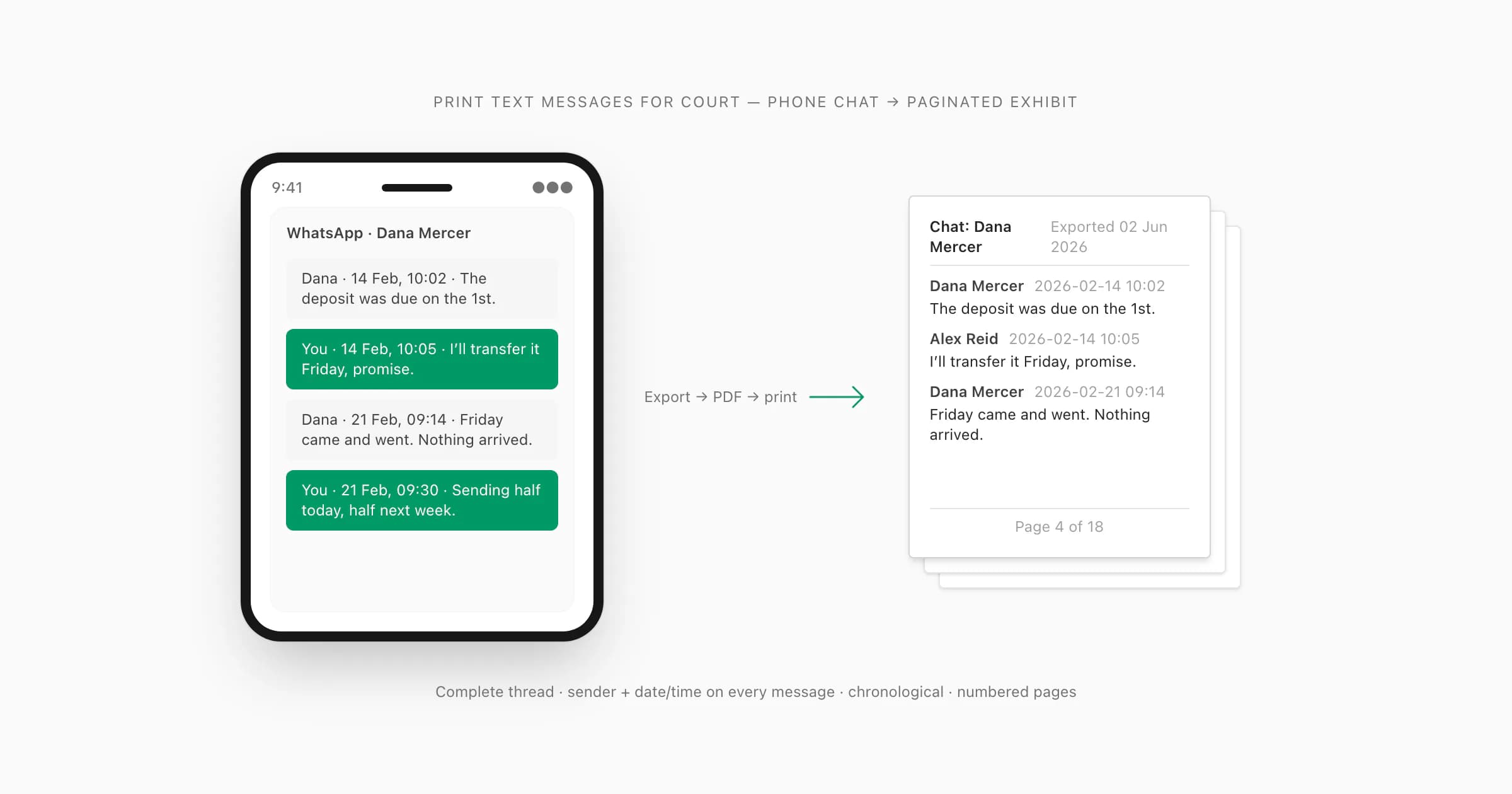
A printout of WhatsApp messages you can hand to a court needs four things: the complete conversation (not hand-picked excerpts), the sender plus the date and time visible on every message, strict chronological order, and numbered pages. Get those four right and you have a document a judge can actually read and reference. Hand over a stack of cropped screenshots instead, and expect the other side to argue they were taken out of context or edited.
This guide is about WhatsApp, which makes it easier than most apps: its built-in Export Chat feature gives you the whole conversation as a file, which you convert to a paginated PDF and print. If your messages are ordinary texts (SMS or iMessage) instead, the route starts with a backup or export tool — that has its own guide: how to print text messages for court from Android or iPhone. Below is the WhatsApp route, including what you can do for free.
Every court and every case is different. Courts commonly accept message printouts when the messages can be authenticated — but whether yours will be accepted, and in what format, is a question for the clerk of your court or your lawyer. This guide covers the formatting and the practical workflow, nothing more.
What a usable court printout needs
I built ChatToPDF because I once needed a WhatsApp conversation as a legal document myself, and discovered that "just print the messages" is harder than it sounds. Here is what separates a printout that works from one that gets picked apart.
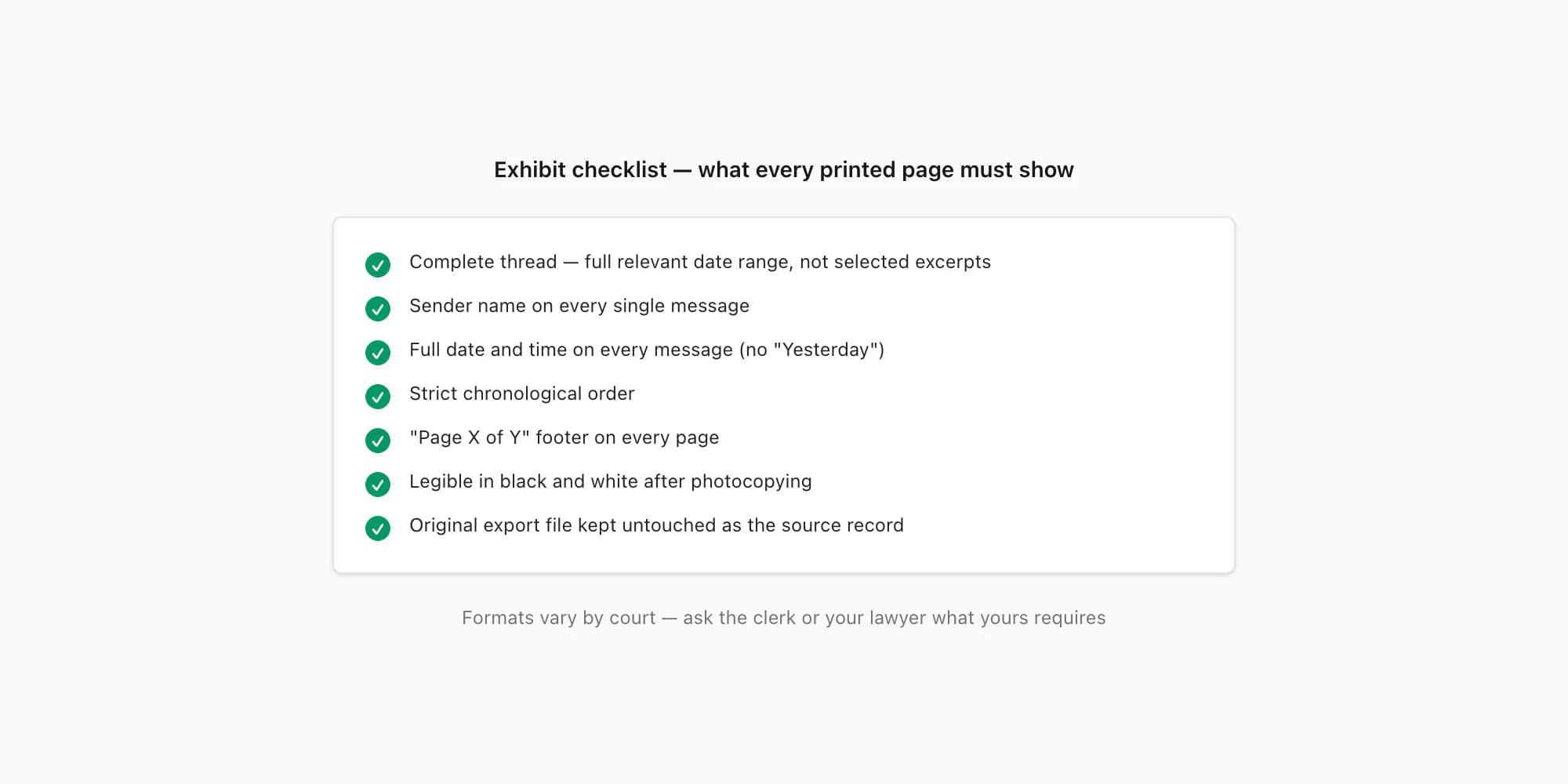
The complete thread, not excerpts. A printout showing only the messages helpful to you invites the obvious objection: what was said before and after? Producing the full conversation — or the full date range relevant to the dispute — is what makes selective-editing arguments hard to sustain. If parts genuinely need withholding (third parties, irrelevant private matters), that is a redaction decision for your lawyer, made from a complete record.
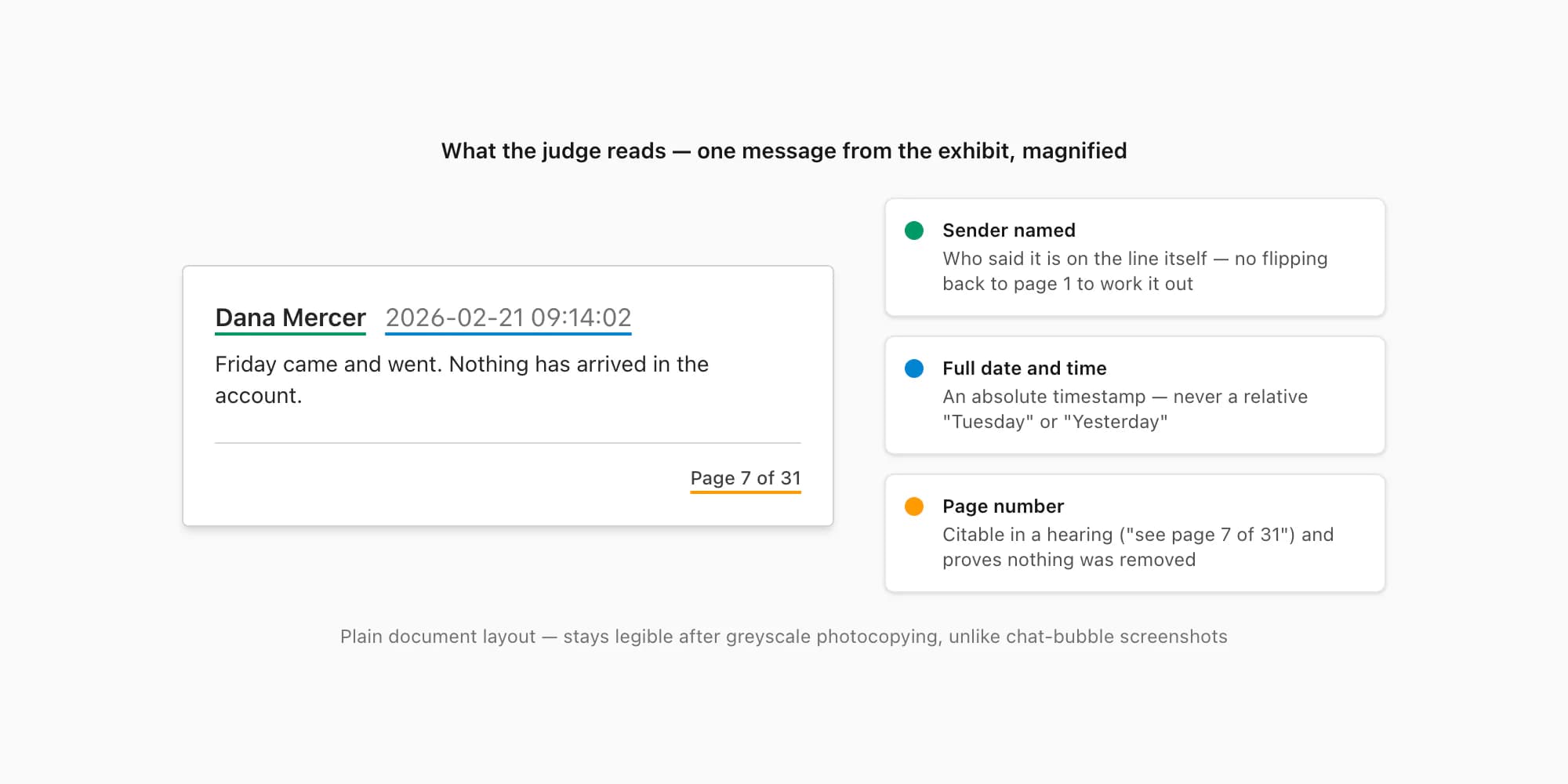
Sender and date/time on every message. A judge reading page 12 should not have to flip back to page 1 to work out who said what, or guess whether "Tuesday" means last Tuesday or one in 2023. Every message needs explicit attribution and a full timestamp.
Chronological order. Messages out of sequence — which happens constantly when people assemble screenshots — make the record confusing at best and suspicious at worst.
Numbered pages. "Page 7 of 31" on every page means nobody can claim pages were removed, added, or shuffled, and it lets your lawyer or the judge cite a specific page in a hearing.
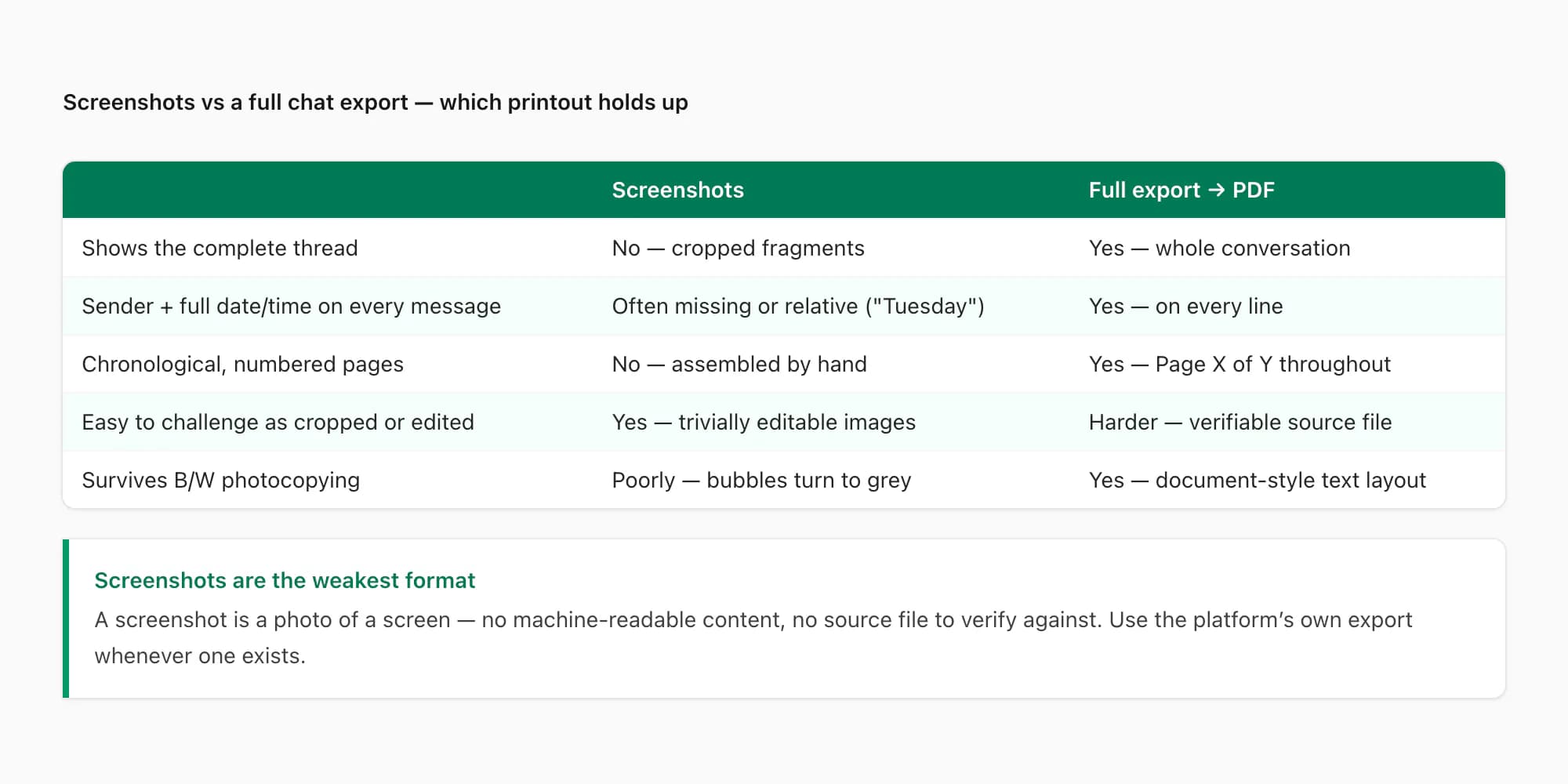
And the thing to avoid: screenshots as your primary format. A screenshot is a photo of a screen. It shows a fragment of a conversation, carries no machine-readable content, and is trivially editable in any image editor. Courts commonly accept message evidence when it can be authenticated — and a pile of crops is the hardest version of that to authenticate. I wrote a full comparison in WhatsApp to PDF vs screenshots, and the deeper authentication questions — hashing the original file yourself, metadata, chain of custody — are covered in the WhatsApp evidence court PDF guide. In the US, the authentication standard lives in Federal Rule of Evidence 901; other jurisdictions have their own equivalents, which is exactly why you ask your lawyer.
WhatsApp or another app?
This question decides your route, so let me be straight about what each app gives you — and what ChatToPDF can and cannot read.
WhatsApp. The best case, and the subject of the rest of this guide. WhatsApp has a built-in Export Chat feature that produces a complete, timestamped text record of the conversation — up to roughly 40,000 messages without media, or about 10,000 with media, per export (WhatsApp's caps, not anyone else's). That export file is what ChatToPDF converts into a paginated PDF. The full walkthrough is in the next section.
SMS and iMessage. Neither has a built-in export button on the phone, so the route starts with a backup or export tool: SMS Backup & Restore on Android, or an iMazing Messages CSV / imessage-exporter output from an iPhone. ChatToPDF reads those files too. The steps are different enough that they have their own guide: how to print text messages for court. Carrier records are a separate thing — they usually show metadata only (which numbers exchanged messages and when), not what the messages said.
Telegram and Instagram. Both have their own export: Telegram Desktop's Export chat history, and Instagram's "Download your information" with Messages selected. ChatToPDF converts those exports as well — see Telegram chat to PDF and Instagram chat to PDF. Signal and other apps are outside ChatToPDF's scope. The same principle applies everywhere: use the platform's own export if one exists, and avoid screenshot stacks.
If your messages are in WhatsApp, keep reading — the rest of this guide is the exact workflow. If this is for a divorce or custody matter specifically, the WhatsApp messages in divorce court guide covers the family-court angle.
How to print WhatsApp messages for court
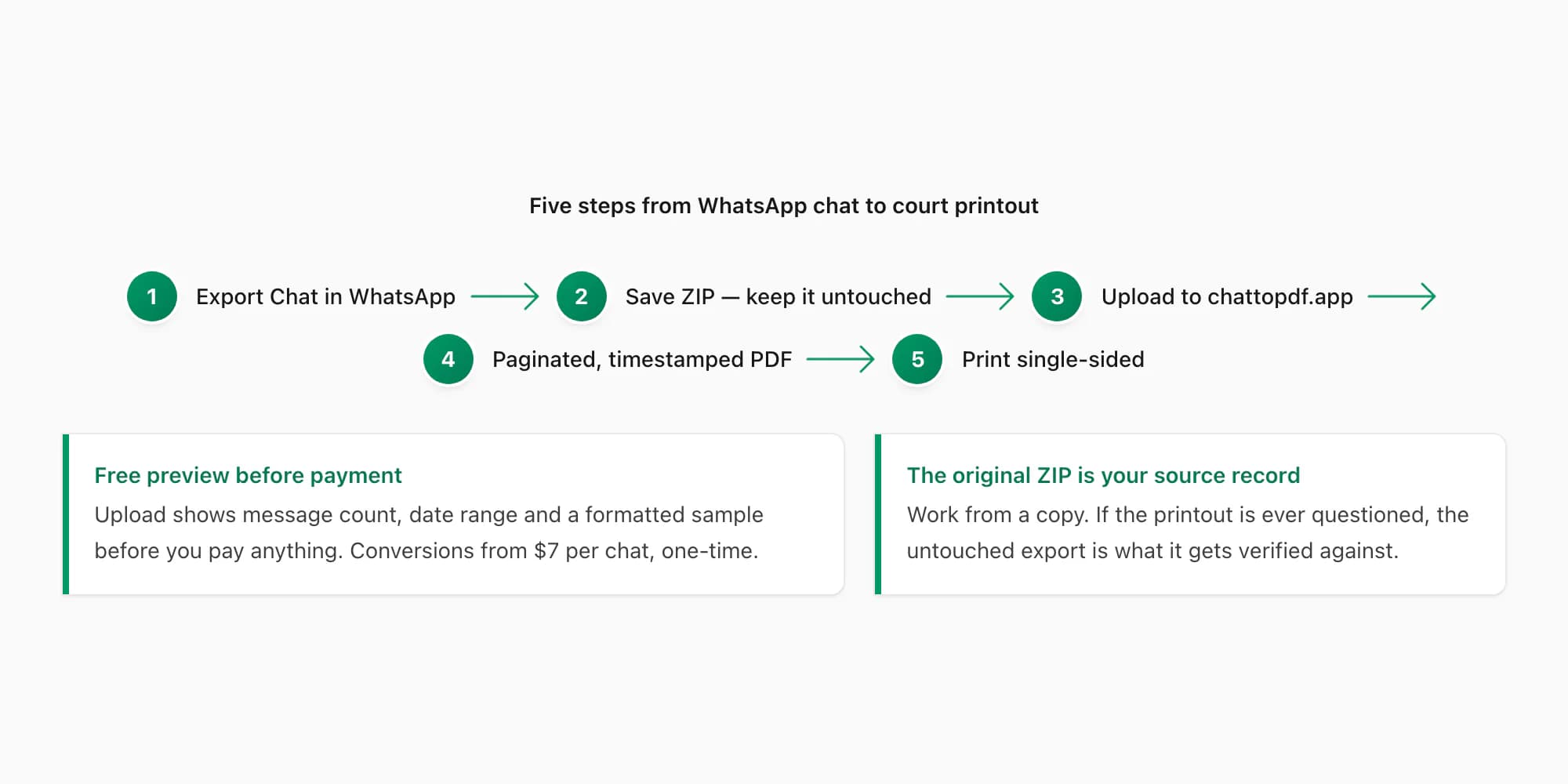
Five steps, phone to paper. No software to install — the conversion runs in the browser at chattopdf.app.
Export the chat from WhatsApp
Open the conversation. On iPhone: tap the contact or group name at the top → scroll down → Export Chat. On Android: tap the ⋮ menu → More → Export Chat. WhatsApp asks whether to include media. For a court printout I recommend Including Media if photos or voice notes matter to your case, Without Media if only the text does — the text export covers more messages (~40,000 vs ~10,000). WhatsApp's own export chat FAQ documents the feature. Do this now even if your hearing is weeks away: the export captures the conversation as it exists today.
Save the export file — and do not touch it again
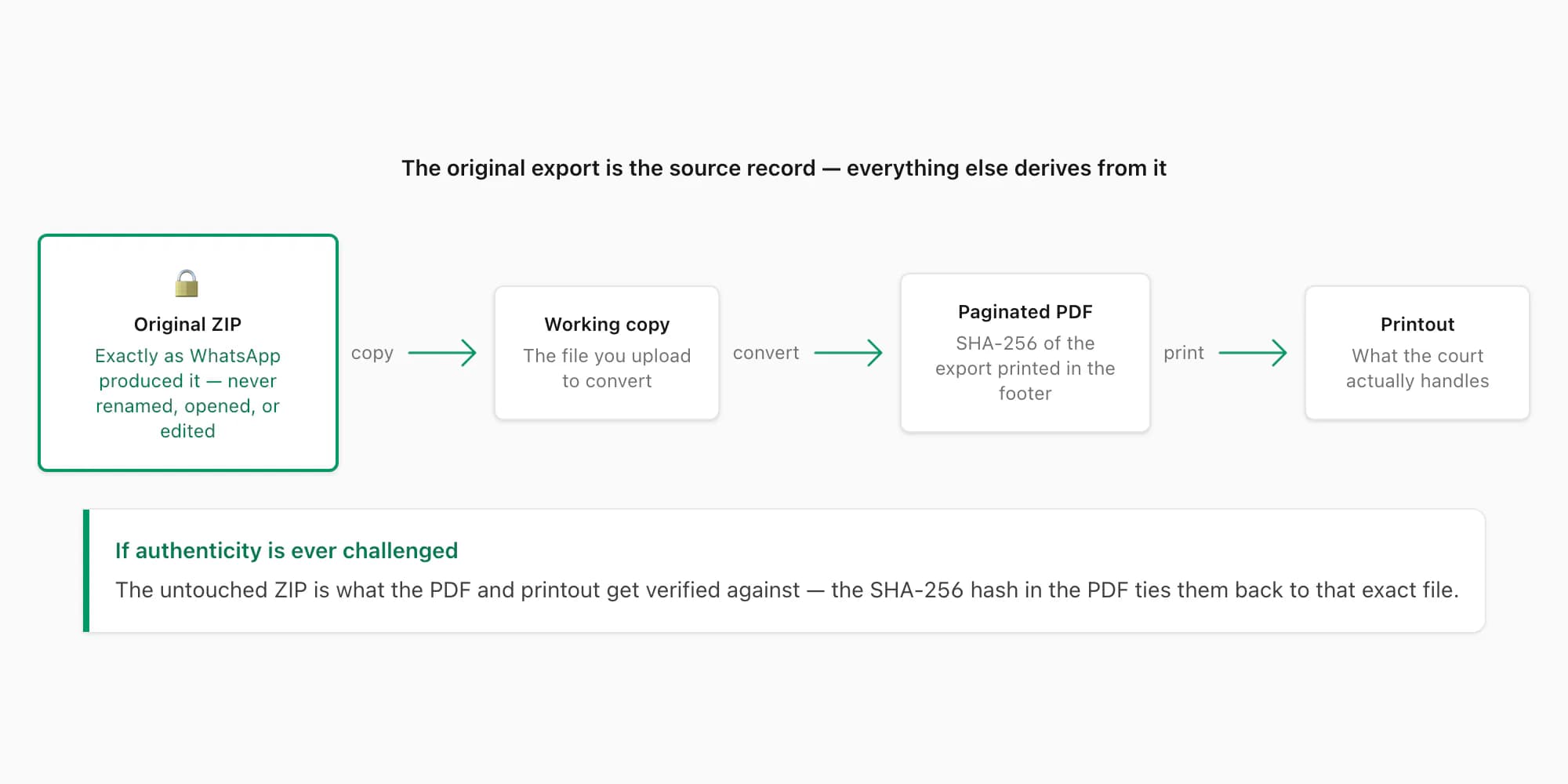
WhatsApp opens the share sheet with a ZIP (or TXT) file. On iPhone, Save to Files; on Android, save to your file manager or Drive. This file is your source record. Make a copy to work from and leave the original exactly as WhatsApp produced it — unrenamed, unopened, unedited. If anyone later questions the printout, the untouched export is what it gets verified against.
Upload the ZIP to chattopdf.app
Go to chattopdf.app on your phone or computer and upload the export. You get a free preview before paying anything — message count, date range, and a sample of the formatted output — so you can confirm the right chat exported correctly. Uploaded files are deleted automatically (7-day retention at most).
Convert to a paginated, timestamped PDF
Pick a tier and convert — one-time payment per chat, from $7 Basic; $14 Standard covers text and photos for most court-printout jobs, and $49 Premium+Voice processes supported voice notes so successful transcripts appear inline. The output is a chronological PDF with sender names and timestamps on every message, photos placed inline, page numbers throughout, and searchable text. It arrives on the page and by email.
Print it — single-sided, black and white is fine
Open the PDF and print the whole document, not a page range. Single-sided is the safe default for court filings. Check the first and last pages and one in the middle: sender, date, time, and page number all legible? You now have the printout — and the PDF itself, which many courts and lawyers will also want digitally.
For general printing that is not headed to court — keepsakes, business records, archiving — the broader how to print WhatsApp messages guide covers more options, and the WhatsApp to PDF overview explains the whole export-and-convert pipeline from the beginning.
For the WhatsApp part, I built a print-ready WhatsApp chat tool that turns the export into numbered, dated pages, and the legal evidence page covers the Formal layout in more detail. The WhatsApp evidence guide goes deeper on integrity and hashing.
Formatting the printout as an exhibit
A few practical points that come up once the PDF is in hand.
Page numbers are non-negotiable. ChatToPDF prints "Page X of Y" on every page automatically. If you assemble a printout any other way, add them — a court bundle without page numbers is genuinely hard to work with, and gaps invite questions.
Design for black and white. Court copies are usually photocopied or scanned, in greyscale, possibly more than once. Green chat bubbles that look clear on screen can turn to grey mush on the third photocopy. A document-style layout — sender name, timestamp, message text — survives copying in a way app-style screenshots do not.
Keep the original export untouched. Worth repeating from step 2. The ZIP that WhatsApp produced is your source record; the PDF and the printout derive from it. If authenticity is challenged, your lawyer's strongest position is "here is the original export file, here is how the PDF was generated from it." ChatToPDF does not add a hash to the PDF; if you want a fingerprint of the original ZIP, the WhatsApp evidence PDF guide shows how to record a SHA-256 hash of it yourself, so anyone can later check that file has not changed.
Ask the clerk — or your lawyer — what your court wants. Some courts want exhibits pre-marked, some want a specific cover sheet or digital filing alongside paper, some have copy-count rules. Five minutes on the phone with the clerk's office beats guessing — self-represented parties can usually get format questions answered there, even though staff cannot give legal advice.
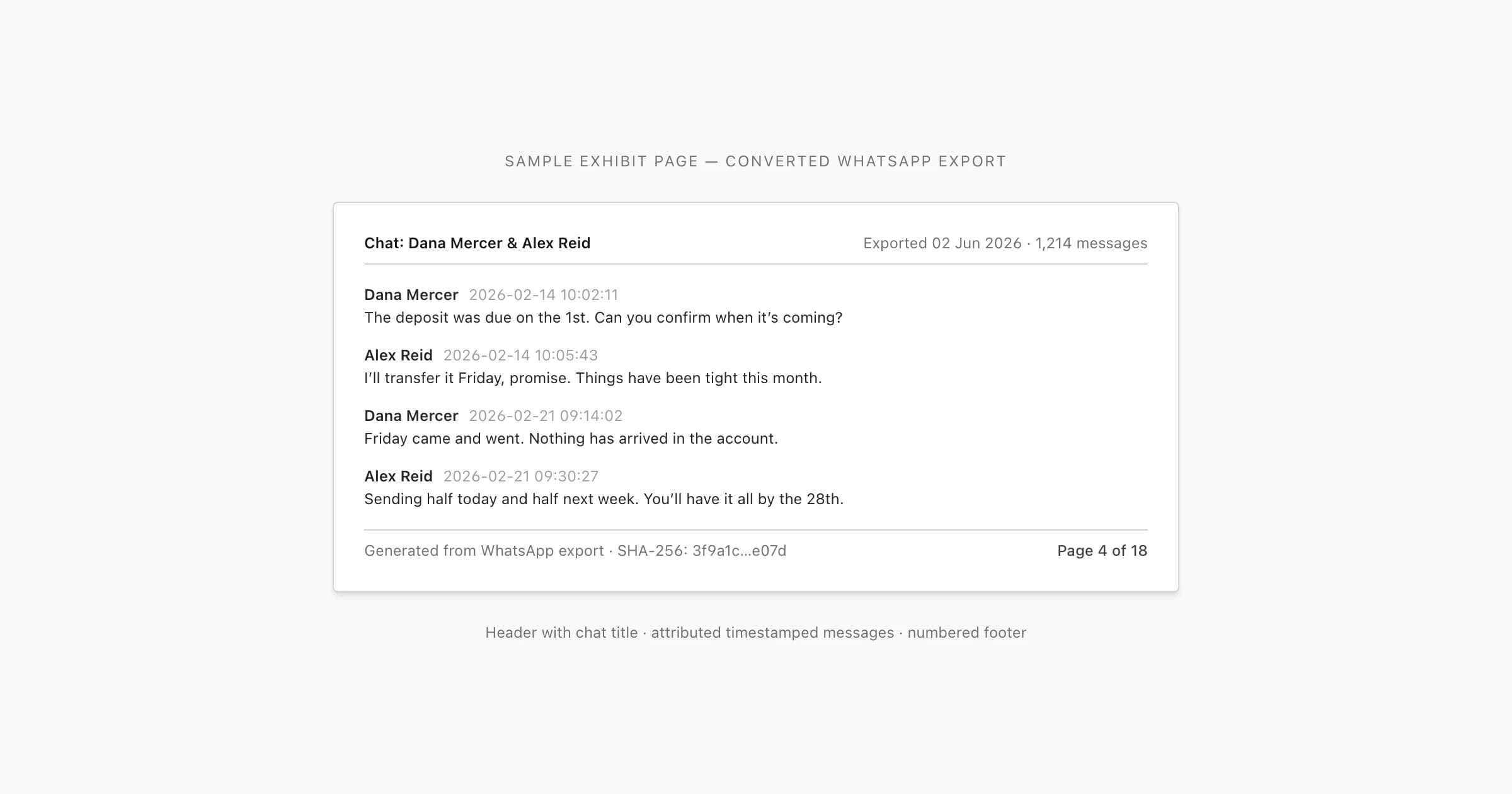
Here is an illustrative exhibit page — attributed, timestamped messages and a page-number footer. (The Formal layout adds a numbered entry to every message.) In a ChatToPDF PDF that footer is a plain "Page X of Y" on every page, and the export details (export date, participants, date range) sit in a block on the first page rather than in a header on every page:
Free vs paid routes
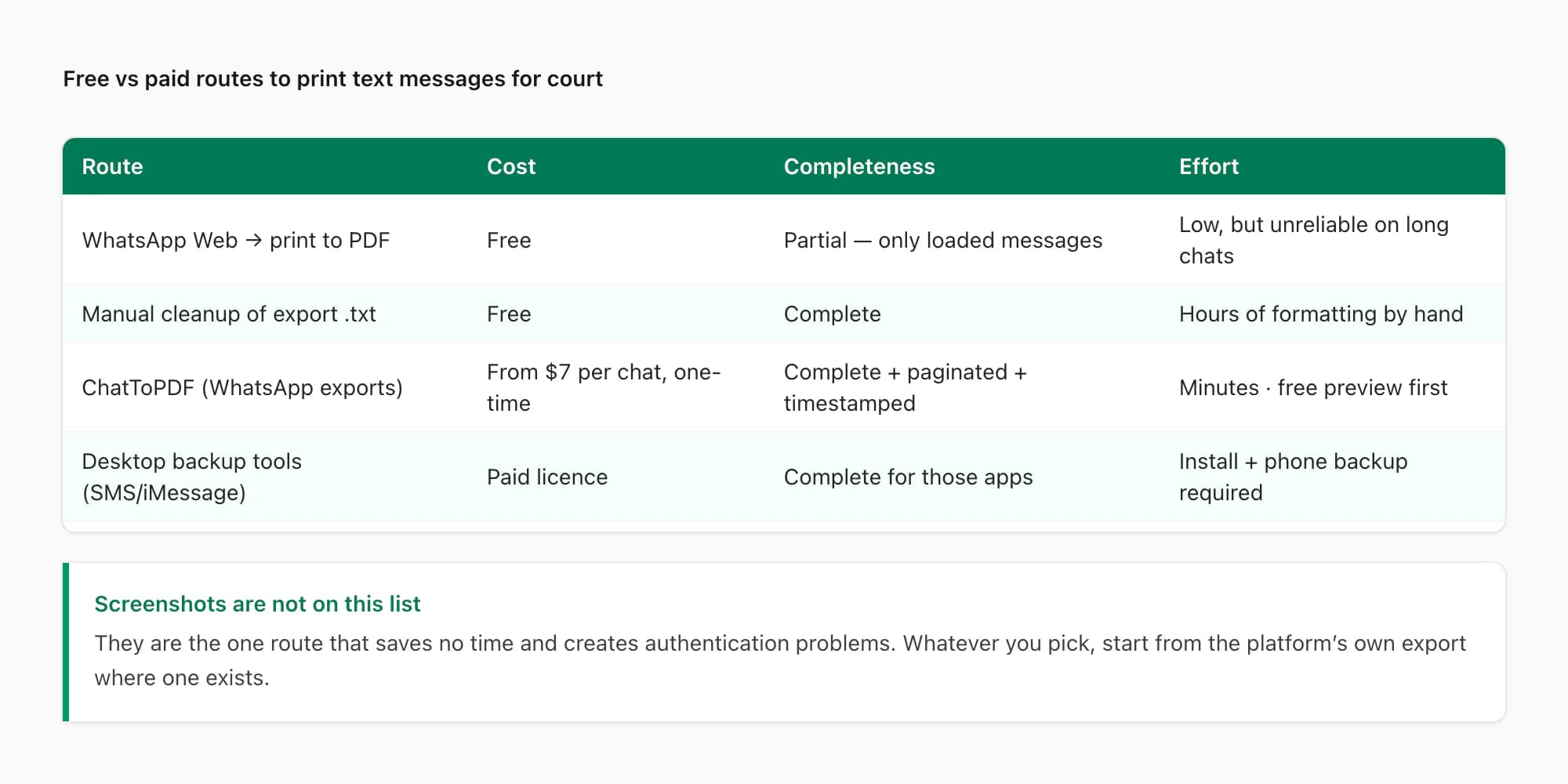
Honest answer: there are free ways to do this, and for a short, simple thread they may be all you need. Here is the real trade-off for WhatsApp chats.
WhatsApp Web + print to PDF (free). Open the chat in WhatsApp Web, press Ctrl/Cmd+P, save as PDF. The catch: the browser only prints what is currently loaded on screen — a small recent slice of a long chat. Scrolling up to force more history to load is unreliable past a few hundred messages, there are no page-number controls, and dates render however the app displays them ("Yesterday", "Tuesday"). Fine for a one-page recent exchange; not workable for a year-long thread.
Manual cleanup of the export (free). The Export Chat ZIP contains a plain _chat.txt. Open it in Word, fix the line wrapping, format the timestamps, add page numbers, print. Everything you need is in there — and for a chat of any length, plan on hours of tedious formatting, with every manual edit something you might later have to explain.
ChatToPDF (from $7 per chat, one-time). Upload the same ZIP, get the paginated, attributed, chronological PDF in minutes, with a free preview before you pay and nothing manually edited in between. For most people preparing a court printout this week, $7–$14 against an afternoon of formatting is the whole decision.
Not WhatsApp? For SMS and iMessage, the text messages for court guide compares the free backup apps and paid desktop tools that get the thread out of the phone in the first place.
Two adjacent situations have their own guides with the specifics this page skips: documenting workplace harassment messages for HR complaints and tribunals, and formatting WhatsApp relationship evidence for visa applications, where officers want curated samples rather than complete exhibits.
Key takeaways
- A usable court printout shows the complete thread, with sender + date + time on every message, in chronological order, on numbered pages.
- Screenshots are the weakest format — fragmentary and trivially editable, so they draw cropped/edited challenges. Use the platform's own export whenever one exists.
- WhatsApp is the easy case: Export Chat → upload the ZIP to chattopdf.app → paginated, timestamped PDF (free preview; from $7 per chat) → print.
- SMS and iMessage have no built-in export. Start from a backup or export tool — the text messages for court guide covers that route. Carrier records show metadata only, not message content.
- Keep the original export file untouched — it is the source record everything else gets verified against.
- Courts commonly accept message printouts when they can be authenticated — but formats and filing rules vary, so ask the clerk or your lawyer exactly what your court requires.
FAQ
Can I print WhatsApp messages directly from my phone?
Not in any way that produces a court-usable document. Phones can print individual screens via AirPrint or Android's print service, but that is effectively printing screenshots — fragments without page numbers, often without full dates. There is no "print this whole conversation" button in iMessage, Android Messages, or WhatsApp's mobile app. The workable path is always: get the conversation out as a file first (Export Chat on WhatsApp; a backup or export tool for SMS/iMessage), turn it into a paginated PDF, then print from any computer or a print shop.
Is there a free way to print WhatsApp messages for court?
There is no good free app, but there are free methods: print-to-PDF from WhatsApp Web (only captures recently loaded messages — fine for short threads, unreliable for long ones) or manually formatting the free Export Chat text file in a word processor (complete, but hours of work). If the messages matter enough to go in front of a judge, a $7–$14 one-time conversion of a WhatsApp export, with a free preview before paying, is usually the cheapest route to a properly paginated document.
Do screenshots of WhatsApp messages hold up in court?
Sometimes — courts have accepted screenshots, especially when nobody disputes the messages. But they are the weakest format you can submit: a cropped fragment with no machine-readable content, a file date reflecting when you took the picture rather than when messages were sent, and trivially alterable in any image editor. If the other side contests the messages, those weaknesses become the argument. When a complete export exists, use it; if screenshots are genuinely all you have (the chat was deleted, or it was on someone else's device), bring them to your lawyer along with anything that corroborates them.
How do I prove the messages haven't been edited?
You cannot absolutely prove it on your own — authentication is ultimately argued in court — but you can put yourself in a strong position. Use WhatsApp's own export mechanism rather than retyping or screenshotting, keep the original export file exactly as produced, and generate the PDF from that file without manual edits in between. ChatToPDF does not add a hash or any authentication stamp to the PDF. If you want a fingerprint of the original file, record a SHA-256 hash of the untouched ZIP yourself before uploading — the WhatsApp evidence court PDF guide shows how, and what a hash can and cannot prove. What weight any of this carries in your case is a question for your lawyer — courts commonly accept exported message records when authenticated, and your lawyer can tell you what your court will want to see.
How do I print WhatsApp messages for court from an iPhone?
Open the chat → tap the contact or group name → scroll down → Export Chat → choose Without Media for a long thread or Include Media if photos matter → save the file via the share sheet (Files, iCloud Drive, or email it to yourself). Then upload that file to the converter in any browser, download the paginated PDF, and print it from a computer or print shop. No cable, no desktop software — the whole point of the browser route is that it works from the phone that holds the messages. The full walkthrough with screenshots is in the WhatsApp section above.
How do I print WhatsApp messages for court from an Android phone?
Same idea, slightly different taps: open the chat → three-dot menu → More → Export Chat → pick Without media or Include media → share the resulting file to Drive, email, or your Files app. Upload it to the converter in Chrome (or any browser), download the PDF, and print. Android's own print service only prints screen-by-screen screenshots, which is exactly the format that gets challenged — the export route produces the full thread with sender and timestamp on every message.
Can I print WhatsApp messages for court online for free?
You can get most of the way for free: the export itself is free, the upload and preview are free (you'll see the message count, senders, and a rendered sample before paying), and short threads can sometimes be handled with WhatsApp Web's print-to-PDF. What costs money is the full paginated conversion — from $7 per chat, one-time. Against the usual desktop alternatives ($30+ licensed software plus a USB cable), the browser route is usually the cheapest path to a document that holds up.
How many messages can I export at once?
WhatsApp caps each export at roughly 40,000 messages without media or about 10,000 with media — its limits, not the converter's. The export takes the most recent messages up to the cap, so a long chat exported "with media" may not reach back far enough; exporting "without media" covers four times the history. WhatsApp offers no date-range picker, so a multi-year conversation may need the text-only export plus your lawyer's advice on what range the case actually requires. For SMS and iMessage there is no WhatsApp-style cap — see the text messages for court guide for those exports.
I'm Paul, the founder of ChatToPDF. I built it after needing a long WhatsApp conversation as a readable PDF for a legal matter. I test and document WhatsApp exports, PDF conversion, voice-note transcription, and the limits people should check before relying on the result.