
WhatsApp to PDF vs Backuptrans — the honest split
I'll start with something I don't always lead with on these pages: Backuptrans is genuinely good at what it does. I've used it. People I respect use it. If your job is "I need to move my entire WhatsApp history from an old Android to a new iPhone and keep the threads intact", Backuptrans is one of the only tools on the planet that actually pulls it off, because it reads WhatsApp's underlying database directly. The PDF export is one feature on its long feature list. Saying anything else here would be dishonest.
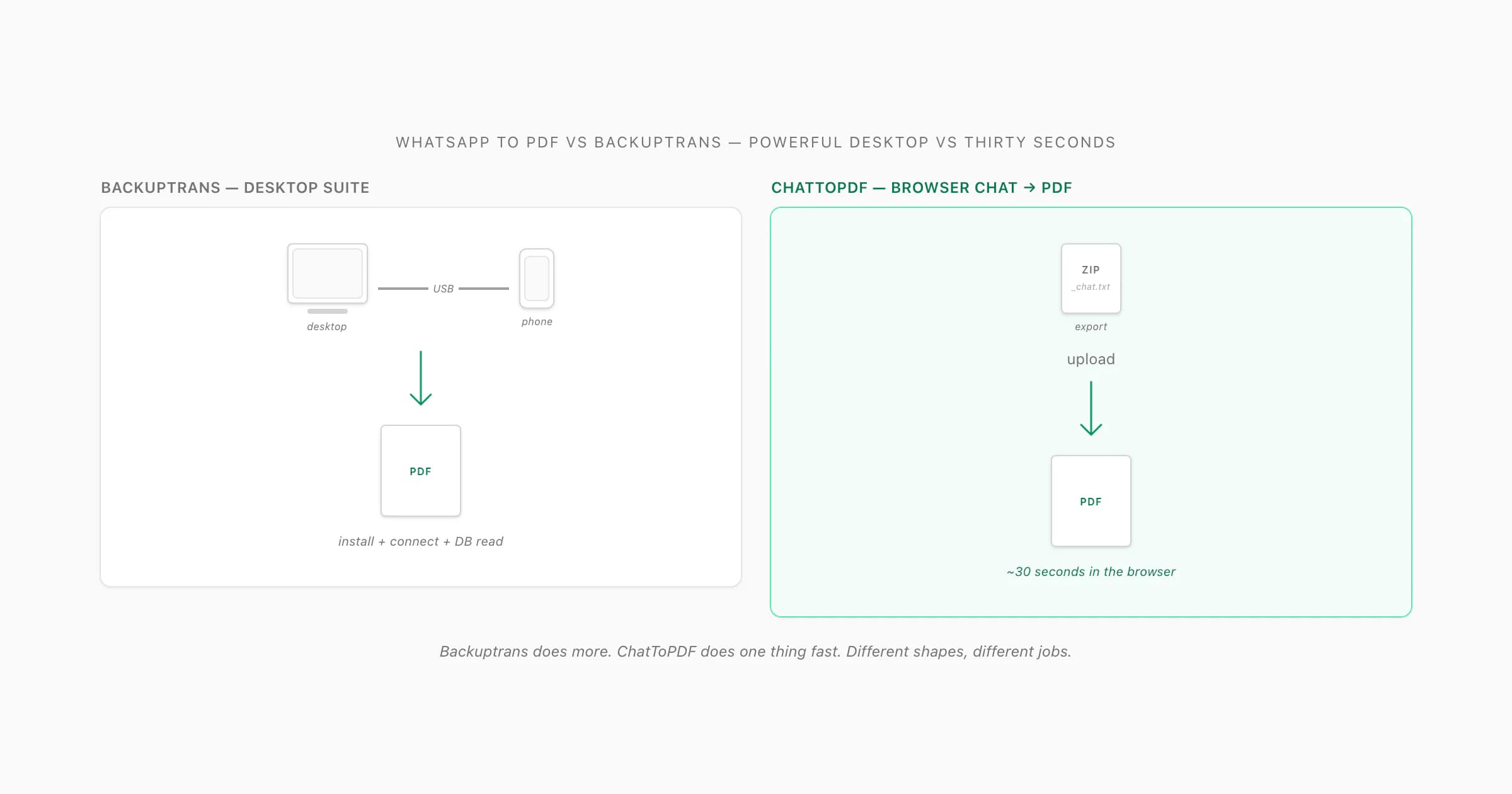
So this whatsapp to pdf vs backuptrans page is not "here's why my thing is better" — it's "here's the trade you're actually making". Backuptrans is a desktop transfer suite that, among its many jobs, can export or print a WhatsApp chat to PDF. ChatToPDF is a browser tool that does exactly one thing: it takes the ZIP from WhatsApp's own Export Chat menu and turns it into a paginated, sender-attributed PDF in about thirty seconds. Backuptrans does more. ChatToPDF does one thing fast.
The reason this comparison page exists at all is that "backuptrans whatsapp" and "backuptrans whatsapp to pdf" show up as real searches — people are evaluating the two routes. Both are legitimate. The choice depends entirely on what you have in front of you. If what you have is "a desktop, a USB cable, and twenty minutes", Backuptrans is shaped for that. If what you have is "a ZIP from WhatsApp and thirty seconds", that's the shape of ChatToPDF. Read on for the honest version of what each one asks of you.
What Backuptrans does (and is genuinely good at)
I want to lay out what Backuptrans is actually for, because the PDF export is only one of its features and you'd undersell it badly if you only judged it on that. As of 2026, the Backuptrans website lists a family of WhatsApp products — the headline two being Android iPhone WhatsApp Transfer + and iPhone WhatsApp Transfer. Both are desktop installers (Windows; a separate Mac build is sold for each).
What Backuptrans does well, and what people actually buy it for:
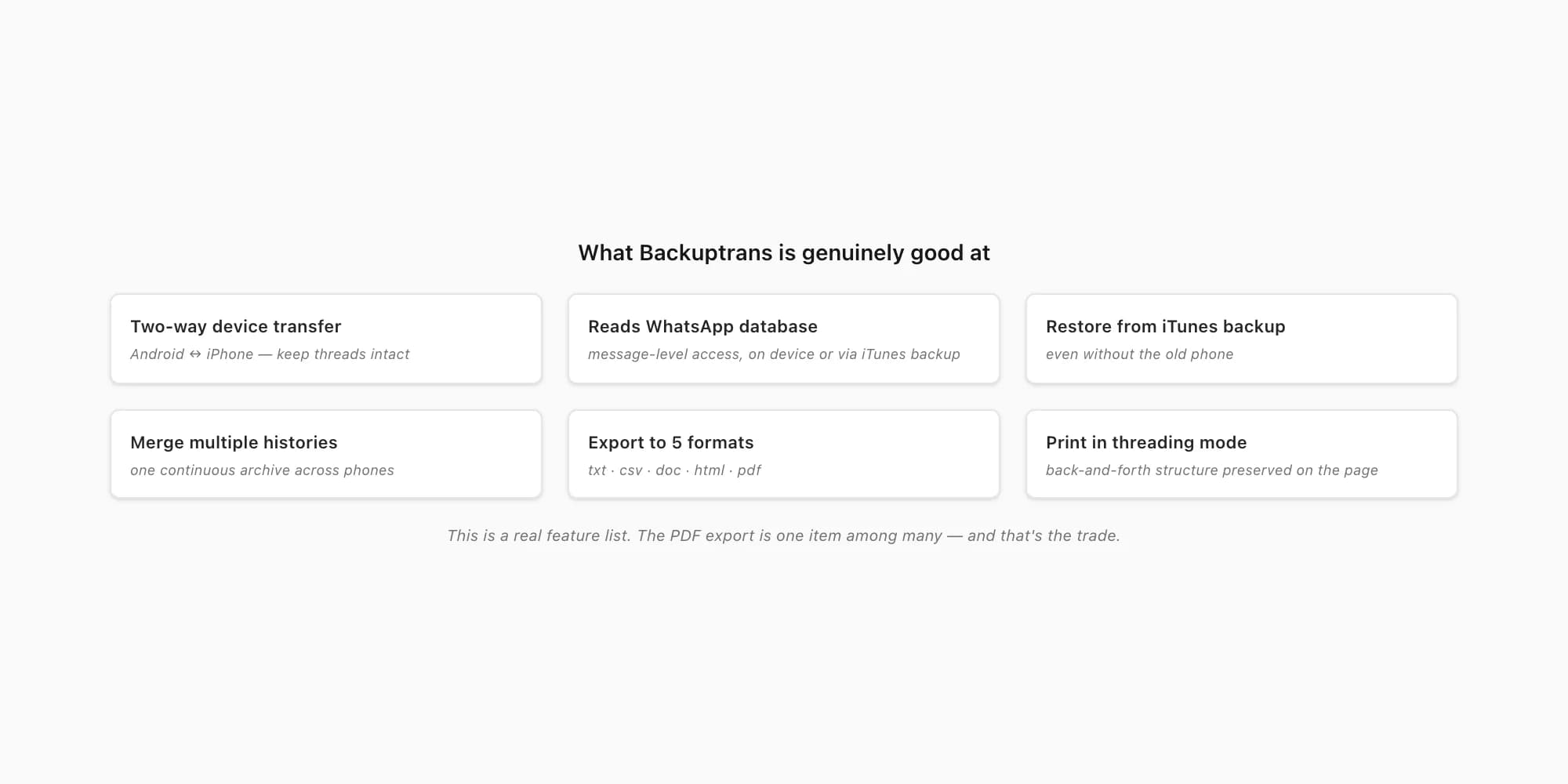
- Two-way device transfer. Move WhatsApp threads from an Android to an iPhone, an iPhone to an Android, an iPhone to an iPhone — keeping the conversation structure intact, including attachments. This is the headline feature. WhatsApp's own built-in chat transfer is fussy and platform-locked; Backuptrans crosses platforms.
- Read the WhatsApp database directly. This is the technical thing the tool is built around. By reading WhatsApp's local database on the device or from an iTunes backup, Backuptrans gets at messages at a level a "share-out export" can't — every message, with metadata, by sender, in order.
- Restore from an iTunes backup, even without the old phone. Backuptrans's marketing copy specifically mentions copying WhatsApp messages from an iTunes backup to a new phone "even without your old iPhone". For someone whose old phone died, that is the killer feature.
- Merge multiple WhatsApp histories. Combine threads from several sources — handy if you've been switching phones and want one continuous archive.
- Export to multiple formats. As of 2026, the product pages list export formats including txt, csv, doc, html and pdf. So yes — you can get a chat as a PDF out of Backuptrans.
- Print the chat in "threading mode". The print feature is described as printing WhatsApp chat messages "in threading mode" — i.e. preserving the back-and-forth structure when you send the chat to a printer or a virtual PDF printer.
- Group chats and large histories. Because it works at the database level, Backuptrans handles long histories that other tools choke on.
That's a real feature list. If your problem is "I'm switching from Android to iPhone and I will not lose my WhatsApp history", or "my old phone is gone but I have its iTunes backup and I need those messages back" — that is what Backuptrans is built for, and ChatToPDF cannot do those things. I'm not going to pretend otherwise. The honest framing is: Backuptrans does more, ChatToPDF does one thing fast.
What Backuptrans costs you in time (the part nobody tells you)
Here's the part the feature list won't show you. I've spent real evenings inside Backuptrans, plugging a phone into a laptop and waiting for it to chew through a WhatsApp database, and I've come away thinking it's a genuinely capable tool for what it sets out to do. But every one of those capabilities quietly assumes the same starting kit: a desktop you can install on, a cable that the drivers actually recognise, a phone or an iTunes backup within reach, and an unhurried block of time. For a phone-to-phone migration that price is already baked in. For the chat-to-PDF job — the narrow thing this page is about — it's pure overhead. None of it is needed to turn one exported chat into one document.
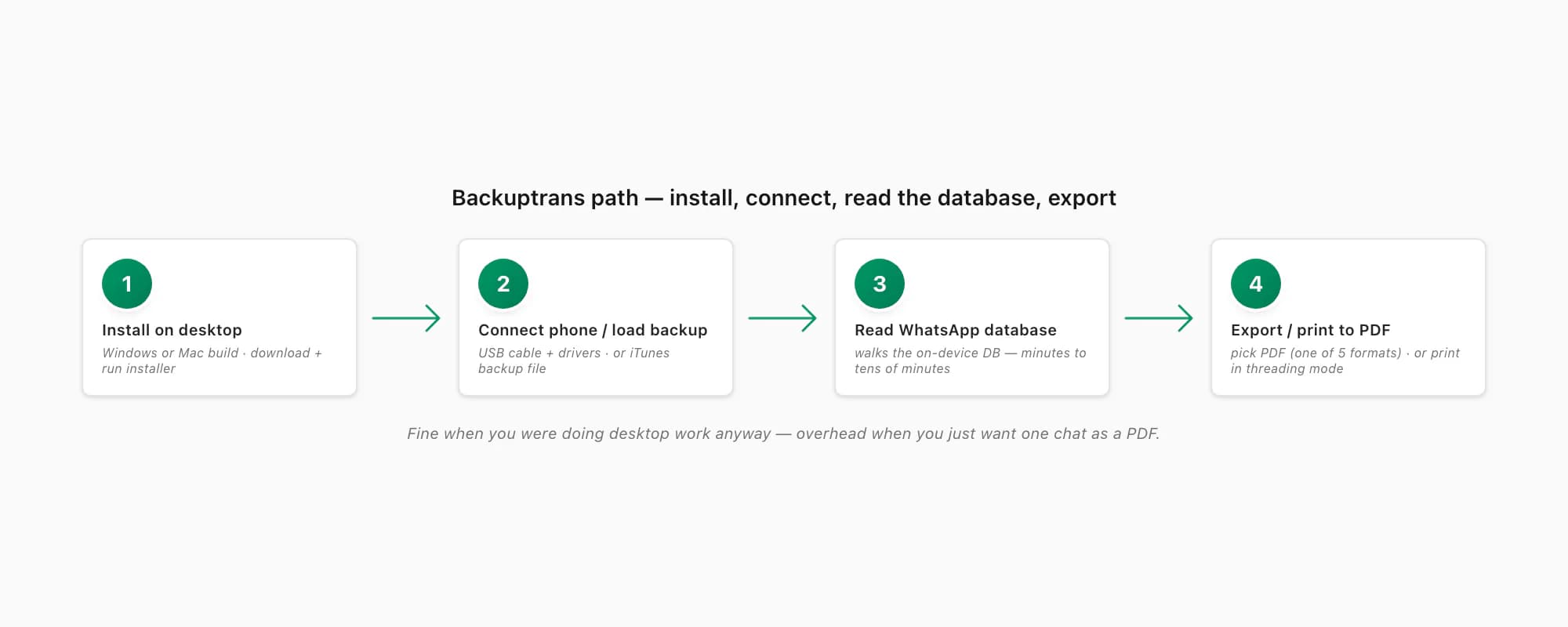
The Backuptrans path to a chat PDF, end-to-end:
- Buy and download. Pick the right product on the Backuptrans site (Transfer +, iPhone Transfer, Mac vs Windows build) and download the installer.
- Install on a desktop. Windows or Mac — and you do need the desktop. Backuptrans is not a web app; there is no browser path.
- Connect the phone, or load an iTunes backup. For an on-device read, plug the iPhone or Android into the computer via cable, with the right drivers and any required USB-debugging or trust permissions; or point Backuptrans at an iTunes backup file on disk.
- Wait for the database read. The tool walks WhatsApp's local database on the device or in the backup. Big histories take time.
- Pick the chat, hit Export or Print. Choose PDF as the export format, or print to a virtual PDF printer in "threading mode". You get a PDF.
For someone who is genuinely doing a phone-to-phone transfer with chat PDFs as a bonus, that whole sequence is fine — the time was always going to be spent. For someone whose only job is "I have a single WhatsApp chat I want as a sender-attributed PDF for a solicitor by Friday", every step in that sequence is overhead. Install a desktop app, find a USB cable, give it driver permissions, wait for a database read — for one PDF.
ChatToPDF's pitch on this page is exactly that narrow case. You already exported the chat — WhatsApp's own Export Chat menu hands you a ZIP. You drop the ZIP onto chattopdf.app. About thirty seconds later the PDF lands in your inbox. No install. No cable. No backup file. No device connection. $14 Standard per chat and that's the whole bill. If you're already in the desktop-and-cable world for other reasons, Backuptrans will serve you well. If you just want this one chat as a PDF without setting any of that up, that's the gap ChatToPDF was built to close.
Side by side — the feature matrix
Here is the row-by-row contrast. I've stuck to claims I can verify against the Backuptrans site as of 2026 — features it lists on its own product pages — and hedged anything I'm not 100% sure of a current figure for. Backuptrans wins every row that is about being a desktop transfer suite; ChatToPDF wins every row that is about being a fast browser-only chat-to-PDF job.
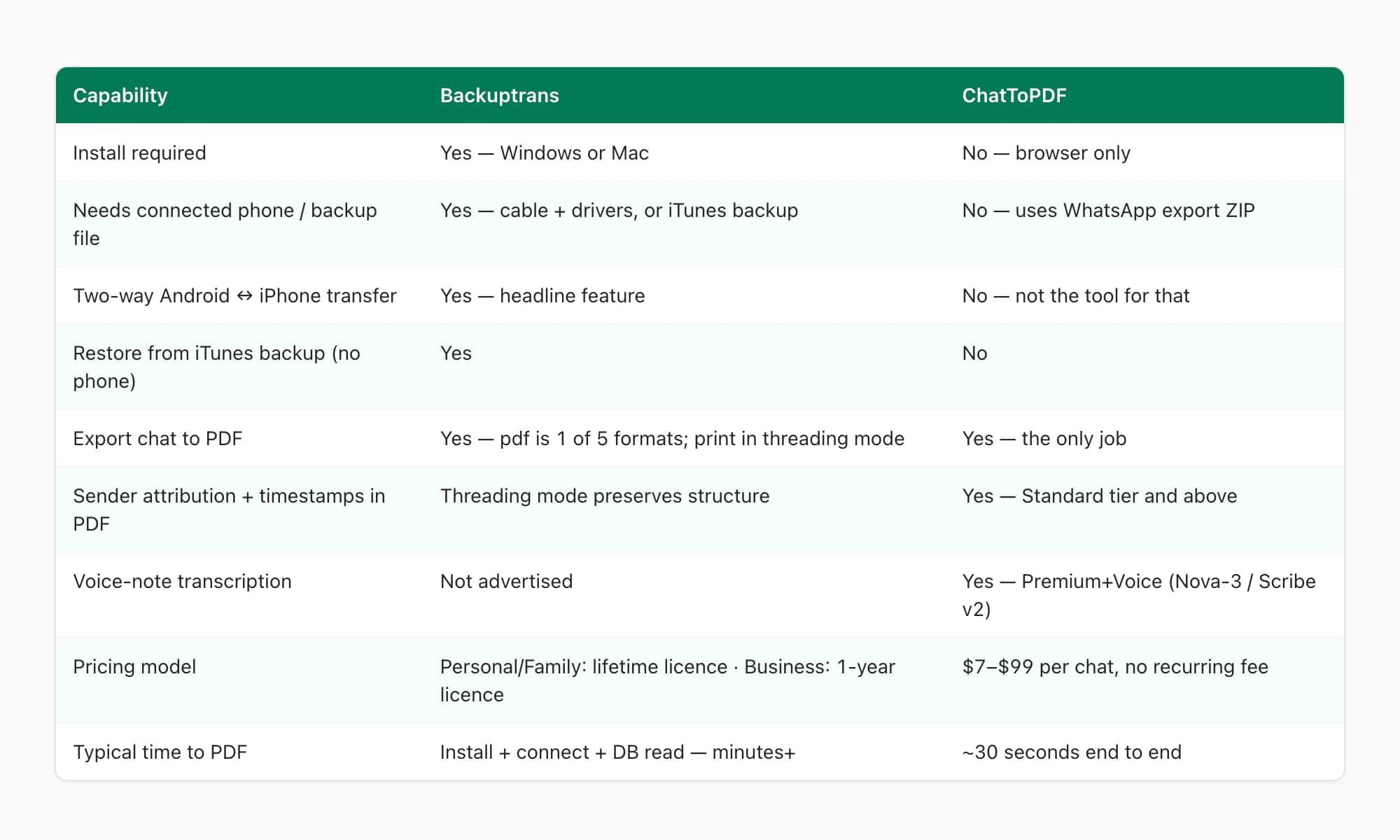
| Capability | Backuptrans | ChatToPDF |
|---|---|---|
| Install required | Yes — Windows or Mac desktop | No — browser only |
| Needs connected phone or backup file | Yes — phone via cable, or iTunes backup on disk | No — uses WhatsApp's own export ZIP |
| Two-way Android↔iPhone transfer | Yes — headline feature | No — not the tool for that |
| Restore from iTunes backup without old phone | Yes | No |
| Export chat to PDF | Yes — pdf is one of five export formats; plus print in threading mode | Yes — the only job |
| Sender-attributed bubbles + timestamps in PDF | Threading mode preserves structure; layout style is the tool's own | Yes — on $14 Standard per chat and above |
| Inline photos placed in the conversation | Attachments handled at database level (verify current layout on backuptrans.com) | Yes — on $14 Standard per chat and above |
| Voice-note transcription in the PDF | Not advertised | Yes — $49 Premium+Voice (Nova-3/Scribe v2 router) |
| Pricing model | Personal and Family editions: one-time lifetime licence; Business edition: one-year licence (verify current figures on backuptrans.com) | Per chat — $7 Basic to $99 Power User per chat, no recurring fee |
| Typical time from "I want a PDF" to "PDF in hand" | Install + connect + database read — minutes to tens of minutes | Export + upload + ~30 seconds |
The pattern is clean. Every "desktop transfer suite" row goes to Backuptrans. Every "narrow chat-to-PDF in a browser" row goes to ChatToPDF. Neither wins the other's category, and pretending otherwise would waste your time.
How ChatToPDF does the chat-to-PDF job
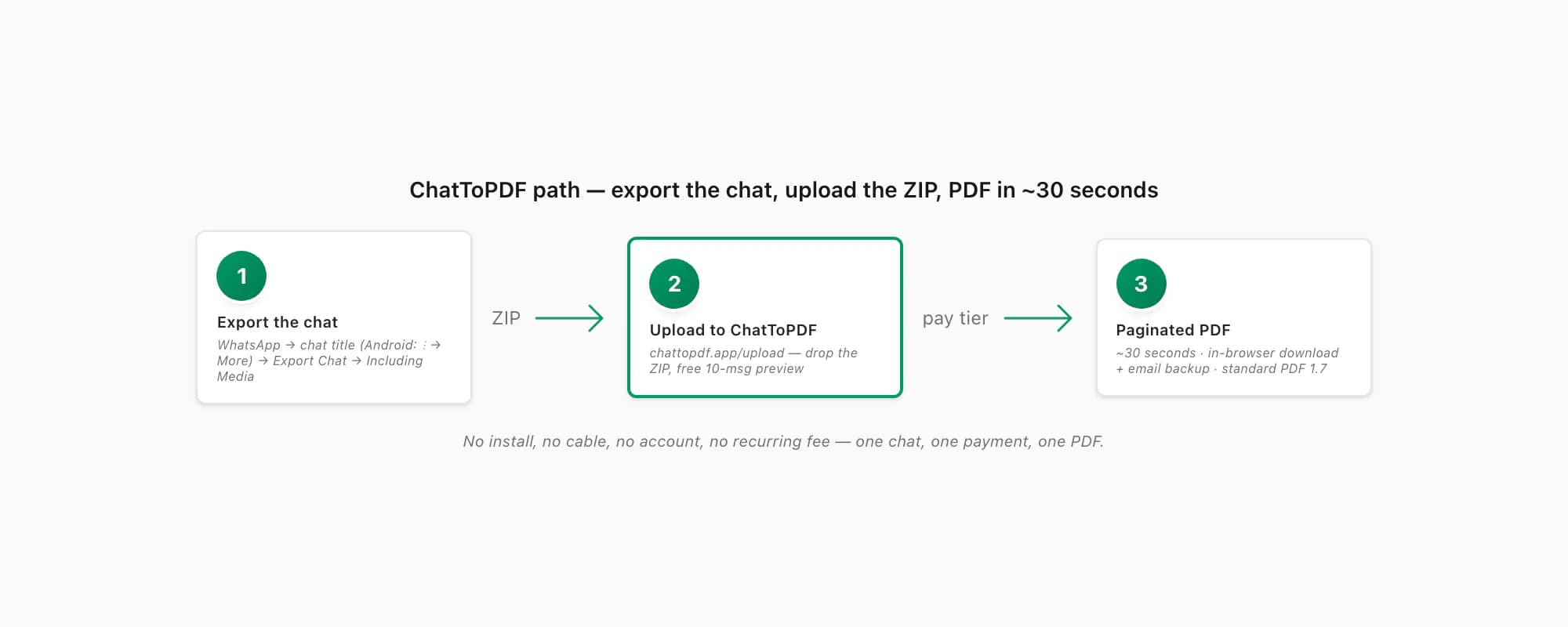
If the only job you have is "one WhatsApp conversation, I want it as a paginated PDF, soon, no install", here is the path. It's three real steps plus the export from WhatsApp.
Export the chat from WhatsApp
Open the chat in WhatsApp. On iPhone, tap the contact or group name at the top, scroll down, tap Export Chat. On Android, tap the three-dot menu top right, then More → Export Chat. Pick Including Media so photos are inlined in the PDF (the ZIP is bigger; that's fine). WhatsApp gives you a
.zipcontaining_chat.txtand every media file in the conversation.Upload the ZIP to ChatToPDF
Open chattopdf.app/upload in any browser — mobile Safari, Chrome, Firefox, Samsung Internet all work. Drop the ZIP onto the upload zone. You get a free preview of the first ten messages so you can confirm the parser read the export correctly before paying anything.
Pick a tier and pay per chat
Choose $14 Standard per chat for the typical case — sender-attributed bubbles, inline photos, timestamps, up to 25,000 messages. $7 Basic per chat is text-only for short photo-less chats. $29 Premium per chat removes the message ceiling and adds an XLSX/CSV export. $49 Premium+Voice per chat adds voice-note transcription through the language-aware Nova-3/Scribe v2 router. $99 Power User per chat adds a priority queue for very large group exports.
Download the PDF (and get the email backup)
The conversion runs in about thirty seconds. You get the download link in-browser and an email backup in case your tab closes. The output is standard PDF 1.7 — it opens in iOS Quick Look, Android file managers, Adobe Acrobat, Chrome, Safari, Firefox, Edge and macOS Preview without any extra reader. If a WhatsApp PDF you've been sent by someone else isn't opening, the WhatsApp not opening PDF guide walks the five usual causes.
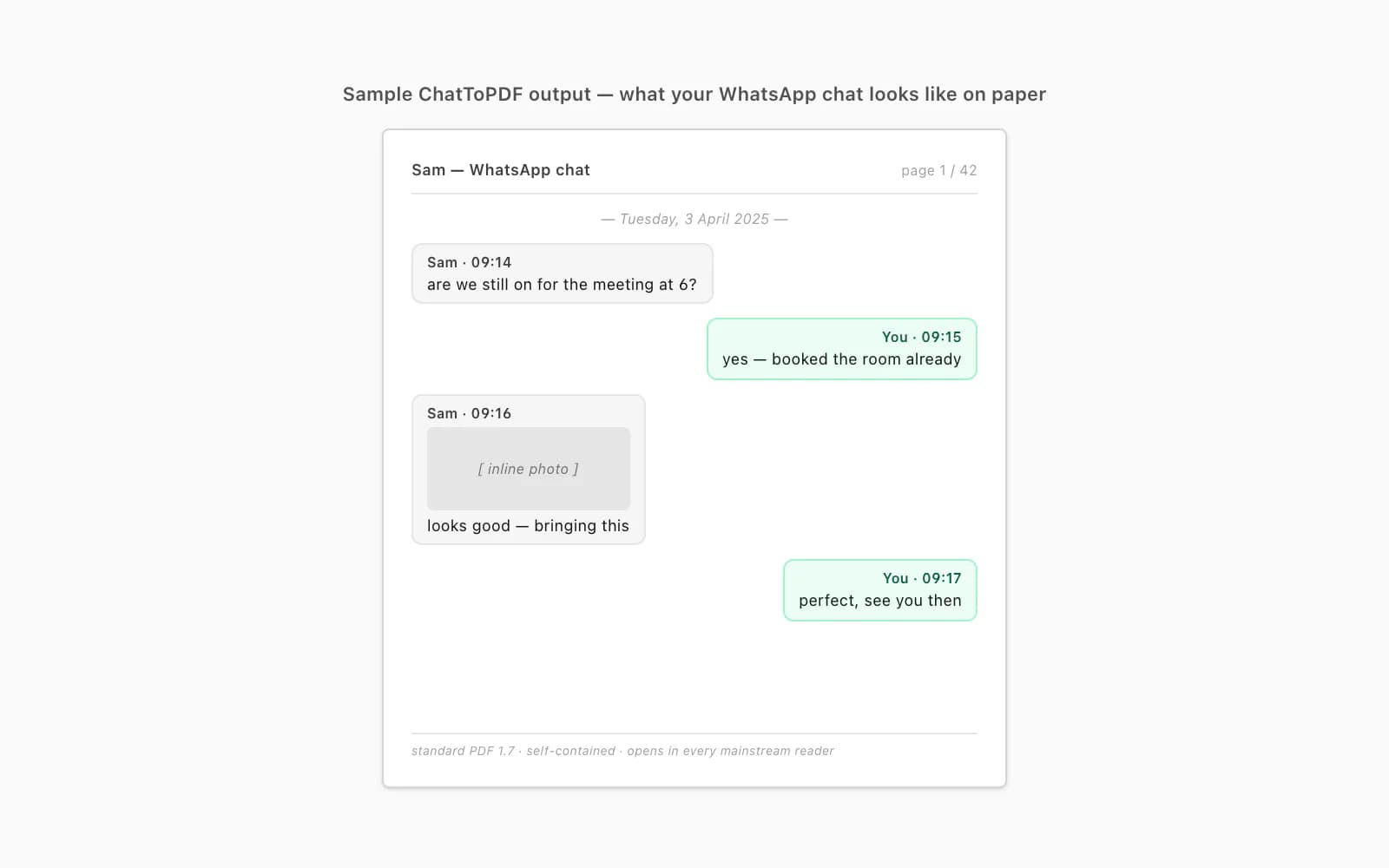
The output looks the way a chat ought to look on paper — bubbles, names, times, photos inlined at the right place, page numbers, a header on each page so a 600-page export still feels navigable. The whole transaction is one payment for one conversion. No installer. No driver. No second visit to the toolkit.
Pricing — lifetime licence vs per chat
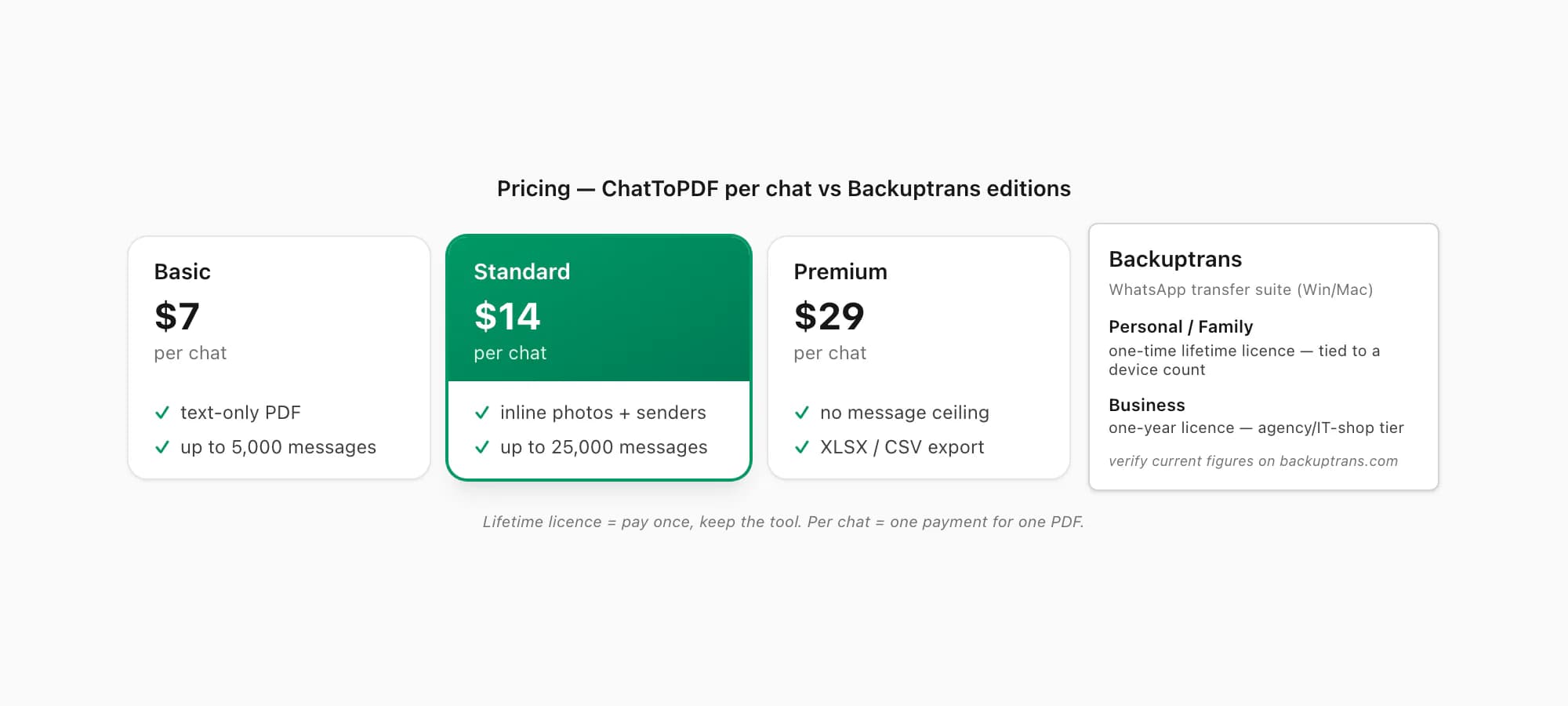
Here is how the money side compares. I've done my best to verify Backuptrans's pricing against its live product pages as of 2026 — figures can drift, so check the Backuptrans Android iPhone WhatsApp Transfer + page before you commit if the dollar amounts matter to you.
Backuptrans. As of 2026, Backuptrans sells its WhatsApp products with three editions per product. For the WhatsApp Transfer + line, the Personal and Family editions are sold as a one-time lifetime licence tied to a device count (Personal covers a smaller number of devices on one computer, Family covers more devices on two computers). The Business edition is the only one sold as a one-year licence — it's the agency/IT-shop tier with a much higher device count and more covered computers. So the typical individual buying Backuptrans pays once and keeps the licence; only the Business edition is a recurring per-year licence. Check backuptrans.com for the current figures on each tier.
ChatToPDF. Priced per chat conversion, no recurring fee, no auto-renewal, no account. You pay once for one chat. Five tiers:
- $7 Basic per chat — text-only PDF, up to 5,000 messages. For a short chat with no photos worth keeping.
- $14 Standard per chat — sender-attributed bubbles, inline photos, timestamps, up to 25,000 messages. The usual pick.
- $29 Premium per chat — no message ceiling, plus an XLSX/CSV export alongside the PDF.
- $49 Premium+Voice per chat — adds language-aware voice-note transcription. The current product registry lists 93 languages, with 57 in its excellent or high accuracy bands; coverage is not an accuracy guarantee.
- $99 Power User per chat — priority queue and bulk handling for very large group exports.
If you have a steady transfer-and-archive practice — multiple phones, ongoing migrations, regular WhatsApp evidence work — Backuptrans's lifetime licence model can be a fair trade for the access; you buy it once and keep using it. If you have one WhatsApp chat you want as a document this week, and you do not want a desktop install on your machine for it, ChatToPDF is shaped for that exact transaction: $14 Standard per chat covers the typical case, no recurring fee, no leftovers. Lateral comparisons live on the ChatToPDF vs iMyFone page and the ChatToPDF vs built-in print-to-PDF page.
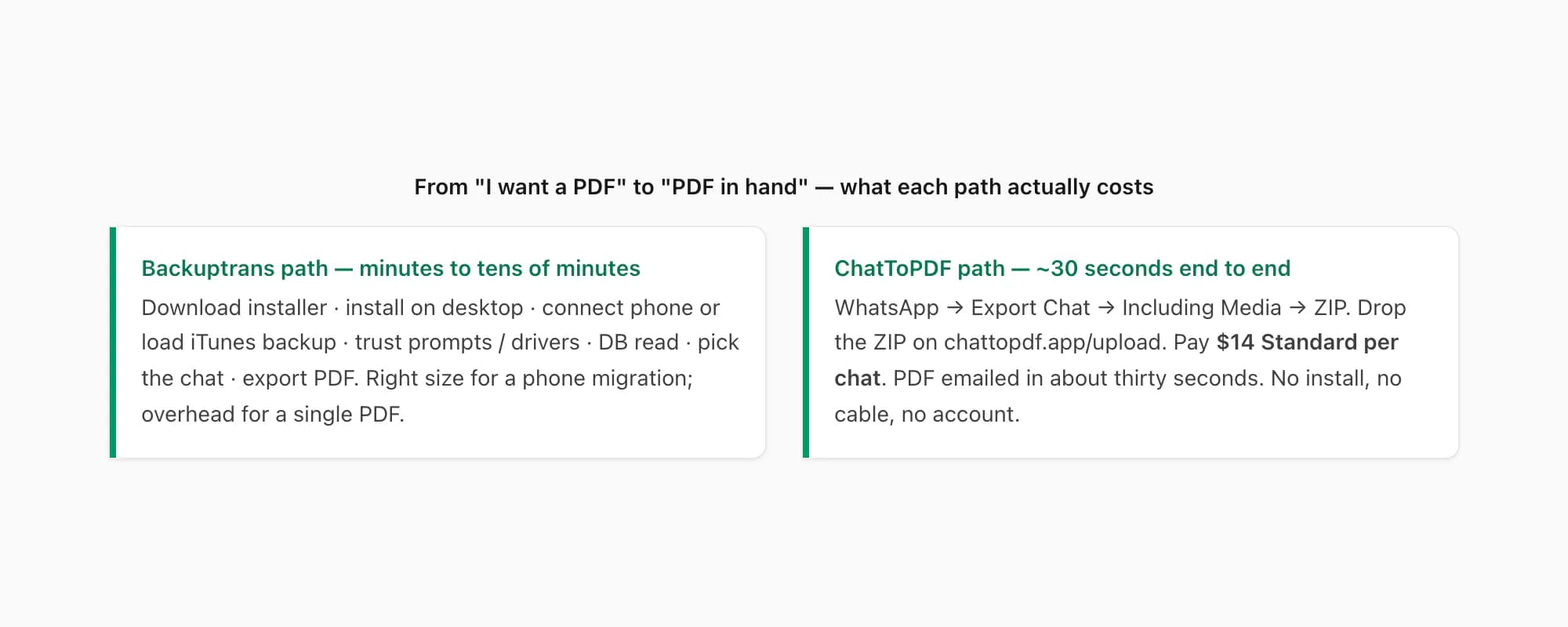
The most honest framing of the trade isn't even about dollars. It's about time. Backuptrans is the right tool when the work was always going to happen on a desktop — phone migrations, multi-device archives, restoring from iTunes backups. ChatToPDF is the right tool when the only job is "one chat to PDF, today, no install".
When Backuptrans is still the right call
I do not want anyone reading this page to come away thinking I'm telling them not to buy Backuptrans. Some examples of when Backuptrans is genuinely the right tool, and I'd send people there:
- You're switching phones across platforms and refuse to lose history. Android → iPhone, iPhone → Android. WhatsApp's own chat-transfer flow is fiddly and version-dependent; Backuptrans is one of the most reliable third-party paths and it's been doing this for years.
- Your old phone died and you have an iTunes backup. This is the killer use case Backuptrans is built for. ChatToPDF cannot help you here — it needs WhatsApp's export ZIP, which means you need the phone working long enough to run Export Chat. Backuptrans does not.
- You manage WhatsApp histories across many devices. Restoring across a fleet, merging histories, doing message-level work — that's a desktop suite job. The lifetime-licence model is a sensible shape for that work.
- You want database-level access to the chat. Backuptrans's edge over export-based tools is that it reads WhatsApp's database directly, which means it sees things WhatsApp's share-out export doesn't surface.
- You're already a Backuptrans user and the PDF export is incidental. If you've bought the licence anyway, the PDF export comes with it. No reason to pay anyone else for that one chat.
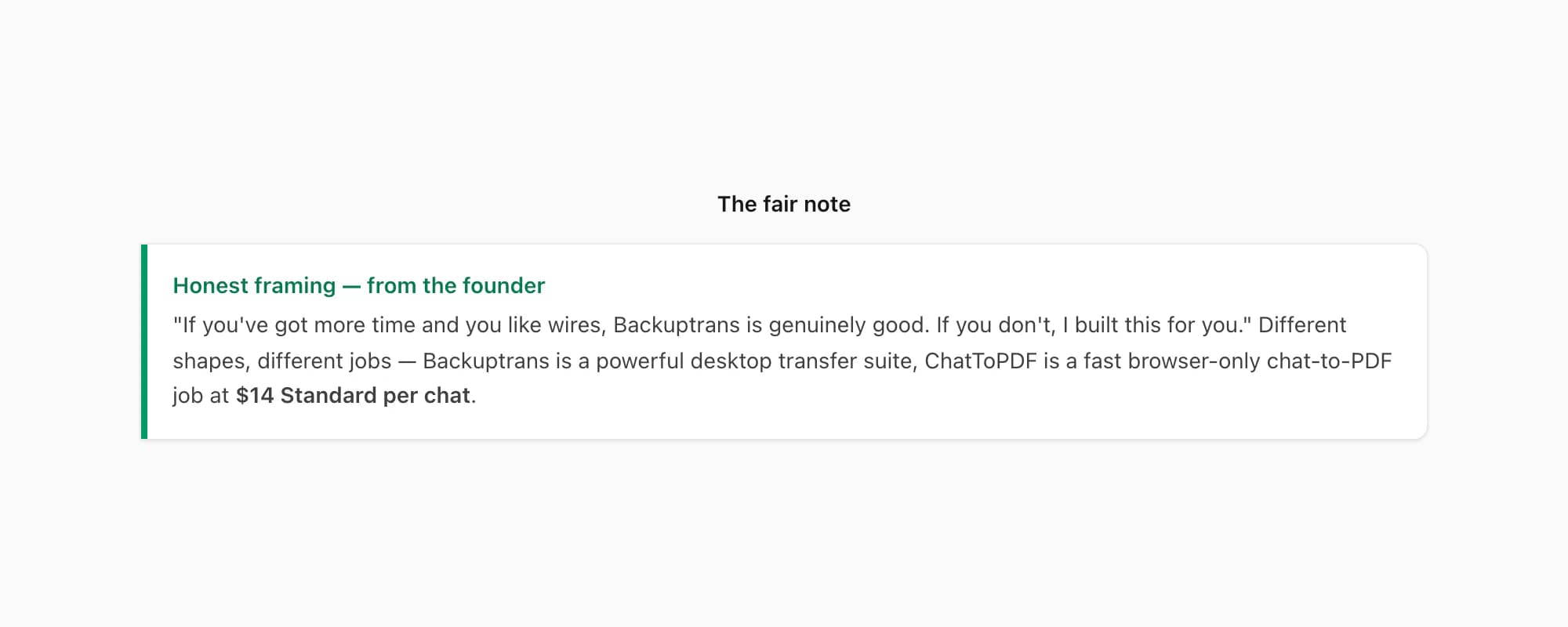
What I would not use Backuptrans for is the narrow case this page exists to settle: one WhatsApp chat, you want it as a paginated, sender-attributed PDF, soon, no desktop install. Installing a Windows or Mac app, connecting a phone, waiting for a database read — for one PDF — is overhead the chat-to-PDF job does not need. The pillar WhatsApp to PDF guide covers the export-and-upload path end to end. Lateral comparisons live on the ChatToPDF vs Smallpdf page and the ChatToPDF vs iMyFone page.
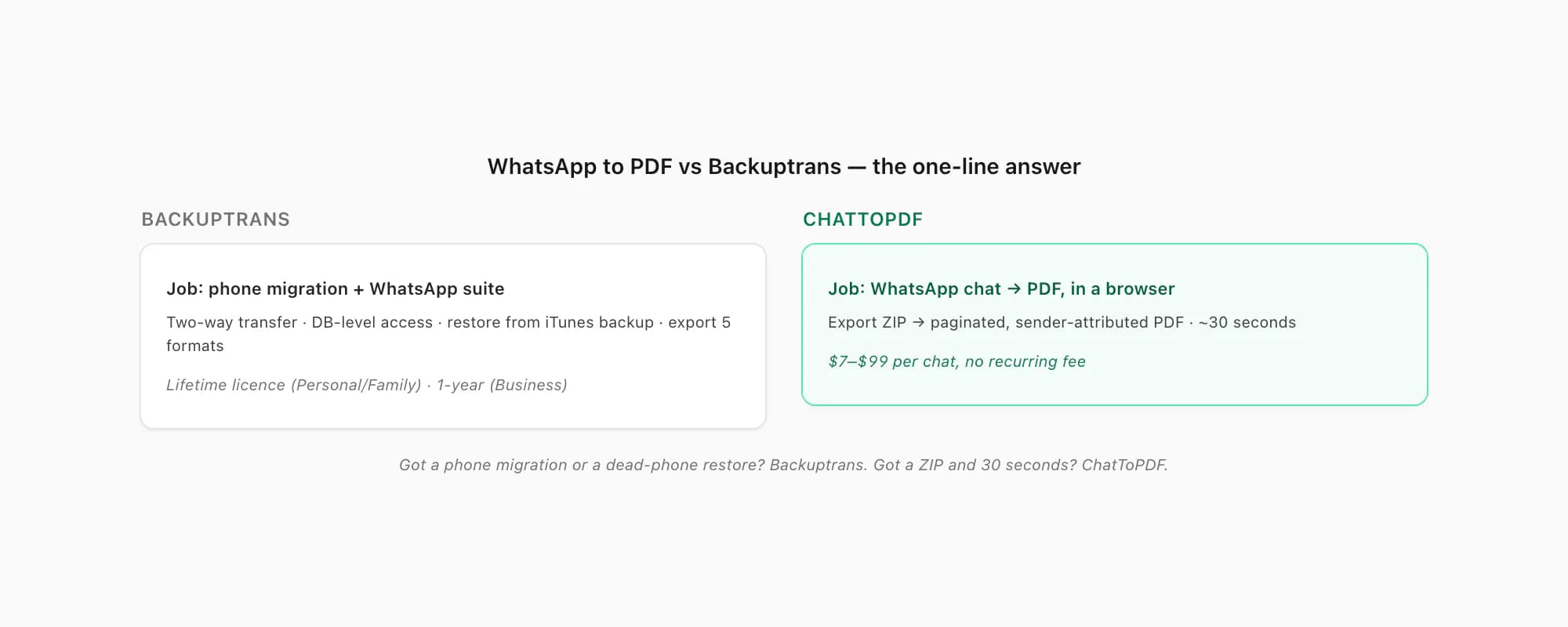
The bumper sticker, in one line: Got a phone migration or a dead-phone restore, use Backuptrans. Got a WhatsApp export ZIP and thirty seconds, use ChatToPDF. That's the whole whatsapp to pdf vs backuptrans answer.
Key takeaways
- WhatsApp to PDF vs Backuptrans is a fair trade — Backuptrans does more, ChatToPDF does one thing fast
- Backuptrans is a powerful Windows/Mac desktop suite that reads WhatsApp's database directly — two-way transfer, restore from iTunes backup, merge histories, print or export a chat to PDF in threading mode
- Backuptrans's Personal and Family editions are sold as a one-time lifetime licence; only the Business edition is a recurring per-year licence (verify current figures on backuptrans.com)
- Backuptrans requires a desktop install plus a connected phone or an iTunes backup — fine when you were doing desktop work anyway, overhead when you just want one chat as a PDF
- ChatToPDF is browser-only, no install, takes the ZIP from WhatsApp's own Export Chat menu and produces a paginated PDF in about thirty seconds
- ChatToPDF is priced per chat — $7 Basic per chat to $99 Power User per chat, one payment covers one conversion, no recurring fee
- If you are doing a phone migration or restoring from an iTunes backup, Backuptrans is the right tool; if you only want a single WhatsApp chat as a PDF this week, ChatToPDF at $14 Standard per chat is the shape of that job
FAQ
Does Backuptrans export a WhatsApp chat to PDF?
Yes. As of 2026, the Backuptrans WhatsApp Transfer + product page lists PDF as one of five export formats (alongside txt, csv, doc and html), and separately describes a print feature that prints WhatsApp chat messages "in threading mode" — i.e. preserving the back-and-forth structure on the page. The catch is that to use any of it you need a Windows or Mac desktop with Backuptrans installed and either the phone connected by cable or an iTunes backup file on disk. ChatToPDF skips all of that — it takes WhatsApp's own export ZIP in any browser and produces a sender-attributed PDF in about thirty seconds, $14 Standard per chat.
How does Backuptrans charge — a one-off licence or a recurring fee?
The answer depends on which edition you buy. As of 2026, Backuptrans's WhatsApp transfer products sell three editions per product. The Personal and Family editions are sold as a one-time lifetime licence — you pay once, keep using it, tied to a device count and one or two computers. The Business edition is the one sold as a one-year licence (the agency/IT-shop tier with a much larger device count and more covered computers). So the typical individual buys Backuptrans once. Check the live Backuptrans product pages for the current per-edition dollar figures before you commit.
Why would I use ChatToPDF instead of Backuptrans if Backuptrans does more?
Because "does more" and "is right for the job" are not the same thing. Backuptrans is a desktop transfer suite — you install it on Windows or Mac, you connect a phone or load an iTunes backup, you read the database. That whole shape is great when you were going to do desktop work anyway (a phone migration, a restore from a dead phone, archiving multiple devices). It is overhead the chat-to-PDF job does not need. If your only job is "one WhatsApp chat, I want it as a paginated PDF, no install" then ChatToPDF is shaped for exactly that — $14 Standard per chat, browser-only, about thirty seconds end to end.
Can ChatToPDF do what Backuptrans does — restore a phone or transfer messages between devices?
No, and I do not pretend otherwise. ChatToPDF is a one-job tool: it takes the ZIP that WhatsApp's own Export Chat menu produces and renders it as a paginated, sender-attributed PDF. It does not read WhatsApp's database, it does not transfer messages between devices, it does not restore from an iTunes backup. If you need any of those jobs done, Backuptrans is one of the few tools on the planet that genuinely pulls it off, and you should buy a licence for it. ChatToPDF and Backuptrans answer different questions.
Will the PDF ChatToPDF produces open in every reader, including the ones a Backuptrans PDF opens in?
Yes — ChatToPDF outputs standard PDF 1.7, the ISO-standardised version every mainstream reader has supported for over a decade: iOS Quick Look and Books, Android file managers and Google Drive, Adobe Acrobat, Chrome, Firefox, Edge, Safari, macOS Preview. The file is self-contained — messages, sender names, timestamps and inline photos all live inside the one PDF — so there is nothing external to go missing. If a WhatsApp PDF you've been sent by someone else isn't opening at all, the WhatsApp not opening PDF guide covers the five usual causes; ChatToPDF's output sidesteps each of them by construction.
I'm Paul, the founder of ChatToPDF. I built it after needing a long WhatsApp conversation as a readable PDF for a legal matter. I test and document WhatsApp exports, PDF conversion, voice-note transcription, and the limits people should check before relying on the result.