
Start with your platform: Web, Windows, Android or iPhone
The best first fix changed in July 2026. Adobe and WhatsApp introduced Acrobat-powered PDF handling inside WhatsApp Web in Chrome and Edge and the WhatsApp Windows desktop app. That route can preview a PDF, open a full-screen reader, handle password-protected files and expose editing or organisation tools without first choosing a separate desktop viewer.
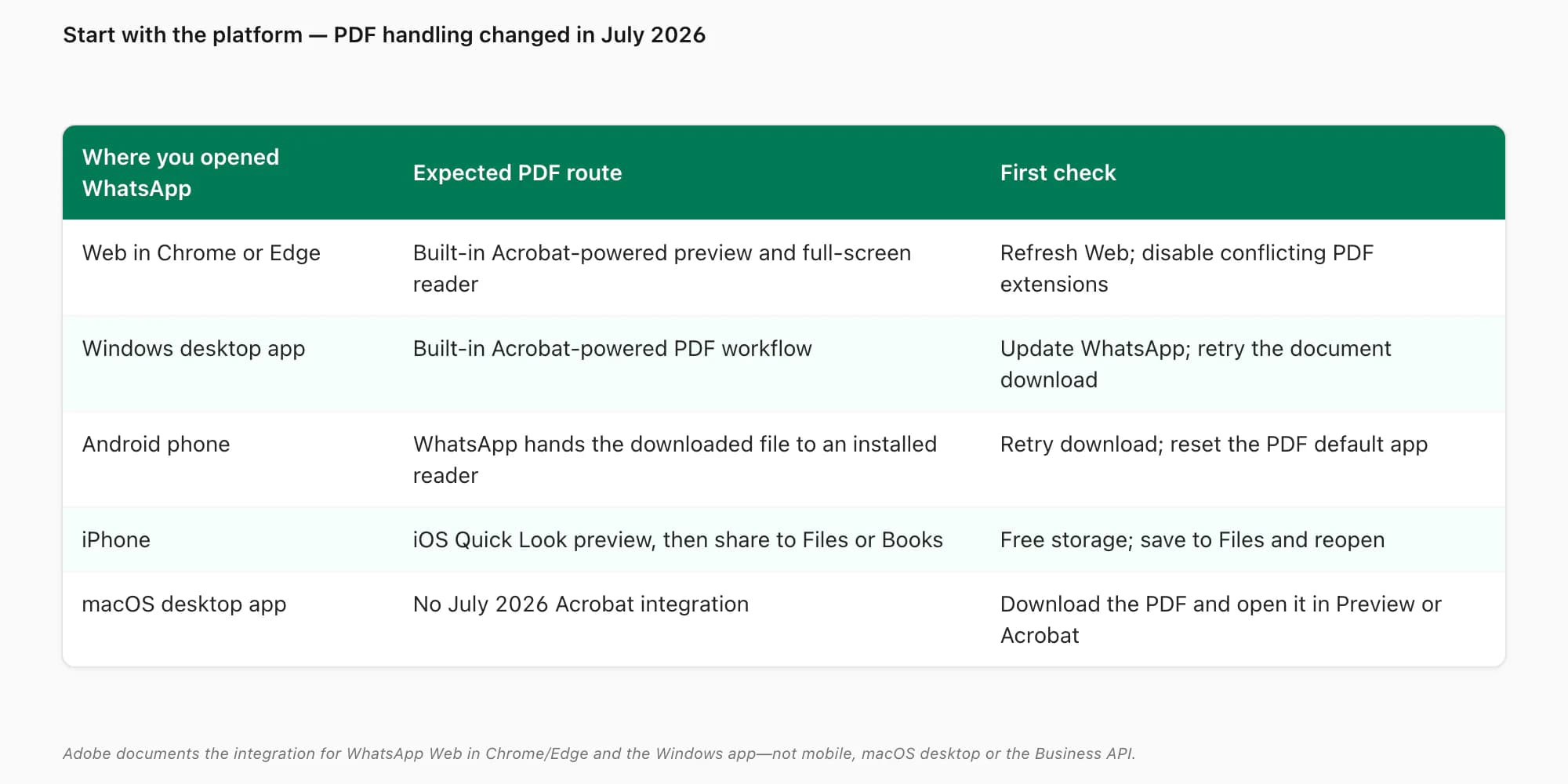
The rollout does not apply everywhere. Adobe's current FAQ lists WhatsApp Web in Chrome/Edge and the Windows desktop app as supported; it excludes the macOS desktop app, mobile apps and the WhatsApp Business API. That produces five different first checks:
- WhatsApp Web in Chrome or Edge: refresh the tab, make sure the document finished downloading and temporarily disable another PDF extension if it conflicts with the integrated preview.
- WhatsApp for Windows: update WhatsApp, reopen the chat and retry the PDF. If the integrated preview still fails, download the file and test it in a standalone reader.
- Android: the OS still needs a working PDF-reader association. Retry the download, then clear or reset the wrong default app.
- iPhone: Quick Look should preview the downloaded PDF. Save it to Files and reopen it to separate a WhatsApp download issue from a file issue.
- WhatsApp for macOS: download the PDF and open it in Preview or Acrobat; do not expect the Windows/Web integration.
Primary sources: Adobe's Acrobat for WhatsApp instructions, supported-platform FAQ and July 2026 product announcement.
The five causes, in order of likelihood
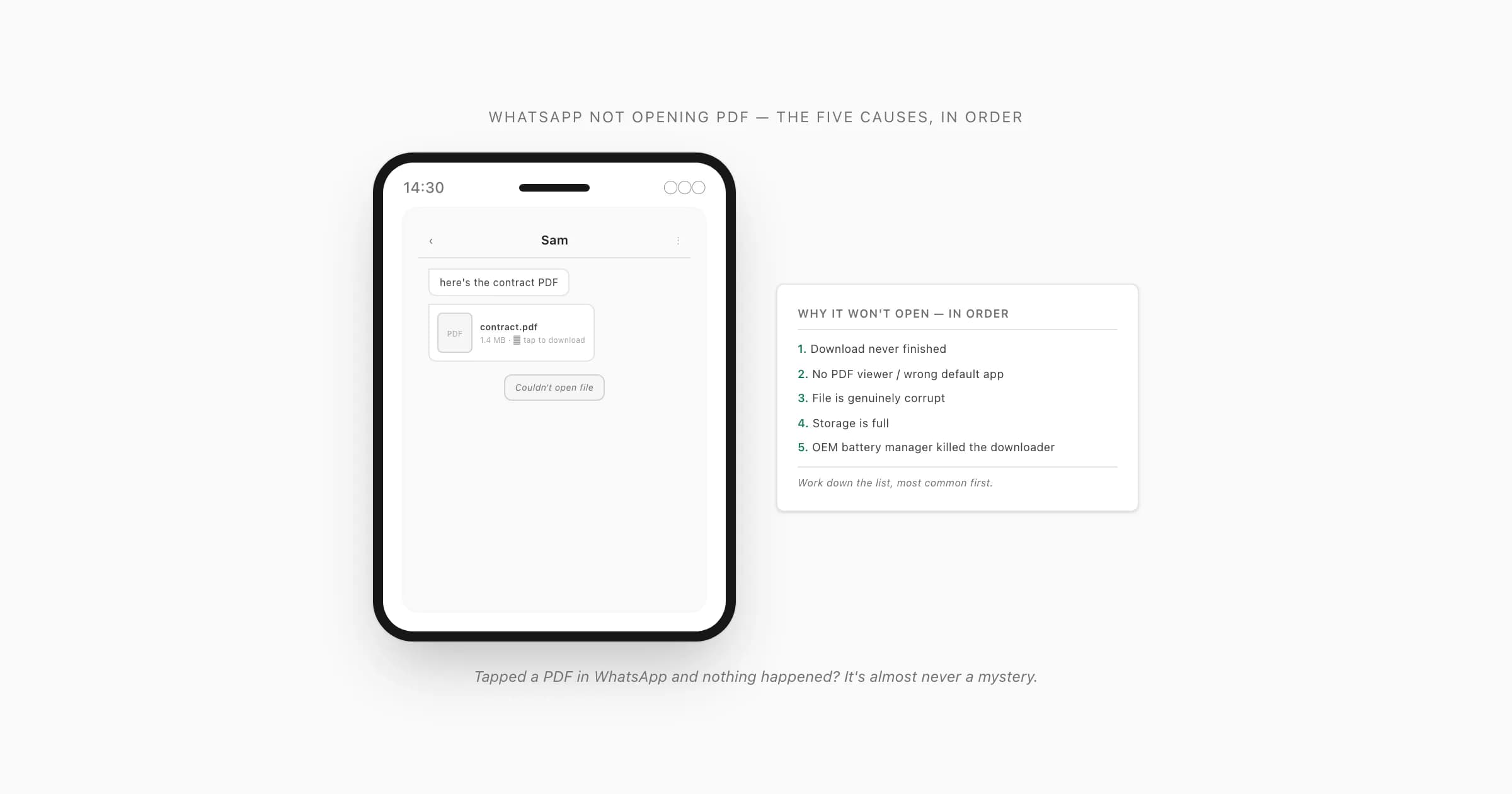
Someone sends you a PDF in a WhatsApp chat. You tap the document tile, expecting it to open, and nothing happens — or you get a "can't open file" toast, or the spinner just sits there. I've watched this play out enough times to know it's almost never a mystery. There are five causes, and they account for nearly all of it.
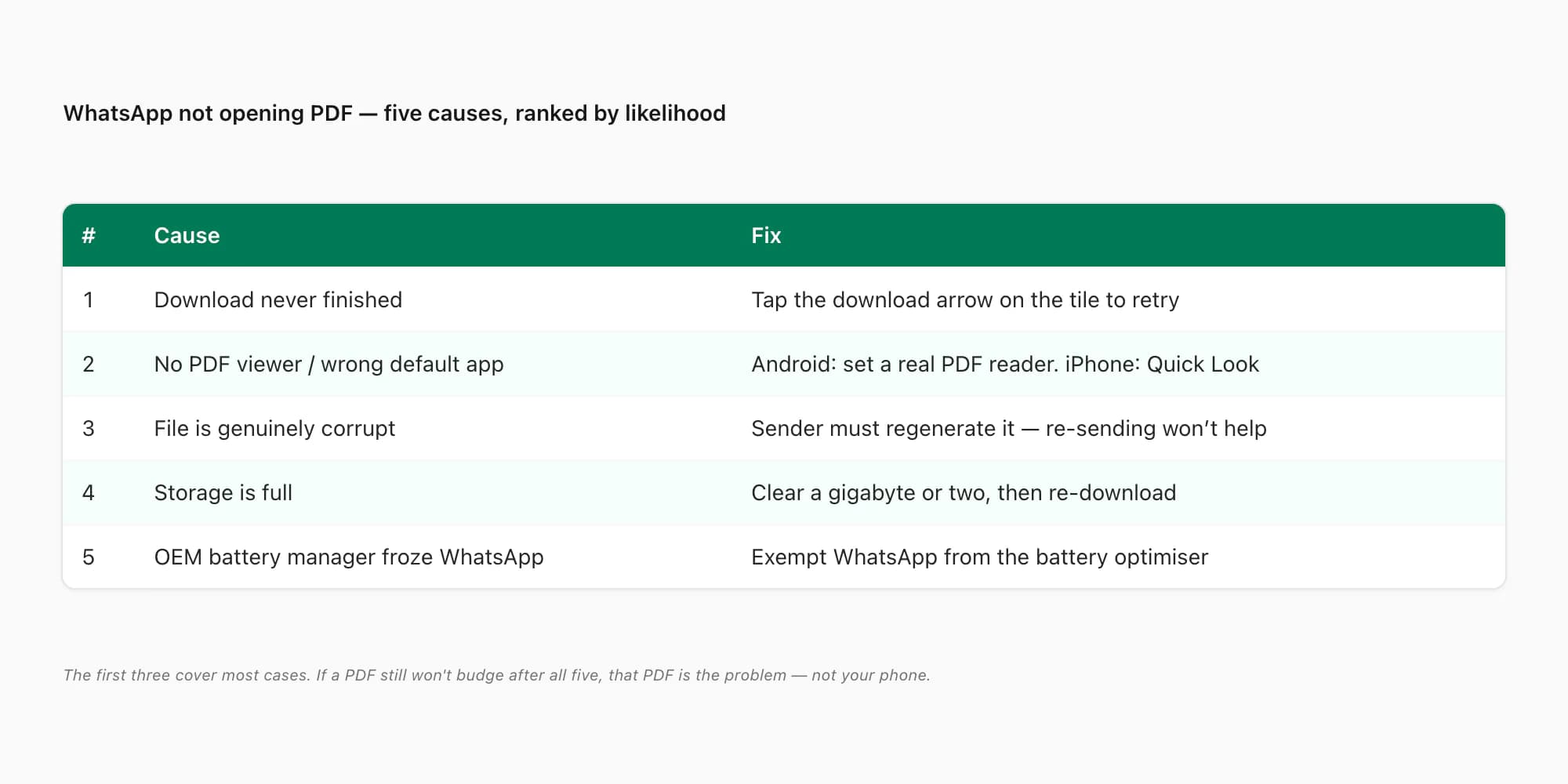
Here's the order I'd check them, most common first:
- The download never finished. The tile shows a download arrow, not a PDF icon. WhatsApp downloaded part of the file and stopped — bad signal, you backgrounded the app mid-download, or a transient server hiccup. Most common cause by a wide margin.
- No PDF viewer set, or the wrong default app on mobile. On Android, WhatsApp hands the file to an app registered for
application/pdf; iPhone uses Quick Look. If the association is broken or a poor third-party app grabbed it, the handoff fails. Web/Windows can now follow the integrated Acrobat route described above. - The file is genuinely corrupt. The sender's export was bad — a truncated transfer, a half-written file, a chat-export tool that produced a malformed PDF. No reader on earth opens a broken PDF. This is rarer than people assume but it does happen.
- Storage is full. WhatsApp can't write the downloaded file to disk, or the viewer can't allocate scratch space to render it. Quietly common on phones sitting at 99% full.
- An OEM battery or permission manager killed WhatsApp's downloader. Xiaomi/MIUI, Samsung's aggressive sleep settings, and a few others will freeze WhatsApp's background processes, so the download silently stalls. If you're on a Xiaomi, Redmi or Poco device this one jumps up the list — see Xiaomi can't open PDF in WhatsApp for the MIUI-specific steps.
The practical split is download versus rendering. If the PDF tile still shows a download control, fix the transfer first. If the file is present but one viewer fails, test another viewer. If the same file fails on every device and reader, regenerate the source.
Cause 1 — the download never finished
This is the one I'd bet on first. The document tile in the chat is showing a circular download arrow with a file size next to it, not a red PDF page icon. That means WhatsApp has a partial file — or no file at all — sitting in its media folder.
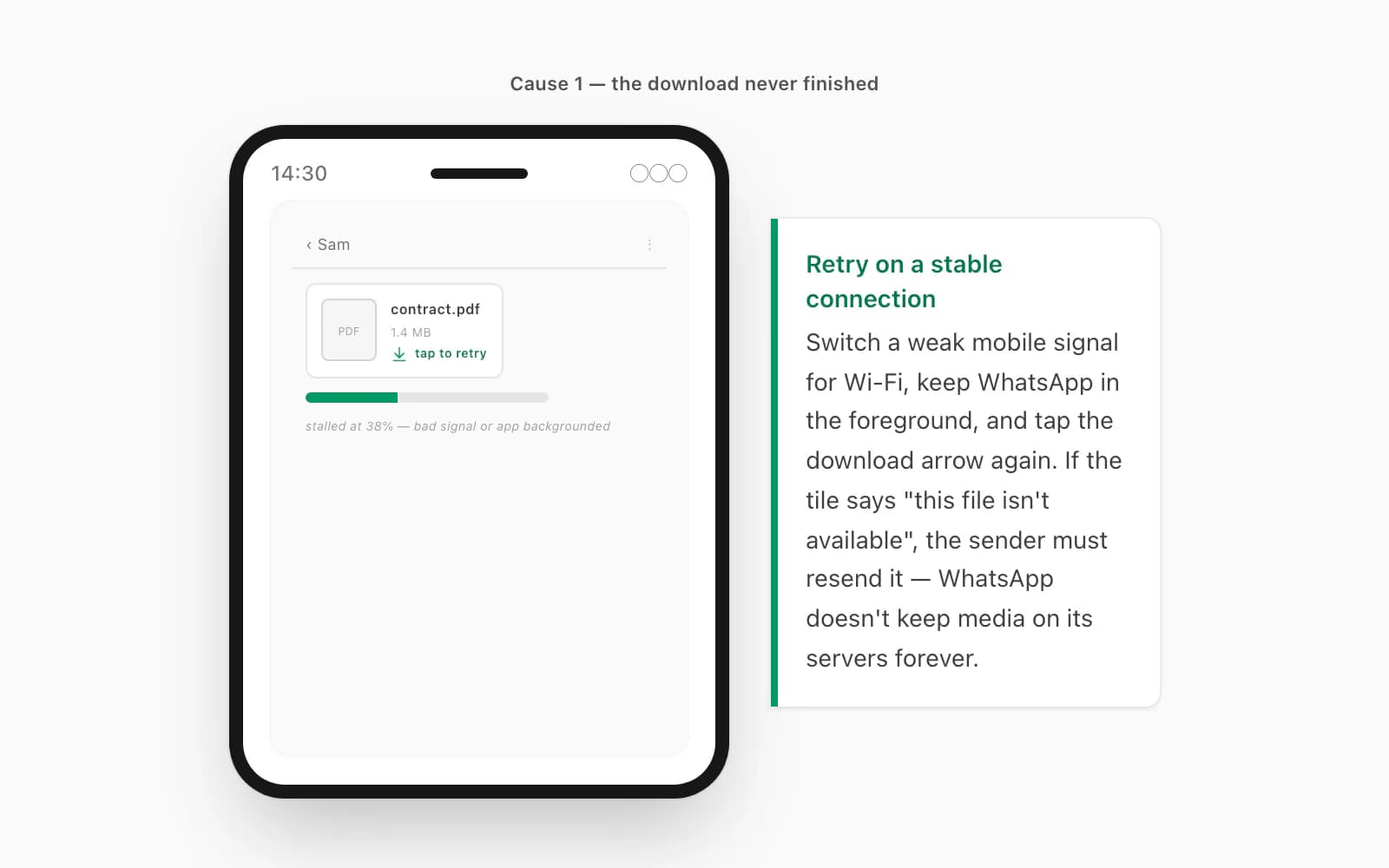
The fix is almost embarrassingly simple: tap the download arrow on the tile to retry. Make sure you're on a stable connection — switch from a weak mobile signal to Wi-Fi if you can. Keep WhatsApp in the foreground while the bar fills; on a lot of phones, backgrounding the app pauses the download. If the tile shows "this file isn't available" instead of a download arrow, the file has aged off the sender's device and they need to resend it — WhatsApp doesn't keep media on its servers forever.
If the retry tap does nothing at all, check WhatsApp's Settings → Storage and data → Media auto-download; documents switched off for your network won't pull until you tap them. This is the same family of problem as a WhatsApp PDF that won't download, and that page walks the network and storage settings in more detail.
Causes 2 & 4 — no PDF viewer, or storage is full
If the tile clearly shows a fully-downloaded PDF — proper icon, no download arrow — and tapping it still does nothing, you're looking at the handoff. WhatsApp passed the file to the OS and the OS had nowhere to send it.
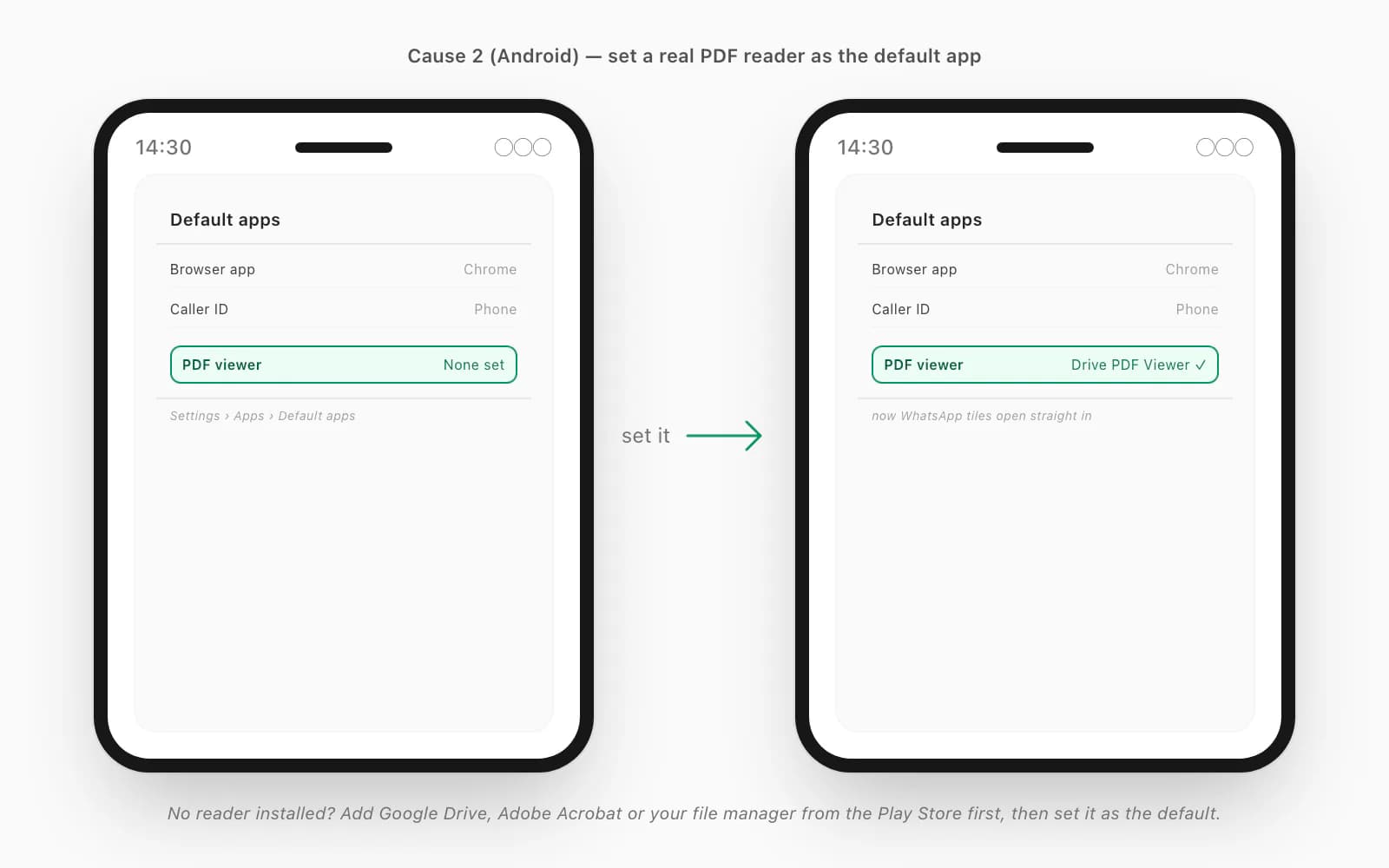
On Android: open Settings → Apps → Default apps (the label varies by manufacturer). Find the PDF entry and set it to a real reader — Google Drive's PDF viewer, Adobe Acrobat, or your phone's file manager all work. No reader installed? Install one from the Play Store first, then set it as the default. Android's behaviour here is covered in Google's default-apps help.
On iPhone: tapping a PDF in WhatsApp opens it in Quick Look, which is always available. If even that fails, the file is either corrupt or — far more likely — your storage is full and Quick Look can't allocate the memory to render it. Settings → General → iPhone Storage, clear some space, then tap the PDF again; the share button in Quick Look lets you choose Open in Files or Books.
Full storage on Android is the mirror image: at 99% full, WhatsApp may not be able to write the downloaded file at all, so the download "completes" but there's nothing on disk to open. Settings → Storage, free up a gigabyte or two, then re-download.
Causes 3 & 5 — corrupt file, or an OEM killed the downloader
If you've ruled out the first four, two stubborn ones are left.
The file is genuinely corrupt. The sender's export produced a broken PDF — common when someone uses a flaky chat-export app, or when the file was transferred over a dodgy link mid-write. You can confirm it quickly: ask the sender to open the same PDF on their own device. If it won't open for them either, it's the file, not your phone, and re-sending the same broken file won't help — they need to regenerate it. This is the same root cause behind a WhatsApp PDF "cannot open file" error: a partial download or a malformed source file, and no reader can rescue either.
An OEM battery or permission manager froze WhatsApp. Some Android skins — MIUI/HyperOS on Xiaomi, Redmi and Poco, plus aggressive sleep settings on a few Samsung models — will suspend WhatsApp's background work to save battery, which silently stalls in-progress downloads. The fix is to exempt WhatsApp from the battery optimiser: on stock-ish Android, Settings → Apps → WhatsApp → Battery → Unrestricted; on MIUI, there's also an Autostart toggle and a separate "no restrictions" battery-saver setting per app. Once WhatsApp is allowed to run unrestricted, downloads finish normally.
If you've cycled all five and a particular PDF still won't budge, that PDF is the problem — not WhatsApp, not your phone. Which is a good moment to talk about the file you can control.
When you want the chat itself as a PDF that opens everywhere
Here's the part nobody tells you about all of the above: most of the time, the PDF you're chasing isn't even the thing you want. You want the conversation — the chat — as a clean document you can keep, search, or send to a solicitor. And that's a file you can produce yourself, in a format that doesn't have any of these failure modes.
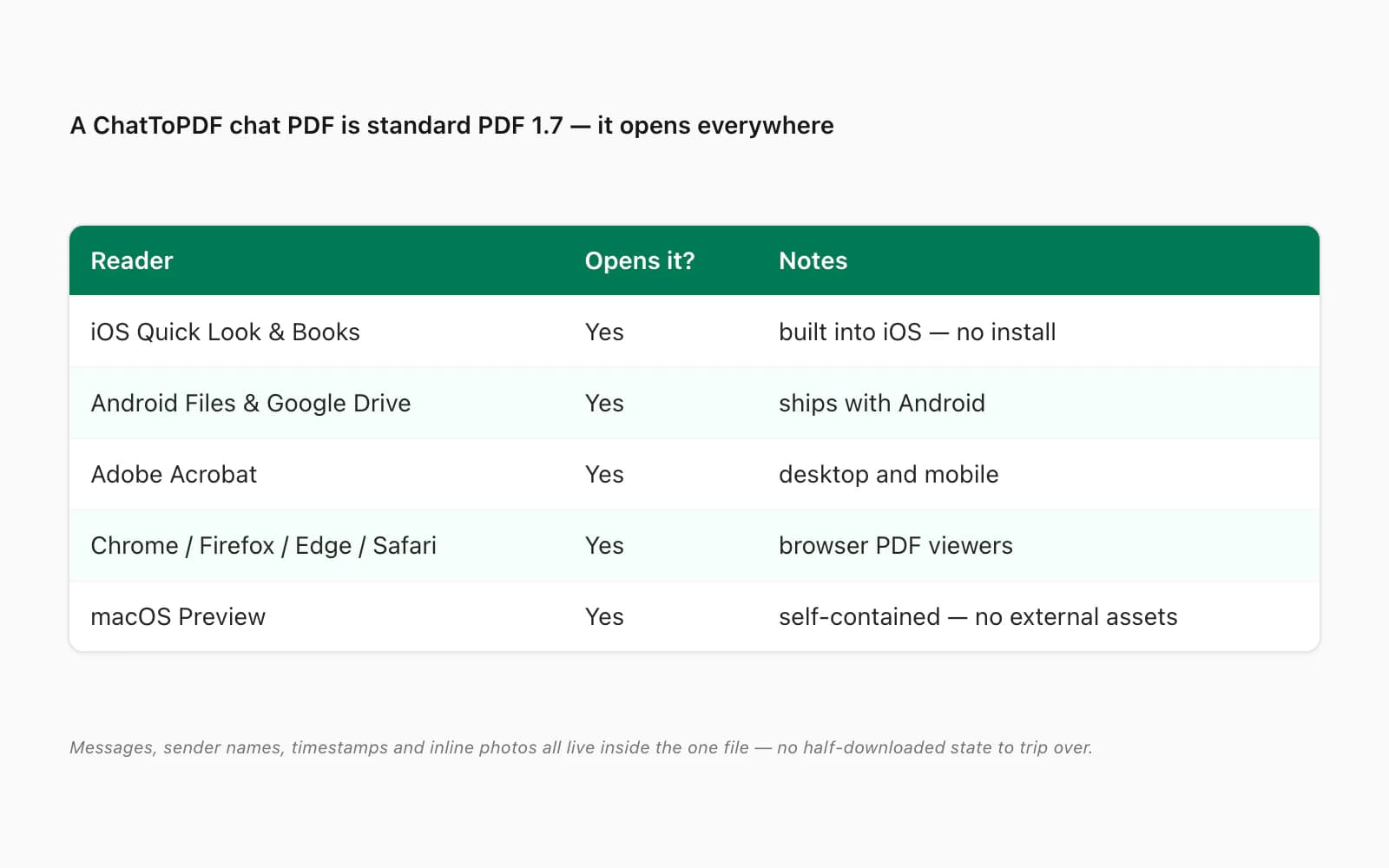
A PDF that ChatToPDF produces is standard PDF 1.7 — the ISO-standardised version every mainstream reader has supported for over a decade. It opens in iOS Quick Look and Books, Android file managers and Google Drive, Adobe Acrobat, Chrome, Firefox, Edge, Safari, and macOS Preview. It's self-contained: messages, sender names, timestamps and inline photos all live inside the one file — no external assets to go missing, no half-downloaded state. Nothing about it depends on WhatsApp still being installed or your account staying open.
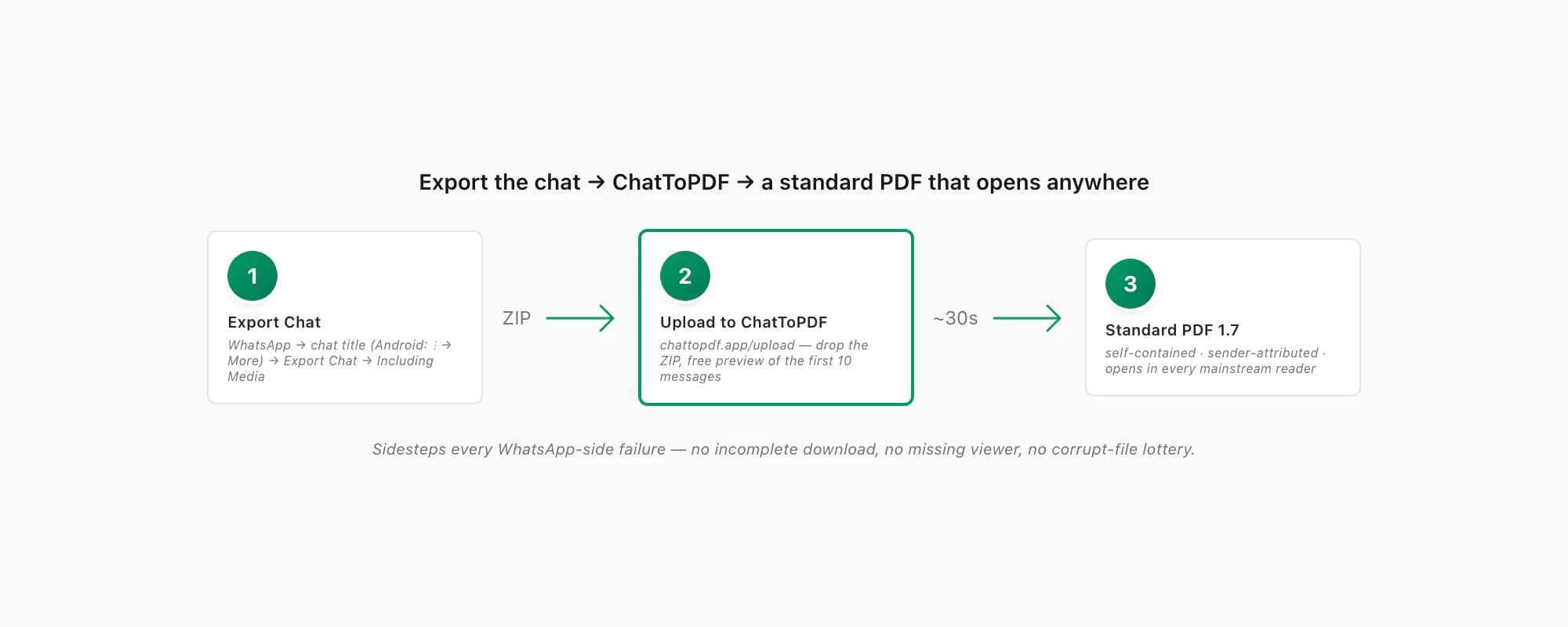
The path is short. In WhatsApp, open the chat, tap the contact or group name at the top (Android: three-dot menu → More), scroll to Export Chat, pick Including Media so photos make it in, and save the ZIP. Then open chattopdf.app/upload, drop the ZIP on the upload zone, and the conversion runs — the WhatsApp to PDF guide walks the whole thing end to end. You get a free preview of the first ten messages before paying.
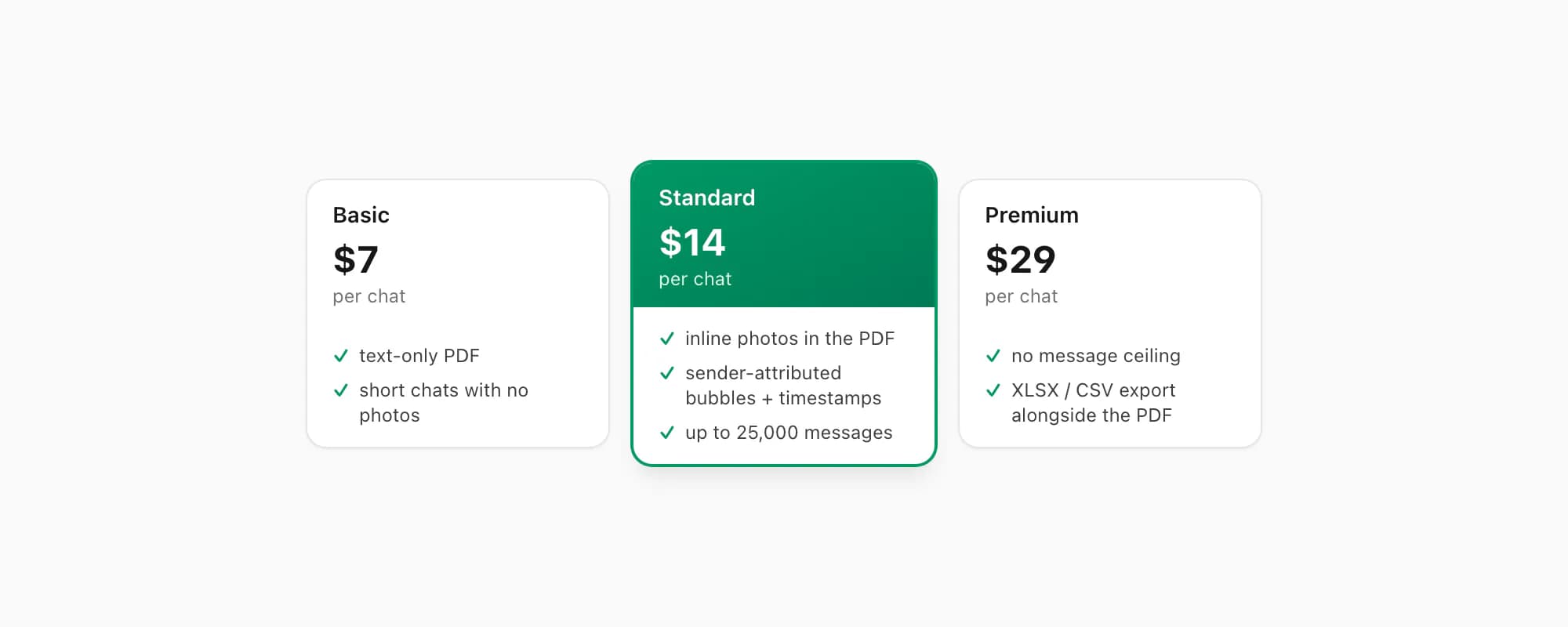
ChatToPDF charges per chat conversion — you pay for the one chat you're converting, nothing recurring. $7 Basic per chat is a text-only PDF, fine for a short chat with no photos. $14 Standard per chat renders inline photos, sender-attributed bubbles and timestamps, up to 25,000 messages — the right tier for almost every chat. $29 Premium per chat removes the message ceiling and adds an XLSX/CSV export; the pillar covers the $49 Premium+Voice per chat tier (language-aware Nova-3/Scribe v2 voice-note transcription) and the $99 Power User per chat tier (priority queue, bulk handling) if you need them. The output opens everywhere, every time — which is the whole point of a standard format.
Key takeaways
- WhatsApp Web in Chrome/Edge and the Windows app gained an Acrobat-powered PDF workflow in July 2026; mobile and macOS use different routes
- WhatsApp not opening PDF is usually one of five things: incomplete download, a broken viewer handoff, a corrupt source file, full storage, or an OEM battery manager freezing WhatsApp
- Most common fix: tap the download arrow on the document tile to retry on a stable connection, with WhatsApp in the foreground
- If the file is fully downloaded but won't open, it's the handoff — set a real PDF reader as the default app (Android) or clear storage so Quick Look can render it (iPhone)
- A genuinely corrupt PDF won't open for the sender either — confirm with them; re-sending the same broken file won't help
- Xiaomi/Redmi/Poco and some Samsung models freeze WhatsApp's background work — exempt WhatsApp from the battery optimiser so downloads finish
- If you want the chat itself as a durable PDF, export it and run it through ChatToPDF — the output is standard PDF 1.7, self-contained, and opens in every mainstream reader
- ChatToPDF is priced per chat — $14 Standard per chat covers almost every conversion, with $7 Basic per chat for text-only and $29 Premium per chat for no message ceiling
FAQ
Why is WhatsApp not opening a PDF I was sent?
First identify the platform. WhatsApp Web in Chrome/Edge and WhatsApp for Windows can use the July 2026 Acrobat-powered preview; Android hands a downloaded PDF to an installed reader; iPhone uses Quick Look. Then check whether the download finished, try another reader, free storage and ask the sender to test the same file. If it fails everywhere, the PDF is probably corrupt.
Why will a PDF not open in WhatsApp Web or Windows?
Update or refresh WhatsApp, confirm the document finished downloading and retry it. Chrome/Edge WhatsApp Web and the Windows app now support an Acrobat-powered PDF workflow. A conflicting browser PDF extension, blocked script, stale app build or corrupt file can still break the preview. Download the PDF and open it in standalone Acrobat or another reader; if that also fails, regenerate the file.
WhatsApp PDF not opening on Android — what do I do?
Retry the download first by tapping the arrow on the document tile, with WhatsApp in the foreground. If the tile shows a full PDF icon and still won't open, the handoff is failing: Settings → Apps → Default apps, set a real PDF reader. On Xiaomi, Redmi or Poco phones, also exempt WhatsApp from the MIUI battery optimiser and turn on Autostart for it. Full storage can block the write too — clear a couple of gigabytes and re-download.
The PDF won't open for me or the sender — is it the file?
Yes. If the same PDF won't open on the sender's device either, it's corrupt or malformed — a truncated transfer or a bad export — and no reader can fix that. Re-sending the same file won't help; the sender needs to regenerate it. If it's a WhatsApp chat they want to share as a PDF, the reliable path is to export the chat and run the ZIP through ChatToPDF, which produces a standard, self-contained PDF.
Will a PDF made by ChatToPDF open on my phone?
Yes — it's standard PDF 1.7, supported by every mainstream reader for over a decade: iOS Quick Look and Books, Android file managers and Google Drive, Adobe Acrobat, Chrome, Firefox, Edge, Safari, macOS Preview. The file is self-contained — messages, sender names, timestamps and inline photos all inside it, no external assets, no half-downloaded state to trip over.
I'm Paul, the founder of ChatToPDF. I built it after needing a long WhatsApp conversation as a readable PDF for a legal matter. I test and document WhatsApp exports, PDF conversion, voice-note transcription, and the limits people should check before relying on the result.