
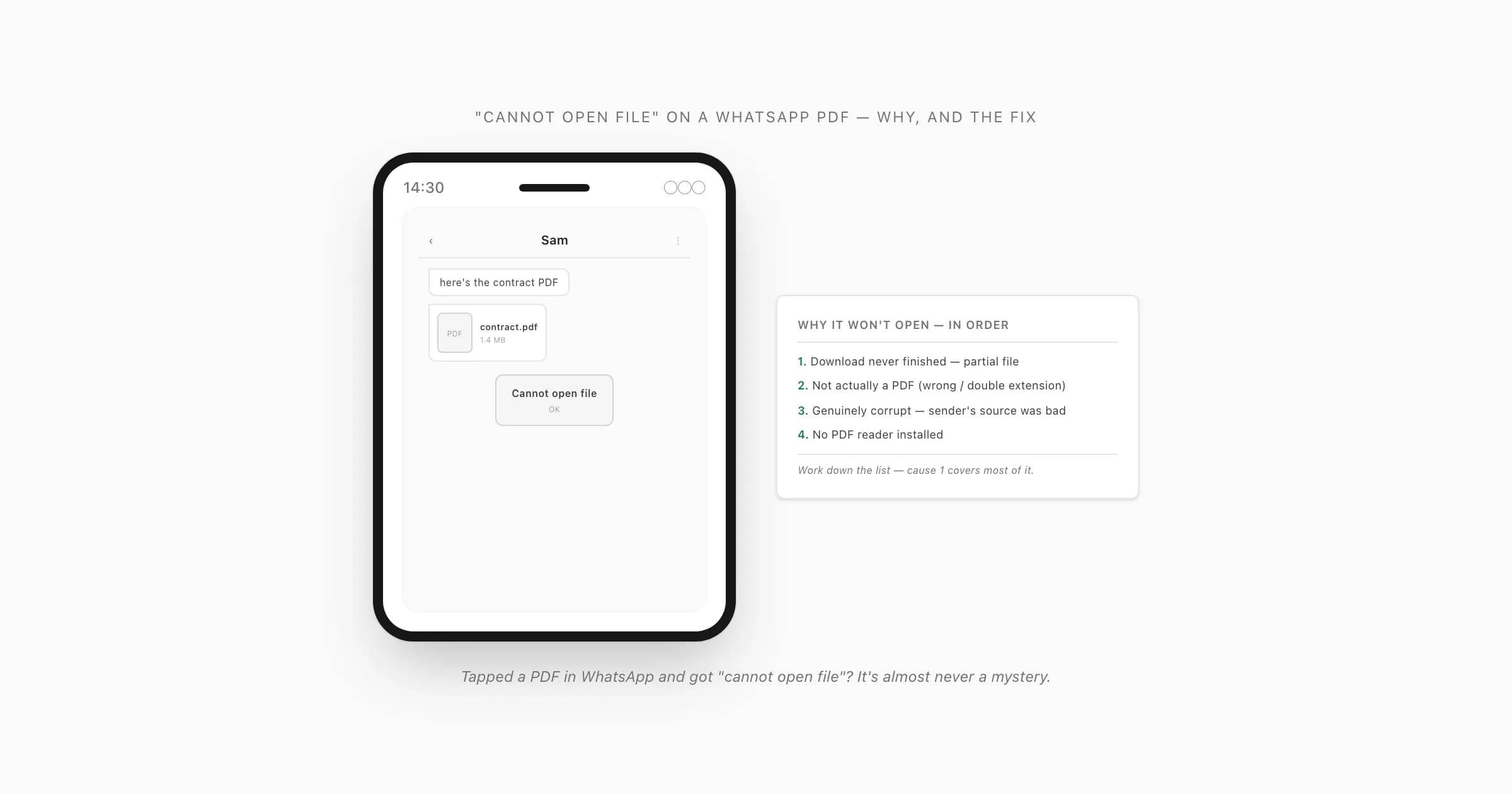
The four causes of "cannot open file", in order
Someone sends a PDF in a WhatsApp chat. You tap the document tile, and instead of the document you get a flat little error: "Cannot open file" on Android, or "Can't open this file" — sometimes "this file could not be opened" or "file cannot be opened". Whatever the exact wording, the underlying problem is one of a small set, and I've watched it play out enough times to be confident about the order.
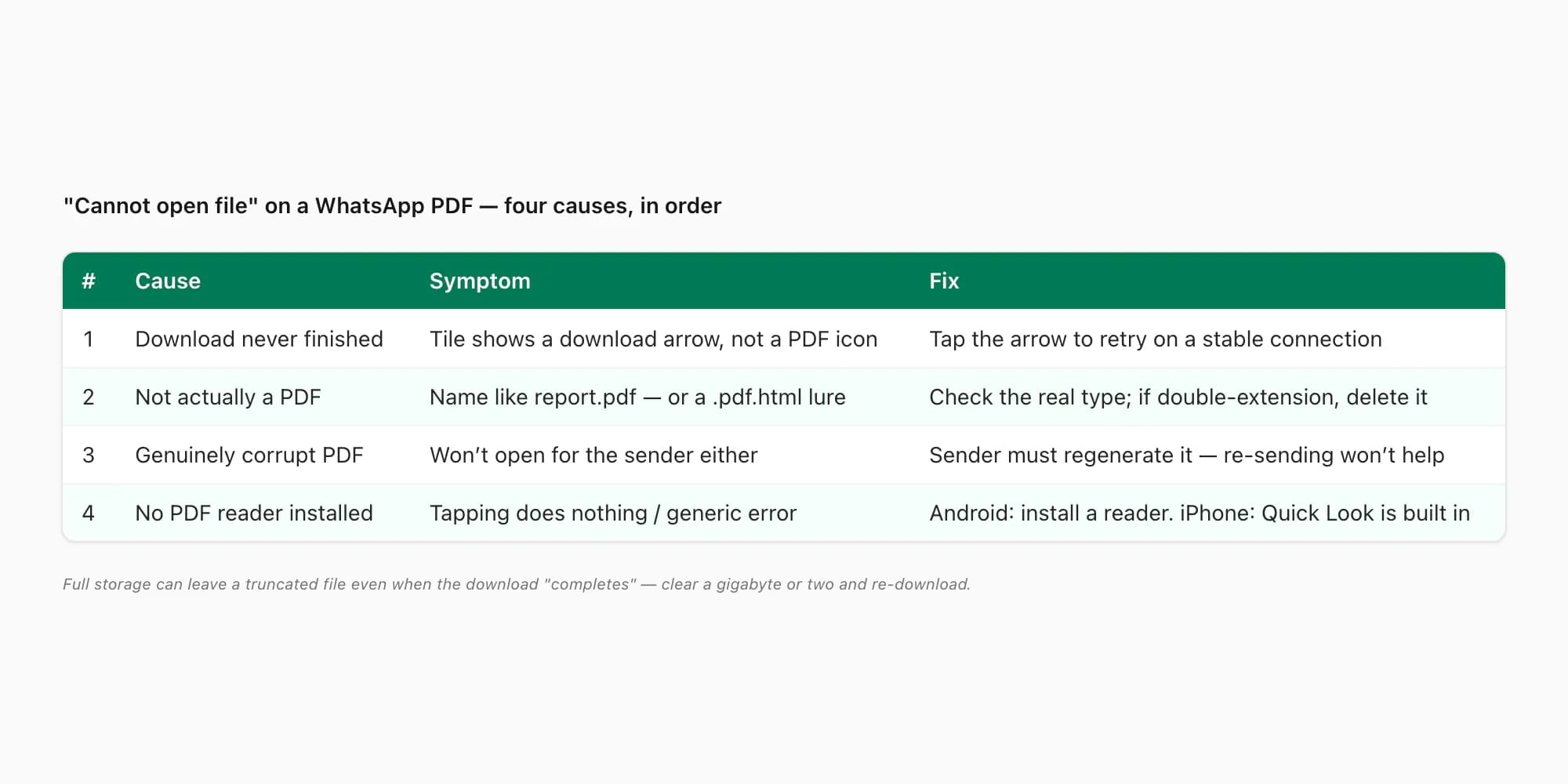
Here's how I'd work down it, most common first:
- The download never finished — you have a partial file. This is the one I'd bet on every time. WhatsApp downloads the PDF to disk before it shows you anything, and if that transfer stopped halfway — a weak signal, the app backgrounded mid-download, a server hiccup — you're left with a truncated file that looks like a PDF (right name, right icon) but is missing its tail. A truncated PDF has no valid cross-reference table at the end of it, so no reader can parse it, and the OS shrugs back "cannot open file". By far the most common cause of the error.
- The file isn't actually a PDF. The thing in the chat has
.pdfon the end of its name but isn't a PDF inside — someone renamed a.docxor a.zipto.pdf, or, more sinister, it's asomething.pdf.htmlweb page dressed up to look like a document. WhatsApp shows you the file name, your reader tries to parse it as a PDF, finds it isn't one, and refuses. There's a safety angle here worth pausing on. - The PDF is genuinely corrupt. The sender's source export was bad — a flaky third-party chat-export tool that produced a malformed file, a half-written PDF, a file damaged in transit before it ever reached WhatsApp. No reader on earth opens a structurally broken PDF, and re-sending the same broken file won't change that. Rarer than people assume, but it does happen.
- No app on your phone can handle PDFs at all. WhatsApp doesn't render PDFs itself — it hands the file to whatever your OS has registered for
application/pdf. If nothing is registered (a stripped-down phone, a uninstalled-by-accident viewer), the handoff has nowhere to go and you get the same generic error.
WhatsApp's own help on sending and receiving documents confirms the basic mechanic the rest of this hinges on: WhatsApp transfers the file to your device, then your installed apps open it. Once you know that, the fixes mostly write themselves.
Cause 1 — the download never finished (a partial file)
Start here, because it's the cause behind most "cannot open file" reports and the fix takes ten seconds.
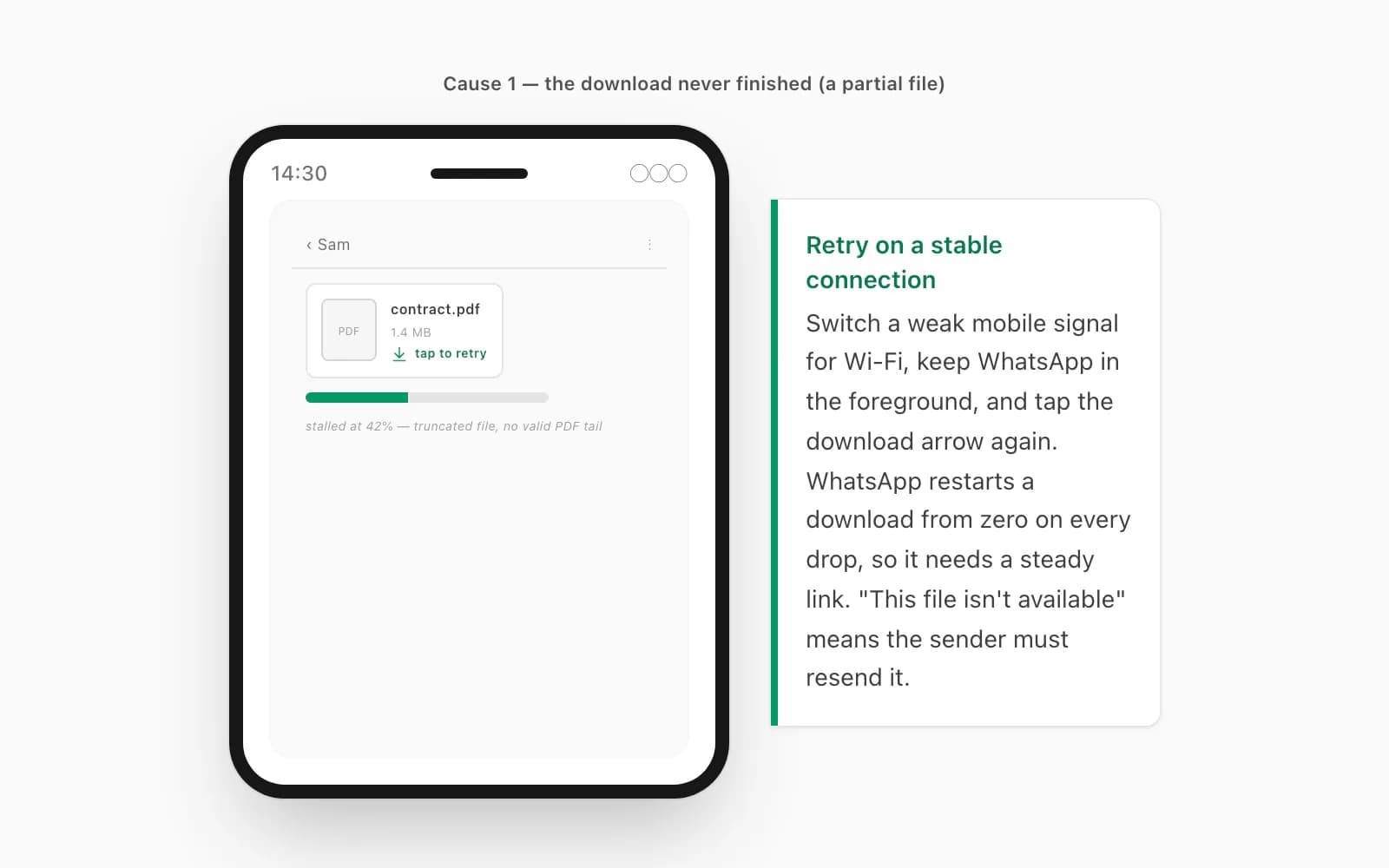
Look closely at the document tile in the chat. If it shows a circular download arrow with a file size next to it — rather than a clean PDF page icon — WhatsApp has a partial file or no file at all sitting in its media folder. The fix is simply to tap the download arrow to retry, on a stable connection: switch a weak mobile signal for Wi-Fi if you can, and keep WhatsApp in the foreground while the bar fills — on a lot of Android phones, backgrounding the app pauses the transfer. WhatsApp doesn't resume a half-finished download; every connection drop sends it back to byte zero, so what you want is a steady link, not necessarily a fast one.
A subtle version of this: the tile shows a finished PDF icon, you tap it, and you still get "cannot open file" — because the download "completed" but your storage was full, so WhatsApp wrote a zero-byte or truncated file. Clear a gigabyte or two (Settings → Storage on Android, Settings → General → iPhone Storage on iOS), then re-download. And if the tile says "this file isn't available" rather than offering a retry arrow, the media has aged off the sender's device — WhatsApp doesn't keep media on its servers forever — and only they can resend it. This is the same family of problem as a WhatsApp PDF that won't finish downloading, which walks the network, storage, and auto-download settings in more detail.
Cause 2 — the file isn't actually a PDF (and a safety note)
If you've ruled out a partial download — the tile clearly shows a fully-downloaded file and tapping it still throws "cannot open file" — the next question is whether the thing is even a PDF.
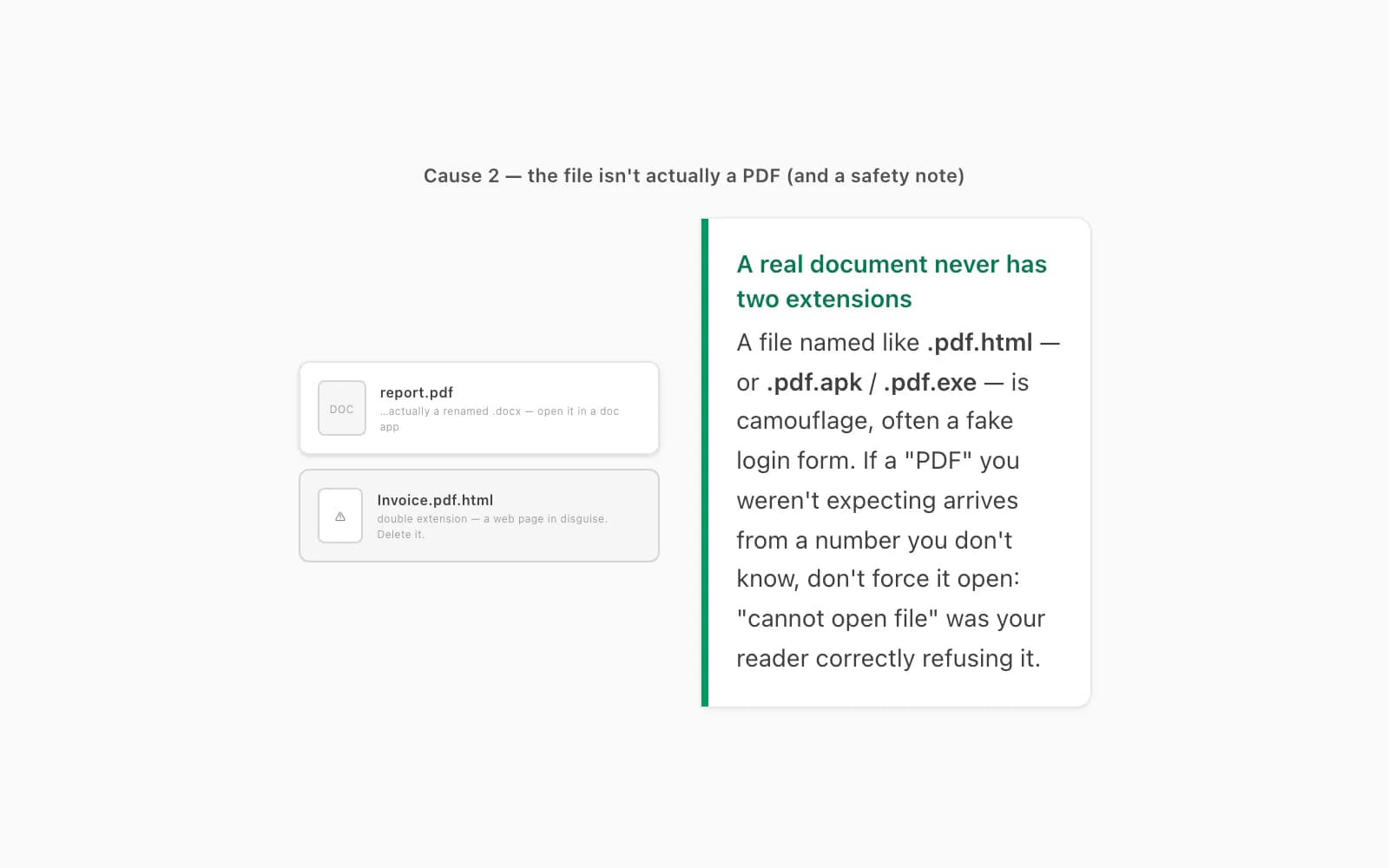
It happens innocently all the time: someone exports a Word document or a spreadsheet, renames it report.pdf because that's what they meant to send, and ships it. Your PDF reader opens it, sees a .docx ZIP container or a CSV inside instead of %PDF-, and gives up. The tell: download the file, open it in a file manager, and check the real name and type — on Android, long-press → Details; on iPhone, share it to Files and look at the kind. If it's secretly a Word doc, open it in a document app that handles .docx instead.
Now the safety part, because this is where it stops being innocent. A favourite trick in scam messages is a file named like Invoice.pdf.html — the .html is the real extension; the .pdf in front is camouflage. Tap it expecting a document and you get a web page (often a fake login form), not a PDF — and depending on your setup, "cannot open file" is actually the good outcome here, because your PDF reader correctly refused it. If a "PDF" you weren't expecting arrives from a number you don't recognise, or the name has a double extension like .pdf.html / .pdf.apk / .pdf.exe, don't try to force it open — delete it. A real document doesn't need two extensions. (If a PDF someone you trust sent still won't open after all this, the broader checklist is in WhatsApp won't open a PDF you were sent.)
Causes 3 & 4 — a genuinely corrupt PDF, or no reader installed
Two stubborn ones are left once a partial download and a fake-PDF are off the table.
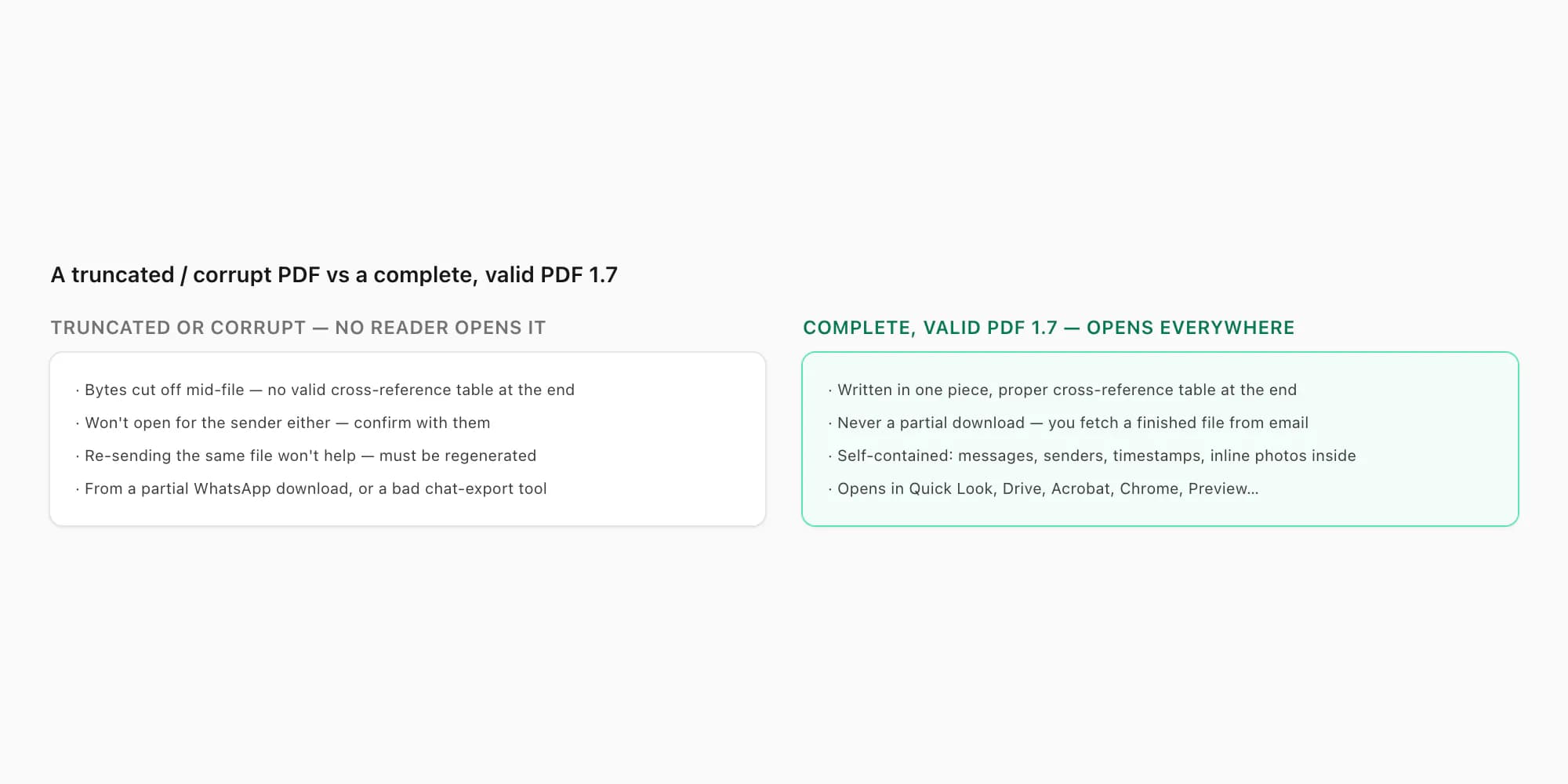
The PDF is genuinely corrupt. The sender's source file was broken before it ever reached you — a chat-export tool that produced a malformed PDF, a file truncated mid-write, damage in an earlier transfer. You can confirm it in one move: ask the sender to open the same PDF on their own device. If it won't open for them either, it's the file, not your phone — and crucially, re-sending the same file won't help: they need to regenerate it from whatever produced it. This is the "whatsapp pdf corrupted cannot open" case, and there's no reader-side fix for a structurally broken PDF; the cross-reference table is gone or the page tree is mangled, and that's that. Worth distinguishing from a near-neighbour failure where the PDF does open but renders wrong — emojis showing as tofu boxes or question marks, which is a font-embedding problem in the source PDF rather than a structural one and has its own write-up in WhatsApp PDF emojis broken.
No app on your phone can handle PDFs. WhatsApp passes the file to your OS, and the OS needs something registered for application/pdf to send it to. On Android, if you've somehow ended up with no PDF viewer at all, install one from the Play Store — Google Drive's built-in viewer, Adobe Acrobat Reader, or your phone's file manager all work — then tap the tile again; if the right reader is installed but the wrong one keeps grabbing the file (or WhatsApp asks "open with…" every time), that's a default-app problem, covered in WhatsApp opens PDFs in the wrong app. On iPhone, Quick Look is always present, so "no reader" doesn't really happen — if Quick Look itself throws an error or just bounces you back to the chat with nothing rendered, you're in WhatsApp PDF not opening on iPhone territory, which is its own iOS-specific checklist (low storage, a choked Quick Look, an old build) on top of the four causes here.
If you've cycled all four and a particular PDF still won't open — and the sender confirms it opens fine for them, it's a real PDF, and it downloaded fully — then that specific file is the problem and no amount of retrying changes it. And if the file is truly gone — the message deleted, the chat wiped, the tile saying "this file isn't available" — that's not a "cannot open file" problem any more, it's a "find what was already on disk" one, and WhatsApp PDF recovery walks the next move (the Android WhatsApp Documents folder, the iPhone Docs tab, a backup restore). Which is the moment to talk about the file you can actually control.
The clean reset — a complete PDF you make yourself
Here's the part nobody tells you about all of the above: most of the time, the PDF you're chasing isn't even the thing you want. You want the conversation — the chat — as a clean, searchable document you can keep or send on. And that's a file you can produce yourself, in a format that has none of these failure modes baked in.
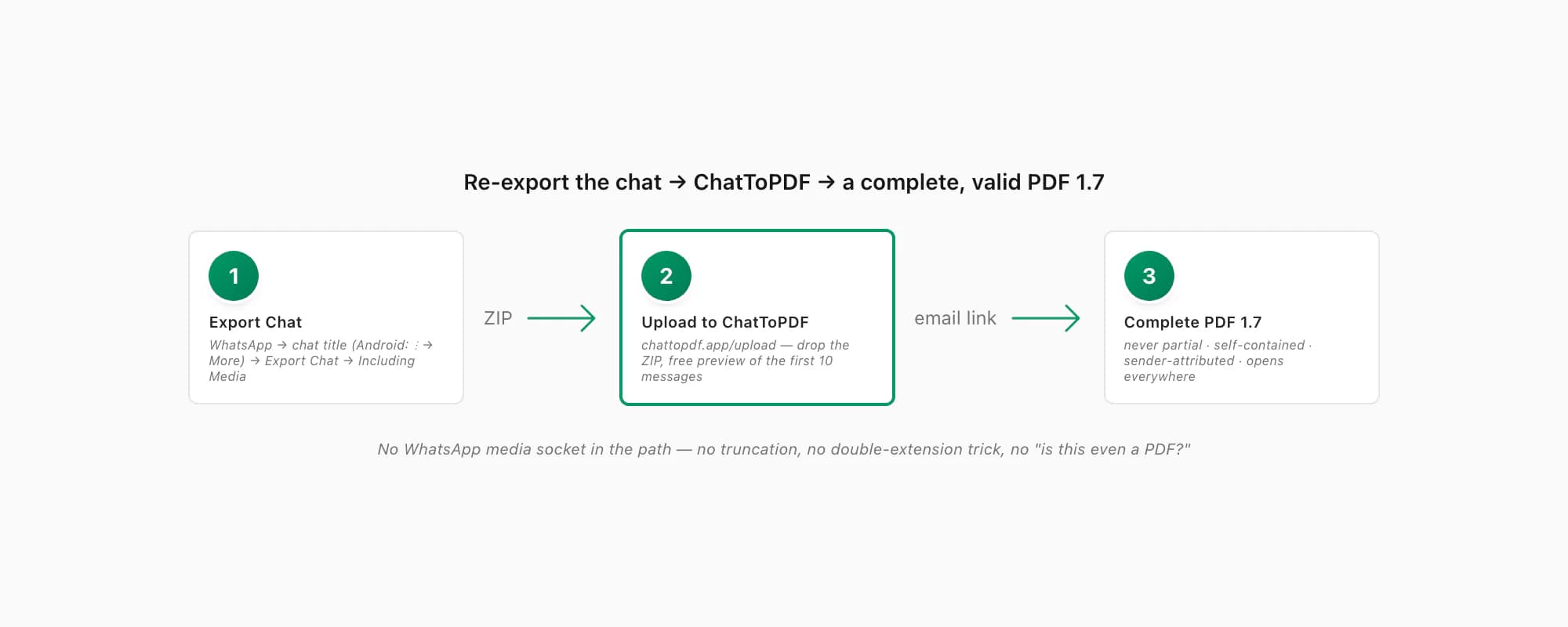
A PDF that ChatToPDF produces is valid PDF 1.7 — the ISO-standardised version every mainstream reader has supported for over a decade — and it's never a partial download: you get a complete file from an email link, written in one piece, with a proper cross-reference table at the end. There's no "is this a real PDF?" question because it is one; no double-extension trick because you generated it; no truncation because it didn't come down a flaky WhatsApp media socket. It's self-contained too: messages, sender names, timestamps and inline photos all live inside the one file, so nothing in it depends on WhatsApp still being installed or that original chat still existing.
The path is short. In WhatsApp, open the chat, tap the contact or group name at the top (on Android: three-dot menu → More), scroll to Export Chat, pick Including Media so photos make it in, and save the ZIP. Then open chattopdf.app/upload, drop the ZIP on the upload zone, enter your email, and the conversion runs — the WhatsApp to PDF guide walks the whole thing end to end, and there's a free preview of the first ten messages before you pay anything. If the ZIP itself won't unzip or comes through "damaged", that's a different snag, covered in a corrupt WhatsApp export ZIP — ChatToPDF accepts the ZIP directly, so you don't unzip anything by hand.
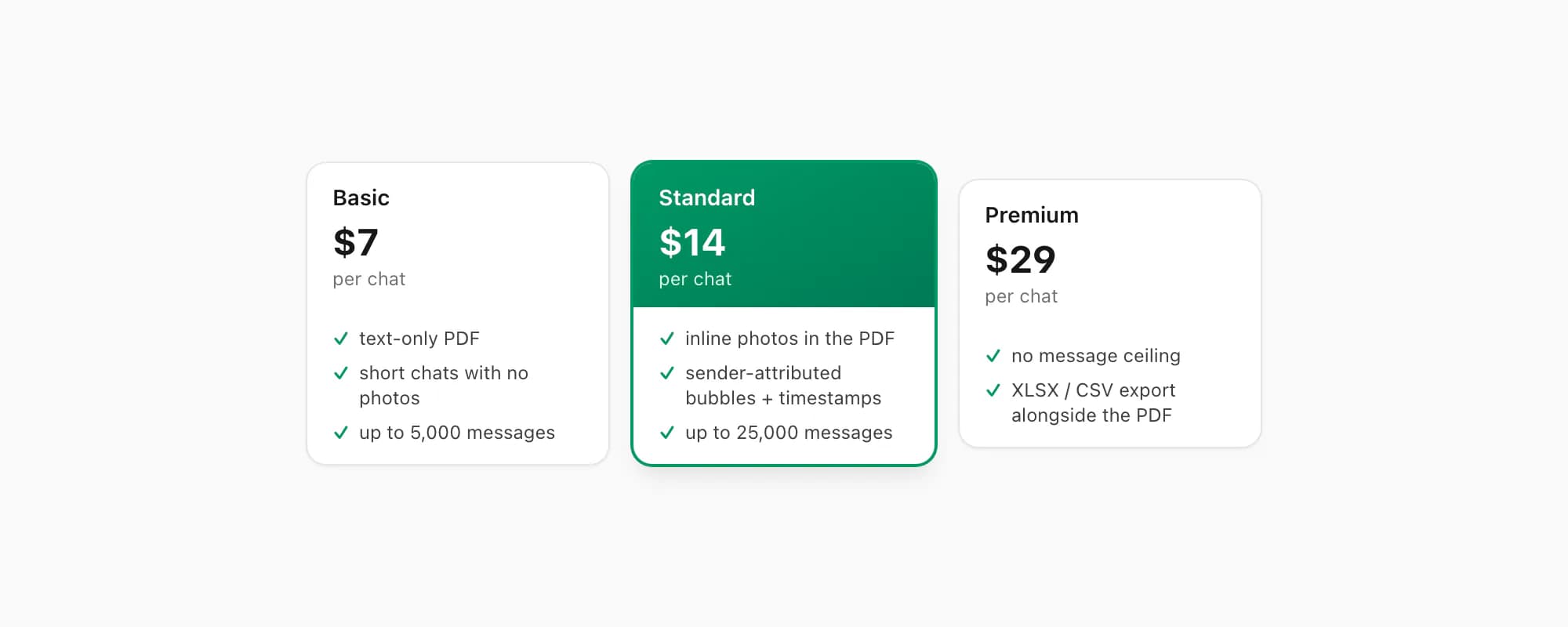
ChatToPDF charges per chat conversion — you pay for the one chat you're converting, nothing recurring. $7 Basic per chat is a text-only PDF, fine for a short chat with no photos, capped at 5,000 messages. $14 Standard per chat renders inline photos, sender-attributed bubbles and timestamps, up to 25,000 messages — the right tier for almost every chat. $29 Premium per chat removes the message ceiling and adds an XLSX/CSV export alongside the PDF; the pillar covers the $49 Premium+Voice per chat tier (language-aware Nova-3/Scribe v2 voice-note transcription) and the $99 Power User per chat tier (priority queue, bulk handling) if you need them. Whichever tier you pick, the output is a complete, valid PDF that opens everywhere — which is the whole point of using a standard format.
Key takeaways
- "Whatsapp pdf cannot open file" is almost always one of four things: a partial download (most common), a file that isn't really a PDF, a genuinely corrupt source PDF, or no PDF reader installed — check them in that order
- Most common fix: the tile shows a download arrow, not a PDF icon — tap it to retry on a stable connection with WhatsApp in the foreground; WhatsApp restarts a download from zero on every drop, so it needs a steady link
- Full storage can write a zero-byte or truncated file even when the download "completes" — clear a gigabyte or two and re-download
- A file named like
Invoice.pdf.html(or.pdf.apk/.pdf.exe) is a disguise, not a document — don't force it open, delete it; "cannot open file" was your reader correctly refusing it - A genuinely corrupt PDF won't open for the sender either — confirm with them; re-sending the same broken file won't help, they need to regenerate it
- On Android with no PDF reader at all, install Google Drive's viewer, Adobe Acrobat or your file manager; on iPhone Quick Look is always there
- If you want the chat itself as a durable PDF, export it and run the ZIP through ChatToPDF — the output is a complete, valid PDF 1.7, never a partial download, self-contained, and opens everywhere
- ChatToPDF is priced per chat — $14 Standard per chat covers almost every conversion, with $7 Basic per chat for text-only and $29 Premium per chat for no message ceiling
FAQ
Why does WhatsApp say 'cannot open file' when I tap a PDF?
In order of likelihood: the download didn't finish, so you have a partial, truncated file no reader can parse (the tile shows a download arrow — tap it to retry on a stable connection); the file isn't actually a PDF, just renamed to look like one (or a .pdf.html lure — be careful with that); the PDF the sender exported is genuinely corrupt; or your phone has no PDF viewer registered at all. Work down that list — the first one covers most cases. Full storage can also leave you with a truncated file even when the download appears to complete, so clear some space and re-download if the tile looks finished but still won't open.
The PDF won't open for me or the sender — is it the file?
Yes. If the same PDF won't open on the sender's device either, it's structurally corrupt — a truncated file or a bad export — and no reader can repair it. Re-sending the same file won't help; the sender needs to regenerate it from whatever produced it. If it's a WhatsApp chat they want to share as a PDF, the reliable route is to export the chat (chat title → Export Chat → Including Media) and run the ZIP through ChatToPDF, which produces a complete, self-contained, valid PDF 1.7 rather than a fragile attachment.
A WhatsApp file is named something.pdf.html — should I open it?
No. A real document never needs two extensions — something.pdf.html is an HTML web page (often a fake login form) dressed up to look like a PDF, and the same trick shows up as .pdf.apk or .pdf.exe. If a "PDF" you weren't expecting arrives, especially from a number you don't recognise, delete it rather than trying to force it open. The "cannot open file" error you got from your PDF reader is actually the safe outcome — it refused something that wasn't a PDF.
Will a PDF made by ChatToPDF give a 'cannot open file' error?
No. A ChatToPDF chat PDF is a complete, valid PDF 1.7 — supported by every mainstream reader for over a decade: iOS Quick Look and Books, Android file managers and Google Drive, Adobe Acrobat, Chrome, Firefox, Edge, Safari, macOS Preview. It's never a partial download — you get the finished file from an email link, written in one piece — and it's self-contained, with messages, sender names, timestamps and inline photos all inside the one document. None of the "cannot open file" causes apply to it.
I'm Paul, the founder of ChatToPDF. I built it after needing a long WhatsApp conversation as a readable PDF for a legal matter. I test and document WhatsApp exports, PDF conversion, voice-note transcription, and the limits people should check before relying on the result.