
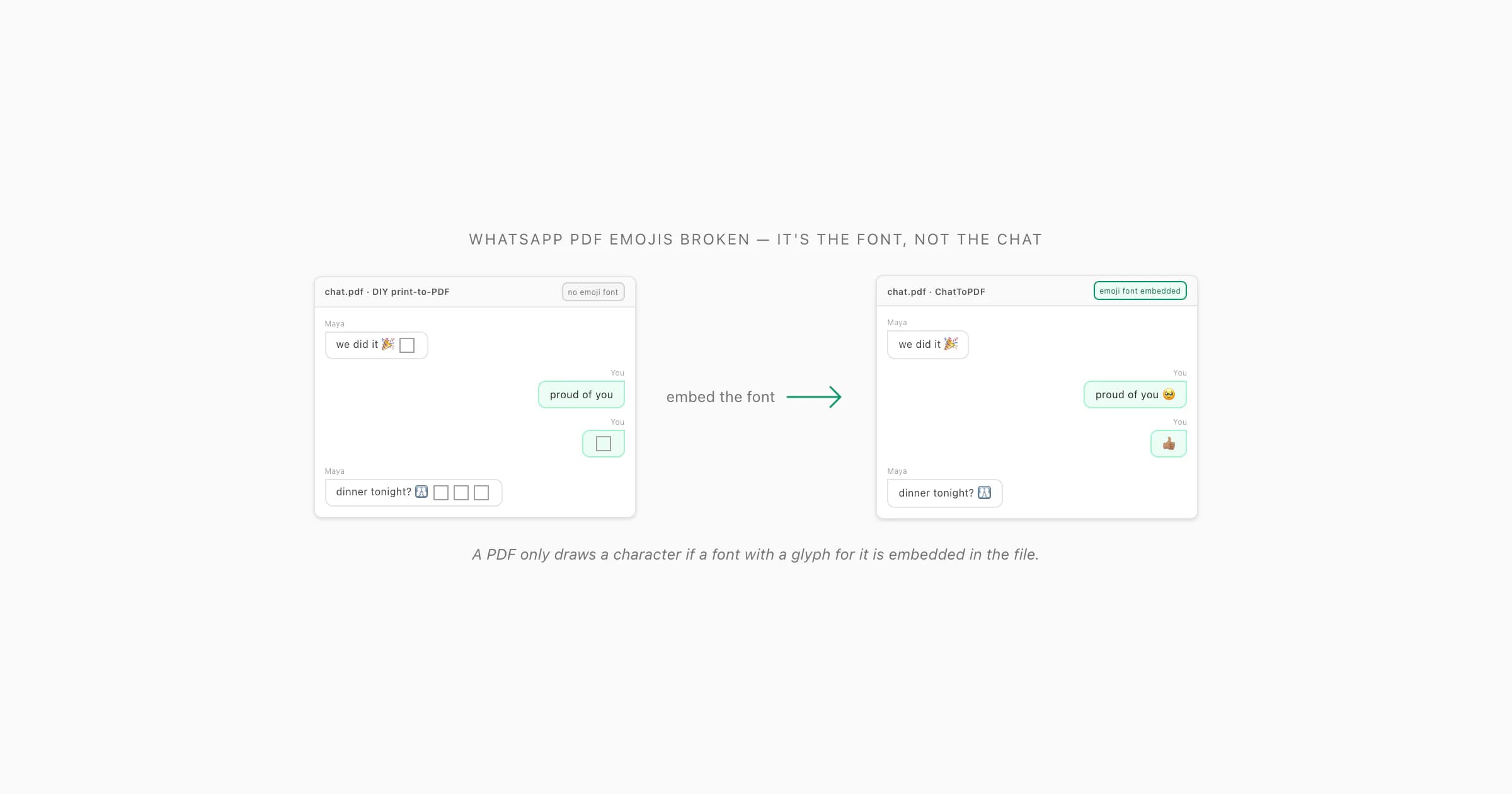
Why emojis come out as boxes — it's font coverage
Here's the thing nobody tells you about PDFs: a PDF can only show a character if a font that has a glyph for that character is embedded inside the file. Text in a PDF isn't really "text" the way it is in a web page — it's a sequence of codepoints plus instructions to draw each one using a specific embedded font. If the codepoint for 😂 (that's U+1F602) maps to a font that doesn't contain a picture for U+1F602, the renderer has nothing to draw, so it draws the universal "I don't have this glyph" placeholder: an empty rectangle. People call it a tofu box. That's the whole story behind whatsapp pdf emojis broken — the emoji is in the file as a codepoint, but no embedded font covers it.
I see this most with the DIY routes. You open the exported _chat.txt in a browser or a text editor and hit "print to PDF". The browser's PDF printer embeds whatever font it used to lay out the page — usually a plain text font like a system serif or Helvetica — and a plain text font has no emoji glyphs. So emojis not showing in whatsapp pdf isn't a bug in your phone or your chat; it's that the conversion step never embedded a colour-emoji font, so there was nothing to draw the emoji with. The Unicode Consortium's own emoji reference lists every codepoint a font would need to cover; a general-purpose text font covers basically none of them.
There's a second flavour, too: whatsapp export emoji squares where some emoji render and others don't. That's a font with some emoji glyphs but not the newer ones — emoji get added to Unicode every year, and a font frozen at, say, the 2019 set won't have anything released since. Same mechanism, partial coverage. Either way, the fix lives in the conversion step, not in the PDF you already have.
What actually breaks emoji in a PDF
When I dig into one of these broken PDFs, it's almost always one of four things. They stack — a file can hit more than one.
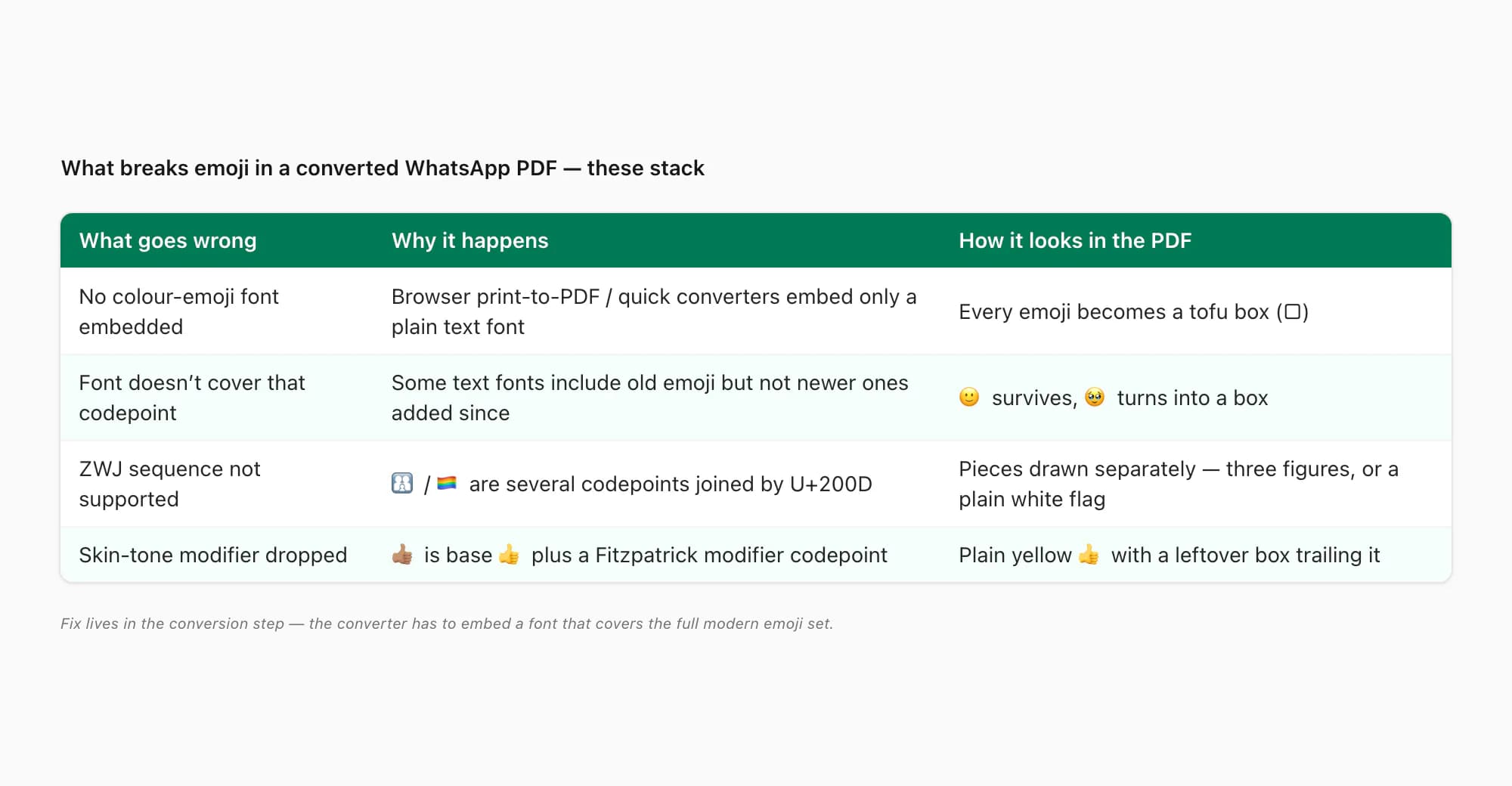
The most common is no colour-emoji font embedded at all. Browser print-to-PDF and lots of free converters lay the chat out with a plain text font and embed only that. Every emoji becomes a box because nothing in the file can draw one. The fix isn't on your end — the converter has to embed an emoji font, and most don't.
Next: the embedded font doesn't cover that codepoint. Some text fonts include a handful of common emoji as a courtesy, so 🙂 might survive while 🥹 turns into a box — the font has the older codepoint, not the newer one. Then there's ZWJ sequences not supported. Plenty of "single" emoji are actually several codepoints glued together with a zero-width joiner (U+200D): 👨👩👧 is man + ZWJ + woman + ZWJ + girl; 🏳️🌈 is white-flag + ZWJ + rainbow. A font that doesn't know the sequence renders the pieces separately — or, worse, the renderer drops the join and you get man-woman-girl as three little figures, or a plain white flag with a stray rainbow. Last, skin-tone modifiers dropped: 👍🏽 is thumbs-up + a Fitzpatrick modifier codepoint; a font without the modifier glyph shows the base 👍 with a leftover box trailing it, or just the plain yellow base.
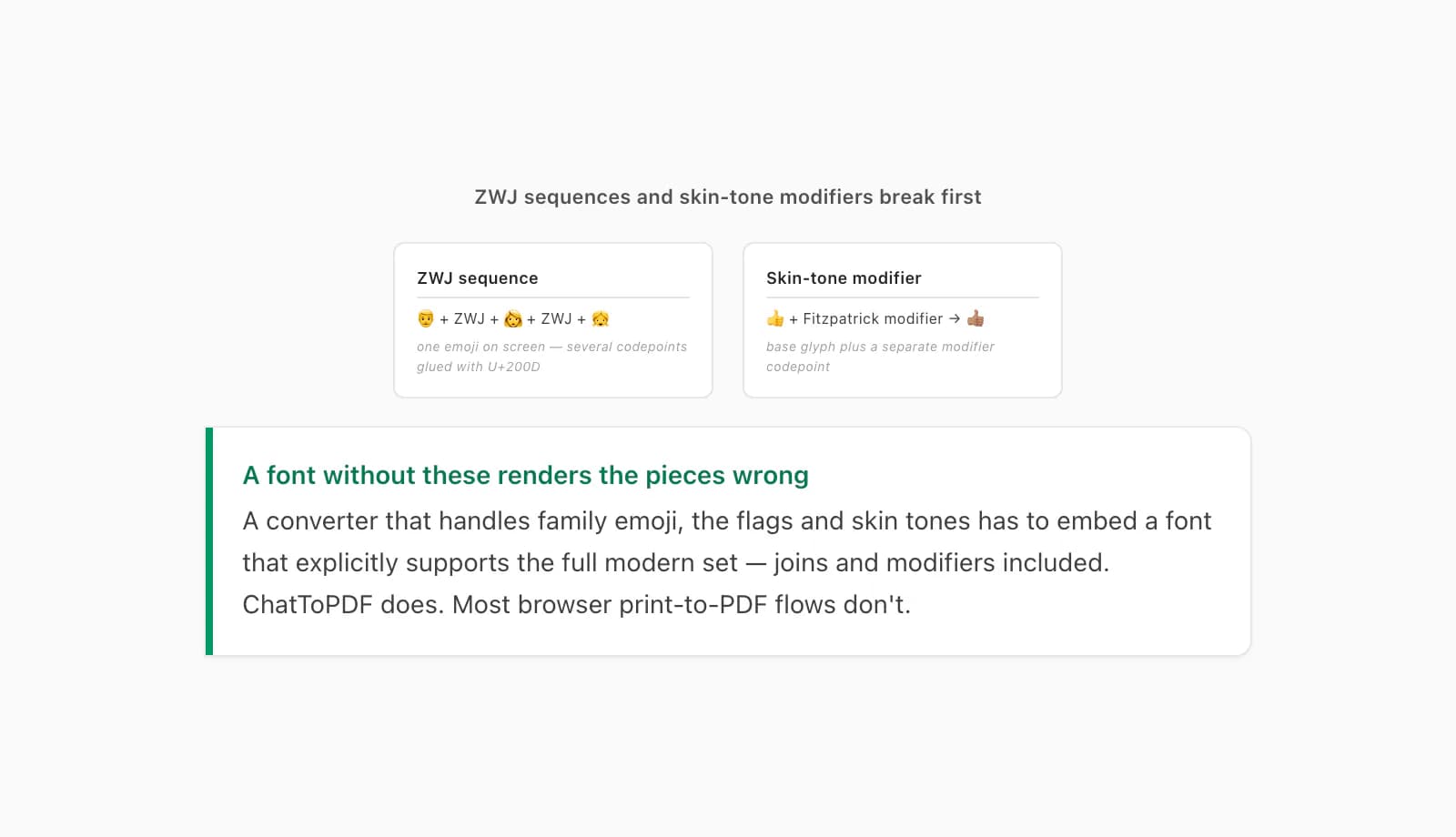
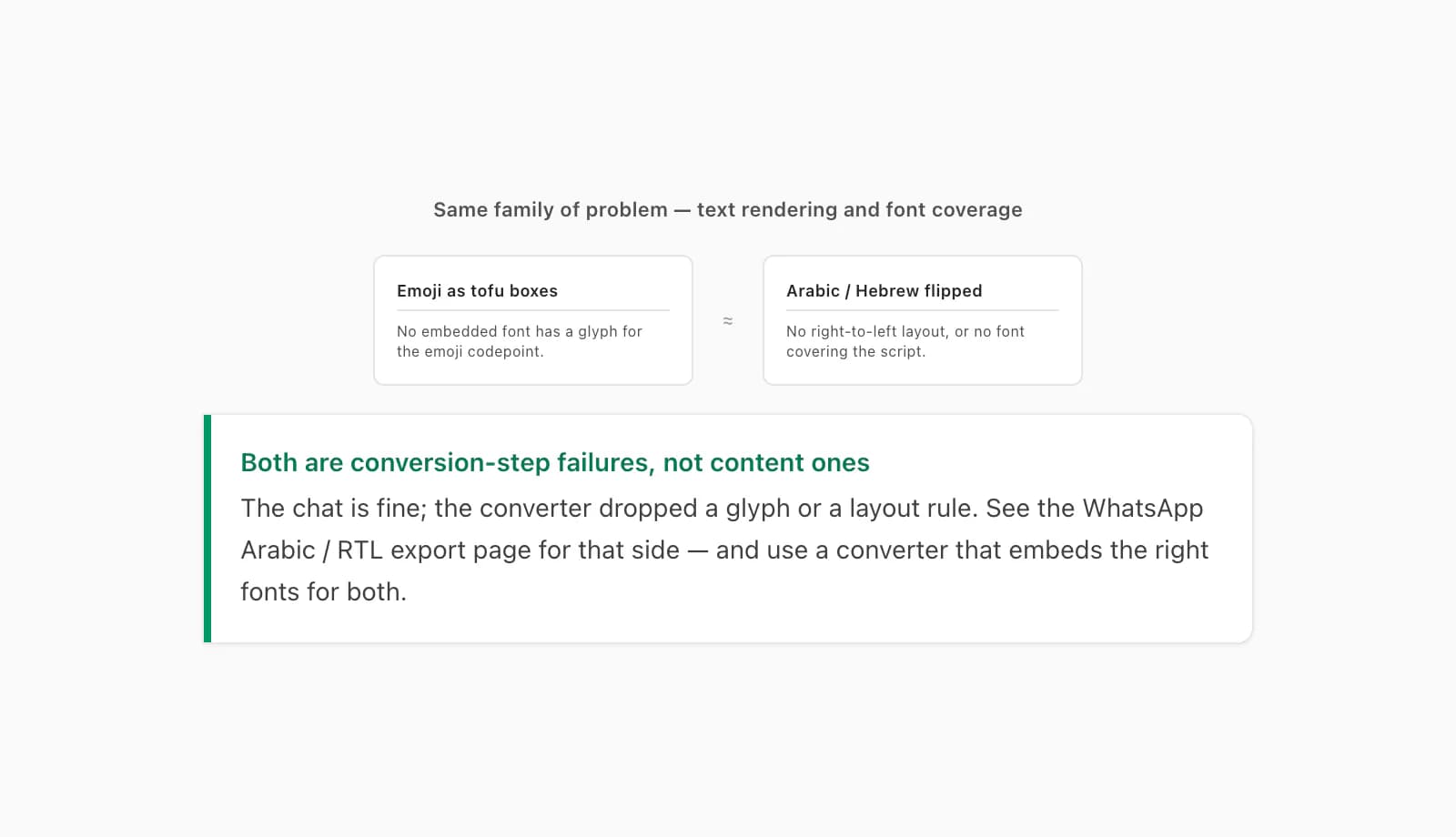
If you've ever looked at a converted chat and thought "the simple emoji are fine but the family/flag/skin-tone ones are mangled" — that's exactly this. ZWJ sequences and modifiers are where font coverage gives out first. A converter that handles them has to embed a font that explicitly supports the full modern emoji set, joins and modifiers included. (This is the same family of problem as Arabic or Hebrew coming out wrong in a converted chat — a text-rendering and font-coverage failure, not a content one. The WhatsApp Arabic / RTL export page covers that side of it.)
What you can do with a DIY export (not much)
I'll be straight with you: once a DIY converter has handed you a PDF with tofu boxes in it, there's no good way to repair it. The emoji glyphs were never embedded — you can't add a font to a PDF that's already rendered without re-doing the whole layout, which means re-converting from the source _chat.txt anyway. Two partial moves are worth knowing about.
First, try opening the same PDF in a different reader before assuming it's broken. Very occasionally an emoji is embedded correctly and a stale, decade-old PDF viewer just refuses to draw it — open it in Chrome, Firefox, Edge, Safari, or Adobe Acrobat 2020 or newer and see if the boxes turn into glyphs. If they don't, the font genuinely isn't in the file and no reader can rescue it. Second, if a sender forwarded you a broken PDF, the only real fix is for them to regenerate it with a converter that embeds an emoji font — re-sending the same file changes nothing, the same way a PDF that won't open for them won't open for you either. None of that is satisfying, which is exactly why I built the conversion step the way I did.
How ChatToPDF renders the emojis the way the chat did
ChatToPDF doesn't lean on whatever font your browser happens to have. It lays the chat out with its own typeface for the message text and embeds a full Unicode emoji font directly in the output PDF — including the modern ZWJ sequences (the family emoji, the flags) and the Fitzpatrick skin-tone modifiers. So when the renderer hits U+1F602, or a man-ZWJ-woman-ZWJ-girl sequence, or 👍🏽, there's a real glyph in the file for it. The emoji render in the converted PDF the way they rendered in the chat — no tofu boxes, no stray rectangles trailing a modifier, no flags falling apart into their pieces.
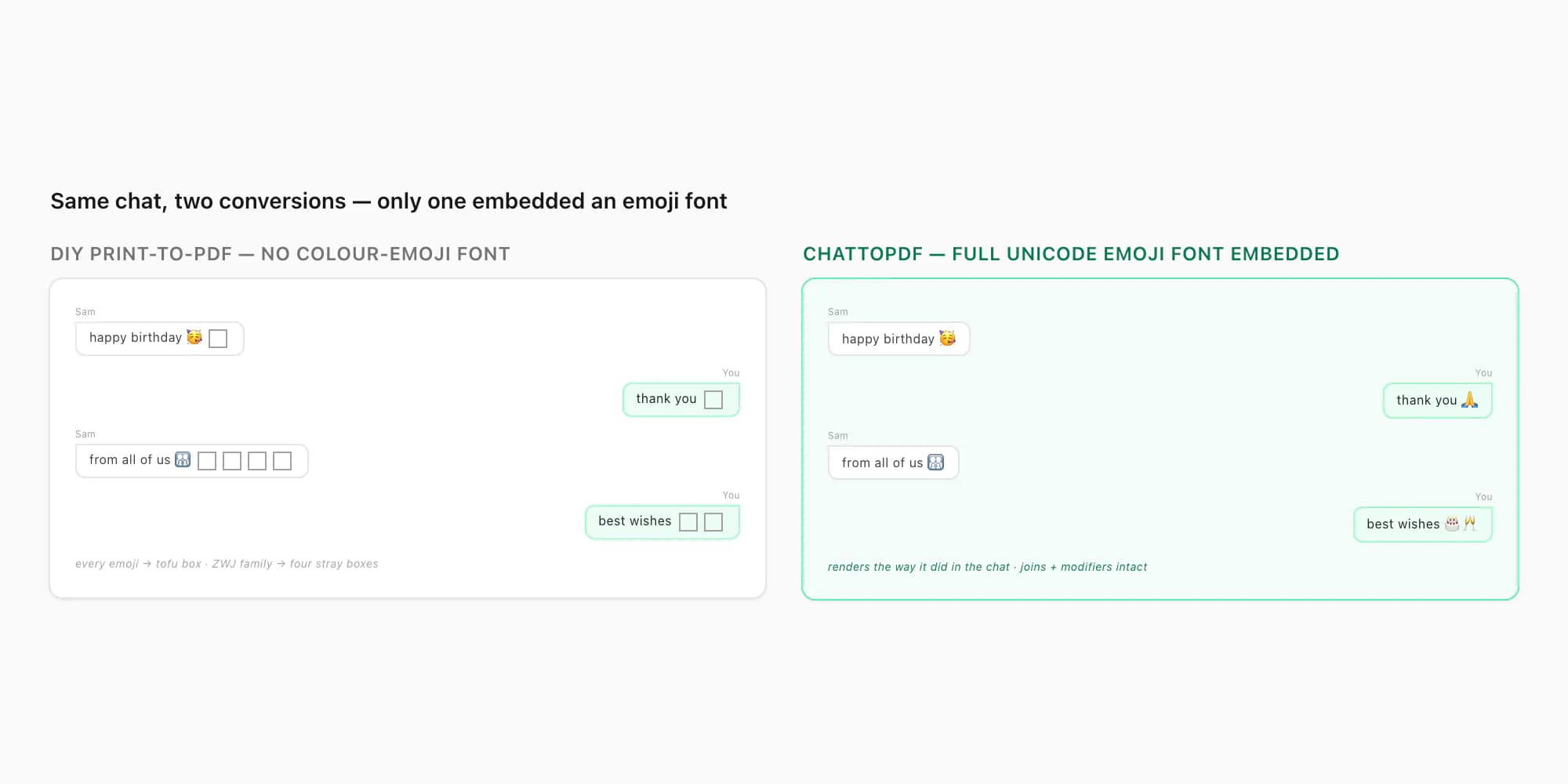
Because the emoji font is embedded in the file, it travels with the file. The PDF is standard PDF 1.7 and self-contained — messages, sender names, timestamps, inline photos and the emoji glyphs all live inside the one document. It doesn't matter whether the person opening it has an emoji font installed; the glyphs are right there in the PDF. It opens the same in iOS Quick Look and Books, Android file managers and Google Drive, Adobe Acrobat, Chrome, Firefox, Edge, Safari, and macOS Preview. (The reader-side caveat from the pillar still holds — a genuinely ancient PDF viewer can refuse to draw an embedded emoji font — but every mainstream reader from the last decade handles it.)
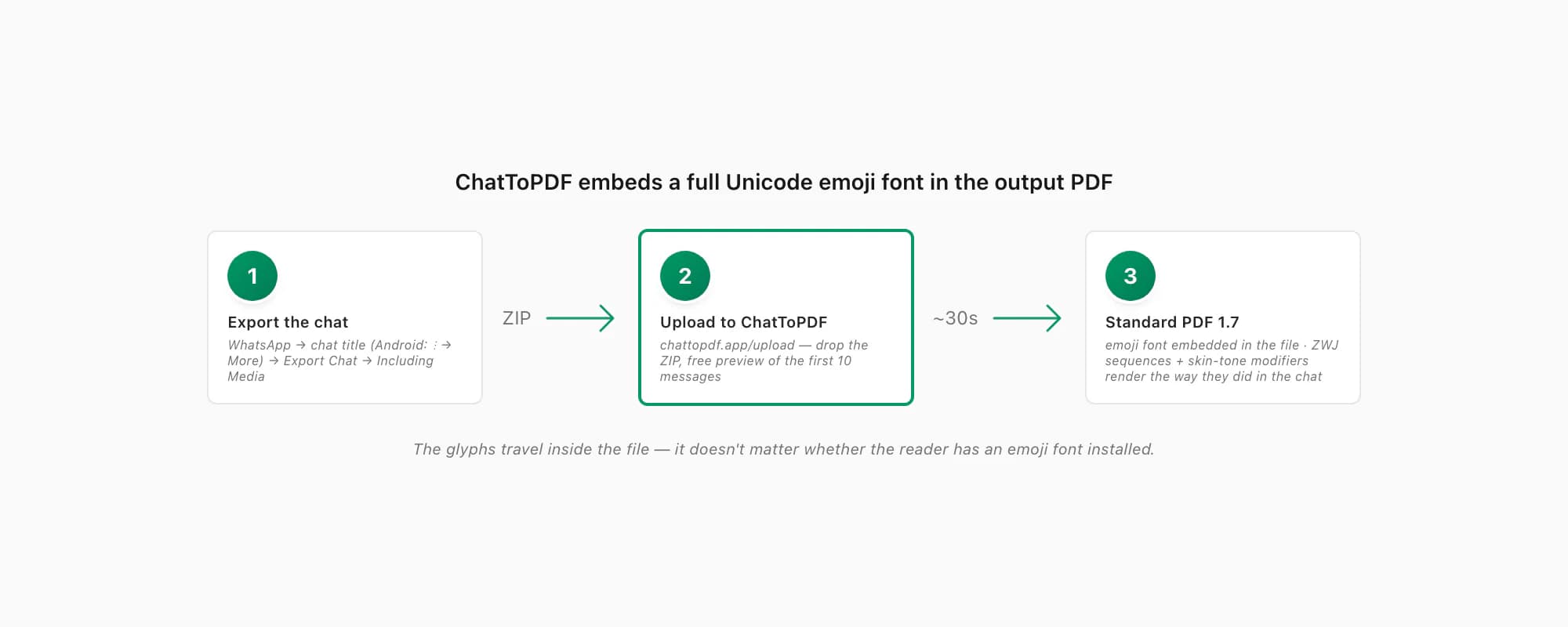
The path is short. In WhatsApp, open the chat, tap the contact or group name at the top (Android: three-dot menu → More), scroll to Export Chat, pick Including Media so photos make it in, and save the ZIP. Then open chattopdf.app/upload, drop the ZIP on the upload zone, and the conversion runs — the WhatsApp to PDF guide walks the whole thing end to end. There's a free preview of the first ten messages before you pay, so if your chat is emoji-heavy you can confirm they render before spending anything.
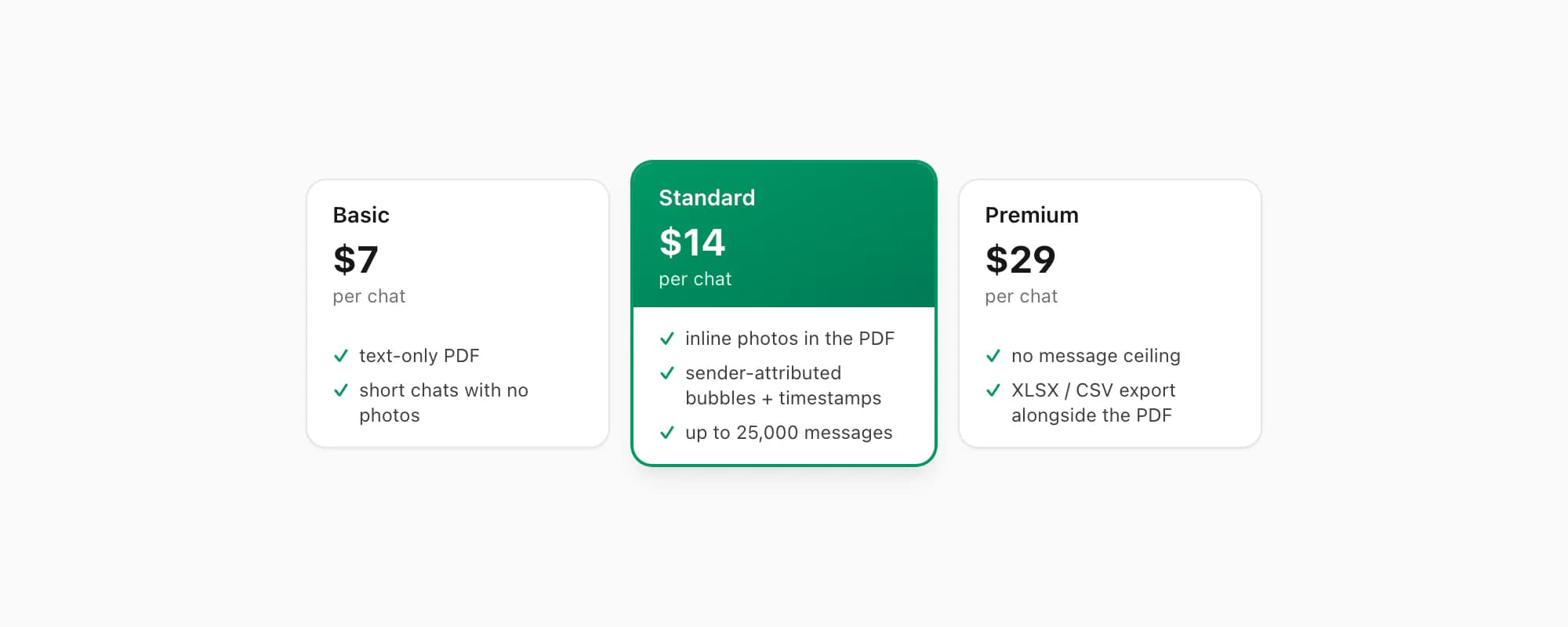
ChatToPDF charges per chat conversion — you pay for the one chat you're converting, nothing recurring. $7 Basic per chat is a text-only PDF, fine for a short chat with no photos. $14 Standard per chat renders inline photos, sender-attributed bubbles and timestamps, up to 25,000 messages — the right tier for almost every chat, emoji-heavy ones included. $29 Premium per chat removes the message ceiling and adds an XLSX/CSV export; the pillar covers the $49 Premium+Voice per chat tier (language-aware Nova-3/Scribe v2 voice-note transcription) and the $99 Power User per chat tier (priority queue, bulk handling) if you need them. Every tier embeds the same emoji font in the output — which is the whole point of building it in rather than hoping a reader has one.
Key takeaways
- WhatsApp PDF emojis broken — tofu boxes, question marks, the wrong glyph — is a font-coverage problem in the conversion step, not a problem with your chat
- A PDF only shows a character if a font with a glyph for that codepoint is embedded in the file; many DIY routes (browser print-to-PDF, quick converters) embed no colour-emoji font at all, so every emoji becomes a box
- Four things break emoji in a PDF: no emoji font embedded; the font doesn't cover that codepoint; ZWJ sequences (👨👩👧, 🏳️🌈) not supported; skin-tone modifiers (👍🏽) dropped — and they stack
- ZWJ sequences and skin-tone modifiers break first — if the "simple" emoji survive but the family/flag/skin-tone ones are mangled, that's font coverage giving out
- You can't repair a DIY PDF after the fact — try a modern reader (Chrome, Acrobat 2020+) in case it's a stale-viewer issue, but if the font isn't embedded, re-convert from the source
_chat.txt - ChatToPDF embeds a full Unicode emoji font — ZWJ sequences and skin-tone modifiers included — directly in the output PDF, so emojis render the way they did in the chat; the file is self-contained standard PDF 1.7
- ChatToPDF is priced per chat — $14 Standard per chat covers almost every conversion, with $7 Basic per chat for text-only and $29 Premium per chat for no message ceiling
FAQ
Why are the emojis in my converted WhatsApp PDF showing as boxes?
Because no font with glyphs for those emoji is embedded in the PDF. A PDF can only draw a character if a font covering that Unicode codepoint is inside the file — and many DIY routes (browser "print to PDF", quick-and-dirty converters) embed only a plain text font, which has no emoji glyphs. So every emoji falls back to the missing-glyph placeholder: an empty rectangle, a "tofu" box. The emoji is there as a codepoint; there's just nothing to draw it with. The fix is in the conversion step — use a converter that embeds a colour-emoji font.
Some emoji show up in my WhatsApp PDF and others are squares — why the difference?
The embedded font has some emoji glyphs but not all of them. Emoji get added to Unicode every year, so a font frozen at an older set won't have anything newer — 🙂 might render while 🥹 turns into a box. ZWJ-sequence emoji (👨👩👧, 🏳️🌈 — several codepoints glued together with a zero-width joiner) and skin-tone modifiers (👍🏽) break first, even when simpler emoji survive, because they need fuller font support. ChatToPDF embeds a font that covers the full modern set, joins and modifiers included.
Can I fix the broken emojis in a PDF I already have?
Not really — if no emoji font was embedded when the PDF was made, you'd have to re-do the layout to add one, which means re-converting from the source export anyway. Two things are worth trying first: open the same PDF in a modern reader (Chrome, Firefox, Edge, Safari, Adobe Acrobat 2020 or newer) in case it's just a stale viewer refusing to draw an embedded font; and if a sender forwarded you the broken file, ask them to regenerate it with a converter that embeds an emoji font — re-sending the same file won't change anything.
Will emojis render correctly in a PDF made by ChatToPDF?
Yes — ChatToPDF embeds a full Unicode emoji font directly in the output PDF, including modern ZWJ sequences (the family emoji, the flags) and Fitzpatrick skin-tone modifiers. The glyphs travel inside the file, so it doesn't matter whether the person opening it has an emoji font installed. The output is standard PDF 1.7, self-contained, and opens the same in iOS Quick Look and Books, Android file managers and Google Drive, Adobe Acrobat, Chrome, Firefox, Edge, Safari and macOS Preview. There's a free preview of the first ten messages so you can confirm the emoji render before paying.
I'm Paul, the founder of ChatToPDF. I built it after needing a long WhatsApp conversation as a readable PDF for a legal matter. I test and document WhatsApp exports, PDF conversion, voice-note transcription, and the limits people should check before relying on the result.