
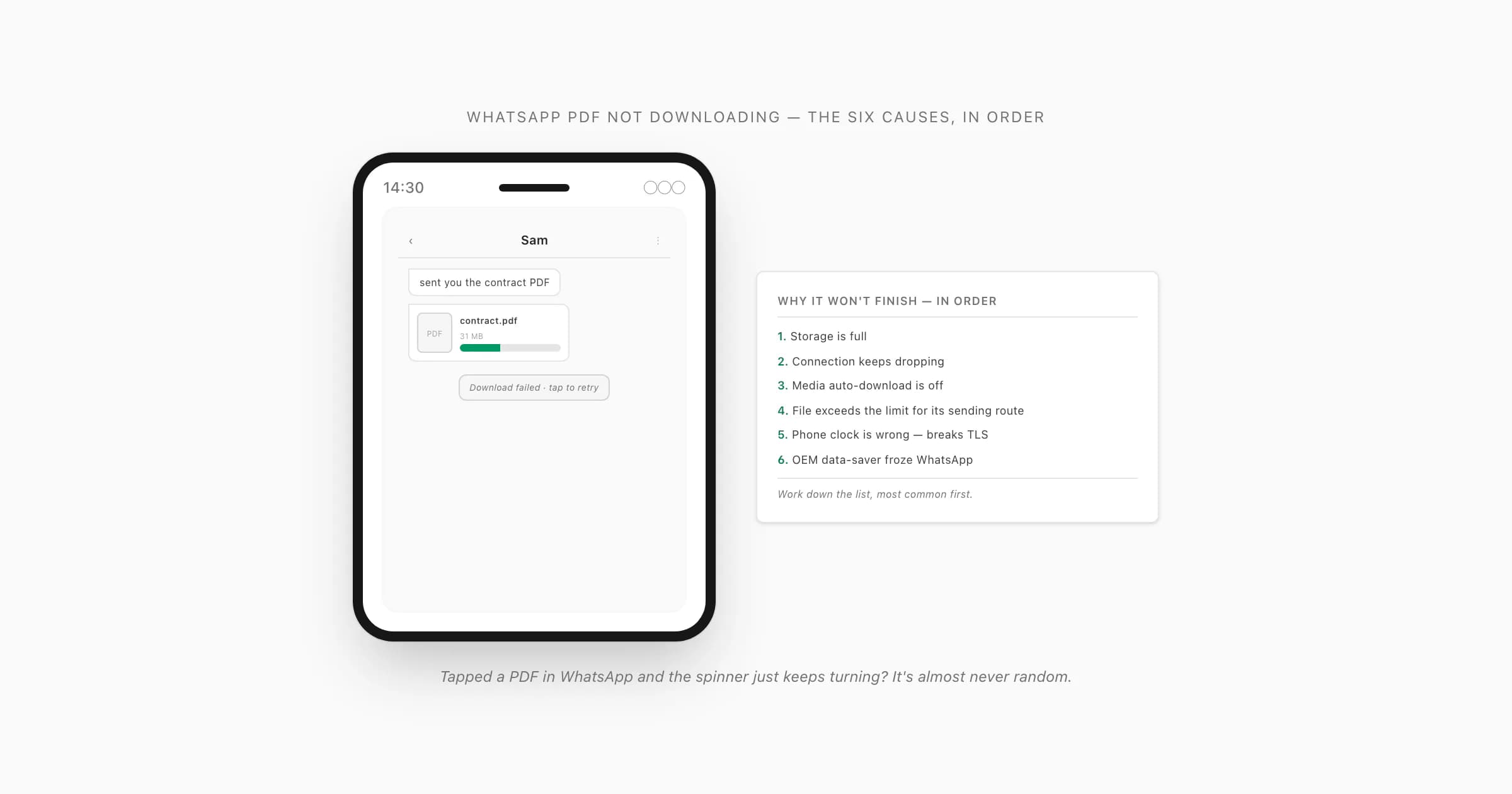
The six causes, in order of likelihood
Someone sends a PDF in a WhatsApp chat. You tap the document tile expecting it to land, and instead the spinner just rotates — or it stalls at 40% — or you get a "download failed" toast and a retry arrow. WhatsApp PDF not downloading is one of those problems that looks random and almost never is. There are six causes, and between them they cover nearly every case I've seen.
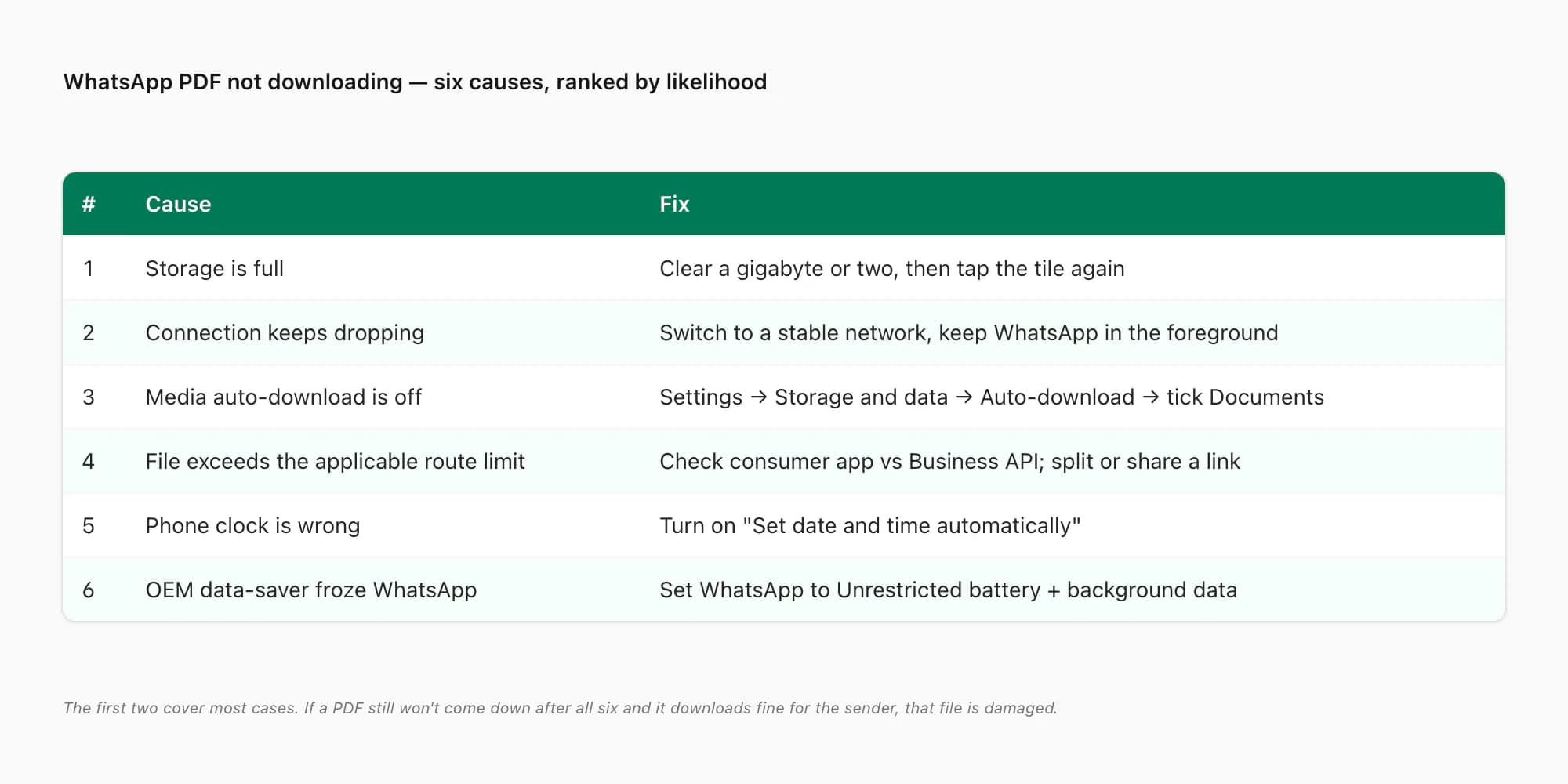
Here's the order I'd check them, most common first:
- Your storage is full. WhatsApp downloads the file to disk before it shows you anything. If the phone is sitting at 99% full, there's nowhere to write it, so the download "starts" and then fails — or never starts. Far and away the most common reason a WhatsApp document is not downloading.
- Your connection keeps dropping. A weak mobile signal, a captive-portal Wi-Fi that hasn't authenticated, switching towers in a moving car — WhatsApp restarts the transfer from zero each time the link drops, so a 30 MB PDF on a bad signal can stall forever. This is the classic "pdf stuck downloading whatsapp" case.
- Media auto-download is switched off. Under Settings → Storage and data → Auto-download, if "Documents" is unchecked for your current network, WhatsApp won't pull the file until you tap it — and even then it needs a clean connection to finish. People forget they ever toggled this.
- The file exceeds the limit for its sending route. Consumer WhatsApp supports file sharing up to 2 GB. Software sending a PDF through the WhatsApp Business Platform/API follows a separate 100 MB PDF cap. Ask how the document was sent before applying the wrong number; the WhatsApp PDF 100KB limit guide cites both primary sources.
- Your phone's clock is wrong. WhatsApp's media downloads run over TLS, and TLS refuses to handshake if your device clock is off by more than a few minutes — the certificate looks "not yet valid" or "expired". Symptom: messages still arrive (they go over an already-open socket) but every fresh download fails. Set the date and time to automatic.
- An OEM data-saver or battery manager froze WhatsApp in the background. Xiaomi/MIUI, some Samsung One UI sleep settings, and a couple of others will suspend WhatsApp's background work or its data access the moment you leave the app — which silently kills an in-progress download. On those phones this jumps up the list.
WhatsApp's own help on storage and data usage confirms the basic mechanic: it transfers the file to your device, controlled by your auto-download settings and your available storage. Knowing that, most of these fixes write themselves.
Causes 1 & 2 — full storage, or a connection that keeps dropping
These are the two I'd rule out first, because they're the two that account for most "whatsapp pdf download failed" reports.
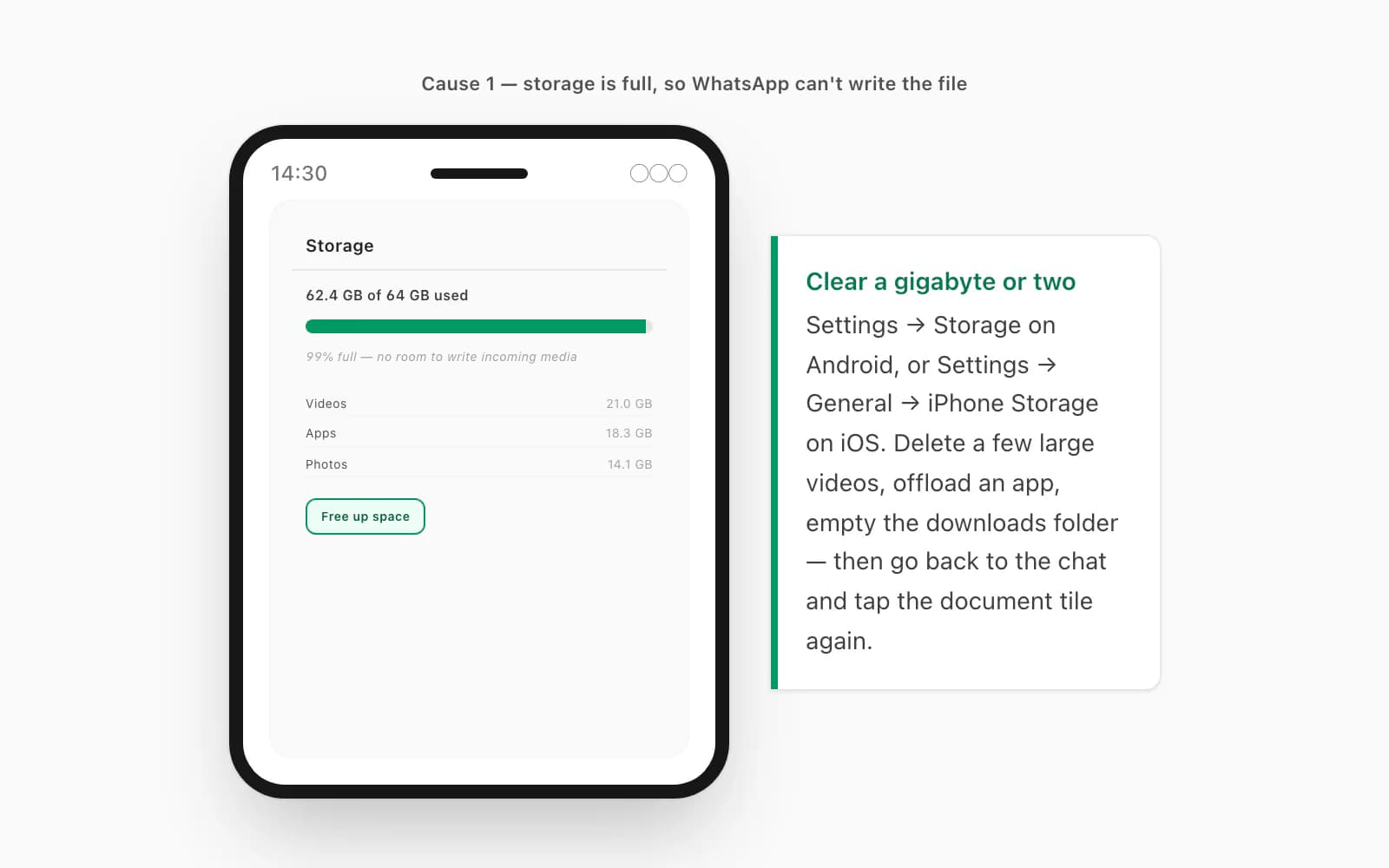
Full storage. Open Settings → Storage (or Settings → General → iPhone Storage on iOS). If you're over about 95%, that's almost certainly it — WhatsApp can't write the incoming file. Clear a gigabyte or two: delete a few large videos, offload an app or two, empty the downloads folder. Apple's help on freeing up storage on iPhone walks the iOS side; on Android, Settings → Storage → "Free up space" does the same. Then go back to the chat and tap the document tile again — with room on disk, it'll pull straight down.
A connection that keeps dropping. WhatsApp doesn't resume a partial download — every drop sends it back to byte zero. So the fix is a stable link, not necessarily a fast one. If you're on a weak mobile signal, move to Wi-Fi (and open a browser tab first to make sure the Wi-Fi has actually let you online — captive-portal networks block WhatsApp's traffic until you sign in). If you're on Wi-Fi and it's flaky, the opposite: switch to mobile data. Keep WhatsApp in the foreground while the bar fills; on a lot of Android phones, backgrounding the app pauses the transfer. If the tile shows "this file isn't available" rather than a retry arrow, the file has aged off the sender's device — WhatsApp doesn't keep media on its servers indefinitely — and they need to resend it.
Cause 3 — media auto-download is switched off
If storage is fine and the signal is solid but the document still won't come down on its own, check the auto-download settings.
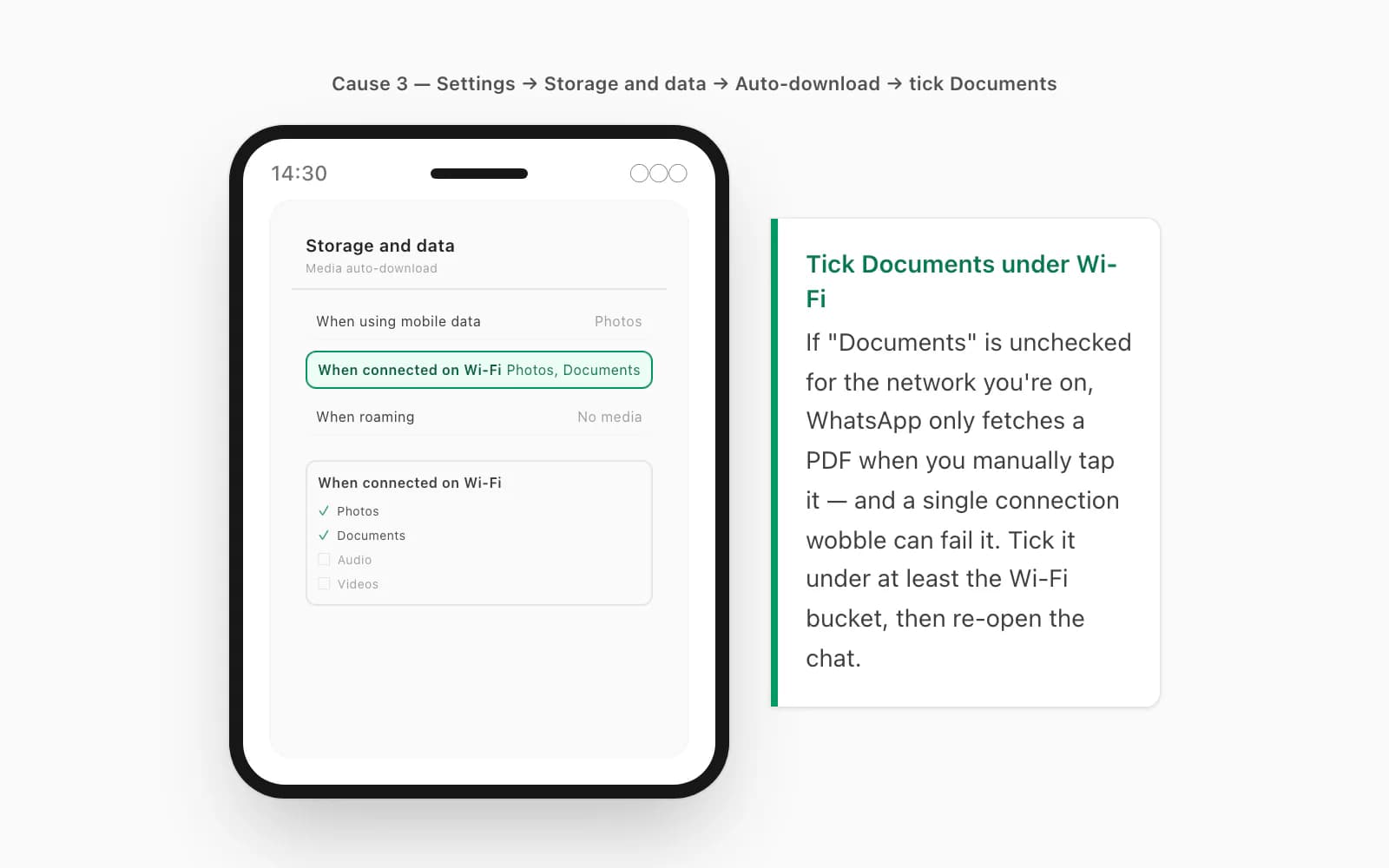
The path is Settings → Storage and data → Auto-download (on Android; on iPhone it's Settings → Storage and Data → Media Auto-Download). There are three buckets — "When using mobile data", "When connected on Wi-Fi", and "When roaming" — and each has a "Documents" checkbox. If "Documents" is unchecked for the network you're on, WhatsApp will only fetch the PDF when you manually tap the tile, and even then a single connection wobble can fail it. Tick "Documents" under at least the Wi-Fi bucket (I'd leave it off for mobile data and roaming unless you have a generous plan), then re-open the chat and tap the file. This is a near-cousin of WhatsApp not opening a PDF: in that case the file downloads but won't render; here it doesn't finish downloading in the first place. Different symptom, overlapping settings.
Causes 4, 5 & 6 — route limit, wrong clock or OEM data-saver
If the first three are clean, three stubborn ones are left.
The file exceeds the limit for its route. Ask the sender for the exact size and how it was sent. A person attaching a PDF in the consumer app can share files up to 2 GB, according to Meta's file-sharing announcement. A CRM, bot or other integration using the WhatsApp Business Platform has different media rules; the current AWS WhatsApp media table lists PDFs at 100 MB. Above the applicable cap, split or compress the PDF, or use a permission-controlled Drive/Dropbox link. Below it, continue with storage, network, expiry and file-integrity checks.
Your phone's clock is wrong. I've watched this one stump people for ages. Messages arrive fine, but every PDF, photo, and voice note refuses to download. The cause is TLS: WhatsApp's media servers present a certificate with a validity window, and if your device clock is outside that window — a dead battery that reset the clock, a SIM swap to a new region, a manual time change for a game — the handshake fails with a "certificate not valid" error you never see. Fix: Settings → System → Date & time → "Set automatically" (Android), or Settings → General → Date & Time → "Set Automatically" (iPhone). Toggle it on, let it sync, then retry the download.
An OEM data-saver or battery manager froze WhatsApp. Some Android skins — MIUI/HyperOS on Xiaomi, Redmi and Poco; aggressive sleep settings on some Samsung One UI builds — will suspend WhatsApp's background processes or cut its data the instant you leave the app, which stalls any in-progress download. The fix is to exempt WhatsApp: Settings → Apps → WhatsApp → Battery → "Unrestricted", and Settings → Apps → WhatsApp → Mobile data → allow "Background data" and "Unrestricted data usage". On MIUI there's an extra Autostart toggle and a separate per-app "no restrictions" battery option. Once WhatsApp is allowed to run unrestricted, downloads finish even when the app isn't in front of you.
If you've cycled all six and a particular PDF still won't come down — and the sender confirms it's a normal-size file that downloads fine for them — that file is probably damaged, which no amount of retrying fixes. And if the file you needed is one that already arrived once but you've since lost — the message gone, the chat deleted, the phone swapped — that's a different problem from a stalled download, and WhatsApp PDF recovery walks the four scenarios for getting it back. Otherwise, here's a good moment to talk about the file you actually control.
When you want the chat as a PDF with no download step at all
Here's the part nobody mentions in all of the above: a lot of the time, the PDF you're chasing in WhatsApp is one you are trying to create — you want the conversation itself as a document you can keep, search, or send to a lawyer. If that's you, there's a way to get that PDF that has none of these failure modes, because there's no in-WhatsApp download step in it at all.
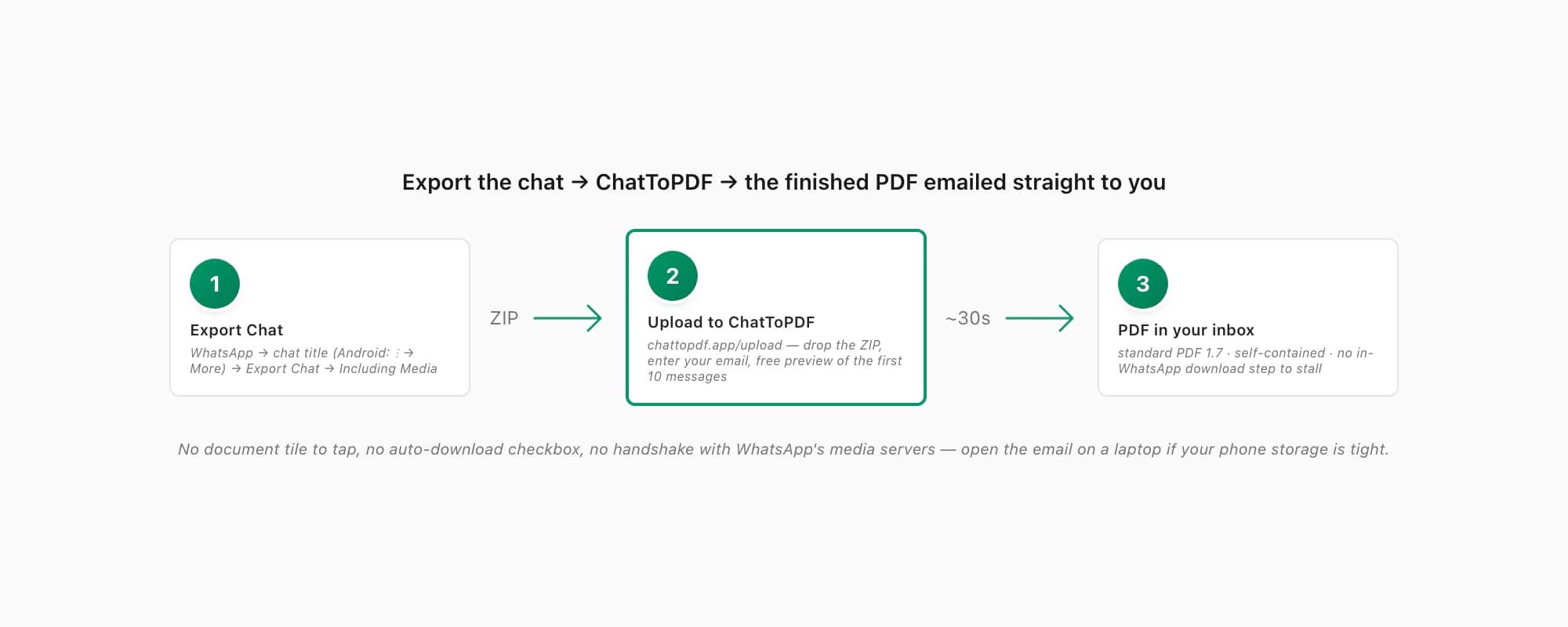
ChatToPDF works off WhatsApp's own Export Chat ZIP. You export the chat, drop the ZIP on the upload page, and the finished PDF is emailed straight to your inbox — there's no document tile to tap in WhatsApp, no auto-download checkbox in the path, no TLS-to-WhatsApp's-media-servers handshake. If your phone storage is tight, you can open the email on a laptop. If your connection is flaky, the email waits for you. The output is standard PDF 1.7 — the ISO-standardised version every mainstream reader has supported for over a decade — and it's self-contained: messages, sender names, timestamps and inline photos all live inside the one file.
The path is short. In WhatsApp, open the chat, tap the contact or group name at the top (on Android: three-dot menu → More), scroll to Export Chat, pick "Including Media" so photos make it in, and save the ZIP. Then open chattopdf.app/upload, drop the ZIP on the upload zone, enter your email, and the conversion runs — the WhatsApp to PDF guide walks the whole thing end to end. You get a free preview of the first ten messages before paying.
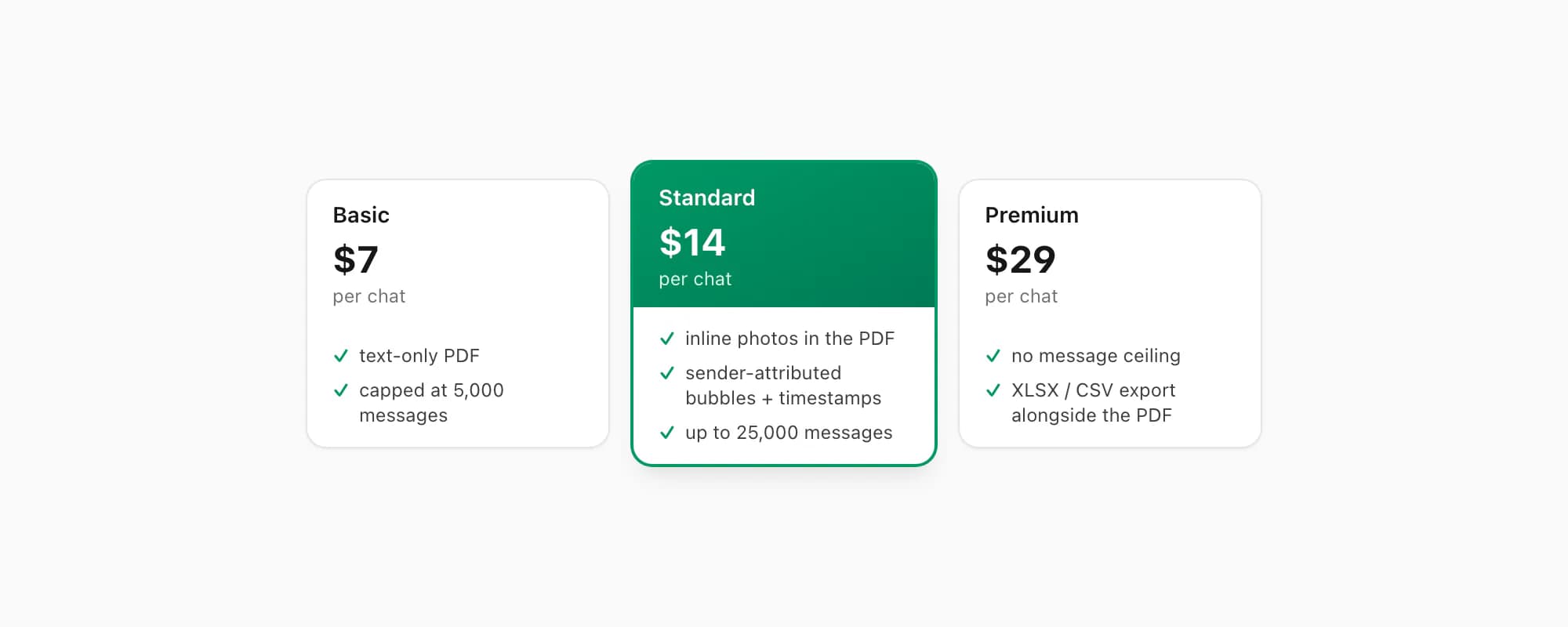
ChatToPDF charges per chat conversion — you pay for the one chat you're converting, nothing recurring. $7 Basic per chat is a text-only PDF, fine for a short chat with no photos, capped at 5,000 messages. $14 Standard per chat renders inline photos, sender-attributed bubbles and timestamps, up to 25,000 messages — the right tier for almost every chat. $29 Premium per chat removes the message ceiling and adds an XLSX/CSV export alongside the PDF; the pillar covers the $49 Premium+Voice per chat tier (language-aware Nova-3/Scribe v2 voice-note transcription, up to 8 hours of audio) and the $99 Power User per chat tier (priority queue, bulk handling) if you need them. Whichever tier you pick, the finished file arrives by email — no download in WhatsApp to stall.
Key takeaways
- WhatsApp PDF not downloading is usually one of six things: full storage, a flaky connection, media auto-download switched off, a file above its route-specific limit, a wrong device clock, or an OEM data-saver
- Consumer WhatsApp file sharing supports up to 2 GB; WhatsApp Business Platform/API PDFs use a separate documented 100 MB cap
- Most common cause: storage is full and WhatsApp can't write the incoming file — clear a gigabyte or two, then tap the document tile again
- WhatsApp restarts a download from zero on every connection drop, so it needs a stable link, not a fast one — switch networks and keep WhatsApp in the foreground
- Settings → Storage and data → Auto-download: tick "Documents" under at least the Wi-Fi bucket so the file pulls on its own
- Messages arriving but no media downloading is the tell-tale sign of a wrong clock — turn on "Set date and time automatically"
- Xiaomi/Redmi/Poco and some Samsung models freeze WhatsApp's background work — set WhatsApp to "Unrestricted" battery and allow background data
- If you want the chat itself as a PDF, export it and run the ZIP through ChatToPDF — the finished file is emailed to you, so there's no in-WhatsApp download step that can stall, and it's standard self-contained PDF 1.7
- ChatToPDF is priced per chat — $14 Standard per chat covers almost every conversion, with $7 Basic per chat for text-only and $29 Premium per chat for no message ceiling
FAQ
Why is a PDF in WhatsApp not downloading when I tap it?
In order: free enough storage for the file and working space; retry on a stable network with WhatsApp open; enable document auto-download for the current network; compare the file with the correct route limit (2 GB consumer file sharing, 100 MB Business Platform/API PDF); turn on automatic date/time; and remove battery or background-data restrictions. If only one PDF fails, ask the sender to open and regenerate it.
My WhatsApp document is stuck downloading at a certain percentage — what do I do?
Treat a repeat stall as a transfer problem first. Switch to a stable network—if mobile data is weak, try authenticated Wi-Fi; if Wi-Fi is flaky, try mobile data—and keep WhatsApp on screen while it downloads. If the file is large, compare it with the correct limit for the route: 2 GB in consumer file sharing or 100 MB for a Business Platform/API PDF. Ask the sender to provide a smaller version or a permission-controlled link if needed.
WhatsApp messages arrive but no photos or PDFs will download — why?
That's almost always a wrong device clock. WhatsApp's media downloads run over TLS, and TLS refuses to handshake when your clock is off by more than a few minutes — the certificate looks not-yet-valid or expired — while messages keep arriving over an already-open connection. Fix it with Settings → System → Date & time → "Set automatically" on Android, or Settings → General → Date & Time → "Set Automatically" on iPhone. Let it sync, then retry the download. If that's not it, check storage and your auto-download settings next.
If I'm the one trying to make a chat into a PDF, is there a way around all this?
Yes — that's exactly the case ChatToPDF is built for. You export the chat from WhatsApp (chat title → Export Chat → Including Media), upload the ZIP at chattopdf.app/upload, and the finished PDF is emailed straight to you. There's no document tile to download inside WhatsApp, no auto-download checkbox in the path, and nothing that depends on WhatsApp's media servers. The output is standard PDF 1.7, self-contained, and opens in every mainstream reader. The $14 Standard per chat conversion covers almost every chat.
I'm Paul, the founder of ChatToPDF. I built it after needing a long WhatsApp conversation as a readable PDF for a legal matter. I test and document WhatsApp exports, PDF conversion, voice-note transcription, and the limits people should check before relying on the result.