
Table of Contents
With the growing need to preserve and share WhatsApp conversations, picking the right PDF converter matters. Some users need basic text conversion; others need professional-grade documentation with embedded media. The market has split into free browser-based tools at one end and paid services at the other, with significant quality differences in between.
Below we evaluate each option against the same criteria — output quality, media handling, security, and pricing — so you can match the right tool to what you actually need to do with the finished PDF.
Evaluation Criteria for WhatsApp PDF Converters
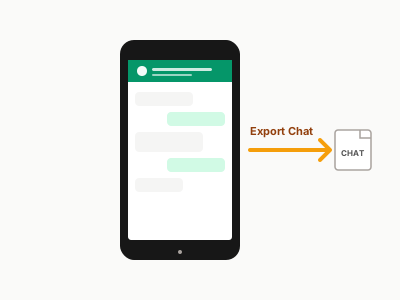
Before getting into the tools, a quick note on what you actually export from WhatsApp itself — see our WhatsApp Chat to PDF: How to Convert in 30 Seconds (2026) guide for the export-side details. Below is how we ranked the converters that take that file and turn it into a PDF.
Security & Privacy
- • Data encryption during upload and processing
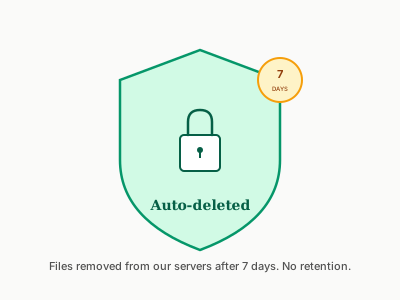
- • Automatic file deletion within seven days
- • Privacy policy transparency
- • Server location and data handling
Features & Quality
- • Professional formatting and layout
- • Media file support and integration
- • Timestamp and participant preservation
- • Multiple export format support
Performance & Speed
- • Processing speed and efficiency
- • File size limitations
- • Reliability and uptime
- • Batch processing capabilities
Value & Pricing
- • Cost per conversion
- • Feature-to-price ratio
- • Free tier limitations
- • Subscription vs. one-time payment
Why Most Online Converters Fail at WhatsApp
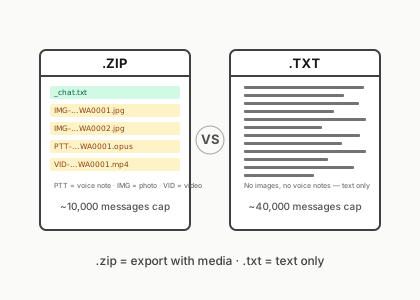
Tools like Smallpdf and ILovePDF are excellent at converting Word documents or image files into PDFs. The problem is that a WhatsApp export is neither. It is a plain-text .txt file — or a .zip with that text file plus dozens of loosely named media attachments — and generic converters have no idea how to parse it.
Drop a WhatsApp .txt into a generic converter and you get a wall of raw text. Timestamps, sender names, and system messages run together with no visual separation. Photos are simply absent — the converter has no logic to pair an image filename mentioned in the text with a corresponding media file. Voice notes do not exist in the output at all.
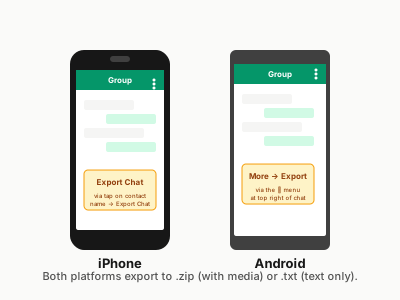
The native "print to PDF" method on iPhone and Android is similarly blunt. On iOS, you open the chat, select Export Chat, open the .txt in the Files app, and hit Print — then save as PDF. The result is a monospaced text dump with no chat bubble layout and no images unless you manually copy-paste them elsewhere. On Android, the WhatsApp web method (view chat in a browser, print page) captures what is visible on screen only: you scroll and print page by page, manually, losing the thread structure every time the page breaks mid-conversation.
Screenshot stitching is the method people resort to when they need images in the output. The process involves taking screenshots of every section of the conversation, then combining them in a PDF editor. For a 200-message chat this takes anywhere from 20 to 45 minutes. The resulting file is often 50 MB or larger — unwieldy to email and difficult to search, since it is entirely image-based with no selectable text.
Desktop tools like Backuptrans and iMyFone take a different approach: they connect directly to your phone via USB cable to extract chat data from the WhatsApp database rather than using the exported file. This gives them access to full media libraries, but the trade-off is significant. Both tools require you to back up your phone, trust the software with your device data, and work through a desktop install on Windows or Mac. iMyFone's WhatsApp transfer features are priced at $19.95–$39.95 per year as part of a broader suite — workable if you need the other features, overkill if all you want is one chat as a PDF.
The WhatsApp date-format trap
WhatsApp exports use different timestamp formats depending on the phone's regional settings — DD/MM/YYYY on most Android devices, M/D/YY on US iPhones, and ISO variants on some European handsets. A converter that only handles one format silently misparses every other message's date, which means timestamps in the final PDF are wrong. This is the kind of error that goes unnoticed until someone checks dates in a legal dispute.
Top Paid WhatsApp PDF Converters
1. ChatToPDF
Professional WhatsApp to PDF conversion service
✅ Strengths
- • Professional PDF formatting
- • Advanced media integration
- • Multiple pricing tiers ($14-$49)
- • Secure processing & auto-deletion
- • Fast processing (5-10 minutes)
- • Both iPhone & Android support
❌ Limitations
- • No free tier
- • Requires email address
- • Online processing only
- • Per-conversion pricing
💰 Pricing (per chat upload)
- • Basic: $7 — text-only PDF
- • Standard: $14 — includes media
- • Premium: $29 — advanced styles
- • Premium+Voice: $49 — voice transcription
- • Power User: $99 — full bundle + Excel/CSV
🌟 Best For:
Business documentation, legal proceedings, professional presentations, and anyone requiring high-quality PDF formatting with media preservation.
2. WhatsPDF Pro
Alternative✅ Pros
- • Desktop software (offline processing)
- • One-time purchase ($39)
- • Batch processing support
- • No file upload required
❌ Cons
- • Windows/Mac only
- • Basic formatting options
- • Limited media support
- • No mobile compatibility
3. ExportChat Premium
Subscription✅ Pros
- • Monthly subscription ($9.99/month)
- • Unlimited conversions
- • Cloud storage integration
- • Multiple platform support
❌ Cons
How ChatToPDF Differs
Most WhatsApp-to-PDF tools treat the job as a text conversion problem. ChatToPDF treats it as a document design problem. The distinction matters when the person reading the finished PDF was not part of the original conversation — a lawyer, a judge, a manager, a new employee reviewing a client complaint history.
Four output styles
ChatToPDF generates the same chat in four distinct visual styles. The Clean style uses a minimal layout with left/right message bubbles — familiar to anyone who has used WhatsApp, easy to follow at a glance. The Document style strips the bubbles and formats the conversation as a formal exchange, similar to an email transcript, which reads more naturally in legal or HR contexts. The Timeline style prioritises date headers and groups messages by day, useful for long chats spanning weeks or months where the progression of events matters more than individual message layout. The Compact style maximises content density for situations where page count matters — insurance claims, for example, often have attachment size limits.
The choice of style is made at upload time, before payment. You see a preview before committing. This matters because once you have paid and downloaded a 400-page PDF in the wrong layout, re-converting is the only option.
Voice note transcription
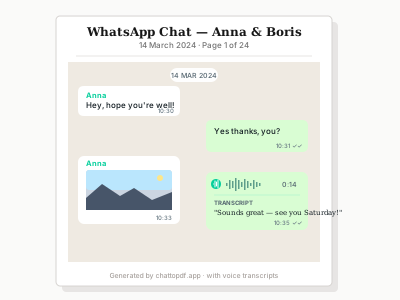
Voice notes are the feature that breaks every free converter. They appear in WhatsApp exports as .opus or .m4a files referenced by filename in the chat text — something like <Media omitted> or an actual filename depending on the export method. Free converters either drop the reference entirely or show it as a dead link. ChatToPDF's Premium+Voice tier ($49 per this chat) transcribes each voice note using speech-to-text processing and embeds the transcript inline, directly beneath the voice note timestamp. The speaker label, timestamp, and transcript text appear together in the PDF so the document is fully readable without access to the original audio files.
This is the feature that comes up most often in family law, tenancy disputes, and workplace investigations, where one party has recorded voice notes the other party claims never to have sent. A PDF that says "Voice note (0:23) — [no content]" is much weaker evidence than one that says "Voice note (0:23) — 'I told you the rent was going up from the first.'"
Excel and CSV export bundle
The Power User tier ($99 per this chat) adds a structured data export alongside the PDF. Every message is parsed into rows — timestamp, sender, message type (text, image, voice note, document, sticker), character count, and full message text — and delivered as both an Excel workbook and a CSV file. This is aimed at researchers, compliance teams, and operations managers who need to run analysis across the conversation: message frequency by sender, response time between messages, volume of media shared, or keyword searches across thousands of messages without scrolling through a PDF manually.
| Tier | Price per chat | Key inclusions |
|---|---|---|
| Basic | $7 | Text-only PDF, Clean style |
| Standard | $14 | Text + embedded images, all 4 styles |
| Premium | $29 | Standard + advanced formatting, group chat labels |
| Premium+Voice | $49 | Premium + voice note transcription |
| Power User | $99 | Premium+Voice + Excel/CSV data export |
Each price above covers one chat upload — there is no recurring billing or subscription. If you need to convert another chat next month, you pay again for that chat. This makes ChatToPDF cost-effective for people who convert chats occasionally and avoids locking anyone into a monthly fee for a service they use twice a year.
Best Free Alternatives
1. Browser Print-to-PDF Method
✅ Pros
- • Completely free
- • No file upload
- • Works offline
- • Universal compatibility
❌ Cons
- • Poor formatting quality
- • No media support
- • Manual process
- • Unprofessional appearance
📊 Rating
Best for: Quick, simple text-only conversions where appearance isn't important
2. Generic Online PDF Converters
✅ Pros
- • Usually free
- • Easy to use
- • Multiple formats
- • No registration
❌ Cons
- • Not optimized for chats
- • Privacy concerns
- • Generic formatting
- • File size limits
📊 Rating
Caution: Be careful about uploading personal conversations to unknown services
3. Open Source Solutions
✅ Pros
- • Completely free
- • Full privacy control
- • Customizable
- • No usage limits
❌ Cons
- • Technical setup required
- • Limited user support
- • Basic formatting
- • Development needed
📊 Rating
Best for: Developers and technical users who need complete control and customization
Detailed Feature Comparison
| Feature | ChatToPDF | WhatsPDF Pro | Browser Print | Generic Tools |
|---|---|---|---|---|
| Professional Formatting | ✅ Excellent | ⚠️ Basic | ❌ Poor | ⚠️ Generic |
| Media Integration | ✅ Advanced | ⚠️ Limited | ❌ None | ❌ None |
| Security & Privacy | ✅ High | ✅ Offline | ✅ Local | ⚠️ Varies |
| Processing Speed | 5-10 min | 2-5 min | Instant | 1-3 min |
| Cost | $14-$49 | $39 one-time | Free | Free-$10 |
| Mobile Support | ✅ Full | ❌ Desktop only | ✅ Yes | ⚠️ Varies |
| Batch Processing | ⚠️ Planned | ✅ Yes | ❌ Manual | ⚠️ Some |
Use Case Recommendations
👩💼 Business & Professional Use
Recommended: ChatToPDF
Best choice for professional documentation, client communications, and business records.
- • Professional formatting for presentations
- • Media integration for complete context
- • Secure processing for sensitive conversations
- • Multiple tiers for different business needs
Alternative: WhatsPDF Pro
Good for companies with high volume needs and offline processing requirements.
- • One-time purchase for unlimited use
- • Desktop software for offline processing
- • Batch processing capabilities
- • Good for IT-managed environments
⚖️ Legal & Compliance Use
Recommended: ChatToPDF Premium ($29) or Premium+Voice ($49 this chat)
Essential features for legal documentation and court admissibility.
- • Timestamp preservation with proper formatting
- • Participant identification and message threading
- • Media evidence integration with references
- • Professional appearance suitable for legal proceedings
- • Secure processing with audit trail documentation
👨👩👧👦 Personal & Family Use
Budget Option: Browser Print
For simple text-only family conversations where appearance isn't critical.
Premium Option: ChatToPDF Standard ($14 this chat)
For preserving family photos and creating beautiful keepsake documents with images embedded.
🔧 Technical & Developer Use
Recommended: Open Source Solutions + ChatToPDF API
For custom integrations and automated processing workflows.
- • Complete control over processing pipeline
- • Integration with existing business systems
- • Custom formatting and branding options
- • Scalable solutions for high-volume processing
What Makes a Court-Ready PDF Different
A PDF that looks good on screen and a PDF that holds up in court are not the same thing. Courts and legal practitioners have specific expectations around digital evidence, and a poorly formatted WhatsApp export can be challenged — or simply set aside by an overworked magistrate who cannot follow the conversation thread.
The first requirement is timestamp integrity. Every message must display its exact date and time, in a format that is unambiguous. Timestamps like "yesterday at 3:45 PM" — which is what you get with the browser print method — are meaningless the moment someone reads the document on a different day. A proper converter replaces all relative date references with absolute dates during processing.
The second requirement is participant attribution. In a group chat with several participants, each message must be clearly labelled with the sender's name or number. A formatted PDF that labels each participant makes it possible to follow a multi-party conversation without confusion. A raw text dump where every message starts with a name followed by a colon is technically attributable, but difficult to follow across 500 messages.
The third requirement is media handling. Deleted messages show as "[This message was deleted]" in the WhatsApp export — that notation must appear verbatim in the PDF, not be silently dropped. Images must be embedded with their original sequence position in the conversation, not appended as an image gallery at the end where the relationship between image and surrounding messages is lost.
The fourth requirement — one that most people do not think about until they need it — is that the PDF must be searchable. Courts increasingly accept electronic filing, and attorneys search PDFs for keywords. A screenshot-based PDF is not searchable. A properly generated PDF from a purpose-built converter produces a text layer that supports full-text search.
Checklist: court-ready WhatsApp PDF
- Absolute timestamps on every message (not relative)
- Sender name or phone number on every message
- Deleted-message notation preserved verbatim
- Images embedded in chronological position, not appended
- Searchable text layer (not a scanned image)
- Voice notes transcribed or explicitly labelled with duration
- System messages preserved (participant added, number changed)
Of the tools in this comparison, only ChatToPDF's Premium tier and above meets all seven criteria on that list. The browser print method fails on timestamps, media position, and voice notes. Generic online converters fail on media, searchability, and often timestamp formatting.
Realistic Time and Cost Comparison
The cost of a free method is rarely zero when you count time. Here is a realistic breakdown for a 300-message WhatsApp group chat with 15 photos and 4 voice notes — a typical size for a tenancy dispute or a contractor complaint.
| Method | Time required | Out-of-pocket cost | Output quality |
|---|---|---|---|
| Browser print-to-PDF (iPhone/Android) | 15–25 min | $0 | Text only, no images, relative timestamps |
| Screenshot stitching (manual) | 35–60 min | $0 | Images visible, not searchable, very large file |
| Generic online converter (Smallpdf, ILovePDF) | 5–10 min | $0–$8/mo [ESTIMATE] | Raw text dump, no images, poor readability |
| iMyFone (desktop install) | 45–90 min setup | $19.95–$39.95/yr [ESTIMATE] | Good media, requires USB backup, Windows/Mac only |
| ChatToPDF Standard | 3–5 min active | $14 this chat | Formatted PDF with embedded images, searchable |
| ChatToPDF Premium+Voice | 5–10 min active | $49 this chat | All above + voice notes transcribed inline |
The "time required" column above is active time — the time you personally spend doing the task. The browser print method looks fast at 15–25 minutes, but that assumes you do not need images or searchability. Add the manual screenshot process for the photos and you are past 45 minutes. At that point, $14 for a two-minute upload and a clean formatted PDF starts to look very reasonable.
The iMyFone setup time deserves a note. The 45–90 minutes assumes you are installing software for the first time, enabling developer mode on your phone (required for some Android extractions), running a full device backup, and navigating the export interface. If you use iMyFone regularly it gets faster — but for a one-off conversation export, that setup overhead is a real cost.
One more thing worth flagging: generic converters also process your file on their servers. The privacy difference is in what happens afterwards. ChatToPDF deletes your file after conversion. Generic tools vary — some retain files for 24 hours, some for longer, and some do not clearly state a deletion policy at all. For conversations involving personal matters, employment, or legal disputes, that distinction is worth knowing before you upload.
Final Recommendations
🏆 Overall Winner: ChatToPDF
Why ChatToPDF Leads:
- • ⭐ Superior formatting quality for professional use
- • 🔒 Robust security with automatic file deletion
- • 📱 Full mobile and desktop compatibility
- • 🎯 Purpose-built for WhatsApp chat conversion
- • 💼 Multiple tiers for different needs and budgets
Best Value Proposition:
- • 💰 Reasonable per-conversion pricing
- • ⚡ Fast, reliable processing
- • 🎨 Professional results worth the investment
- • 🛡️ Peace of mind with security guarantees
- • 📧 Email delivery for convenience
💡 Decision Framework
⚠️ Important Considerations
- • Always review privacy policies before uploading personal conversations
- • Test with smaller files before processing large exports
- • Keep original export files as backups
- • Consider the sensitivity of your conversations when choosing tools
- • Verify PDF quality meets your specific requirements
Conclusion
Choosing the right WhatsApp to PDF converter depends on your specific needs, budget, and quality requirements. While free solutions exist for basic conversions, professional tools like ChatToPDF provide superior results for business, legal, and important personal documentation.
For most users, ChatToPDF offers the best balance of features, security, and value. Its professional formatting, media integration, and secure processing make it the clear choice for anyone who needs reliable, high-quality WhatsApp PDF conversions.