
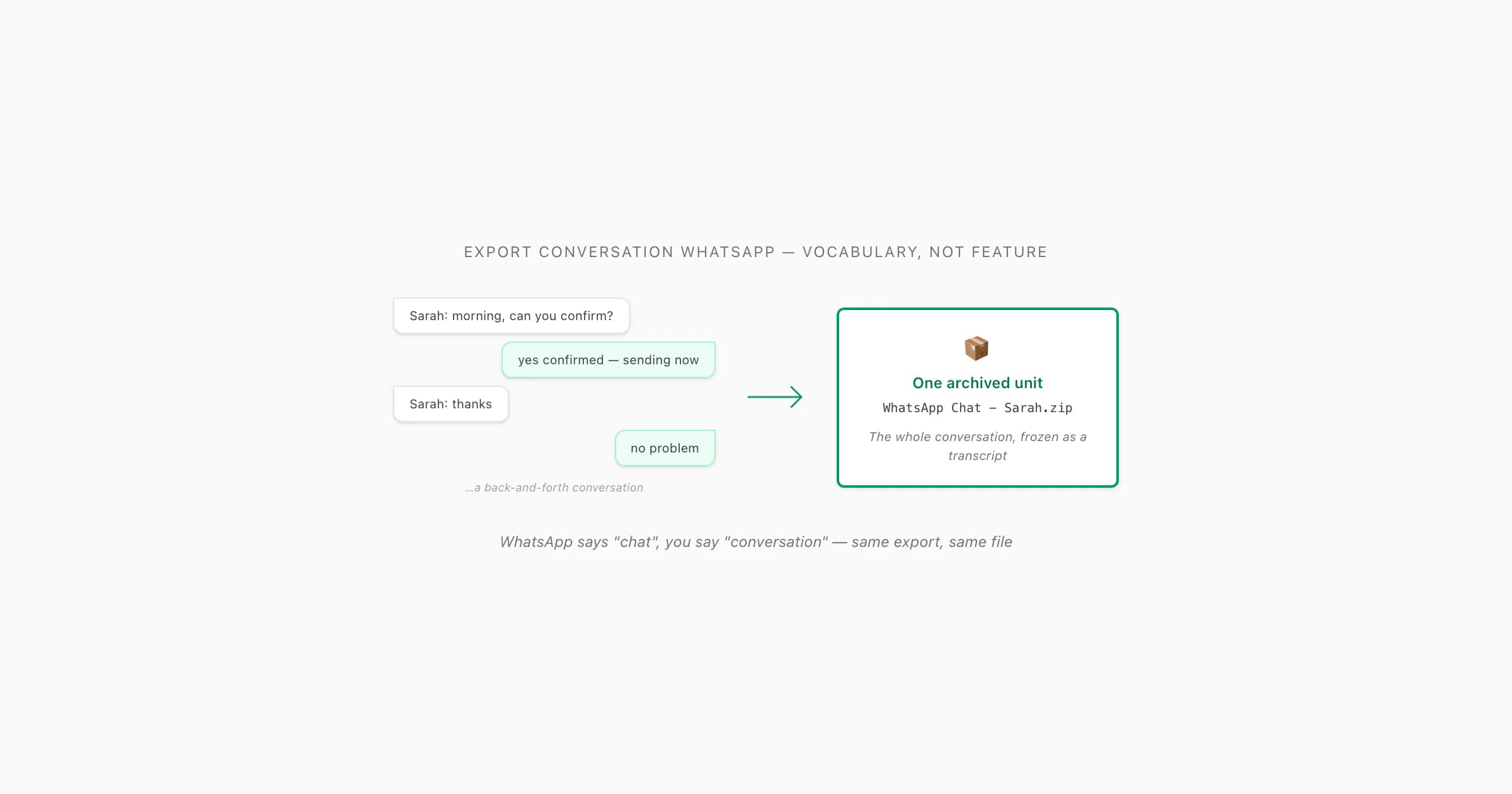
To export a conversation on WhatsApp, use the Export Chat feature — WhatsApp calls it a "chat" not a "conversation," but it is the same thing. Open the chat, tap the title (iOS) or three-dot menu → More (Android), tap Export Chat, choose Without Media or Including Media, and save the ZIP. Upload the ZIP to ChatToPDF to get a formatted PDF of the full conversation with every sender attributed by name.
Conversation vs Chat — same thing, different vocabulary
- Export Chat (WhatsApp vocabulary)
- WhatsApp's label for the feature that archives an entire conversation as a ZIP file. Despite the "chat" label, it exports the full conversation — every message, every timestamp, every sender name — in a plain-text file called
_chat.txt. Other messaging apps (iMessage, Outlook) call the same concept a "conversation"; WhatsApp simply uses a different word for the same thing.
If you typed "export conversation WhatsApp" into a search engine, your mental model is probably this: the back-and-forth between you and another person — or among a group — is a single thing called a conversation, and you want to take that whole thing out of WhatsApp and put it somewhere else. That mental model is correct. WhatsApp's own model agrees with it. The only thing that does not agree is WhatsApp's vocabulary. The menu does not say Export Conversation. It says Export Chat. And so a search that uses the natural word — conversation — comes back with results full of a slightly different word — chat — and the question lingers: are these the same feature?
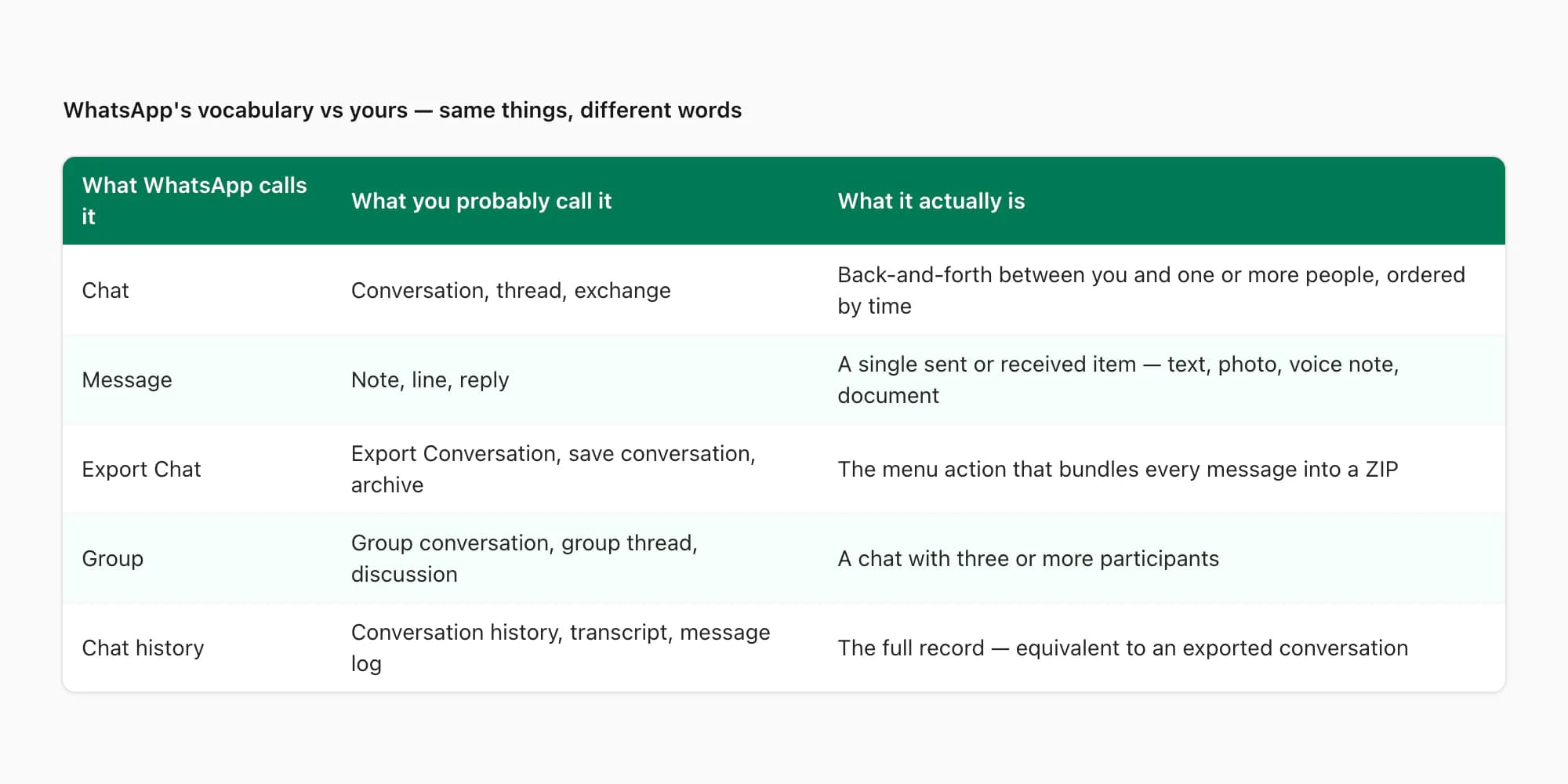
They are. WhatsApp uses "chat" as a UI label because it is shorter and matches the casual register the app aims for. Underneath, what gets exported is the entire conversation between you and one or more people: every message, every timestamp, every sender's name, in order. The pillar guide on WhatsApp chat export covers what is in the file in detail. The companion piece Export chat WhatsApp: what the feature actually does is the definitional explainer using WhatsApp's own vocabulary. This guide is for readers who think in conversations and want the workflow framed in their own words.
- What WhatsApp calls it
- Chat
- What you probably call it
- Conversation
- What it actually is
- The complete back-and-forth between you and one or more people, ordered by time
- What WhatsApp calls it
- Message
- What you probably call it
- Note, line, reply, comment
- What it actually is
- A single sent or received item — text, photo, voice note, document
- What WhatsApp calls it
- Export Chat
- What you probably call it
- Export Conversation, save conversation, archive conversation
- What it actually is
- The menu action that bundles every message in the chat into a ZIP file
- What WhatsApp calls it
- Group
- What you probably call it
- Group conversation, group thread, group discussion
- What it actually is
- A chat with three or more participants
- What WhatsApp calls it
- Without Media / Including Media
- What you probably call it
- Text-only / full export, lite / complete
- What it actually is
- Whether to bundle photos, voice notes, and documents alongside the text
- What WhatsApp calls it
- Chat history
- What you probably call it
- Conversation history, message log, transcript
- What it actually is
- The full record of messages, equivalent to an exported conversation
| What WhatsApp calls it | What you probably call it | What it actually is |
|---|---|---|
| Chat | Conversation | The complete back-and-forth between you and one or more people, ordered by time |
| Message | Note, line, reply, comment | A single sent or received item — text, photo, voice note, document |
| Export Chat | Export Conversation, save conversation, archive conversation | The menu action that bundles every message in the chat into a ZIP file |
| Group | Group conversation, group thread, group discussion | A chat with three or more participants |
| Without Media / Including Media | Text-only / full export, lite / complete | Whether to bundle photos, voice notes, and documents alongside the text |
| Chat history | Conversation history, message log, transcript | The full record of messages, equivalent to an exported conversation |
The vocabulary mismatch is not unique to WhatsApp. Different messaging apps use different words for the same concept. Some apps call it a conversation (iMessage, Outlook), some call it a chat (WhatsApp, Slack DMs), some call it a thread (Slack channels, Twitter DMs). Underneath the labels, they all describe the same thing: an ordered sequence of messages between identifiable participants. When you search "export conversation WhatsApp", you are speaking the language used by Apple's Messages app or Microsoft Outlook — which is fine, but WhatsApp will reply in its own dialect.
Why "conversation" is the more accurate word for what you are exporting
Here is something worth saying out loud: if I had to argue which word better describes what an export actually is — chat or conversation — I would pick conversation. The reason has to do with what WhatsApp's menu actually does versus what its label suggests.
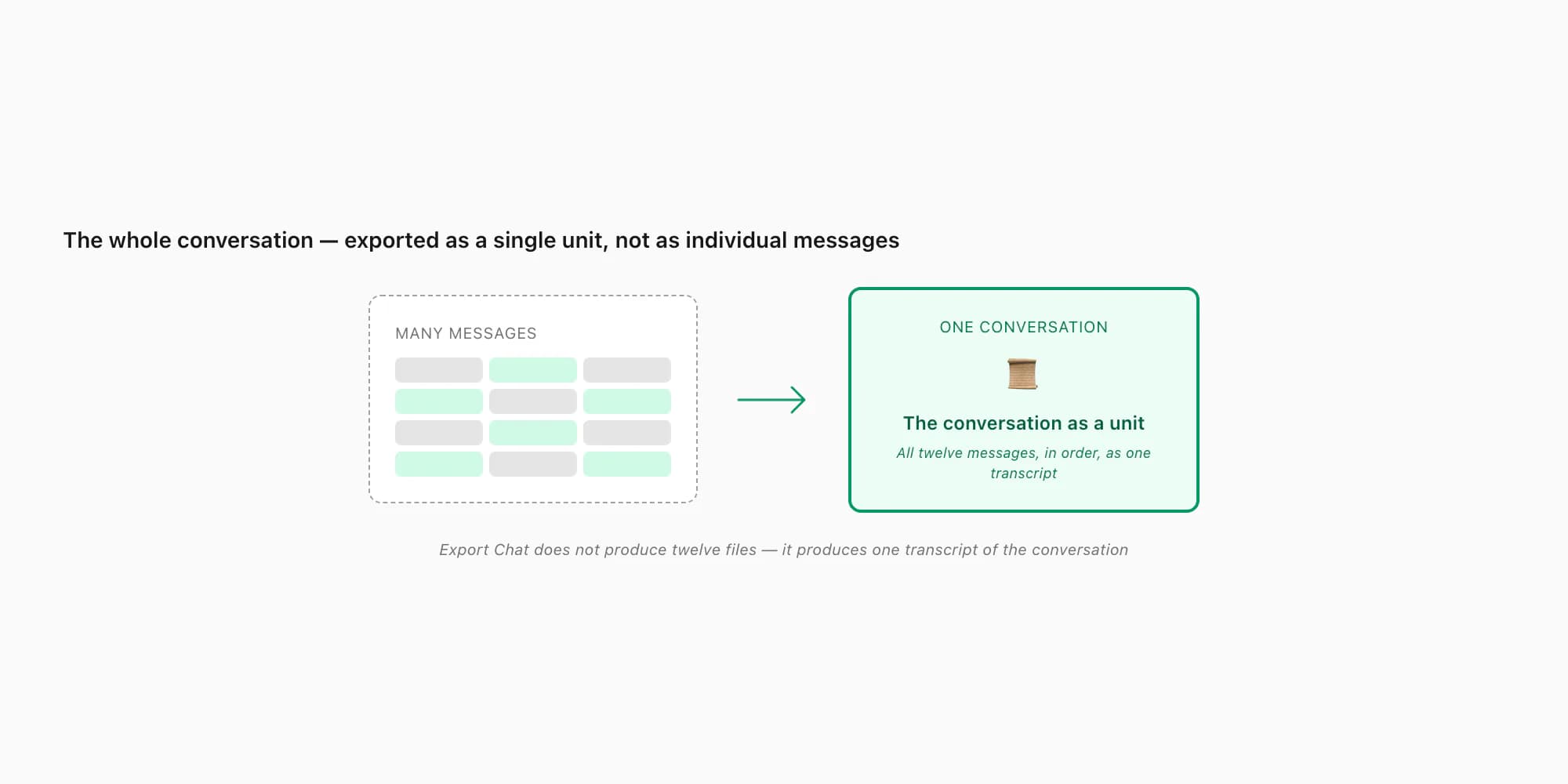
When you tap Export Chat, you do not get the chat as a chat — interactive, scrollable, replyable. You get it as a frozen artifact: a _chat.txt file with every message rendered as a line of plain text, in order, with sender attributions and timestamps. This artifact is much closer to what the formal world calls a conversation transcript than to a "chat". It is a record of an exchange between named parties, end to end, with no interactivity left. A court of law would call this a transcript. A historian would call it a record. A linguist would call it a conversation. A casual user would call it a chat. WhatsApp picked the casual register; the formal register is also valid.
This matters when you are explaining the artifact to other people — a lawyer, a manager, a board, a regulator — who do not live inside WhatsApp's vocabulary. Saying "I exported the chat" can sound flippant in formal contexts. Saying "I exported the conversation" or "here is the conversation transcript" lands more naturally. The artifact is the same. The framing is what changes. The export from WhatsApp step-by-step guide walks the same workflow with WhatsApp's own vocabulary if you want to compare side by side.
There is also a practical implication. If you call the exported artifact a "conversation transcript" rather than "the chat", you are subtly more accurate about what it is — a static, time-ordered record — and that accuracy helps when you hand it to someone unfamiliar with WhatsApp. They will not expect to scroll through it, tap on messages, or reply. They will treat it like a document, which is what it is. If your need is granular — only some messages from the conversation, not the whole transcript — the export WhatsApp messages guide covers the per-sender and date-range filtering pattern that gets you a sub-slice. And for the standard one-conversation case, the single-chat export guide is the focused walkthrough.
Formal contexts — where "conversation" framing is natural
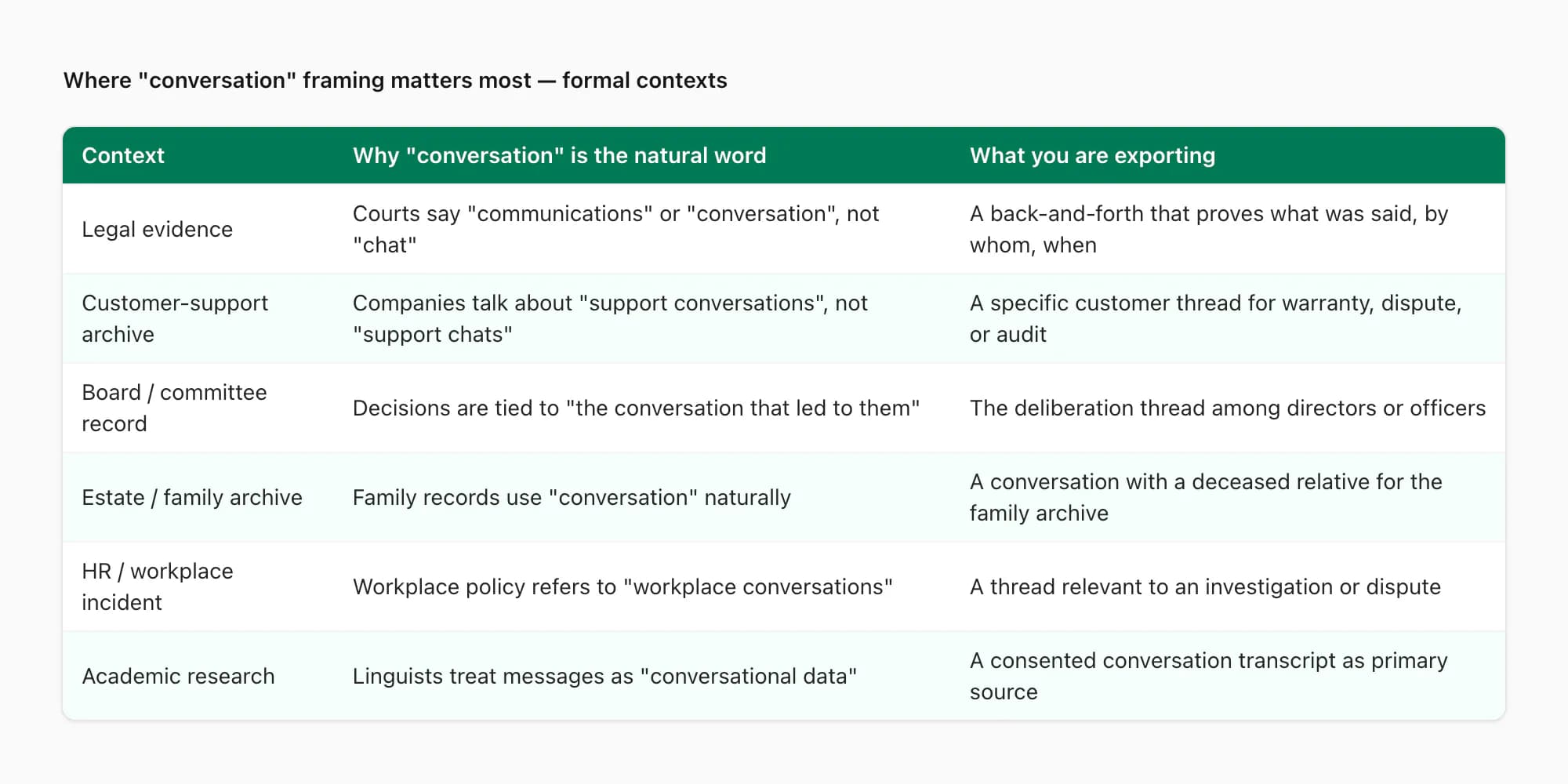
The places where "conversation" is the natural word — and "chat" can sound out of place — are exactly the places where exports tend to matter most. Three contexts in particular keep coming up in what people upload to chattopdf.
- Context
- Legal evidence
- Why 'conversation' is the natural word
- Lawyers, judges, and the court process call it 'conversation' or 'communications', not 'chat'
- What you are actually exporting
- A complete back-and-forth that proves what was said, when, by whom — typically as a PDF exhibit
- Context
- Customer-support archive
- Why 'conversation' is the natural word
- Companies talk about 'support conversations', 'customer interactions', not 'support chats'
- What you are actually exporting
- A conversation with a specific customer that needs to be preserved for warranty, dispute, or audit reasons
- Context
- Board or committee decision
- Why 'conversation' is the natural word
- Decisions are recorded as 'the conversation that led to the decision', not 'the chat that led to it'
- What you are actually exporting
- The deliberation thread among directors or officers leading up to a recorded decision
- Context
- Estate or family record
- Why 'conversation' is the natural word
- Inheritance and family-history work uses 'conversation' for personal records
- What you are actually exporting
- Conversations with a deceased relative being preserved for the family archive
- Context
- Academic or research record
- Why 'conversation' is the natural word
- Linguistic, sociological, and journalistic research treats messages as 'conversational data'
- What you are actually exporting
- A consented conversation transcript used as primary source material
- Context
- HR or workplace incident
- Why 'conversation' is the natural word
- Workplace policies and investigations refer to 'inappropriate conversations' or 'workplace conversations'
- What you are actually exporting
- A conversation thread relevant to a workplace dispute, harassment claim, or policy review
| Context | Why 'conversation' is the natural word | What you are actually exporting |
|---|---|---|
| Legal evidence | Lawyers, judges, and the court process call it 'conversation' or 'communications', not 'chat' | A complete back-and-forth that proves what was said, when, by whom — typically as a PDF exhibit |
| Customer-support archive | Companies talk about 'support conversations', 'customer interactions', not 'support chats' | A conversation with a specific customer that needs to be preserved for warranty, dispute, or audit reasons |
| Board or committee decision | Decisions are recorded as 'the conversation that led to the decision', not 'the chat that led to it' | The deliberation thread among directors or officers leading up to a recorded decision |
| Estate or family record | Inheritance and family-history work uses 'conversation' for personal records | Conversations with a deceased relative being preserved for the family archive |
| Academic or research record | Linguistic, sociological, and journalistic research treats messages as 'conversational data' | A consented conversation transcript used as primary source material |
| HR or workplace incident | Workplace policies and investigations refer to 'inappropriate conversations' or 'workplace conversations' | A conversation thread relevant to a workplace dispute, harassment claim, or policy review |
The dedicated guide WhatsApp evidence court PDF goes deep on the legal-evidence side specifically — what courts expect, how to format the PDF for filing, what metadata to preserve. The shape of the export matters more in formal contexts than in casual ones, because the artifact's job is to stand alone in front of someone who was not part of the conversation.
In all six contexts, the actual export step is the same: open the conversation in WhatsApp, tap or click the export menu, choose Without Media or Including Media, and save the resulting ZIP. The framing of what you are exporting changes; the mechanic does not. Where the framing matters is in how you handle the output — naming the file something more descriptive than WhatsApp Chat - John.zip, perhaps Conversation transcript - John Smith - 2024-03-12.pdf once converted, and accompanying it with a brief description of context.
Finding the Export menu when WhatsApp does not use your word
The single most common moment of friction for someone searching "export conversation WhatsApp" is opening the app, looking for an option called "Export Conversation", not finding one, and concluding the feature does not exist. It does — but it is labelled Export Chat. Here is the menu path on each platform so you do not have to hunt.
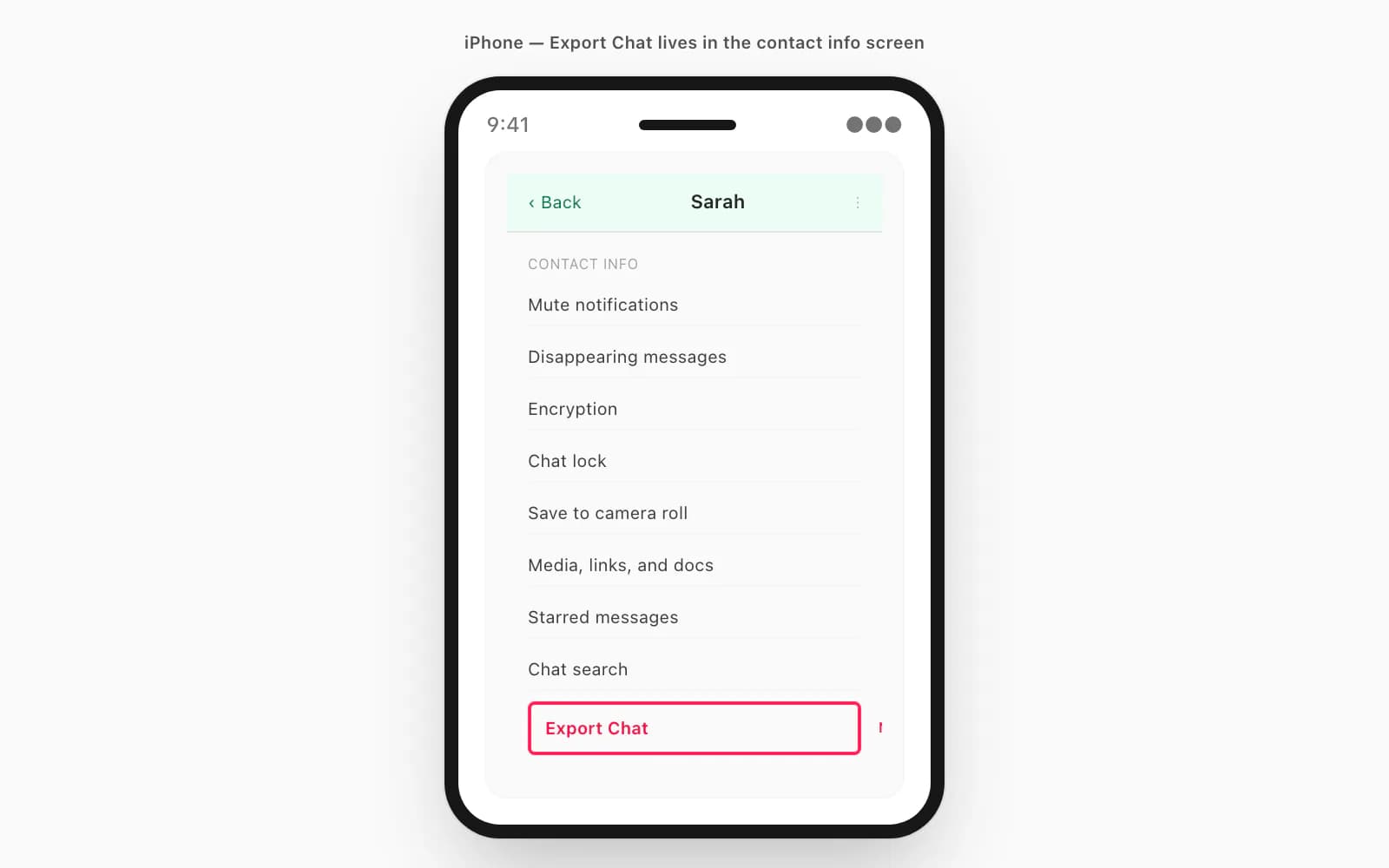
On iPhone: open the conversation, tap the contact's or group's name at the top of the screen to open the info screen, scroll all the way to the bottom of the info screen, and tap Export Chat. The button is in red text on most iOS versions. Choose Without Media or Including Media. iOS shows a share sheet — pick Save to Files (or Mail to send it to yourself, or AirDrop to a Mac) and choose a folder.
On Android: open the conversation, tap the three-dot menu at the top-right, tap More, then tap Export Chat. Same Without Media versus Including Media choice. Android shows a share sheet too — pick Drive, Files, Gmail, or another destination depending on where you want the ZIP to land.
On WhatsApp Web or Desktop: open the conversation, click the three-dot icon at the top-right of the chat header, click More, click Export Chat. Browser saves a ZIP to Downloads. The dedicated guide How to export chat from WhatsApp Web covers the desktop path in depth.
The label "Export Chat" appears in all three menus. There is no separate Export Conversation feature, no Save Conversation, no Archive Conversation that does what you want — those phrases are not in WhatsApp's vocabulary. If a tutorial or piece of advice tells you to look for "Export Conversation", that tutorial is using your word for what WhatsApp's menu calls something else. Translate accordingly. WhatsApp's own export chat history FAQ confirms the menu name and the steps in their official documentation.
One small clarification because it confuses people: WhatsApp does have an Archive feature (the swipe-left-to-archive on iOS or the long-press-to-archive on Android), but archiving is something else entirely. Archiving moves the conversation out of your visible chats list into an Archived folder, where it sits, fully active and unread-counted, until a new message bumps it back. Archiving does not produce a file. Archiving is not export. If you saw "Archive" in WhatsApp and wondered if that was the conversation export, no — Export Chat is the menu you want.
What comes out — the conversation as a single archived unit
Once you tap Export Chat, what you get is the entire conversation as one frozen artifact. This is worth describing in the "conversation" framing because it captures something that "ZIP file" or "_chat.txt" does not.
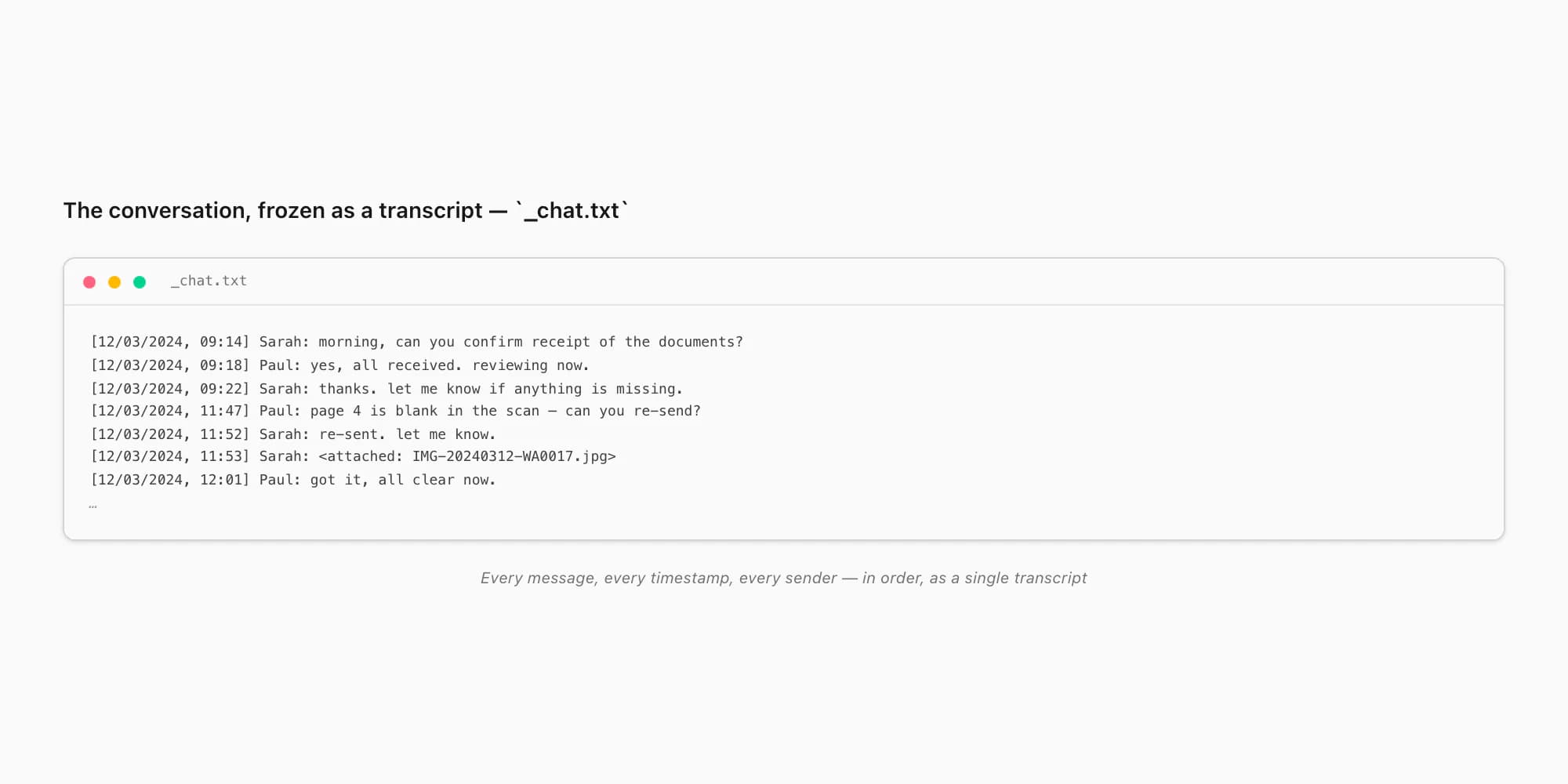
The ZIP contains a single text file — _chat.txt — with every message in the conversation, in chronological order, formatted line-by-line as [date, time] Sender Name: message content. Read it from top to bottom and you have read the entire conversation. There is no pagination, no threading collapse, no UI affordance hiding parts of the exchange. It is the conversation as a transcript would render it: complete, sequential, attributed.
If you exported with Including Media, the ZIP also contains the photos, voice notes, and documents that were sent during the conversation, in the same flat folder. Each media file is referenced from the corresponding line in _chat.txt (something like <attached: IMG-20240312-WA0017.jpg>). The conversation, as a unit, is preserved with both its words and its attachments.
What is not included is also worth flagging because it affects how you use the exported conversation:
- Calls are not in the export — voice and video calls show up only as system messages like "Missed call" with no audio
- Disappearing messages that already vanished are not in the export
- Reactions (emoji reactions on individual messages) are typically not in the text export
- Read receipts and online status are not in the export — the file does not record when the other person read messages
- Deleted messages appear as "This message was deleted" with the original content gone — WhatsApp does not preserve the original
These omissions matter most in formal contexts. The pillar WhatsApp chat export covers each of them in detail. The takeaway: the exported conversation is the textual content plus referenced media, frozen at the moment of export. Anything that lived in WhatsApp's interactivity (calls, reactions, read receipts) does not survive the conversion to a transcript.
For most use cases — including the formal ones — this is enough. A court typically wants the textual exchange and any photos that were sent, not whether a phone call lasted twelve seconds. A customer-support archive needs the words and any attached evidence, not reaction emoji. The export captures what matters for documentary purposes; the parts it leaves out tend to be ones a static transcript could not represent anyway.
The companion guide Export WhatsApp chat to PDF covers the conversion of the _chat.txt into a readable PDF — which is the format most formal contexts actually want, since _chat.txt is hard to skim for someone unfamiliar with the format.
Other apps that DO call it a conversation
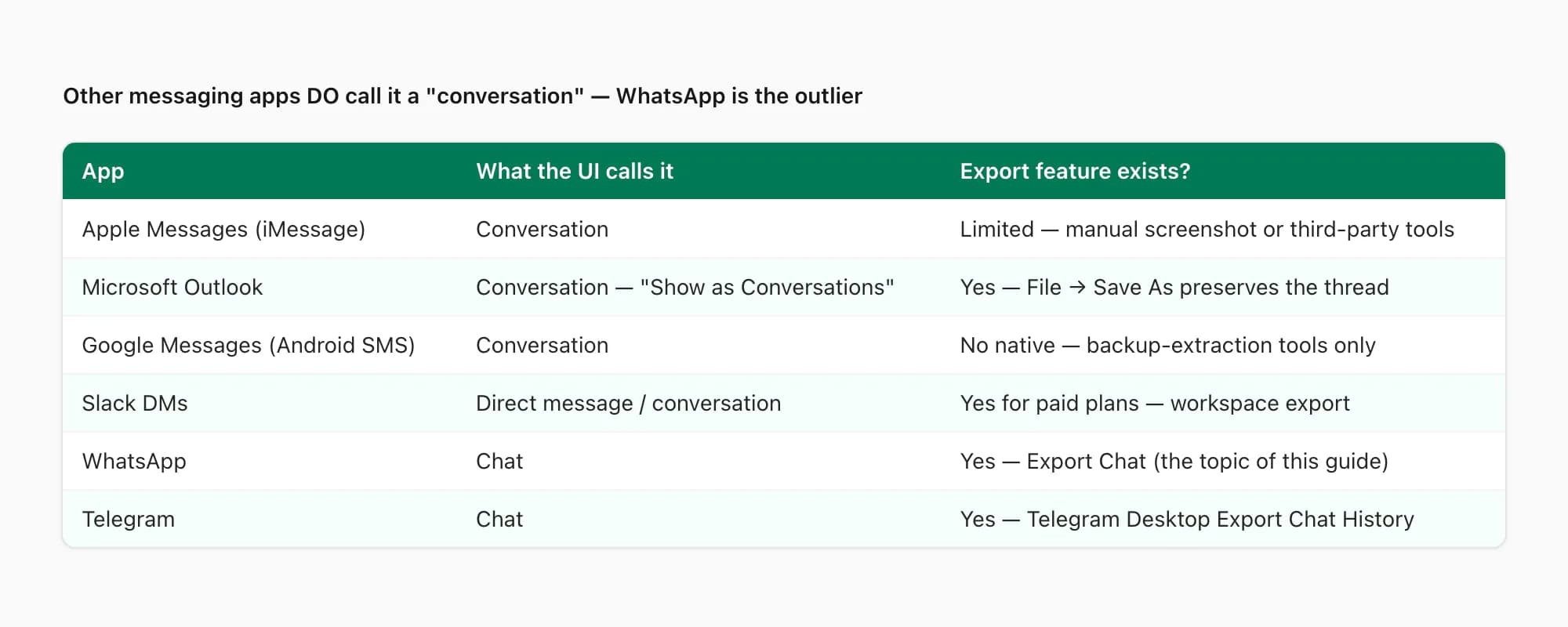
Worth noting that "conversation" is not unusual vocabulary in messaging — WhatsApp is actually the outlier. Several major apps use "conversation" in their UI, which explains why the word feels natural to so many users.
- App
- Apple Messages (iMessage / SMS)
- What the UI calls it
- Conversation — list view shows 'Conversations'
- Export feature exists?
- Limited — manual screenshot or third-party tools (iMazing) are common
- App
- Microsoft Outlook (email threads)
- What the UI calls it
- Conversation — 'Show as Conversations' is a setting
- Export feature exists?
- Yes — File → Save As preserves the email thread
- App
- Slack DMs
- What the UI calls it
- Direct message / conversation — both terms appear in the UI
- Export feature exists?
- Yes for paid plans — Workspace export bundles DMs
- App
- Google Messages (Android default SMS)
- What the UI calls it
- Conversation — list view labels them 'Conversations'
- Export feature exists?
- No native export — backup-extraction tools required
- App
- What the UI calls it
- Chat — menu reads Export Chat
- Export feature exists?
- Yes — the feature this guide is about
- App
- Telegram
- What the UI calls it
- Chat — menu reads Export Chat History
- Export feature exists?
- Yes — Telegram Desktop has an Export Chat History feature
- App
- Signal
- What the UI calls it
- Chat — though Signal documentation often uses 'conversation'
- Export feature exists?
- Limited — full database export with passphrase, not per-chat
| App | What the UI calls it | Export feature exists? |
|---|---|---|
| Apple Messages (iMessage / SMS) | Conversation — list view shows 'Conversations' | Limited — manual screenshot or third-party tools (iMazing) are common |
| Microsoft Outlook (email threads) | Conversation — 'Show as Conversations' is a setting | Yes — File → Save As preserves the email thread |
| Slack DMs | Direct message / conversation — both terms appear in the UI | Yes for paid plans — Workspace export bundles DMs |
| Google Messages (Android default SMS) | Conversation — list view labels them 'Conversations' | No native export — backup-extraction tools required |
| Chat — menu reads Export Chat | Yes — the feature this guide is about | |
| Telegram | Chat — menu reads Export Chat History | Yes — Telegram Desktop has an Export Chat History feature |
| Signal | Chat — though Signal documentation often uses 'conversation' | Limited — full database export with passphrase, not per-chat |
So if you are coming to WhatsApp from iMessage or Outlook — both of which use "conversation" prominently — your vocabulary is already calibrated for those. WhatsApp's choice of "chat" reflects its more casual product positioning (the WhatsApp marketing language is uniformly informal), but the underlying data model is the same. A conversation by any other name is still an ordered exchange of messages between identifiable participants, which is exactly what Export Chat captures.
For users moving content between apps — for example, exporting an iMessage conversation and a WhatsApp chat with the same person to combine into a single archive — the vocabulary mismatch is more of an annoyance than a barrier. Once you understand that "Export Chat" is WhatsApp's name for what other apps call "save conversation", the mental translation becomes automatic.
Pricing — converting the exported conversation to a PDF
For most formal use cases — legal evidence, professional records, customer-support archives — the _chat.txt ZIP is not the final form. The final form is a PDF: paginated, formatted, sender-attributed, suitable for filing or attaching as an exhibit. ChatToPDF handles this conversion as a per-chat purchase.
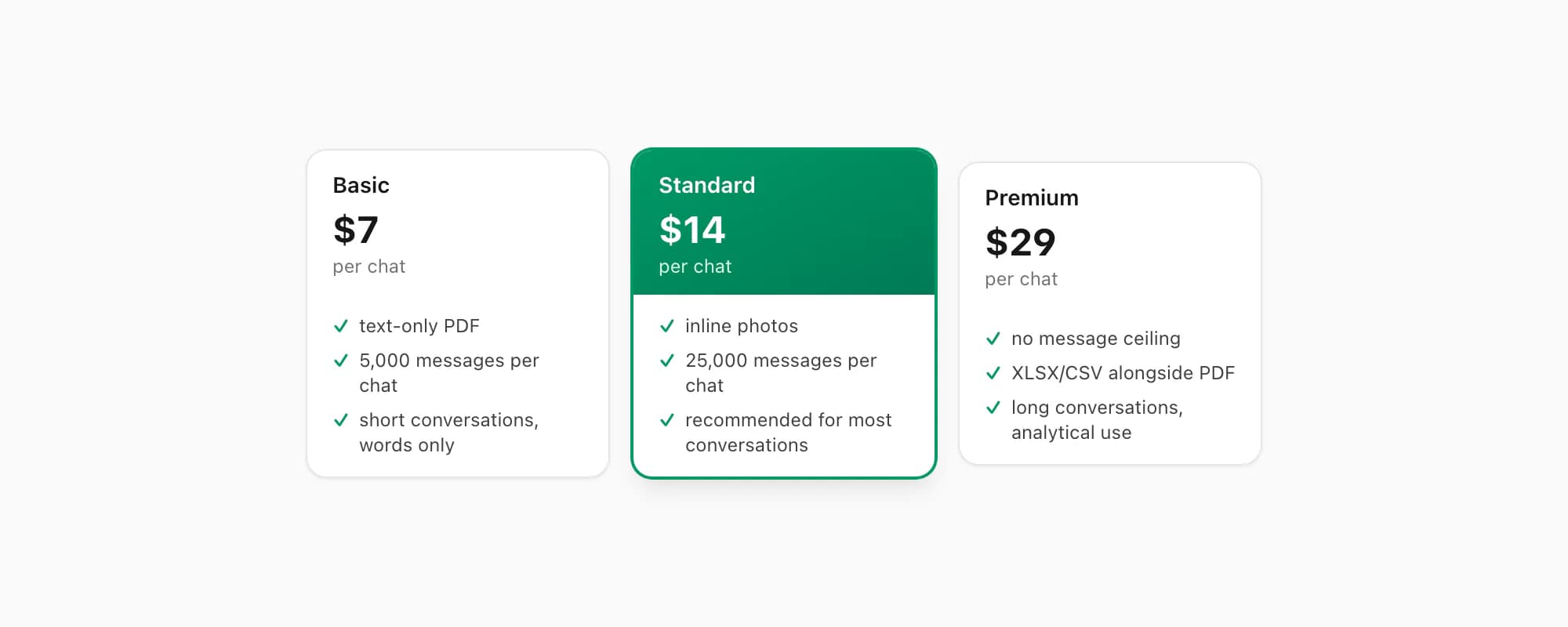
$7 Basic per chat is text-only — fine for short conversations where the words alone are the record and there are no photos, voice notes, or attached documents to preserve. Useful for quick personal archives.
$14 Standard per chat is the recommended tier for most exported conversations. Inline photos render in the PDF if the conversation included Media, the per-chat ceiling is 25,000 messages, and every distinct sender appears in attribution. This is the tier I recommend for legal-evidence and customer-support archive use cases — the formal contexts where conversation-framing matters most.
$29 Premium per chat removes the per-chat message ceiling and adds an XLSX/CSV export alongside the PDF. Useful for very long conversations (over 25,000 messages — typically large group threads or multi-year conversations) and for cases where the conversation will be analyzed quantitatively as well as read.
$49 Premium+Voice per chat adds voice-note transcription through the language-aware Nova-3/Scribe v2 router. Conversations with voice notes — which is most personal and many professional conversations — produce a more complete written record when the voice notes are transcribed inline. The transcribe WhatsApp audio guide covers this transcription in detail.
$99 Power User per chat adds priority queue processing and bulk-conversion support. Useful when you have several conversations to convert in one session — for example, all conversations with one specific person across a multi-year dispute.
Each conversion is real work against the conversation as it existed at the moment of export. Re-export the same conversation a month later and convert again — that is a separate conversion and a separate payment. No recurring charge, no subscription. The whole flow — open WhatsApp, Export Chat, drag into chattopdf — typically runs under two minutes for an individual conversation.
Key takeaways
- "Export conversation" is the natural vocabulary for what WhatsApp's menu calls "Export Chat" — the feature is the same; only the label differs.
- Underneath, what gets exported is the entire conversation between you and one or more people: every message, every timestamp, every sender's name, in chronological order, as a
_chat.txtfile inside a ZIP. - "Conversation" framing is more natural in formal contexts — legal evidence, customer-support archives, board records, HR investigations — where "chat" can sound flippant.
- Other major messaging apps (iMessage, Outlook, Google Messages) DO call it a conversation in their UI; WhatsApp is the outlier in using "chat" as the label, but the underlying data is the same.
- The Export Chat menu is on iPhone (tap contact name → scroll down → Export Chat), Android (three-dot → More → Export Chat), and Web (chat header three-dot → More → Export Chat). There is no separate Export Conversation feature anywhere.
- What is NOT in the exported conversation: calls, reactions, read receipts, deleted message content, and disappearing messages that already vanished. Everything else (text, photos if Including Media, voice notes if Including Media, documents) is preserved.
- ChatToPDF's $14 Standard per chat tier is the recommended conversion for most exported conversations — produces a sender-attributed PDF suitable for legal filings, professional archives, and personal record-keeping.
- For a complete breakdown of every pricing tier and what the conversion process looks like end to end, see the WhatsApp to PDF guide.
FAQ
Does WhatsApp have an Export Conversation feature?
The feature exists, but WhatsApp labels it Export Chat, not Export Conversation. Underneath the different names, the function is identical: it bundles the entire conversation — every message, every timestamp, every sender's name — into a ZIP file containing a _chat.txt plain-text transcript. If you searched "export conversation WhatsApp" and could not find an option with that exact label in the app, you were not missing anything. Look for "Export Chat" instead. The path is iPhone (tap contact name → scroll down → Export Chat), Android (three-dot → More → Export Chat), or Web (chat header three-dot → More → Export Chat). The output is the conversation as a single archived unit.
Why does WhatsApp say 'chat' when other apps say 'conversation'?
Different messaging apps use different vocabulary for the same concept. Apple Messages and Microsoft Outlook use "conversation" prominently in their UIs. WhatsApp, Telegram, and Slack DMs use "chat". Underneath the labels, they all describe an ordered sequence of messages between identifiable participants — the same thing. WhatsApp's choice of "chat" reflects its more casual product positioning. The data model and the export capability are the same. If you are coming from iMessage or Outlook, expect to mentally translate "conversation" to "chat" when reading WhatsApp documentation, and vice versa.
Is the exported conversation suitable for legal evidence?
Yes — with caveats. The exported _chat.txt (or its PDF conversion) preserves every message, timestamp, and sender attribution in chronological order, which is what most courts want from a conversation transcript exhibit. What it does not preserve: calls (voice and video appear only as system messages), reactions, read receipts, and the original content of deleted messages. For legal use, the PDF conversion is typically more practical than the raw _chat.txt because it is paginated, readable, and easier to file. The dedicated guide WhatsApp evidence court PDF covers court-specific formatting requirements. Always check with the court or your lawyer about whether additional metadata (device IDs, hash verifications) is required for the specific filing.
What does the exported conversation actually contain?
A ZIP file with one _chat.txt plain-text file inside, plus — if you chose Including Media — the photos, voice notes, and documents that were sent during the conversation. The text file lists every message line by line as [date, time] Sender Name: message text, in chronological order from earliest to most recent. WhatsApp caps exports at 40,000 messages (the most-recent 40,000), which matters for very long conversations. The pillar guide on WhatsApp chat export covers the file structure, locale-specific timestamp formats, and the 40,000-message ceiling in detail.
Can I export only part of a conversation, not the whole thing?
No — Export Chat takes the whole conversation up to the 40,000-message limit, with no date-range filter and no per-message selection. You cannot export "just yesterday's conversation" or "just the messages after March 1st" from inside WhatsApp itself. Workarounds exist if you only need a few messages: forward the relevant messages to a new chat with yourself or another person, and export THAT chat instead. For more analytical or selective slicing, the extract WhatsApp data guide covers the extraction-and-filter pattern that lets you take the full export and then keep only what you need.
What is the fastest way to turn an exported conversation into a PDF?
Drag-drop the WhatsApp Chat ZIP onto chattopdf.app. Open chattopdf in a browser, drag the ZIP onto the upload area (or click and pick the file), choose the $14 Standard per chat tier, pay, and a sender-attributed PDF arrives by email in roughly 30 seconds. Standard handles up to 25,000 messages and renders inline photos if you exported with Including Media. The whole flow — Export Chat in WhatsApp plus the chattopdf conversion — runs in under two minutes for most individual conversations and produces a single readable PDF suitable for legal filings, professional archives, or personal record-keeping. The companion guide Export WhatsApp chat to PDF walks through the conversion step-by-step.
I'm Paul, the founder of ChatToPDF. I built it after needing a long WhatsApp conversation as a readable PDF for a legal matter. I test and document WhatsApp exports, PDF conversion, voice-note transcription, and the limits people should check before relying on the result.