
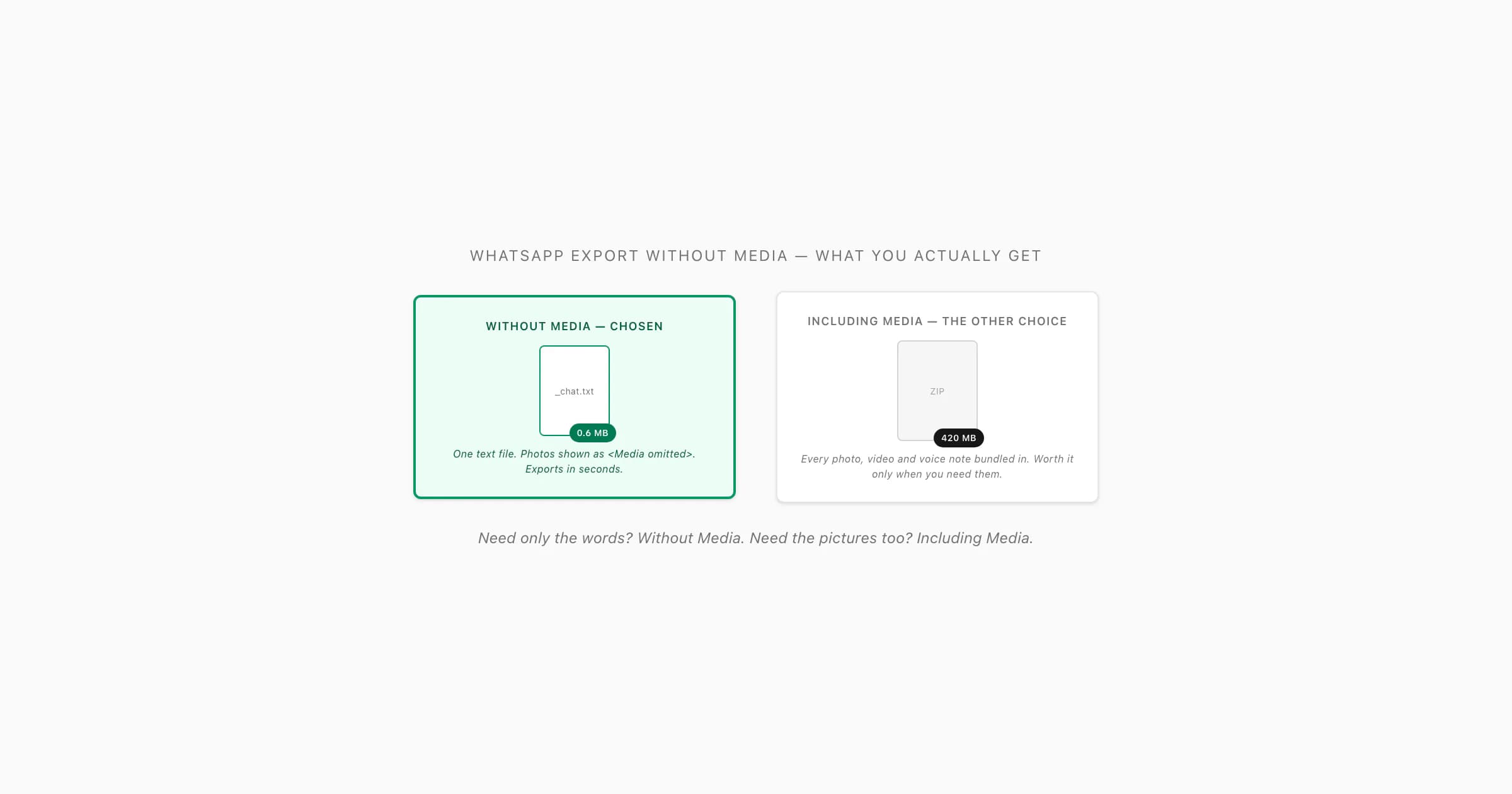
What a WhatsApp export without media actually gives you
When you tap Export Chat in WhatsApp, the very next thing it asks you is the only question that matters for file size: Without Media or Including Media. People hover over this and freeze, so let me be precise about what each one produces.
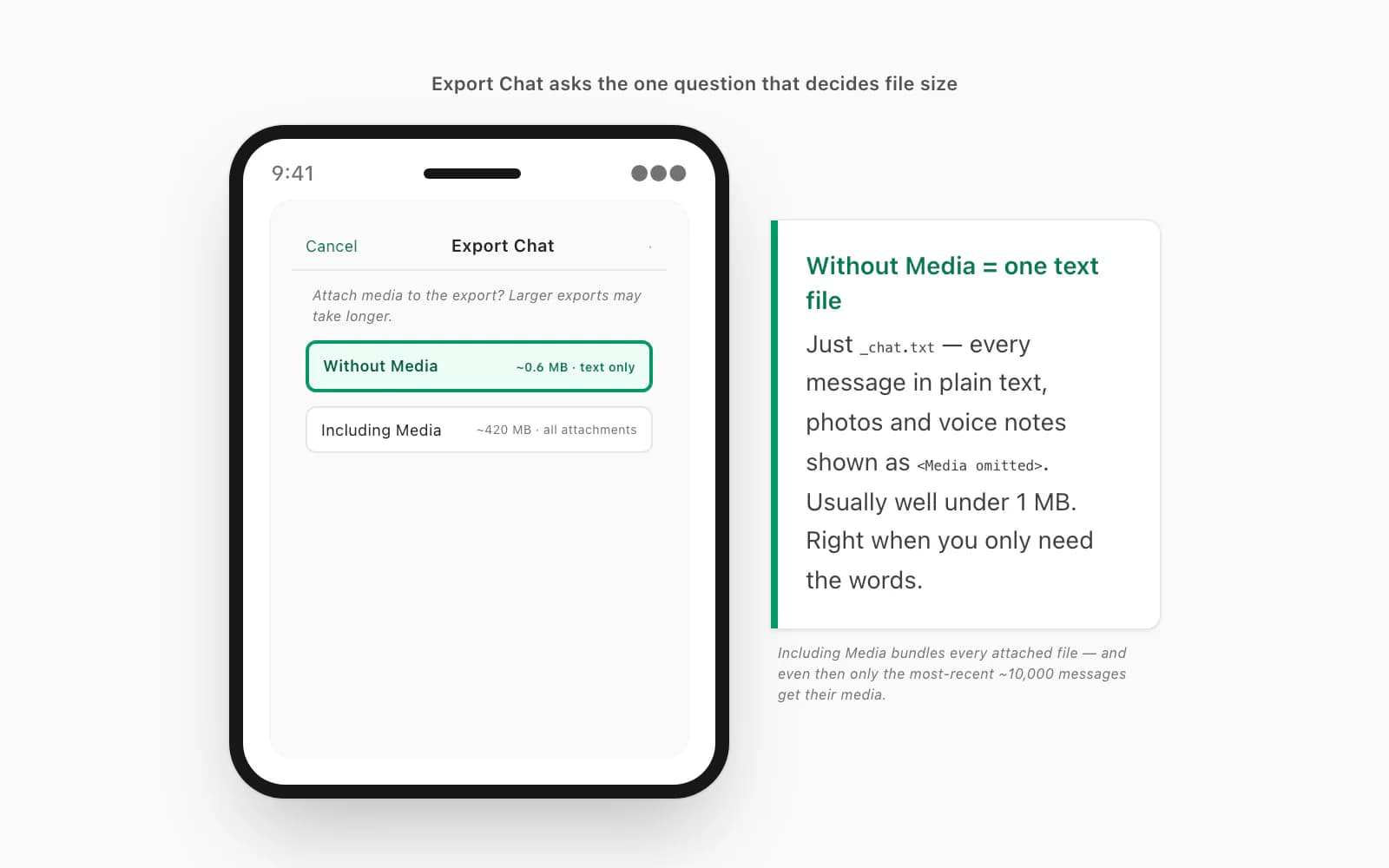
A WhatsApp export without media writes one file: _chat.txt. That's it. Every message in the conversation, line by line, in plain UTF-8 text — sender name, timestamp, message content — wrapped in a small ZIP archive. Every photo, every video, every voice note, every shared document is replaced in the text by a <Media omitted> placeholder. Nothing is attached. The ZIP is tiny: a few thousand messages is usually well under 1 MB, sometimes a few hundred kilobytes. It exports in seconds even on a long chat, emails without complaint, and uploads to any converter instantly.
Including Media does the opposite: it bundles _chat.txt plus every attached file — images as .jpg or .webp, voice notes as .opus or .m4a (WhatsApp calls them PTT-… files, for Push-to-Talk), videos as .mp4, documents in their original format. On a chat where people have shared hundreds of photos and a few clips, that ZIP balloons fast — a media-heavy family group can pass 100 MB without trying, and a years-long couple's chat full of pictures can run past 400 MB. (There's also a quiet ceiling inside that option: WhatsApp only bundles media for roughly the most-recent 10,000 messages, so older photos still show as <Media omitted> even on an Including Media export. If you want the full story on why those ZIPs get so big and how to move them, I wrote a whole page on the WhatsApp ZIP export that's too big.)
So a WhatsApp export without media is the lean version: text, attributed, complete as a text record, and small enough to do anything with. WhatsApp's own help on exporting chat history documents the Without/Including Media choice but says nothing about either size implication — you find that out the hard way. If you want the full menu path on every platform and what's inside the ZIP, the export-mechanics walkthrough covers it; this page is about the choice itself.
What the <Media omitted> placeholder lines look like
This is the part people are genuinely unsure about, so here's exactly what a Without Media _chat.txt reads like. A normal text message is one line:
[2024-03-15, 14:32:18] John Doe: Hello there
[2024-03-15, 14:33:02] Jane Smith: Hey! How are you?
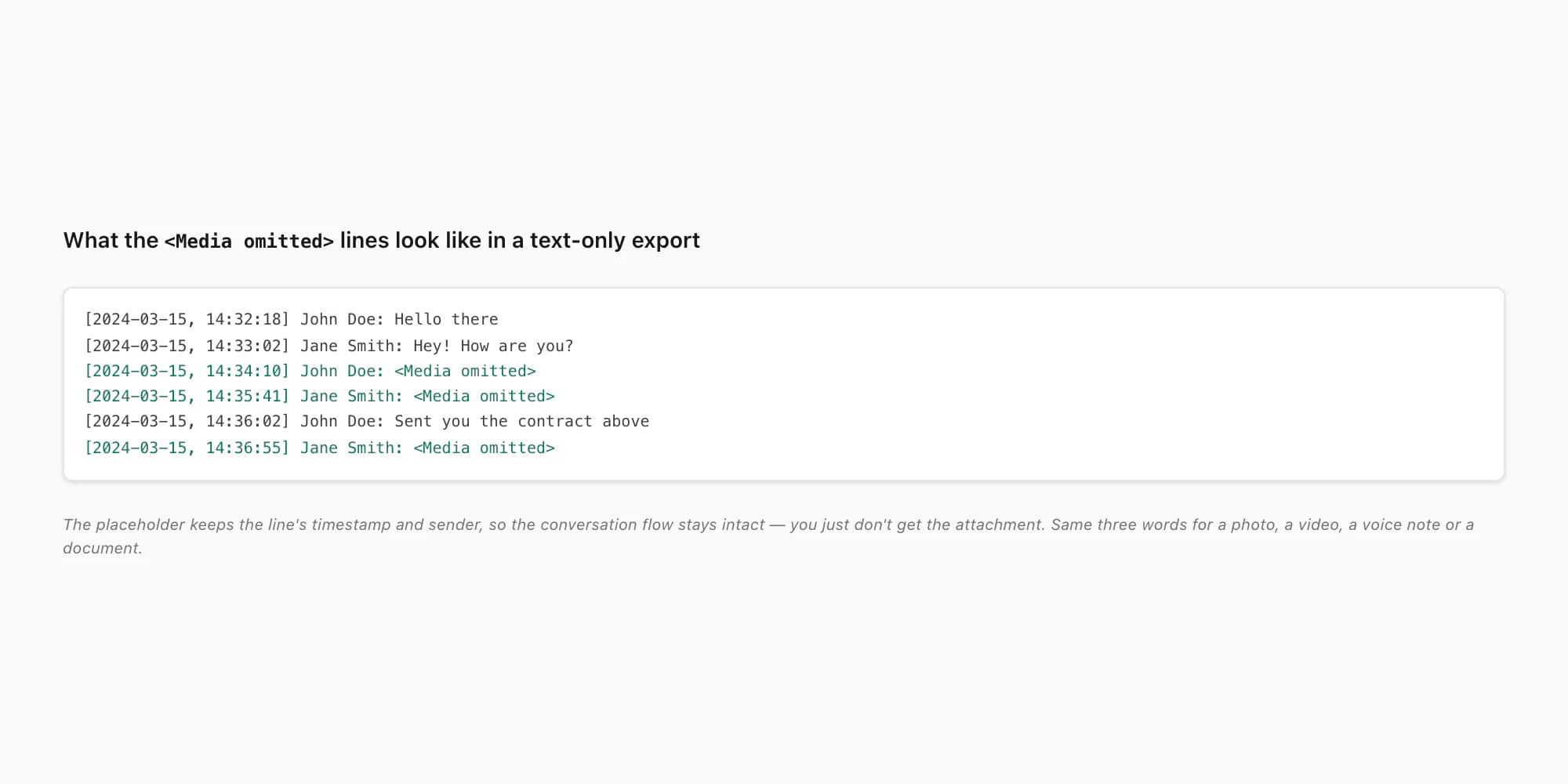
And here's what happens where a photo, a voice note, and a document used to be:
[2024-03-15, 14:34:10] John Doe: <Media omitted>
[2024-03-15, 14:35:41] Jane Smith: <Media omitted>
[2024-03-15, 14:36:02] John Doe: Sent you the contract above
[2024-03-15, 14:36:55] Jane Smith: <Media omitted>
Every attachment — photo, video, voice note, sticker, PDF, location pin — collapses to the same three-word placeholder: <Media omitted>. (On some locales it's <Media omitted> with a leading left-to-right mark, U+200E — invisible, but there. And if your chat is in Arabic, Hebrew, Farsi or Urdu, that LTR mark is the visible signal of a deeper question — whether the bidirectional text rendering survives the export at all, which is exactly what the WhatsApp export Arabic / RTL write-up covers.) The placeholder keeps the line's timestamp and sender, so the flow of the conversation is intact — you can still see "John sent something, then Jane replied" — you just don't get the something itself. The brackets, the date format, even the separator between date and time vary by locale (US exports use M/D/YY, H:MM AM/PM; ISO exports use YYYY-MM-DD, HH:MM:SS; European ones often use DD/MM/YYYY, HH:MM) — but the <Media omitted> placeholder is the same everywhere. If those placeholder lines bother you in the final document, that's the signal to re-export with Including Media instead.
When Without Media is the right call — and when it isn't
I use Without Media as my default, and I switch to Including Media deliberately, not automatically. Here's the line I draw.
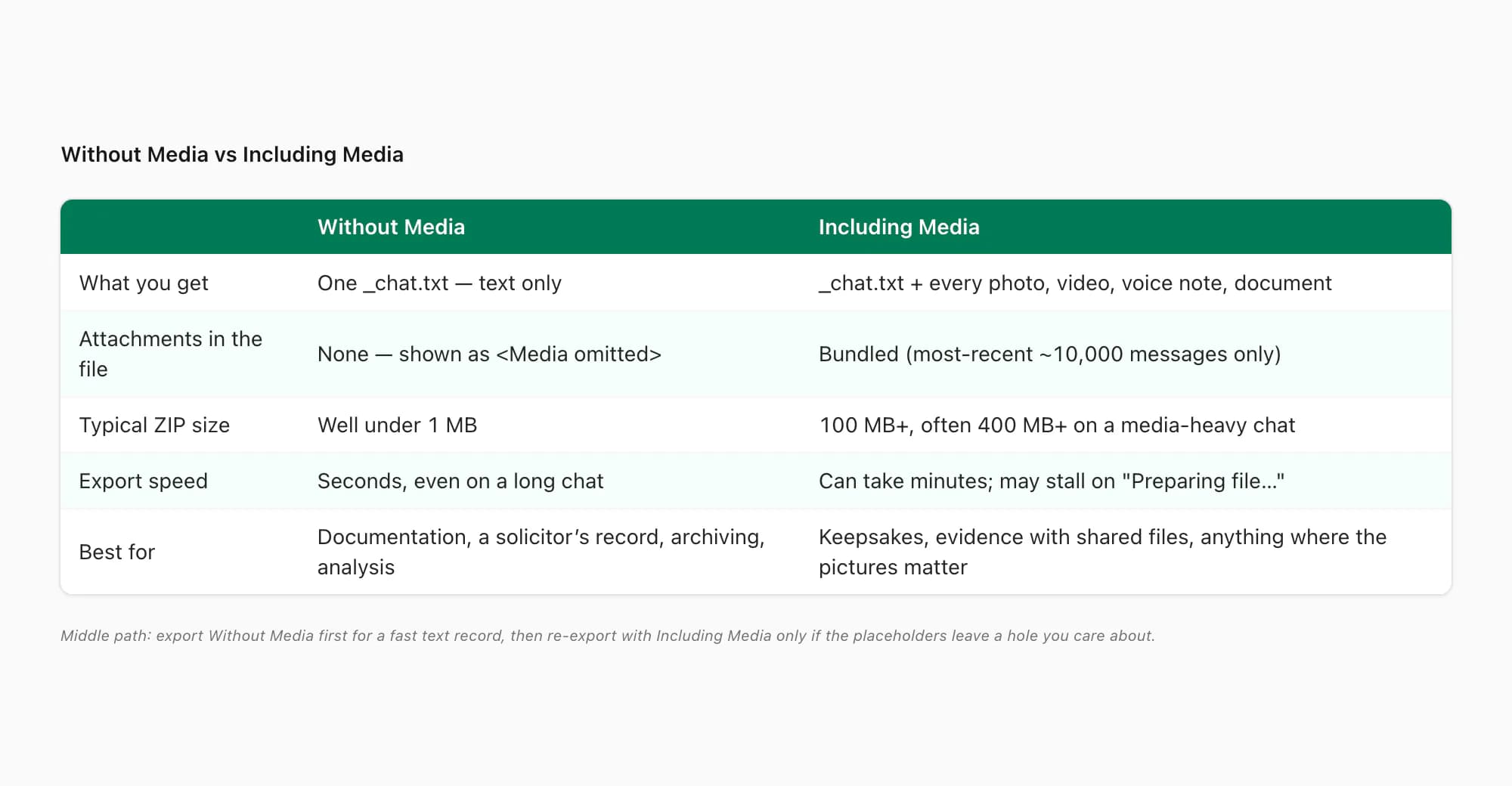
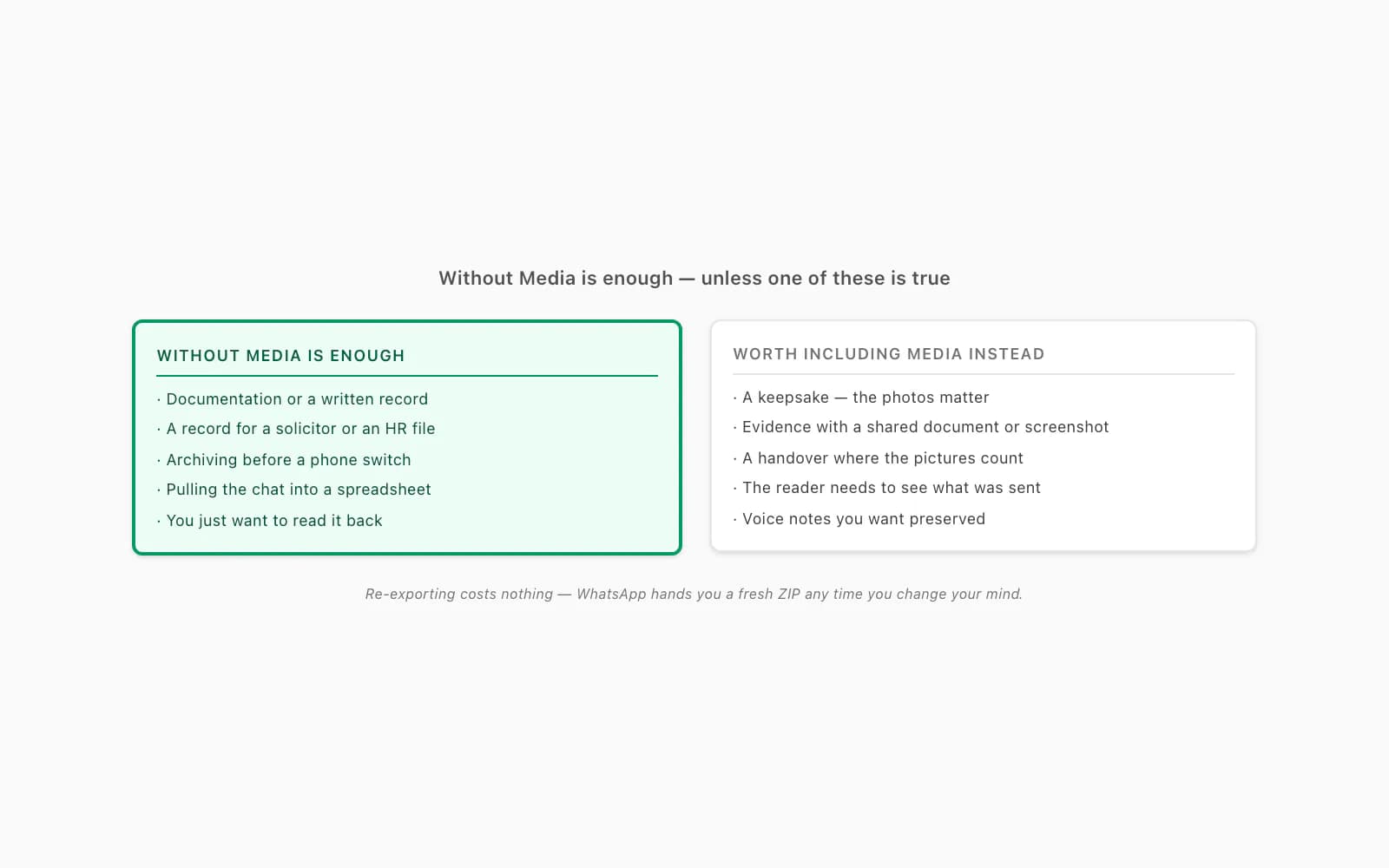
Pick Without Media when you only need the words. Documentation. A record for a solicitor or an HR file. Archiving a conversation before you switch phones or before someone leaves a group. Pulling a chat into a spreadsheet for analysis — counting messages, response times, who said what. In every one of those cases the text is what matters; the photos are noise, and the <Media omitted> placeholders are irrelevant. You get a tiny file that exports in seconds, fits any email, and uploads anywhere with no transport drama. If your goal is a readable text record, this is almost always the better choice — there is no downside except the missing attachments, and if you didn't need them, that's not a downside.
Pick Including Media when the attachments are part of the point. A family chat where the photos have sentimental value and you're making a keepsake. A business dispute where a shared document or a screenshot is evidence. A property handover where the pictures of the flat matter as much as the messages about it. Any situation where someone reading the final document needs to see what was sent, not just know that something was. The cost is a much bigger ZIP — and the need to transfer it carefully, since anything over ~25 MB chokes most email — but if you need the pictures, you need the pictures.
Voice notes follow the same rule: a Without Media export keeps only a placeholder. If the recordings matter, re-export with Including Media, then follow the voice-note download steps while preserving the original ZIP.
A middle path: export Without Media first to get the text record fast, and only re-export with Including Media if, on reading it back, the placeholders are leaving a hole you actually care about. Re-exporting costs nothing — WhatsApp will hand you a fresh ZIP any time. (If a re-export stalls on "Preparing file…" rather than finishing, that's a different failure — see WhatsApp chat export stuck on preparing for why a big media bundle does that and how to get past it.)
One thing that's true for both modes: whichever you pick, the export-mechanics pillar covers the 40,000-message cap, the locale date formats, and the group-chat quirks that affect what ends up in your _chat.txt regardless of the media choice.
A text-only export converts cleanly — here's how
Here's the reassuring part, because people worry about this: a WhatsApp export without media converts to a perfectly good PDF. You're not getting a worse result — you're getting a text result, which is exactly what a text-only export should produce.
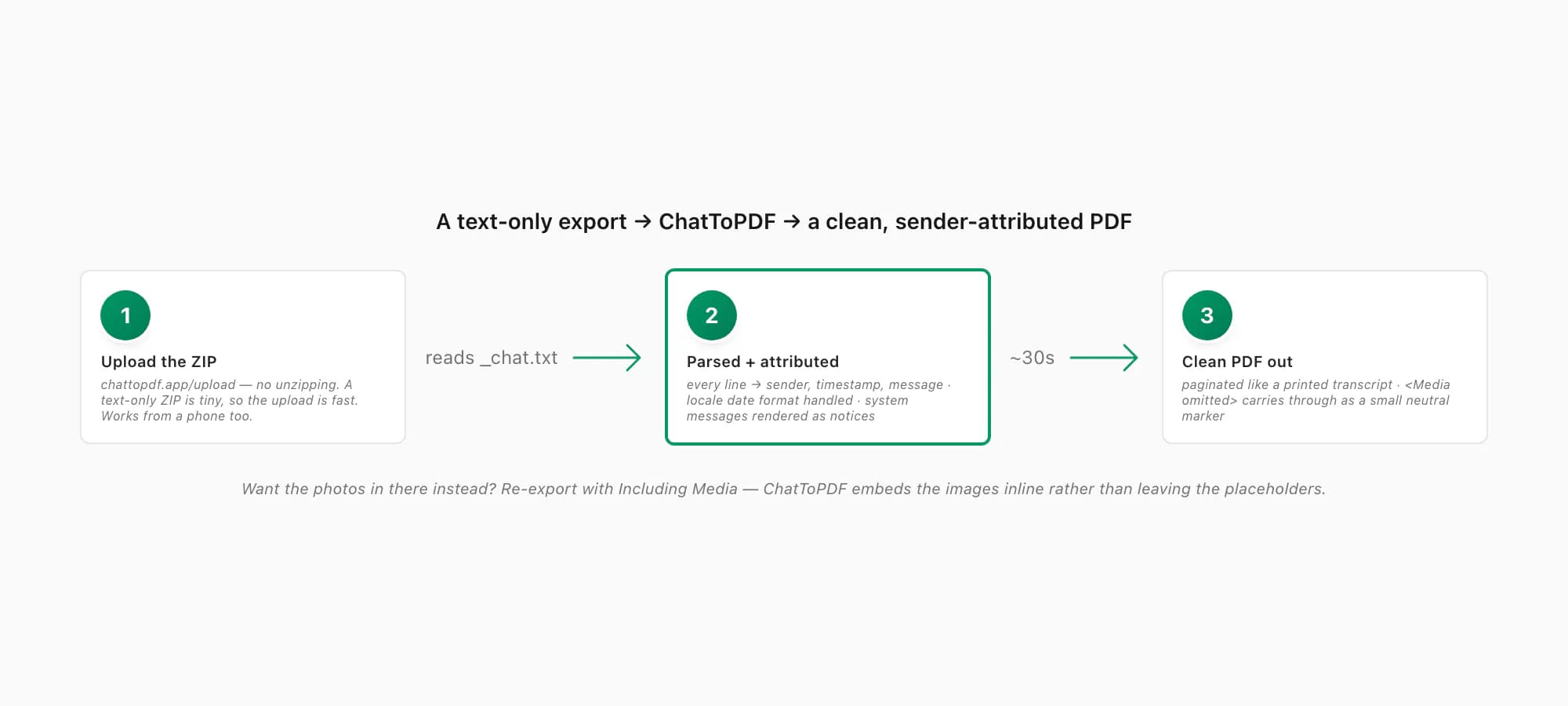
When you upload that ZIP to ChatToPDF, it reads the _chat.txt, parses every line into its sender, timestamp and message, handles the locale date format correctly, detects system messages ("X added Y to the group", encryption notices) and renders them as notices rather than mystery messages, and then paginates the whole conversation into a clean PDF — every message attributed, in order, the way you'd read a printed transcript. The <Media omitted> placeholders carry through as exactly that: a small, neutral note where an attachment used to be. Nothing breaks. There's no media to embed, so there's nothing to go wrong with embedding.
You don't need to unzip anything first — drop the ZIP straight onto the upload zone, from your computer or from your phone's Files app. You get a free preview of the first ten messages before paying, so you can confirm the senders and dates look right on your specific export before you commit. And because there's no media bundle, even a long text-only chat is a small upload and a fast conversion — about thirty seconds from drop to PDF.
If, after seeing the result, you decide the placeholders bother you and you want the photos in there — re-export from WhatsApp with Including Media and convert that ZIP instead. ChatToPDF embeds the images inline rather than leaving <Media omitted> in their place. Same workflow, bigger file, photos in the document.
Pricing for a text-only export (and what changes if you add media)
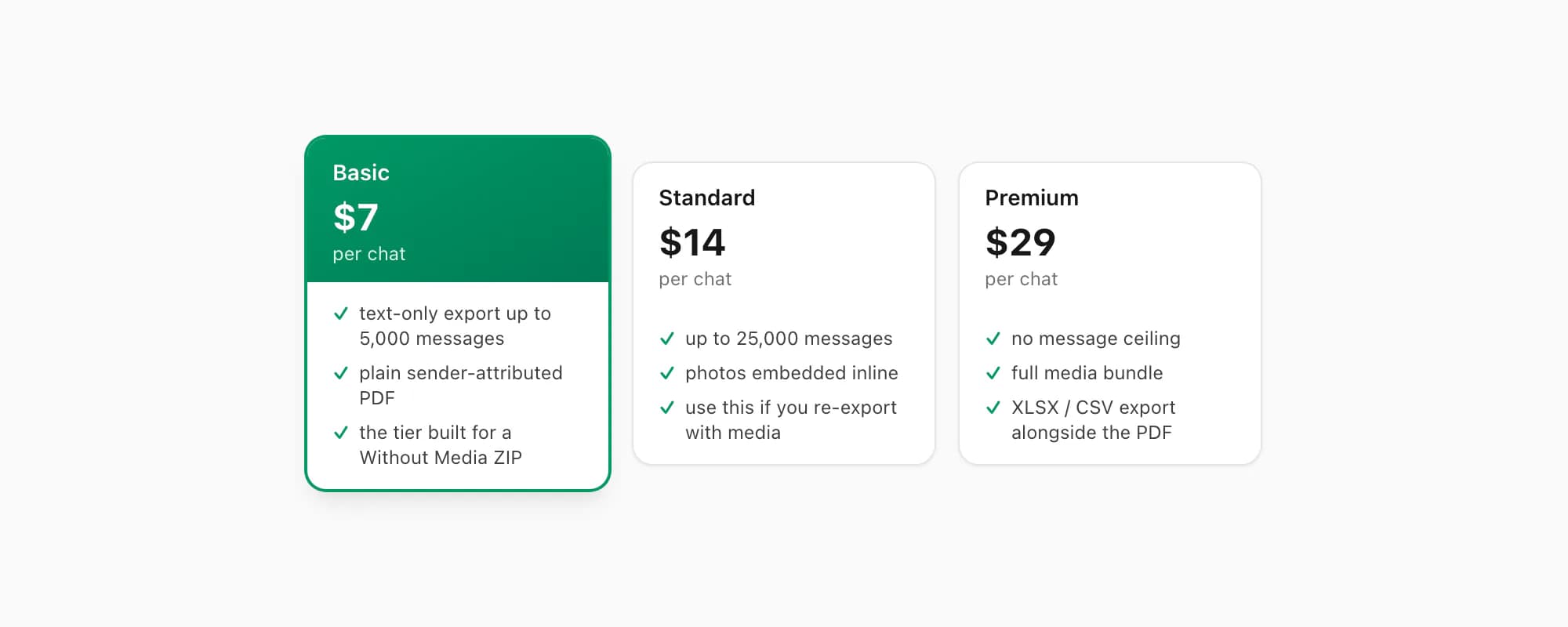
ChatToPDF charges per conversion — you pay for the chat you're converting today, and there's no recurring fee attached to your account. For a WhatsApp export without media, the tier is straightforward:
- The $7 Basic per chat conversion handles a text-only export up to 5,000 messages — exactly the shape a Without Media ZIP has. Short conversations, quick records, anything where the
<Media omitted>placeholders are fine because you only needed the words. This is the tier built for a text-only export. - The $14 Standard per chat conversion handles up to 25,000 messages and embeds photos inline — so this is the one you want if you went back and re-exported with Including Media. The placeholders disappear and the pictures appear in the PDF where they were sent.
- The $29 Premium per chat conversion removes the message-count ceiling entirely and takes the full media bundle, for the very longest chats; it also adds an XLSX/CSV export alongside the PDF if you want the messages as structured data. Voice-note transcription through the language-aware Nova-3/Scribe v2 router starts on the $49 Premium+Voice conversion — relevant only if the re-export contains supported notes; successful transcripts appear inline.
So the honest summary: a WhatsApp export without media maps to the $7 Basic per chat conversion for a plain text PDF; if you later decide you want the photos, re-export with media and use the $14 Standard per chat conversion. Neither tier cares about the locale of your export or whether it's a one-to-one or a group chat — those don't change the price.
Key takeaways
- A WhatsApp export without media is the "Without Media" choice in Export Chat — it writes a single
_chat.txtinside a small ZIP, with every photo, video, voice note and document replaced by a<Media omitted>placeholder - The placeholder keeps each line's timestamp and sender, so the conversation flow stays intact — you just don't get the attachment itself; the placeholder text is identical across every locale
- Pick Without Media when you only need the words (documentation, a solicitor's record, archiving, analysis) — it's tiny, exports in seconds, and emails or uploads anywhere; pick Including Media only when the attachments are part of what needs preserving
- A middle path: export Without Media first for a fast text record, and re-export with Including Media later only if the placeholders leave a hole you care about — re-exporting costs nothing
- A text-only export converts to a clean PDF: ChatToPDF parses
_chat.txt, attributes every sender, handles the locale date format, and paginates it; the<Media omitted>notes carry through as neutral markers - Pricing: the $7 Basic per chat conversion handles a text-only export up to 5,000 messages; the $14 Standard per chat conversion (up to 25,000 messages, inline photos) is the one to use if you re-export with media
FAQ
What does a WhatsApp export without media actually contain?
Just one file: _chat.txt, wrapped in a small ZIP. Every message in the conversation is in there as plain text — sender name, timestamp, message content, line by line. Every photo, video, voice note, sticker, document and location pin is replaced by a <Media omitted> placeholder; none of the actual files are attached. The result is usually well under 1 MB even for thousands of messages, and it exports in seconds. If you want the attachments in your end result, choose Including Media instead — that bundles every file alongside _chat.txt and the ZIP can run to hundreds of megabytes.
How do I export a WhatsApp chat without photos?
Open the chat, start Export Chat (on Android: the three-dot menu → More → Export Chat; on iPhone: tap the contact or group name at the top, scroll to the bottom, tap Export Chat), and when WhatsApp asks "Without Media or Including Media", pick Without Media. That gives you a text-only _chat.txt — every message in plain text, photos and other attachments shown as <Media omitted>. Then save the ZIP somewhere you'll remember (Save to Files on iPhone, Save to Drive or your file manager on Android). To turn it into a PDF, upload the ZIP to chattopdf.app; the $7 Basic per chat conversion handles a text-only export up to 5,000 messages.
Without Media vs Including Media — which should I choose?
Choose Without Media when you only need the words — documentation, a record for a solicitor, archiving before a phone switch, or pulling the chat into a spreadsheet for analysis. It's tiny, exports in seconds, and goes anywhere without transport problems; the <Media omitted> placeholders are irrelevant when text is all you wanted. Choose Including Media when the attachments are part of the point — a keepsake family chat, a dispute where a shared document is evidence, a handover where the photos matter. The trade-off is a much bigger ZIP (often 100 MB+, sometimes 400 MB+) that you have to transfer carefully. A reasonable middle path: export Without Media first, and re-export with Including Media only if the placeholders leave a gap you actually care about.
Can I convert a text-only WhatsApp export to PDF?
Yes — a Without Media export converts to a clean PDF with no problems. ChatToPDF reads the _chat.txt, parses every line into sender, timestamp and message, handles the locale date format correctly, renders system messages as notices, and paginates the whole conversation into a readable, sender-attributed document. The <Media omitted> placeholders carry through as small neutral markers where attachments used to be. You don't need to unzip anything — upload the ZIP directly, from a computer or a phone, and you get a free preview of the first ten messages before paying. If you later want the photos in the document, re-export from WhatsApp with Including Media and convert that ZIP on the $14 Standard per chat conversion, which embeds images inline.
I'm Paul, the founder of ChatToPDF. I built it after needing a long WhatsApp conversation as a readable PDF for a legal matter. I test and document WhatsApp exports, PDF conversion, voice-note transcription, and the limits people should check before relying on the result.