
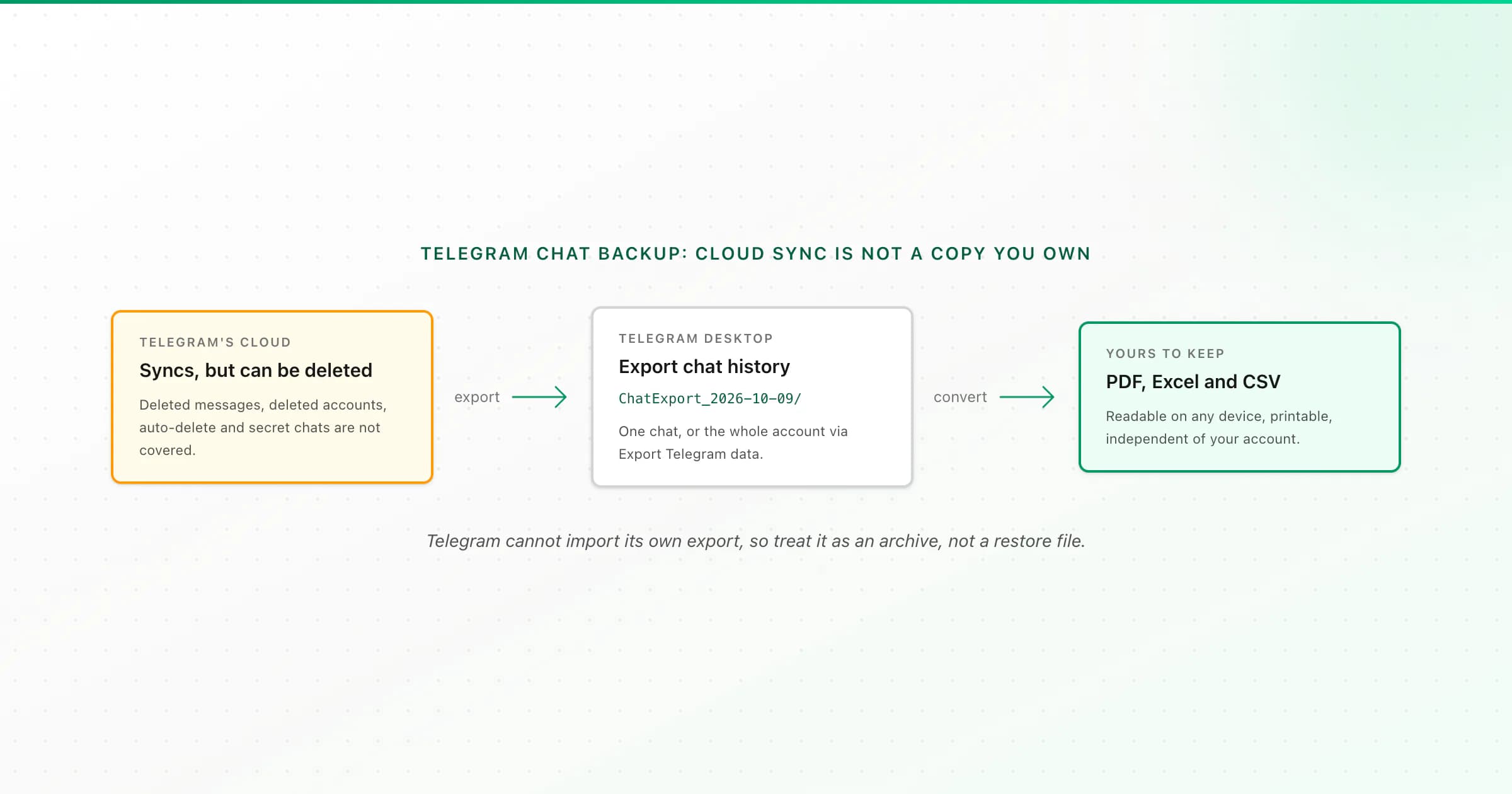
Telegram doesn't have a backup button because regular chats live in its cloud. Reinstall the app or switch phones and they sync back. But that copy isn't yours: deleted messages, a deleted account, auto-delete timers and secret chats aren't covered. For a backup you own, export the chat with Telegram Desktop and keep a PDF.
Searches for "Telegram backup" mix a few different worries. Some people are switching phones and want to know their chats will survive (they will). Some want to save messages before someone deletes them. Some want a copy outside Telegram entirely, for records or for memories. This guide sorts those out and shows the steps for each.
What Telegram's cloud keeps, and what it doesn't
Telegram's normal chats ("cloud chats") are stored on Telegram's servers and synced to every device you log in on. That's why a new phone shows your history straight away, and why there's no Google Drive or iCloud backup step like WhatsApp has.
What the cloud won't save you from:
- Deleted messages. If you, or the other person, delete a message or a whole chat "for everyone", it's removed from every device. There's no recycle bin for normal users.
- Account deletion. Telegram deletes accounts that stay inactive for a period you choose under Settings → Privacy and Security (the "delete my account if away for" setting). Deleted accounts take their messages with them.
- Auto-delete timers. Chats with auto-delete turned on remove messages after the timer.
- Secret chats. They're end-to-end encrypted and stored only on the two devices in the chat. They don't sync and aren't in the cloud at all, so losing the phone loses them.
- Groups and channels you leave or get removed from, or that an admin deletes.
So if a conversation matters (a business record, an agreement, a family group, someone you've lost), "it's in the cloud" isn't a backup. A copy you hold yourself is.
- Option
- Cloud sync (default)
- Where the copy lives
- Telegram's servers
- Survives deletion by others?
- No
- Readable outside Telegram?
- No
- Option
- Saved Messages
- Where the copy lives
- Telegram's servers
- Survives deletion by others?
- Yes, for what you forward
- Readable outside Telegram?
- No
- Option
- Telegram Desktop: export one chat
- Where the copy lives
- Your computer
- Survives deletion by others?
- Yes
- Readable outside Telegram?
- JSON or HTML files
- Option
- Export Telegram data (whole account)
- Where the copy lives
- Your computer
- Survives deletion by others?
- Yes
- Readable outside Telegram?
- JSON or HTML files
- Option
- PDF from the export
- Where the copy lives
- Anywhere you like
- Survives deletion by others?
- Yes
- Readable outside Telegram?
- Yes: paginated, printable
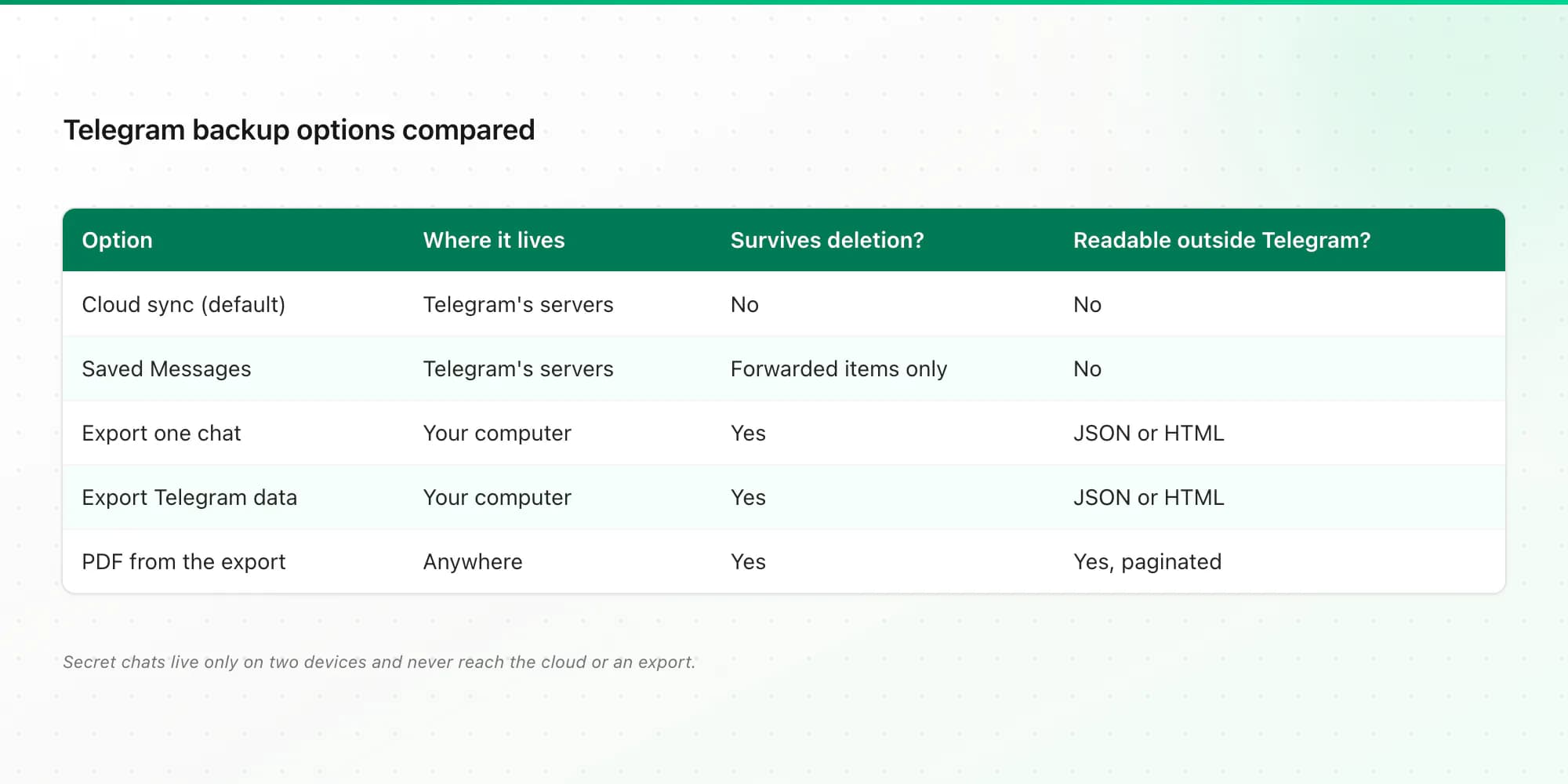
| Option | Where the copy lives | Survives deletion by others? | Readable outside Telegram? |
|---|---|---|---|
| Cloud sync (default) | Telegram's servers | No | No |
| Saved Messages | Telegram's servers | Yes, for what you forward | No |
| Telegram Desktop: export one chat | Your computer | Yes | JSON or HTML files |
| Export Telegram data (whole account) | Your computer | Yes | JSON or HTML files |
| PDF from the export | Anywhere you like | Yes | Yes: paginated, printable |
Quick option: forward to Saved Messages
Saved Messages is a private chat with yourself. Forward important messages there (long-press → Forward → Saved Messages) and they stay even if the original sender deletes them. It's handy for a few messages, but it's still inside your Telegram account. If you lose access to the account, it goes too. Use it as a bookmark, not a backup.
How to back up a single Telegram chat
Exports only work in Telegram Desktop (Windows, macOS, Linux). The phone apps don't have the option. If you're phone-only, my guide to exporting a Telegram chat when you only have a phone covers borrowing a computer safely.
Open the chat in Telegram Desktop
Install Telegram Desktop from desktop.telegram.org, log in with the QR code (phone: Settings → Devices → Link Desktop Device), and open the conversation.
Choose Export chat history
Click ⋮ at the top right → Export chat history.
Select media, format and dates
Tick photos, voice messages, videos or files if you want them. Set Format to Machine-readable JSON (best for converting) or HTML (opens in a browser). Leave the date range at the full history unless you only need part of it.
Export and store the folder
Click Export. You get a
ChatExport_…folder withresult.json(ormessages.html) and media folders. Copy it somewhere that's itself backed up: an external drive, or a cloud folder like Google Drive or OneDrive.
How to back up your whole Telegram account
For everything at once, Telegram Desktop has Settings → Advanced → Export Telegram data. You choose what to include: account info, contacts, personal chats, bot chats, private and public groups, channels, and media types. It writes one large export folder in JSON or HTML.
That's a good archive to keep, but it's a lot to read through. ChatToPDF converts one conversation per upload: if you upload a whole-account export, it converts the largest chat and tells you how to get a different one. For a PDF of a particular chat, export just that chat.
Can you restore a Telegram export?
No. Telegram has no way to import its own export back into the app. Cloud chats come back by logging in, so you don't need to restore those. The export is an archive for reading, searching and keeping, not a restore file. That's the opposite of WhatsApp, where the backup is restore-only and the export is the readable copy; I compare both in how to save WhatsApp chats.
Make the backup readable: PDF, Excel and CSV
A JSON export is complete but unreadable to most people, and the HTML version is split into pages of 1,000 messages. To get something you can open on any device, print or hand to someone:
- Zip the
ChatExportfolder (or uploadresult.jsonalone for text only). - Upload it at the Telegram chat to PDF page and check the free preview.
- Pick a style (chat bubbles, Clean Document, Formal / Legal with numbered entries, or Book) and download.
The PDF shows each sender, date and time, replies, forwards and edits, with photos inline and "Page X of Y" on every page. Pricing is one-time: $7 for text-only chats up to 5,000 messages, $14 up to 25,000 with photos, $29 with no cap, and $49 to transcribe voice messages from a ZIP. Excel and CSV come with every paid plan. Uploads are deleted within 7 days.
Related guides
- Export a Telegram chat on your phone: the options when you don't own a computer.
- Saving Instagram DMs as well? See how to download Instagram messages.
- Archiving iPhone texts? Here's how to save text messages from iPhone to a computer.
Key takeaways
- Telegram cloud chats sync back on any device, so there's no backup button, but the cloud doesn't protect against deletion.
- Secret chats live only on two devices and can't be exported or synced.
- Saved Messages keeps forwarded messages, but only inside your account.
- For a copy you own, use Telegram Desktop: Export chat history (one chat) or Export Telegram data (whole account).
- Telegram can't import its own export, so keep it as an archive and make a readable PDF of the chats that matter.
FAQ
Does Telegram back up chats automatically?
Regular cloud chats are stored on Telegram's servers and sync to any device you log in on, so you don't lose them when you switch phones. That isn't a backup you control: messages deleted for everyone, deleted accounts and secret chats aren't recoverable from the cloud. Export important chats with Telegram Desktop.
Do I lose my chat history if I reinstall Telegram?
Not your cloud chats. Log back in with the same number and they sync again. Secret chats are lost, because they exist only on the device. Downloaded media may need to load again from the cloud.
Are deleted Telegram chats gone forever?
Usually, yes. Messages deleted for everyone are removed from all devices, and Telegram has no recycle bin for normal users. In groups, admins can see recently deleted messages for a short time in Recent Actions. The reliable protection is an export made before anything was deleted.
How do I save a Telegram chat to Google Drive?
Telegram has no Google Drive backup. Export the chat with Telegram Desktop (⋮ → Export chat history), then upload the export folder, or a PDF of it, to Google Drive yourself.
Can I restore a Telegram chat from an export?
No. Telegram can't import its own JSON or HTML export back into the app. The export is a readable archive. Cloud chats return when you log in, so they don't need restoring.
How do I save a Telegram chat as a PDF?
Export the chat in Telegram Desktop as JSON, zip the export folder if you want photos and voice notes, and upload it to ChatToPDF. Check the free preview, then download a paginated PDF plus Excel and CSV from $7.
I'm Paul, the founder of ChatToPDF. I built it after needing a long WhatsApp conversation as a readable PDF for a legal matter. I test and document WhatsApp exports, PDF conversion, voice-note transcription, and the limits people should check before relying on the result.