
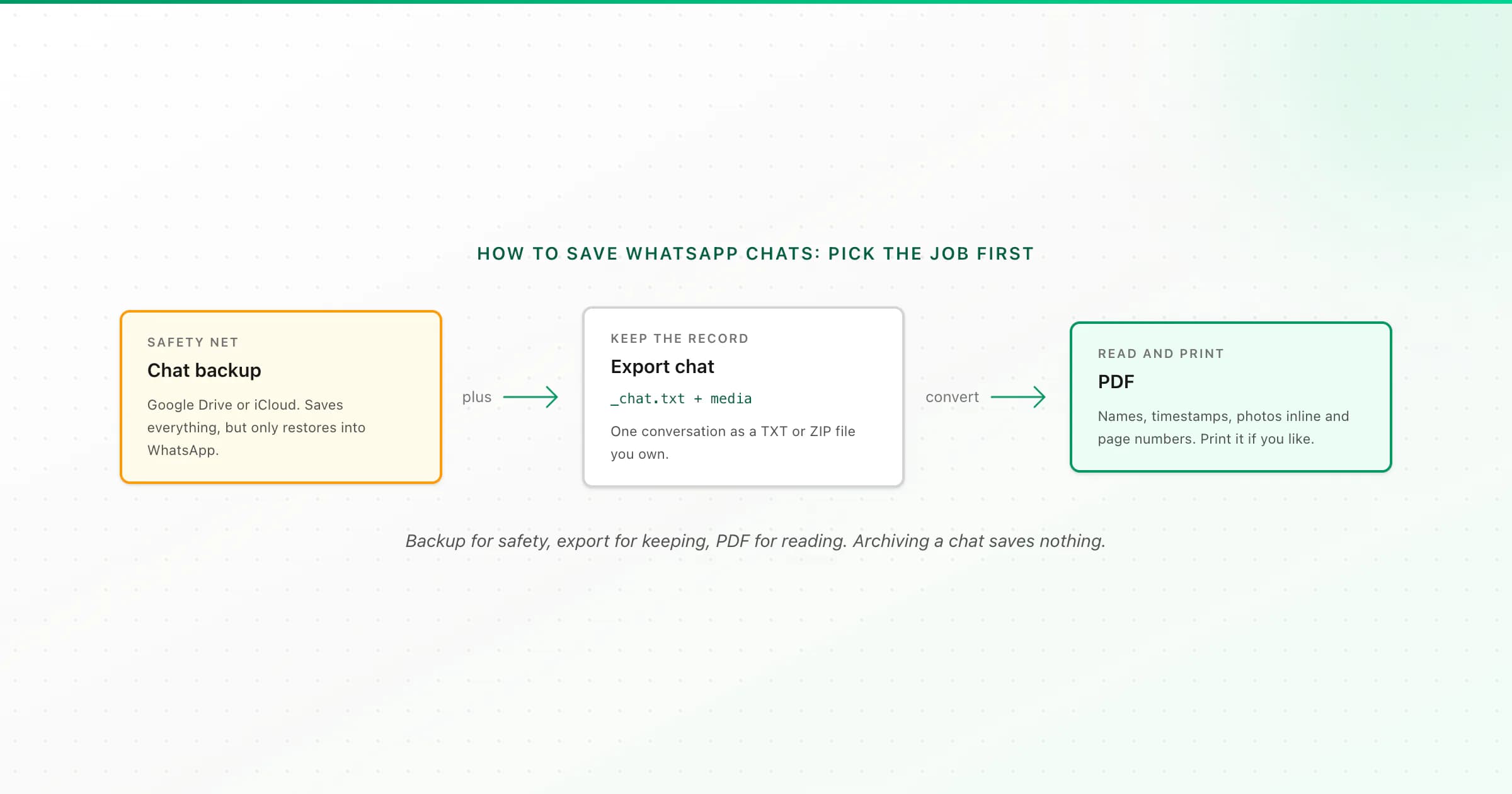
To save WhatsApp chats, use the method that matches the job. Chat backup (Google Drive or iCloud) saves everything but only restores into WhatsApp. Export Chat saves one conversation as a TXT or ZIP file you can open anywhere. Converting that export to PDF gives you readable, printable pages. Use backup for safety and export for keeping.
WhatsApp's own help pages explain each feature on its own. What they don't do is put them next to each other, which is where most people get stuck: they turn on backup, assume their chats are "saved", and discover years later that they can't open the backup. I run a WhatsApp-to-PDF tool, so I see the end of that story a lot. Here's the whole picture in one place.
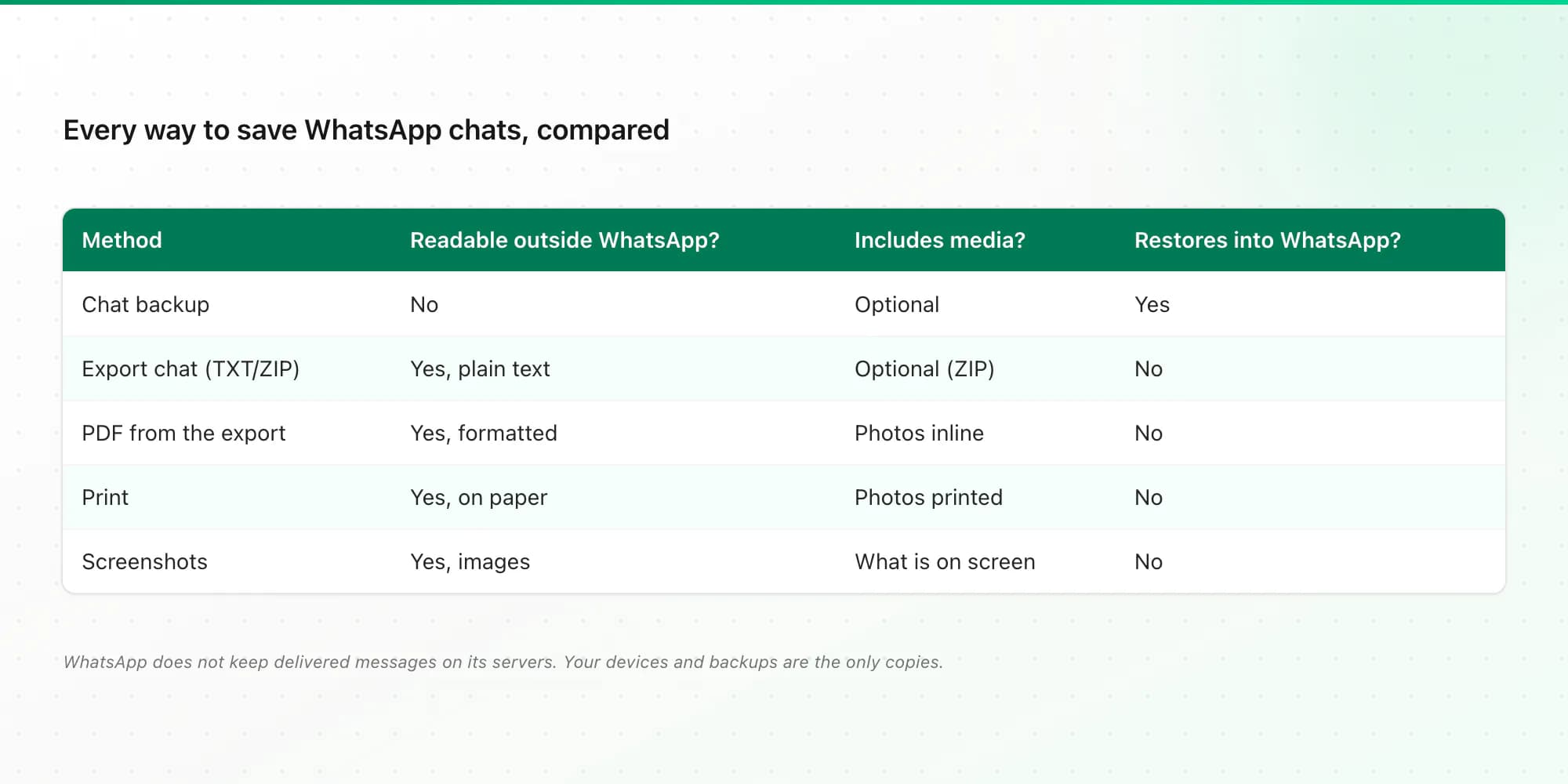
Every way to save WhatsApp chats, compared
- Method
- Chat backup (Google Drive / iCloud)
- What it saves
- All chats and optionally media
- Can you read it outside WhatsApp?
- No: restore-only
- Best for
- New phone, lost phone
- Method
- Export Chat (TXT or ZIP)
- What it saves
- One conversation, optional media
- Can you read it outside WhatsApp?
- Yes, as a plain text log
- Best for
- Keeping the original record
- Method
- PDF from the export
- What it saves
- One conversation, formatted
- Can you read it outside WhatsApp?
- Yes: paginated, printable
- Best for
- Reading, sharing, archiving
- Method
- What it saves
- Whatever PDF you print
- Can you read it outside WhatsApp?
- Yes, on paper
- Best for
- Keepsakes, meetings, filing
- Method
- Screenshots
- What it saves
- What's on screen
- Can you read it outside WhatsApp?
- Yes, as images
- Best for
- A few specific messages
- Method
- Star or Keep messages
- What it saves
- Single messages inside WhatsApp
- Can you read it outside WhatsApp?
- No
- Best for
- Bookmarking, disappearing chats
| Method | What it saves | Can you read it outside WhatsApp? | Best for |
|---|---|---|---|
| Chat backup (Google Drive / iCloud) | All chats and optionally media | No: restore-only | New phone, lost phone |
| Export Chat (TXT or ZIP) | One conversation, optional media | Yes, as a plain text log | Keeping the original record |
| PDF from the export | One conversation, formatted | Yes: paginated, printable | Reading, sharing, archiving |
| Whatever PDF you print | Yes, on paper | Keepsakes, meetings, filing | |
| Screenshots | What's on screen | Yes, as images | A few specific messages |
| Star or Keep messages | Single messages inside WhatsApp | No | Bookmarking, disappearing chats |
Two common mix-ups before the details:
- Archiving a chat doesn't save it. Archive just hides the chat from your main list. It's still on the phone, and it's gone if the phone is lost without a backup.
- WhatsApp's servers don't keep your messages. Once messages are delivered, the only copies are on the devices in the chat and in any backups. If you don't save them, nobody else will.
Method 1: chat backup (save everything, restore later)
Backup is the safety net. It saves all your chats on a schedule so you can restore WhatsApp on a new or reset phone.
- Android: ⋮ → Settings → Chats → Chat backup. Choose a Google account, how often to back up, and whether to include videos. Tap Back up to run one now.
- iPhone: Settings → Chats → Chat Backup. Make sure iCloud is on for WhatsApp, then tap Back Up Now and set Auto Backup.
Turn on end-to-end encrypted backup if you want it locked with a password or key, and don't lose that password.
What backup can't do is let you read your chats anywhere else. The Google Drive copy can't be downloaded as a file (I explain why in how to download a WhatsApp backup from Google Drive), and the iCloud copy isn't browsable either. If you also want a copy on your computer, my guide to backing up WhatsApp to a PC covers both phones.
Method 2: Export Chat (save one conversation as a file)
Export Chat is WhatsApp's built-in way to save a conversation as a file you own.
Open the conversation
Open the individual or group chat you want to save.
Find Export Chat
Android: tap ⋮ → More → Export chat. iPhone: tap the contact or group name at the top, scroll down and tap Export Chat.
Choose media or not
Include media / Attach Media puts photos, voice notes and videos into a ZIP with the text. Without media gives you a single TXT file, which is smaller and holds more history.
Save the file somewhere safe
Pick Files, Google Drive, iCloud Drive or email from the share menu. Keep this original file even if you convert it later.
The limits: one conversation per export, and WhatsApp caps each export at roughly 40,000 recent messages without media, or about 10,000 with media. The text file is readable but rough: one line per message, timestamps first, photos shown as filenames. The WhatsApp chat export guide goes deeper on what's inside the file.
Method 3: save WhatsApp chat as PDF
There's no "Save as PDF" in WhatsApp. The reliable way is to export the chat and convert the file:
- Export the chat (Method 2). Include media if you want photos in the PDF.
- Upload the TXT or ZIP to the WhatsApp to PDF converter.
- Check the free preview, pick a style (WhatsApp-style bubbles, Clean Document, Formal / Legal with numbered entries, or Book), and download.
The PDF keeps sender names and timestamps on every message, places photos inline where they were sent, and numbers every page "Page X of Y". It's one-time pricing: $7 for text-only chats up to 5,000 messages, $14 up to 25,000 with photos, $29 with no message cap, and $49 if you want voice notes transcribed. Each paid plan includes an Excel and a CSV copy too.
On an iPhone the whole loop happens in Safari. I've got a dedicated walkthrough for saving a WhatsApp chat as a PDF on iPhone if you want the tap-by-tap version.
Method 4: print the chat
WhatsApp has no Print button. Export the chat, turn it into a PDF, then print the PDF with AirPrint, Android's print service or Ctrl/Cmd+P on a computer. Printing WhatsApp Web directly only captures the messages you've scrolled into view and cuts bubbles across pages. The print WhatsApp chat tool gives you a print-ready PDF, and the full guide to printing WhatsApp messages covers each device. For a gift, the WhatsApp chat book layout makes something closer to a printed book.
Method 5: screenshots, starred and kept messages
For a handful of messages, a screenshot is fine. It's fast and shows exactly what you saw. It doesn't scale, though, and screenshots often crop out the date or the sender.
Star a message (long-press → star) to bookmark it inside WhatsApp; it's still only on your phone. In chats with disappearing messages, long-press a message and choose Keep to stop it vanishing, and turn disappearing messages off in the chat info if you want to save what comes next. Messages that have already disappeared can't be brought back by any method.
Which method should you use?
- "I don't want to lose anything if my phone breaks." Turn on chat backup. That's it.
- "I want to keep this conversation for years." Export it, keep the original file, and make a PDF. A PDF opens on any device without WhatsApp.
- "I need to show it to someone else." PDF. For anything official, ask the person receiving it what format they need; the Formal / Legal style numbers every entry.
- "I want it on paper." Export, convert, print.
- "I'm saving text messages, not WhatsApp." Different export. See how to print text messages from Android or saving iPhone text messages to a computer.
Key takeaways
- Backup saves everything but only restores into WhatsApp; you can't open it elsewhere.
- Export chat saves one conversation as a TXT or ZIP you own. Keep that original file.
- Convert the export to a PDF for a readable, printable copy with names, timestamps, photos and page numbers.
- Archiving hides a chat; it doesn't save it.
- WhatsApp doesn't keep delivered messages on its servers, so your devices and backups are the only copies.
FAQ
How do I save a WhatsApp conversation as a PDF?
Export the conversation in WhatsApp (Android: ⋮ → More → Export chat; iPhone: tap the contact name → Export Chat), then upload the TXT or ZIP to a converter such as ChatToPDF. You get a free preview, then a paginated PDF with sender names, timestamps and photos. WhatsApp itself has no Save as PDF option.
How can I save my entire WhatsApp chat history?
Turn on chat backup to Google Drive (Android) or iCloud (iPhone). That saves every chat, but it only restores into WhatsApp. To keep conversations as readable files, export each chat with Export chat. WhatsApp exports one chat at a time.
Can I export a WhatsApp chat without a backup?
Yes. Export Chat works on whatever is currently on your phone and doesn't need a backup. A backup only matters if the chat is no longer on the phone; then you'd restore the backup first and export afterwards.
Does archiving a WhatsApp chat save it?
No. Archive only moves the chat out of your main chat list. The messages stay on the phone exactly as before and are lost with the phone unless you have a backup or an export.
How long does WhatsApp keep my messages?
WhatsApp doesn't store messages on its servers after they're delivered. They stay on your devices until you delete them, and in your backups if backup is on. Disappearing messages delete themselves after the timer unless you choose Keep.
Can I save WhatsApp chats with photos?
Yes. Choose Include media (Android) or Attach Media (iPhone) when exporting. That creates a ZIP containing the chat text and the media. Converted to PDF, the photos appear inline next to the message they were sent with. With-media exports hold fewer messages, roughly 10,000.
I'm Paul, the founder of ChatToPDF. I built it after needing a long WhatsApp conversation as a readable PDF for a legal matter. I test and document WhatsApp exports, PDF conversion, voice-note transcription, and the limits people should check before relying on the result.